Camera Detection · Volume 11
CameraDetection Volume 11 — Add-ons to Existing Hack Tools Gear
Nyan Box native detection · Marauder OUI-filter + RSSI walk · Flipper Zero devboard · HackRF analog sweep + SDR side-channel · phone apps · gear × capability matrix
11.1 About this volume
The volumes before this one established the detection physics (Vols 2–6) and surveyed what commercial instruments buy (Vol 9) and what open-source projects are worth forking (Vol 10). The natural question before committing to a build is: what can the gear already on the bench do, today, without modification? That is the question this volume answers.
The owned and aspirational Hack Tools lineup includes several devices that, in whole or in combination, can address meaningful portions of the hidden-camera detection problem — specifically the Wi-Fi/IP camera problem (Vols 3 and 5) and the analog wireless camera problem (Vol 6). Vol 11 works through each piece of gear systematically:
Table 1 — The owned and aspirational Hack Tools lineup includes several devices that, in whole or in combination, can address meaningful portions of the hidden-camera detection problem — specifically the Wi-Fi/IP camera problem (Vols 3 and 5) and the analog wireless camera problem (Vol 6). Vol 11 works through each piece of gear systematically
| Gear | Camera-finding relevance | Status |
|---|---|---|
| Nyan Box | Native hidden-camera detection firmware; the closest single device to a purpose-built finder | Aspirational — spec-sourced |
| AWOK Dual Touch V3 (Marauder) | Wi-Fi station scan + OUI filter + RSSI walk on owned hardware | Owned |
| Ruckus Game Over (Marauder) | Same as AWOK plus CC1101/NRF24 daughter slot for sub-GHz/2.4 GHz sweep | Owned |
| Flipper Zero (bare) | BLE scan natively; Wi-Fi devboard adds Marauder capability | Owned (multiple units) |
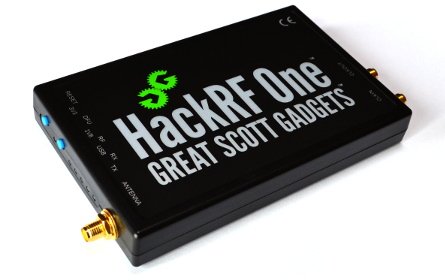
| HackRF One + PortaPack H2+ | Wideband sweep and analog-cam demodulation (1.2 / 2.4 / 5.8 GHz bands) | Owned |
| RTL-SDR | Receive-only analog sweep companion | Aspirational |
| Phone | Fing network scanner; retroreflection via flash; IR-LED spotting | Always-available |
How to read this volume. Every section answers two questions with equal emphasis: (1) what can this tool detect, and (2) what will it miss? The honest-limits theme — carried from every prior volume in this series — is non-negotiable. The core constraints remain in force regardless of how sophisticated the owned gear is:
- Non-emitting cameras (SD-only and wired) are invisible to every RF and Wi-Fi method. No scan, no traffic analysis, and no OUI filter finds a camera that transmits nothing. Optical (lens retroreflection), thermal, or physical search methods are the only recourse — and none of the gear in this volume provides those natively.
- Wi-Fi detection is fingerprint- and behavior-based, not magic. Vendor OUI matching is defeated by MAC randomization and generic modules. Traffic-rate / motion-correlation (Vol 3 §5) is the more robust tell, but it requires active traffic to analyze.
- Analog and cellular cameras need different radios. An ESP32 Wi-Fi scan is blind to every analog wireless camera operating on 1.2 GHz, 2.4 GHz FM video, or 5.8 GHz. A HackRF or RTL-SDR sweep is required for those bands; the Wi-Fi scan and the SDR sweep are complementary, not interchangeable.
Provenance. Performance claims in this volume are spec-sourced pending bench verification unless explicitly noted otherwise. The Nyan Box (aspirational hardware) is rated from Nyan Devices product documentation and community reports. The AWOK Dual Touch V3 and Ruckus Game Over are owned and run Marauder v1.12.x; capability descriptions are based on documented Marauder features and typical ESPresso-32 Wi-Fi promiscuous-mode behavior rather than a dedicated camera-finding bench test. HackRF capability in the analog-sweep role is derived from the HackRF One deep dive, Vol 6 §3, and the GNU Radio documentation.
Volume map. This volume consumes the detection techniques from Vol 3 §5 (traffic-rate / motion-correlation), Vol 5 §4 (Wi-Fi camera OUI fingerprinting and network behavior), and Vol 6 §2–3 (analog wireless camera frequencies and demodulation). It produces §7’s gear × capability matrix, which Vol 12 (the sweep methodology) uses to assign roles in the room-sweep playbook, and Vol 14 (buy-vs-build) uses to assess what new gear adds.
11.2 Nyan Box — Native
11.2.1 What the Nyan Box is as a camera finder
The Nyan Box (Nyan Devices) is a multi-radio educational handheld purpose-built around two features that nothing else in the Hack Tools lineup delivers natively: Drone Remote ID detection and hidden-camera detection. For the counter-surveillance problem addressed by this deep dive, the camera detection feature is the directly relevant one. The Nyan Box full hardware platform, triple-NRF24 architecture, and firmware is covered in the companion Nyan Box deep dive; this section focuses exclusively on what the camera-detection feature provides as a sweep instrument.
Hardware summary (spec-sourced from Nyan Devices product documentation):
Table 2 — Hardware summary (spec-sourced from Nyan Devices product documentation):
| Parameter | Value |
|---|---|
| MCU | ESP32-WROOM-32U |
| Radio | ESP32 built-in 802.11 b/g/n 2.4 GHz + BLE 4.2 + 3× NRF24L01+ |
| Display | 0.96” OLED |
| Battery | 2500 mAh Li-Ion |
| Form factor | Compact handheld |
| Camera detection mode | Native — factory firmware |
| Status (as of 2026-06-26) | Aspirational; all capability claims spec-sourced pending acquisition |
The Nyan Box camera detection mode uses the ESP32 Wi-Fi radio in monitor / promiscuous scanning mode — the same physical layer that underlies the ESP32 Marauder firmware — but applies a camera-specific multi-heuristic fingerprint layer that stock Marauder lacks. The result is the closest commercially available off-the-shelf approximation to the DIY detector designed in Vols 7–8.
11.2.2 The 20+ brand fingerprint DB
The Nyan Box camera detection firmware applies a multi-brand OUI fingerprint database against detected Wi-Fi station and AP MACs. Nyan Devices marketing materials document coverage of 20+ camera brands. Based on product documentation and community reports (spec-sourced), the confirmed or highly probable brand coverage includes:
Table 3 — The Nyan Box camera detection firmware applies a multi-brand OUI fingerprint database against detected Wi-Fi station and AP MACs. Nyan Devices marketing materials document coverage of 20+ camera brands. Based on product documentation and community reports (spec-sourced), the confirmed or highly probable brand coverage includes
| Vendor category | Known brands covered |
|---|---|
| Budget Chinese surveillance | Hikvision, HiLook, Dahua, Tiandy, white-label Hikvision OEM |
| US consumer cameras | Wyze, Reolink, Amcrest, Eufy/Anker, Blink/Amazon |
| Smart-home platforms | TP-Link Tapo, Arlo, Nest/Google |
| Retail mainstream | Ring (Sidewalk-adjacent OUIs), Lorex, Zmodo |
| Embedded / IoT cam modules | EZVIZ (Hikvision subsidiary), Sricam, Sannce, some Swann OEM |
Beyond OUI prefix matching, the confidence-scoring heuristics documented in Nyan Devices materials include:
- Detection of mDNS service advertisements specific to IP cameras (
_rtsp._tcp,_onvif._tcp,_hap._tcpfor HomeKit-compatible cameras) - SSDP/UPnP device description responses that identify camera-type devices
- Signal-strength behavior consistent with a device at a fixed location (as opposed to a moving phone that changes RSSI over time)
- Frame timing patterns characteristic of a device streaming at a fixed bitrate
The fingerprint DB is proprietary — not available as source code. As established in Vol 10 §3, the approach is reconstructible from the public IEEE OUI database using the pipeline in Vol 10 §3.2 and is the architecture basis for the Vol 7/8 DIY builds. The Nyan Box is useful as a drop-in sweep tool; it is also the reference behavior target for validation testing once the device is acquired.
11.2.3 RSSI-walk localization
Once the Nyan Box identifies a camera candidate with a minimum confidence threshold (multi-heuristic match), it activates a real-time RSSI-walk display — a bar indicator on the OLED that updates as the user moves physically through the room. The RSSI-walk technique is the same EMA-filtered directional approach described in Vol 5 §5 and implemented in the Vol 7/8 DIY design:
┌────────────────────────────────────────────────┐
│          NYAN BOX — RSSI WALK MODE              │
├────────────────────────────────────────────────┤
│  Target:  Wyze Labs  [2C:AA:8E:xx:xx:xx]       │
│  Channel: 6    RSSI: -63 dBm  ▲  (getting ↑)  │
│  Confidence: HIGH  ██████████████░░  91%        │
│                                                 │
│  [||||||||||||||||||||          ]  ← bar fills  │
│   Closer ────────────────────► Further          │
│                                                 │
│  Walk toward ↑ bar fill direction              │
└────────────────────────────────────────────────┘
(Display layout reconstructed from product documentation — spec-sourced; actual UI may differ.)
The walk procedure is to hold the Nyan Box at waist height, move slowly in a systematic grid pattern, and follow the direction in which the bar fills. When the bar reaches maximum and the RSSI value stops improving, the camera is within 0.5–1 m (spec-sourced; typical ESP32 station-mode directional resolution at close range). The user then performs physical inspection of that area.
The RSSI-walk channel lock is required for accurate localization: the Nyan Box locks to the channel of the confirmed camera candidate and stops channel hopping before the walk begins. This prevents RSSI values being polluted by frames from other channels during the dwell gap.
11.2.4 Running a Nyan Box sweep
A complete Nyan Box room sweep sequence, from product documentation (spec-sourced):
- Power on and navigate to Camera Detector mode from the main menu.
- Initial scan — the device hops all 2.4 GHz channels and builds a candidate list. In a typical hotel room, this takes 30–60 seconds to stabilize (spec-sourced; channel-hop dwell × 13 channels × settling time).
- Review candidates — the candidate list shows each detected device with its OUI-resolved vendor and current confidence score. Devices scoring below the minimum threshold (generic phones, laptops, routers) appear in a lower-priority list or are suppressed.
- Select a camera candidate — navigate to any device with a HIGH or MEDIUM confidence score.
- Enter RSSI-walk mode — the device locks channel and activates the bar display.
- Walk toward the bar fill — move in steady steps, pause 2–3 seconds at each position to allow the EMA filter to settle.
- Physical inspection — at maximum bar fill, physically examine the nearest wall fixtures, smoke detectors, USB outlets, decorative objects, and framed pictures within 0.5–1 m radius.
- Repeat for each candidate — return to the candidate list and repeat for every HIGH or MEDIUM confidence device.
Secondary heuristic check. After sweeping camera candidates, a complementary pass with the Nyan Box in a general Wi-Fi scan mode can surface devices on the host network’s channel that the camera-mode fingerprinter may have scored low due to atypical OUI (white-label module, generic ESP32 OUI). These are worth investigating with Fing (§6.1) for network-layer identification.
11.2.5 Honest limits of the Nyan Box
The Nyan Box is the strongest single-device camera finder in the lineup — and it is still completely blind to non-emitting cameras. SD-only and wired cameras produce no Wi-Fi radio traffic; no OUI fingerprinter, RSSI walk, or confidence scorer finds them. The Nyan Box complements a lens finder (Vol 9 §5) and thermal pass; it does not replace them.
Table 4 — 2.5 Honest limits of the Nyan Box
| Limitation | Impact |
|---|---|
| Wi-Fi cameras only | SD-only, wired, analog wireless (1.2/2.4/5.8 GHz FM), and cellular cameras are invisible to the Nyan Box’s detection engine |
| 2.4 GHz only | Modern cameras connecting on 5 GHz (dual-band AP cameras) are not detectable by the ESP32-WROOM-32U radio, which does not support 5 GHz |
| Off-network cameras on separate AP | A camera on its own isolated SSID (not on the property network) still has a discoverable radio that the Nyan Box can fingerprint; however, cameras using MAC randomization or generic Wi-Fi modules may produce weak or absent OUI fingerprint matches |
| OUI fragility | A camera built on a generic ESP32 or Realtek module (no camera-brand OUI) will not score high in OUI matching; the confidence score then depends entirely on traffic-rate behavior and service announcements |
| Firmware closed-source | The Nyan Box firmware is proprietary; the OUI database, confidence-scoring weights, and mDNS/SSDP matching logic cannot be inspected or updated by the user |
| Aspirational hardware | As of 2026-06-26, the Nyan Box is not in Jeff’s possession; all capabilities above are spec-sourced from Nyan Devices documentation and community reports pending bench verification |
| No cellular camera detection | 4G/LTE cameras burst on licensed bands at low duty cycle — outside the ESP32 radio’s frequency range entirely |
11.3 Marauder Modules — AWOK / Game Over
11.3.1 What Marauder gives you without modification
The ESP32 Marauder firmware (justcallmekoko; MIT license) is the active pentest firmware running on both of Jeff’s owned ESP32 modules: the AWOK Dual Touch V3 (AWOKflip Flipper configuration) and the Ruckus Game Over (game-over-host Flipper configuration). The firmware’s full architecture, feature set, fork landscape, and four-layer camera-detection gap analysis are in Vol 10 §2. This section focuses on what you can do right now, with stock Marauder on owned hardware, for camera detection.
Stock Marauder does not have a camera detection mode. What it does have is the foundation layer the camera-detection stack builds on: a capable 802.11 station enumeration engine with per-client RSSI, OUI lookup, and promiscuous-mode frame capture. Used deliberately with a manual OUI lookup table, stock Marauder is a serviceable camera-finder for the experienced operator:
┌─────────────────────────────────────────────────────────────────────┐
│  STOCK MARAUDER — CAMERA DETECTION CAPABILITY (NO MODIFICATION)      │
├──────────────────────────────────────────┬──────────────────────────┤
│  Feature available in stock Marauder     │  Camera-detection use    │
├──────────────────────────────────────────┼──────────────────────────┤
│  `scanap` — AP beacon capture            │  First-pass: find all    │
│  SSID, BSSID, channel, RSSI, OUI        │  APs; flag camera SSIDs  │
├──────────────────────────────────────────┼──────────────────────────┤
│  `scansta` — station enumeration         │  Get client MAC list;    │
│  Source MACs from data-frame sniffing    │  manually match OUIs     │
├──────────────────────────────────────────┼──────────────────────────┤
│  `setchannel N` — lock channel           │  Lock to camera's ch.    │
│                                          │  before RSSI walk        │
├──────────────────────────────────────────┼──────────────────────────┤
│  Per-client RSSI in station list         │  Raw data for walk       │
│                                          │  (read value; move; re-  │
│                                          │  read; compare manually) │
├──────────────────────────────────────────┼──────────────────────────┤
│  SD PCAP logging (`stopscan` → PCAP)     │  Offline traffic-rate    │
│                                          │  analysis per Vol 3 §5   │
├──────────────────────────────────────────┼──────────────────────────┤
│  `scanble` — BLE advertiser enumeration  │  Catches BLE cameras     │
│                                          │  advertising (rare)       │
└──────────────────────────────────────────┴──────────────────────────┘
What stock Marauder does NOT provide (and why the four-layer fork in Vol 8 §2 adds them):
- A camera-vendor OUI filter on the station list — without it, all clients are equally weighted
- A traffic-rate accumulator — the motion-correlated uplink bitrate tell (Vol 3 §5) requires per-client byte-rate history not present in stock firmware
- A confidence scorer combining OUI + traffic-rate history
- A dedicated RSSI-walk display mode with EMA smoothing
Using stock Marauder for camera finding is a manual, operator-intensive process. It works — a knowledgeable operator who knows which OUI prefixes belong to camera vendors can derive the same result — but it is slower and requires more field expertise than the Nyan Box or a four-layer Marauder fork.
11.3.2 Station scan and OUI filter workflow
The practical workflow on stock Marauder v1.12.x (verified on AWOK Dual Touch V3):
# ── STEP 1: AP SCAN ──────────────────────────────────────────────────
# Navigate: Main Menu → WiFi → Scan APs
# or via serial CLI:
scanap

# AWOK display shows a scrollable list:
#   SSID        | Ch | RSSI | Vendor OUI (resolved)
#   HomeNetwork |  6 | -42  | ASUSTek
#   TP-Link_7E2 |  6 | -51  | TP-Link Technologies
#   [no SSID]   | 11 | -67  | Hikvision Digital Technology  ← FLAG THIS
#   DIRECT-Cam  |  1 | -74  | Wyze Labs                    ← FLAG THIS
#
# Camera-brand AP vendor OUIs to recognize in the field:
#   Hikvision: 00:24:C8  44:19:B6  48:EA:23  BC:AD:28
#   Dahua:     90:02:A9  9C:D3:E5  3C:E8:24
#   Wyze:      2C:AA:8E  D0:3F:27  34:CE:00
#   Reolink:   10:62:EB  DC:DA:80
#   Amcrest:   9C:8E:CD
#   Eufy:      18:EC:E7  04:D4:C4
#   TP-Link (Tapo cameras share OUI with routers — verify via SSID/service)

# ── STEP 2: STATION SCAN ─────────────────────────────────────────────
# Navigate: Main Menu → WiFi → Scan Stations
# or via serial CLI:
scansta

# Displays all associated clients seen in promiscuous mode:
#   MAC                | Ch | RSSI | AP association
#   2C:AA:8E:F1:23:45  |  1 | -74  | DIRECT-Cam   ← Wyze OUI — CAMERA CANDIDATE
#   48:EA:23:AB:CD:EF  | 11 | -67  | [hidden]     ← Hikvision OUI — CAMERA CANDIDATE
#   AC:22:0B:xx:xx:xx  |  6 | -48  | HomeNetwork  ← Samsung phone — ignore

# ── STEP 3: LOCK CHANNEL AND NOTE RSSI ──────────────────────────────
setchannel 11          # lock to the camera's channel (no more hopping)
# Move 1 meter in each direction and re-run scansta or note the RSSI delta
# RSSI increases as you move closer; use this as a manual walk indicator

# ── STEP 4: PCAP CAPTURE FOR OFFLINE TRAFFIC ANALYSIS ───────────────
# Start PCAP to SD card (if inserted):
startpcap
# Wait 30–60 seconds, move in front of suspected camera view
# Watch for uplink bitrate spike vs. baseline in the PCAP
stoppcap
# Analyze with tshark per Vol 10 §4.3 traffic-analysis pipeline
The OUI table is the operator’s memory aid. The six-prefix list above covers the most common vacation-rental and hotel-grade hidden cameras. The full Vol 7 §5 OUI table has approximately 50 prefixes across 15+ vendors; that table is the embedded data layer the four-layer Marauder fork adds automatically.
11.3.3 RSSI-walk procedure in stock Marauder
Without a dedicated walk mode (added by the four-layer fork), the RSSI-walk in stock Marauder is manual:
- Identify the camera candidate MAC from
scansta. - Run
setchannel Nto lock to the camera’s channel. - Hold the device at waist height. Note the current RSSI value from the station list.
- Move 1 meter in one direction. Re-note RSSI. If the value increased (closer to 0 dBm), continue in that direction.
- Move in 0.5 m increments, pausing 3–5 seconds at each position to allow the scanning interval to refresh.
- When RSSI peaks (stops improving), turn 90°. Test each quadrant.
- At maximum RSSI, the camera is within approximately 0.5–1 m. Physically inspect the area.
The manual method is workable but slow. The ESP32 station scan updates every 2–3 seconds per channel; a dwell-and-read approach in a 3 m × 4 m room requires approximately 10–15 minutes to walk a grid manually versus the real-time EMA bar in the Nyan Box or the four-layer fork. The main advantage is that it runs today, on owned hardware, with no modification.
PCAP-based RSSI walk alternative. The AWOK has a GPS module — raw GPS data is logged to SD in some Marauder build configurations. While the GPS is not useful for indoor localization (no satellite signal), the PCAP-with-coordinates pattern could be applied if the operator walks a predetermined grid and notes GPS timestamps against position. This is speculative; the GPS module is designed for wardriving, not indoor localization.
11.3.4 AWOK Dual Touch V3 hardware specifics
The AWOK Dual Touch V3 (owned, mounted as AWOKflip) adds two design elements relevant to the camera-finding role:
Table 5 — The AWOK Dual Touch V3 (owned, mounted as AWOKflip) adds two design elements relevant to the camera-finding role
| Feature | Camera-finding relevance |
|---|---|
| Dual ESP32-WROOM modules | Two independent Wi-Fi radios; one can be locked for RSSI walk on a confirmed target while the other continues channel-hopping to catch additional candidates |
| Resistive touchscreen (dual) | Manual scrolling of the station list and RSSI values is ergonomic on the touchscreen vs. Flipper directional buttons |
| On-board GPS | Not useful indoors; useful for wardriving-style outdoor property sweeps where GPS coordinates track camera candidate locations |
| Flipper module form factor | Powered by the host Flipper Zero’s LiPo; no separate battery management needed; total device is pocketable |
The dual-radio configuration is underutilized in stock Marauder’s camera-finding role but is a meaningful asset in the four-layer fork: one radio runs the traffic-rate accumulator on a locked channel; the other performs a background channel sweep to detect new candidates.
11.3.5 Game Over — sub-GHz and 2.4 GHz daughter slot
The Ruckus Game Over (owned, mounted as game-over-host) distinguishes itself from the AWOK through its CC1101 / NRF24L01 daughter slot. This slot — the same hardware interface used by the CC1101 sub-GHz transceiver — enables two detection functions the AWOK lacks:
CC1101 sub-GHz sweep (433/868 MHz analog cameras): The CC1101 (TI) is a sub-GHz narrowband transceiver (300 MHz – 928 MHz). A small number of hidden cameras, particularly early-generation battery-operated wireless cameras, operate on 433 MHz or 868 MHz OOK/FSK video channels. These cameras are uncommon in the current market but appear in older installations. The CC1101 can sweep these bands for OOK carriers and detect the always-on transmission characteristic of an analog wireless camera. Implementation requires a Marauder sub-GHz scan mode or a custom CC1101 sweep firmware — neither ships in stock Marauder v1.12.x, but the hardware is present.
NRF24L01 2.4 GHz channel sweep (Nordic-RF cameras):
The NRF24L01+ (Nordic Semiconductor) is a 2.4 GHz narrowband radio (2400–2525 MHz in 1 MHz steps). Some analog wireless camera transmitters in the 2.4 GHz band — particularly low-cost wireless nanny cams — use NRF24-class narrowband modulation rather than 802.11 OFDM. These appear as raised-noise-floor signals on an 802.11 spectrum scan but do not produce station entries in Marauder’s scansta. The NRF24 can be configured in receive-scan mode to sweep all 125 channels in sequence, detecting carrier energy per channel — a crude but functional analog-cam indicator for the 2.4 GHz ISM band beyond what the ESP32’s Wi-Fi radio sees.
┌─────────────────────────────────────────────────────────────────────┐
│       GAME OVER DAUGHTER SLOT — WHAT IT ADDS FOR CAMERA FINDING      │
├──────────────────────────────────────────────┬──────────────────────┤
│  Radio                                       │  Camera-detection    │
│  capability                                  │  use                 │
├──────────────────────────────────────────────┼──────────────────────┤
│  CC1101: 300–928 MHz, OOK/FSK sweep         │  433/868 MHz OOK     │
│  (sub-GHz narrowband transceiver)            │  analog cam carriers │
├──────────────────────────────────────────────┼──────────────────────┤
│  NRF24L01+: 2400–2525 MHz, 1 MHz steps      │  Non-802.11 2.4 GHz  │
│  per-channel RSSI scan (noise floor probe)   │  narrowband cam TX   │
├──────────────────────────────────────────────┼──────────────────────┤
│  ESP32-S3 host radio: 802.11 b/g/n          │  Standard Wi-Fi/IP   │
│  (Marauder camera detection, same as AWOK)   │  camera fingerprint  │
└──────────────────────────────────────────────┴──────────────────────┘
Current limitation: Neither the CC1101 sweep mode nor the NRF24 ambient-scan mode for camera finding is implemented in stock Marauder v1.12.x. The daughter-slot hardware is present and documented; firmware support for these sweep modes requires custom development (or a future Marauder contribution). The Game Over’s camera-finding advantage over the AWOK today is mostly theoretical — the hardware is there, but the mode is not yet shipped.
11.3.6 AWOK vs Game Over for camera finding
Table 6 — 3.6 AWOK vs Game Over for camera finding
| Criterion | AWOK Dual Touch V3 | Ruckus Game Over |
|---|---|---|
| Wi-Fi camera scanning (stock) | ✅ Full Marauder scanap/scansta | ✅ Same Marauder capability |
| BLE camera scanning | ✅ Marauder scanble | ✅ Same |
| Display for RSSI walk | ✅ Dual resistive touchscreen — ergonomic | ⚠ OLED + joystick — functional but smaller display |
| 433/868 MHz analog cam | ❌ ESP32 radio out-of-band | ⚠ Hardware present (CC1101); firmware needed |
| NRF24-class 2.4 GHz cam | ❌ ESP32 only sees 802.11 | ⚠ Hardware present (NRF24); firmware needed |
| Dual radio architecture | ✅ Two ESP32-WROOM radios | ❌ Single ESP32-S3 + daughter radios |
| GPS (outdoor wardriving) | ✅ On-board GPS | ❌ No GPS |
| SD card PCAP logging | ✅ Marauder PCAP to SD | ✅ Marauder PCAP to SD |
| Best use case today | RSSI-walk and AP/station scan; dual-display advantage | Wi-Fi + BLE scan; daughter slot for future sub-GHz firmware |
Recommendation: For camera finding today, the AWOK Dual Touch V3 has a slight ergonomic edge due to its dual-touchscreen display making the RSSI-walk manual procedure less painful. Once a CC1101-sweep or NRF24-scan firmware mode is developed for the Game Over’s daughter slot, the Game Over becomes the more capable combined unit. Until then, use both in the same sweep: AWOK for the station-scan walk; Game Over as a parallel AP-scan channel to cross-check SSID / BSSID data.
11.3.7 Honest limits of the Marauder modules
The AWOK and Game Over are excellent Wi-Fi pentest tools in a camera-finding role — and they share the same fundamental ceiling as every other Wi-Fi tool in this volume. SD-only cameras, wired cameras, and cameras operating outside the 2.4 GHz 802.11 band are invisible. The OUI filter is the first thing an attacker defeats by choosing a generic-module camera.
Table 7 — 3.7 Honest limits of the Marauder modules
| Limitation | Impact |
|---|---|
| Wi-Fi (2.4 GHz) only — stock | 5 GHz cameras, analog wireless cameras, cellular cameras not detected |
| No native camera confidence scoring | Manual OUI-vs-table matching required; slower and more error-prone than Nyan Box or four-layer fork |
| OUI fragility | Generic ESP32 (Espressif OUI: A0:B7:65, 50:02:91, 24:0A:C4), Realtek, and white-label camera modules produce no brand match |
| MAC randomization | A camera client using randomized MACs appears as a locally-administered address (02:xx:xx:xx:xx:xx pattern bit set); OUI match fails entirely |
| No traffic-rate accumulator | Motion-correlation analysis (Vol 3 §5) is the most robust detection tell; stock Marauder does not compute rolling uplink bitrate; manual PCAP + tshark is the workaround |
| No optical, thermal, or NLJD capability | Non-emitting cameras require separate physical methods not provided by the ESP32 modules |
| Game Over sub-GHz: firmware not yet implemented | The CC1101 daughter slot is hardware-present but not enabled for camera-finding sweeps in stock Marauder v1.12.x |
11.4 Flipper Zero
11.4.1 Built-in Flipper capabilities
The Flipper Zero (multiple units owned; built-in radio only, excluding the AWOK and Game Over modules which have their own sections) provides a limited but non-zero camera-detection capability through its native firmware (Momentum, Xtreme depending on unit):
Table 8 — The Flipper Zero (multiple units owned; built-in radio only, excluding the AWOK and Game Over modules which have their own sections) provides a limited but non-zero camera-detection capability through its native firmware (Momentum, Xtreme depending on unit)
| Flipper built-in capability | Camera-detection relevance |
|---|---|
| Sub-GHz radio (CC1101 built-in) | Sweep 300–928 MHz for analog camera carriers — same hardware as the Game Over daughter slot; same limitation (requires a sweep firmware not in stock Flipper firmware) |
| BLE scanner | Enumerate BLE advertisers; catch BLE cameras (BLE-advertised IP cameras are rare but exist) |
| 125 kHz / 13.56 MHz RFID/NFC | No camera-detection relevance |
| IR transceiver | Could in principle check for active IR illuminators on night-vision cameras (the camera’s IR LEDs reflect back if the Flipper’s IR RX is aimed at them); niche technique |
| GPIO / SPI / UART | Hardware interface for adding external modules — the Wi-Fi devboard is the relevant add-on |
The Flipper Zero without a Wi-Fi devboard cannot perform 802.11 station scanning, AP scanning, or OUI fingerprinting. Its native camera-detection role is limited to BLE and the CC1101 sub-GHz sweep (if a sweep mode is implemented as a FAP).
11.4.2 Wi-Fi devboard + Marauder
Attaching a Flipper Zero Wi-Fi Devboard (ESP32-S2 or ESP32-S3 based; official Flipper accessory) and flashing it with the ESP32 Marauder firmware converts the Flipper into a capable Wi-Fi scanner:
┌────────────────────────────────────────────────────────────────┐
│       FLIPPER ZERO + WIFI DEVBOARD — CAMERA-FINDING STACK       │
├────────────────────────────────────────────────────────────────┤
│                                                                │
│   Flipper Zero body                                            │
│   ├── Flipper display (128 × 64 px, monochrome)                │
│   │     Shows Marauder output from devboard over UART         │
│   ├── Flipper controls (D-pad + Back/OK buttons)               │
│   │     Navigate Marauder menus                               │
│   └── Flipper LiPo                                             │
│         Powers the devboard via GPIO pin header               │
│                                                                │
│   Wi-Fi Devboard (attached)                                    │
│   ├── ESP32-S2 / ESP32-S3 (depending on devboard generation)   │
│   ├── Marauder firmware (flash once; runs autonomously)        │
│   │     scanap / scansta / setchannel / scanble / PCAP        │
│   └── 2.4 GHz 802.11 b/g/n antenna                            │
│                                                                │
│   Result: a Marauder-capable unit in a more pocketable form    │
│   than the AWOK or Game Over, with inferior display + single   │
│   radio vs AWOK's dual-ESP32 and larger touchscreen            │
└────────────────────────────────────────────────────────────────┘
The Flipper + devboard combination is capable of running the same scanap, scansta, setchannel, and PCAP commands as §3.2, but carries the same manual-OUI-lookup limitation as the AWOK (no native camera-confidence scoring, no camera mode) — consistent with the ⚠ Marginal rating in §7.2’s master matrix. Its limitations vs. the AWOK and Game Over are ergonomic rather than fundamental: the Flipper’s 128 × 64 monochrome display shows fewer station entries per screen than the AWOK’s resistive touchscreen, and the single-radio devboard cannot do simultaneous scan + walk like the dual-ESP32 AWOK.
11.4.3 BLE scan from Flipper firmware
The Flipper Zero’s built-in BLE radio (integrated into the STM32WB55RG SoC — Cortex-M4 main core + Cortex-M0+ radio co-processor running ST’s BLE 5.x stack; there is no Nordic chip in Flipper hardware) can enumerate BLE advertisers in the vicinity. BLE-advertising cameras are uncommon but exist in two scenarios:
- BLE pairing cameras — some Wi-Fi cameras use BLE for initial pairing and provisioning. During this phase they advertise a BLE pairing service name that may include the camera brand.
- BLE-primary cameras — a minority of small hidden cameras transmit exclusively via BLE (BLE 4.2 / BLE 5.0 broadcasting a video stream at low bitrate to a nearby receiver). These are typically limited to very short range and low resolution.
In Momentum/Xtreme firmware, the Flipper’s BLE scanner (accessible as BLE Scanner or similar FAP) lists advertising devices with device name, address, RSSI, and advertised services. A camera in BLE pairing mode will show a device name like WyzeCam_XXXX or IEGEEK-xxxx. The same OUI-based reasoning applies to BLE: the first 24 bits of the BLE device address are the OUI (for public addresses; random addresses randomize it).
11.4.4 Apps relevant to camera detection
The Flipper FAP ecosystem (third-party apps in .fap format) includes apps that enhance the camera-finding role:
Table 9 — The Flipper FAP ecosystem (third-party apps in .fap format) includes apps that enhance the camera-finding role
| FAP / app category | Camera-detection use | Notes |
|---|---|---|
| Sub-GHz custom frequency scanner | Sweeps CC1101 across 433 / 868 MHz bands; detects OOK/FSK carrier energy | Requires custom frequency file; output is RSSI-per-channel; analog cam carrier appears as raised energy at specific frequency |
| BLE Scanner apps | Extended BLE advertiser enumeration with RSSI filtering | Third-party FAPs offer more display flexibility than stock Flipper BLE scan |
| iButton / RFID detect (IR variant) | IR detection mode via the Flipper IR hardware | Indirect use: some covert cameras emit near-IR from night-vision LEDs; pointing Flipper IR RX at fixtures may detect active LEDs |
| Serial console to Marauder | Full Marauder serial CLI over USB when devboard attached | Allows running full tshark-style commands via a laptop USB connection to the devboard; the Flipper becomes the USB-serial bridge |
No purpose-built camera-finder FAP is confirmed in the Flipper app catalog at authoring time; the combination of Marauder-on-devboard plus the sub-GHz scanner FAP covers the most relevant functions.
11.4.5 Honest limits of the Flipper Zero
The Flipper Zero is the weakest dedicated scanner in the lineup for camera finding — its main value is as a carrier for the Wi-Fi devboard, which provides Marauder capability at a cost of display and dual-radio ergonomics.
Table 10 — 4.5 Honest limits of the Flipper Zero
| Limitation | Impact |
|---|---|
| No native Wi-Fi scan | Without the devboard, zero 802.11 camera detection capability |
| Single radio on devboard | Cannot lock a channel for RSSI walk while simultaneously scanning for additional candidates |
| 128 × 64 display | Fewer station entries visible per screen; slower manual triage compared to AWOK touchscreen |
| Sub-GHz sweep requires custom FAP | Not in stock firmware; must be written or acquired as a third-party app |
| BLE camera detection is niche | Very few hidden cameras advertise via BLE in a detectable way during a passive sweep |
| No analog cam detection | 1.2 GHz and 5.8 GHz analog wireless cameras are entirely out of range |
| Recommended pairing | The devboard + Marauder is the play for Wi-Fi camera finding; for any serious sweep, the AWOK or Game Over is strictly superior |
11.5 HackRF and RTL-SDR
11.5.1 Why analog wireless cameras need a different radio
Vol 6 §2 established the analog wireless camera taxonomy: three bands dominate the affordable hidden-camera market.
Table 11 — 5.1 Why analog wireless cameras need a different radio
| Band | Typical camera format | Modulation | Notes |
|---|---|---|---|
| 1.2 GHz (1080–1300 MHz) | Long-range wireless cameras; FPV-style; some covert cams | FM composite video | Less common; overlaps licensed bands in some regions |
| 2.4 GHz (2400–2500 MHz) | The dominant low-cost wireless cam format; nanny cams; AV senders | FM composite video (ATV) | Occupies the same ISM band as 802.11 but uses narrowband FM, not OFDM |
| 5.8 GHz (5725–5875 MHz) | Common for longer indoor range; AV senders; FPV | FM composite video | Out of most ESP32 radios entirely |
An ESP32 Wi-Fi scan is completely blind to all three bands when the camera uses analog FM modulation. The 802.11 MAC layer will not decode an FM video carrier as a station. The carrier appears as elevated noise floor in a Wi-Fi spectrum view — not as a device entry.
The correct instrument is a wideband SDR receiver that can sweep any of these bands, observe the carrier as a peak in the power spectrum, and demodulate the FM video to confirm the source is a camera. The HackRF One + PortaPack H2+ owned by Jeff is the exact right tool for this role.
11.5.2 HackRF One — full-band sweep and carrier identification
The HackRF One (Clifford Heath modified design, JSTVRO-built, 1 MHz – 6 GHz) covers all three analog wireless camera bands with margin. The PortaPack H2+ adds a standalone display and battery, enabling a portable sweep without a host computer.
Hardware configuration for analog cam sweep:
Table 12 — Hardware configuration for analog cam sweep:
| Parameter | Value |
|---|---|
| SDR hardware | HackRF One (Clifford Heath modified, owned) |
| Frequency coverage | 1 MHz – 6 GHz — covers 1.2, 2.4, and 5.8 GHz analog cam bands |
| Max sample rate | 20 Msps real-valued — sufficient bandwidth for each analog cam band |
| Gain chain | Built-in LNA + IF amp; hackrf_transfer -g 20 -l 16 typical starting point |
| Portable mode | PortaPack H2+ with SD card and internal LiPo — no laptop required |
| Sweep tool (host) | osmocom_fft (GNU Radio), gqrx, inspectrum |
| Sweep tool (standalone) | PortaPack Mayhem firmware spectrum analyzer mode |
Quick sweep procedure (host-connected, osmocom_fft):
# ── ANALOG WIRELESS CAMERA CARRIER IDENTIFICATION ─────────────────────
# Tools: GNU Radio + osmocom_fft, or gqrx 2.17+, HackRF One via USB
# Goal: find a persistent carrier in any of the three analog cam bands

# --- Band 1: 2.4 GHz sweep (most common analog cam band) ─────────────
osmocom_fft \
  --args "hackrf=0" \
  --freq 2450e6 \
  --rate 20e6 \
  --gain 20 \
  --fft-size 4096 \
  --window-size 1024 \
  --peak-hold

# Observe the spectrum display:
#   - A camera-free room: noise floor + scattered 802.11 channel bumps
#   - A transmitting analog camera: a NARROW persistent spike, typically
#     6–8 MHz wide, sitting between 802.11 channels or on the edges.
#     An analog FM video carrier does NOT have the 22 MHz OFDM shape of
#     an 802.11 signal — it is narrower and FM-shaped (carrier + sidebands).
#   - Common analog cam 2.4 GHz frequencies: 2412, 2422, 2432, 2442,
#     2452, 2457, 2462, 2467 MHz (some ride on or between 802.11 channels)

# --- Band 2: 5.8 GHz sweep ────────────────────────────────────────────
osmocom_fft \
  --args "hackrf=0" \
  --freq 5800e6 \
  --rate 20e6 \
  --gain 32 \
  --fft-size 4096 \
  --window-size 1024 \
  --peak-hold
# Free-air path loss at 5.8 GHz is ~7.7 dB higher than 2.4 GHz (20 dB/decade
# rule, x2.4 frequency). Use higher gain settings; expect shorter indoor range.

# --- Band 3: 1.2 GHz sweep ────────────────────────────────────────────
osmocom_fft \
  --args "hackrf=0" \
  --freq 1200e6 \
  --rate 10e6 \
  --gain 16 \
  --fft-size 2048 \
  --window-size 1024 \
  --peak-hold
# Lower frequency = longer antenna wavelength; HackRF's SMA antenna is less
# effective here. A short helical or 1/4-wave stub at 1.2 GHz improves SNR.
What the carrier looks like. An analog FM video carrier from a 10 mW (10 dBm) hidden camera at 3 meters produces approximately −75 to −85 dBm at the HackRF antenna (free-space at 2.4 GHz; real-environment varies by wall materials and orientation). The HackRF’s noise floor with gain applied is approximately −100 to −110 dBm; the carrier should be comfortably visible 15–25 dB above the noise floor at 3 m. Spec-sourced pending bench verification against actual analog cam hardware.
PortaPack Mayhem firmware standalone sweep. The PortaPack H2+ running Mayhem firmware includes a passive spectrum analyzer (Looking Glass — wideband waterfall sweep in RX-only mode) that enables a standalone sweep without a host computer. (Note: Spectrum Painter is a TX app — it transmits an image encoded as instantaneous frequency; do not use it during a passive sweep.) Set frequency to 2450 MHz, bandwidth to 20 MHz, gain to 40 dB, and watch the waterfall display. A camera carrier appears as a persistent vertical line in the waterfall that does not come and go like 802.11 traffic.
11.5.3 Demodulating the analog video to confirm
Finding a carrier is the detection step. Demodulating the carrier to watch the video is the confirmation step — the most powerful confirmation available for an analog wireless camera, because it directly shows whether the demodulated content is a video signal (live room view) or a spurious source (a microwave, a baby monitor, a wireless AV extender).
# ── ANALOG FM VIDEO DEMODULATION ──────────────────────────────────────
# Tools: gqrx 2.17+ (or GNU Radio WFM demod block)
# Assumption: carrier found at 2422 MHz in the sweep above

# Step 1: Open gqrx; set hardware to HackRF; sample rate to 8 Msps
# Step 2: Tune to 2422.000 MHz
# Step 3: Demodulation mode: WFM (Wide FM) — matches the FM deviation
#         of composite video carriers; typical deviation is ±3.5–5 MHz
# Step 4: Filter bandwidth: 8 MHz (covers the FM deviation + sidebands)
# Step 5: Audio output: route to system speakers or capture as audio file
#
# The WFM demodulator outputs the baseband signal:
#   - If source is an analog video camera: you will hear a steady 50/60 Hz
#     sync tone (the composite video vertical sync rate) and a subcarrier
#     hum. Connecting the demodulated output to a video decoder (a composite
#     video monitor or VLC with NTSC/PAL input via USB capture card) will
#     show the live camera image.
#   - If source is a baby monitor: you will hear audio (voice, room noise)
#   - If source is a wireless AV sender: similar to camera; needs video decode
#     to distinguish from a hidden cam

# GNU Radio command-line alternative (no gqrx GUI required):
# Prerequisite: gr-osmosdr installed, GNU Radio 3.10+

# Minimal WFM demod flowgraph (conceptual; implement in GRC or run grcc):
#   osmosdr.source → low_pass_filter → fm_demod → audio_sink
#   osmosdr.source(args='hackrf=0', freq=2.422e9, samp_rate=8e6, gain=30)
#   low_pass_filter(decimation=4, cutoff=4e6, transition=500e3)  # → 2 Msps
#   analog.fm_demod_cf(channel_rate=2e6, audio_decim=2, deviation=5e6,
#                      audio_pass=15e3, audio_stop=16e3, tau=75e-6)
#   audio.sink(sample_rate=50000)

# For composite-video reconstruction to a viewable frame:
# The demodulated FM output is a composite NTSC/PAL baseband signal.
# Feed demodulated audio out into a USB video capture card accepting composite
# input, then open VLC or mpv with v4l2 input. Or use ffmpeg:
#   ffmpeg -f alsa -i default -vf "pad=...,format=yuv420p" \
#          -c:v h264 -preset ultrafast camera_confirm.mp4
Why this matters. The demodulation confirm is legally and operationally important: before taking any action based on an analog carrier detection, confirming that the demodulated content is camera video (rather than another ISM-band device) removes doubt. This is explicitly counter-surveillance — finding what was hidden — and is within the consenting-environment use envelope per _shared/legal_ethics.md when conducting a sweep of your own space or a space you are authorized to sweep.
Legal gate — demodulating an analog video signal. Demodulating an FM video carrier found during a sweep of your own space (Airbnb room you have rented, hotel room you occupy, your own property) is defensive counter-surveillance analysis within the scope of personal authorization. Demodulating, recording, or distributing a video signal from a camera installed in someone else’s space without authorization crosses into wiretapping or interception law in most jurisdictions. Consult
_shared/legal_ethics.mdand applicable regional law before any such action.
11.5.4 RTL-SDR for analog camera finding
The RTL-SDR (aspirational, not yet owned) is a $30 receive-only SDR based on the RTL2832U chipset, covering approximately 25 MHz – 1.7 GHz on standard units (some variants with modified firmware push to ~2.2 GHz). This coverage is:
Table 13 — The RTL-SDR (aspirational, not yet owned) is a $30 receive-only SDR based on the RTL2832U chipset, covering approximately 25 MHz – 1.7 GHz on standard units (some variants with modified firmware push to ~2.2 GHz). This coverage is
| Analog cam band | RTL-SDR standard | RTL-SDR v3 + bias-T + upconverter |
|---|---|---|
| 1.2 GHz | ✅ Within range (nominal) | ✅ |
| 2.4 GHz | ❌ Above 1.7 GHz ceiling | ⚠ With Nooelec Ham-It-Up or similar upconverter |
| 5.8 GHz | ❌ Far above ceiling | ❌ No upconverter reaches 5.8 GHz practically |
The RTL-SDR is a viable companion to the HackRF for the 1.2 GHz band — its noise figure is lower than the HackRF at lower frequencies because it uses a dedicated tuner IC (R820T2) optimized for the consumer TV / FM / DAB bands. However, for the dominant analog camera bands (2.4 GHz and 5.8 GHz), the HackRF One is strictly superior and no RTL-SDR configuration without substantial external hardware reaches 5.8 GHz.
Recommendation: With the HackRF One owned and covering 1 MHz – 6 GHz, the RTL-SDR adds value primarily as a cheap leave-in receiver for long-duration monitoring at 1.2 GHz — not as a camera-finding primary instrument. The HackRF covers the full analog cam frequency range.
11.5.5 The EMI side-channel as research: CamRadar and EM Eye
Vol 10 §5.3–5.4 covered two research systems that use a SDR in an entirely different detection mode: detecting involuntary electromagnetic emissions from a camera’s image-sensor clock circuitry, rather than receiving an intentionally transmitted signal.
CamRadar (ACM IMWUT 2022) transmits a flickering light stimulus at the camera scene and correlates the resulting AM modulation in the camera’s unintentional clock EMI (1–3 GHz band) with the stimulus. The 93.23% detection rate and 3.95% false positive rate in lab conditions established that this is physically real. The HackRF One is the candidate receiver for a CamRadar-inspired experiment — set the receive frequency to the camera’s expected clock emission band, configure the AM demodulator, flash the stimulus, and correlate.
EM Eye (NDSS 2024) goes further: it reconstructs a recognizable video image from the camera’s unintentional EM leakage, without intercepting any intended signal. The EM Eye artifact is publicly available via the NDSS 2024 proceedings page.
Callout — these are research techniques, not sweep procedures. CamRadar and EM Eye are proof-of-concept systems demonstrated in controlled lab conditions with specialized equipment (USRP B210 for paper-grade performance). A HackRF One experiment in this mode is feasible and scientifically interesting — the signal chain is reconstructible from the papers — but the expected outcome in a hotel room with a consumer HackRF and a hand-written GNU Radio flowgraph is unknown. Treat as a research experiment, not as a reliable sweep technique. The SDR sweep for an intentional FM video carrier (§5.2) is the practical camera-finding application; the EMI side-channel is the research frontier. Spec-sourced, pending any bench experiments.
The key implication: if a CamRadar-class experiment works at room distances with a HackRF, it would detect powered SD-only cameras that the Wi-Fi scan is blind to. That would be a genuine capability expansion. Whether the HackRF’s noise figure and dynamic range are sufficient for this is an open bench question.
11.5.6 Honest limits of the SDR path
Table 14 — 5.6 Honest limits of the SDR path
| Limitation | Impact |
|---|---|
| Analog cam detection only (standard use) | Wi-Fi cameras require the Marauder/Nyan Box path; the HackRF’s 802.11 demod is not a Wi-Fi scanner |
| Requires host computer in standard mode | The osmocom_fft / gqrx path runs on the laptop (Parrot OS / Windows with SDR#); the PortaPack Mayhem standalone mode is more portable but lower-resolution |
| Carrier identification requires judgment | A 2.4 GHz narrowband spike is camera-like but not camera-confirmed without demodulation; ISM-band clutter (baby monitors, wireless AV senders, FPV receivers) produces similar carrier shapes |
| 5.8 GHz sensitivity | At 5.8 GHz, free-space path loss at 3 m ≈ 55 dB; with the stock HackRF omni antenna, effective detection range for a 10 mW camera may be < 2 m. A directional antenna (patch, Yagi) improves this significantly |
| SD-only and wired cameras invisible | Even with the HackRF: a camera that uses no radio and is fully off produces no RF emission the SDR can receive |
| RTL-SDR aspirational | Not yet owned; 2.4 GHz coverage requires upconverter; the HackRF is the practical instrument for the owned kit |
| EMI side-channel (CamRadar/EM Eye) | Research technique; bench-unverified; requires controlled experimental conditions |
11.6 Phone
11.6.1 Fing — network scanner
Fing (iOS and Android; fing.com/app; free basic tier) is the most useful free tool in the phone-based camera-finding toolkit. It performs active network discovery on any Wi-Fi network you have joined: ARP sweep, mDNS/DNS-SD enumeration, and SSDP/UPnP discovery, resolving each discovered device by MAC address to its OUI-registered vendor.
What Fing catches in a camera sweep:
- Any Wi-Fi IP camera that has joined the same network your phone is on. If the camera is on the property’s Wi-Fi (the Airbnb’s router), and you join that network, Fing will list the camera. Its OUI resolution will identify it as Hikvision, Wyze, Reolink, or another camera brand.
- mDNS service announcements from cameras advertising
_rtsp._tcpor_onvif._tcp— these appear in Fing’s “Services” view and are direct camera indicators independent of OUI matching. - Cameras with open RTSP port 554 — Fing’s port scanner (premium feature) can probe the discovered device list for port 554 (RTSP) and 8899 (ONVIF), surfacing cameras that did not announce themselves via mDNS.
What Fing cannot catch:
- Cameras on a separate network from your phone (an isolated AP, a hidden SSID, the property’s private management VLAN)
- Cameras using a cellular connection (SIM-only; no Wi-Fi present at all)
- SD-only and wired cameras (no network presence)
- Cameras with randomized MACs — the OUI match fails; the device appears as
Unknownvendor with a locally-administered address
Practical workflow with Fing:
- Join the room’s Wi-Fi network.
- Open Fing →
Scan Network. Wait 30–60 seconds for the discovery phase. - Review the device list. Flag any device from a camera-brand OUI.
- For flagged devices: tap to see full details; check
Servicesfor_rtsp._tcp; useFind Open Portsto probe 554, 8899. - Separately: check for devices with no hostname, no services, and
Unknownvendor — these may be deliberately anonymized cameras.
Fing’s “Hidden Camera Detector” premium feature (available via Fingbox subscription) adds heuristic classification of devices that behave like cameras based on traffic patterns and service fingerprints, without requiring port access. This maps to the traffic-rate approach in Vol 3 §5 applied at the application layer.
11.6.2 Hidden Camera Detector magnetometer apps
A large category of apps on iOS and Android markets themselves as Hidden Camera Detector, Spy Camera Finder, Bug Detector, and similar titles. The primary detection mechanism in most of them is the phone magnetometer (Hall sensor), used to detect static or low-frequency magnetic fields.
What these apps detect:
- Strong static magnetic fields from permanent magnets (mounting brackets, magnetic wall mounts on cameras)
- Transformer cores in AC-powered cameras or power adapters
- Ferromagnetic enclosure materials (steel or iron housing)
Why this is not a camera detection technique: Most hidden cameras do not have strong magnetic signatures. A Wi-Fi camera module encased in plastic with a switching-mode power supply (no large ferrite transformer) produces a weak, localized magnetic field indistinguishable from hundreds of other electronics in the room. The magnetometer in a typical phone (AK8963, ICM-20948, or similar) is sensitive to milligauss-level static fields but is not selective for cameras vs. power strips, laptop power supplies, or speaker magnets.
The apps that claim 99% accuracy for hidden camera detection via the magnetometer are using a misleading test methodology. The false-positive rate in a furnished hotel room (laden with magnets in speaker grilles, laptop chargers, and decorative objects) is high; the true positive rate against non-magnetic SD-only cameras is zero by definition.
The magnetometer as a corroborating cue, not a primary detector. A strong magnetic anomaly in a location where a camera is suspected — near a picture frame, inside a smoke detector, behind a clock — is a reason to look more carefully at that location. It is not evidence of a camera on its own. Treat magnetometer apps as “something in this spot has a magnet” alerts, nothing more.
11.6.3 Glint Finder — retroreflection via phone flash
Glint Finder (Android; APK; workshop512 developer; available on Aptoide and similar) activates the phone’s rear LED flash and toggles it on/off at a rapid rate while displaying the camera feed. A camera lens retroreflects the LED flash as a bright spot that blinks in sync with the flash toggle — making it stand out from the static background.
Why it works. Every camera lens — regardless of whether the camera is powered, transmitting, or even has a battery installed — retroreflects a coaxially-placed light source back toward the illuminator due to the converging optics of the lens elements. This is the same physical principle underlying the SpyFinder Pro SF-103P reviewed in Vol 9 §5. Glint Finder implements it with the phone’s flash.
Why it is inferior to the SpyFinder Pro: The phone LED flash is not coaxial with the camera sensor. The flash LED sits 2–5 cm off-center from the phone’s main camera lens. At close range (< 0.5 m), this offset is small enough that the retroreflected spot lands in the sensor’s field of view. At normal sweep distances (2–5 m), the angular offset means the retroreflected spot misses the sensor. The SpyFinder Pro’s ring of LEDs surrounding a central viewing port maintains near-exact coaxiality at all practical sweep distances.
Practical use:
- Walk slowly across the room, holding the phone at eye level with the flash facing toward the walls.
- Look at the phone display for a bright white spot that appears only when the flash is on and disappears when it cycles off.
- At less than 2 m from a camera lens, this technique has a reasonable detection probability for lenses > 2 mm aperture diameter.
- For pinhole lenses (< 1 mm aperture) at 3+ m, Glint Finder’s off-axis geometry reduces detection probability significantly.
11.6.4 IR-LED spotting through the front camera
Night-vision hidden cameras use infrared LEDs (typically 850 nm or 940 nm) to illuminate a scene in darkness without visible light. These IR LEDs are detectable through a phone’s front-facing camera because the front camera usually has a partial or absent IR-cut filter (to allow Face ID / selfie low-light performance), unlike the main rear camera which has a full IR-cut filter.
The technique:
- Turn off all room lights — complete darkness.
- Open the phone’s front-facing camera and look at the display.
- Sweep the phone in front of you across fixtures, smoke detectors, wall outlets, and decorative objects.
- A night-vision camera will appear as a cluster of glowing white/purple spots on the phone display — the IR LEDs, visible through the front camera’s partial IR sensitivity.
Limitations:
- Only catches cameras with active IR illumination — cameras without IR LEDs (daylight-only cameras, or cameras using white-light illumination) produce no IR signal to detect.
- Requires complete darkness in the room — ambient visible light washes out the IR contrast.
- Front camera IR sensitivity varies by phone model. Some front cameras have full IR-cut filters (zero sensitivity to 850/940 nm IR); others have only partial filtering. Test your phone first: hold a TV remote IR LED in front of the front camera, press a button, and confirm whether you see the IR flash.
- A powered-off camera with no active IR LEDs is invisible.
11.6.5 Phone-as-lens-finder: the flash technique
A quick technique that partially replicates the SpyFinder Pro’s coaxial illumination geometry using only a phone:
- Open the phone’s front-facing camera app (or any camera app that activates the front camera).
- Hold the rear LED flash at eye level, aimed at the room.
- The front camera + flash approximates the coaxial geometry: the flash is near the viewing lens.
- Look at the front camera display for bright retroreflective glints from camera lenses.
This differs from Glint Finder in that it uses the front camera as the viewer (better coaxial alignment with the rear flash than using the rear camera). In practice, the alignment is still imperfect, but the technique is a valid first pass and requires no app download.
11.6.6 Honest limits of the phone
Table 15 — 6.6 Honest limits of the phone
| Detection method | What it catches | What it misses | Honest rating |
|---|---|---|---|
| Fing network scan | Wi-Fi cameras on the same network; vendor OUI + services | Off-network cameras; SD-only; wired; cellular | Useful — do this first |
| Magnetometer apps | Devices with strong magnetic field | Nearly all cameras; any device with no magnet | Low confidence; corroborating cue only |
| Glint Finder | Large-aperture lenses at < 1–2 m | Pinhole cams at sweep distance; powered-off lens at distance | Useful at close range; inferior to SpyFinder Pro |
| IR-LED spotting (front cam) | Active night-vision IR LEDs in darkness | No-IR cams; powered-off cams; partial-IR-cut front cams | Useful supplement; requires darkness + active LEDs |
| Flash-as-lens-finder (front cam) | Medium-to-large-aperture lenses at < 2 m | Pinhole lenses; distance > 2 m | Quick first pass; SpyFinder Pro is better |
The phone-only sweep verdict: A phone-only sweep — Fing on the network, Glint Finder walked slowly across the room, IR-LED check in darkness — covers the Wi-Fi camera (on-network), some large-aperture non-emitting lenses at close range, and cameras with active IR emitters. It misses pinhole cameras at distance, off-network cameras, all analog wireless and cellular cameras, and SD-only cameras that are not at close range with a visible lens. It is better than nothing; it is not a complete sweep.
11.7 Capability and Limit Table
11.7.1 Reading the table
The table below mirrors and expands DEVELOPMENT.md §4’s gear-capability table (the original four-column version), adding emission-class columns for each camera type from the Vol 1 taxonomy, rating each owned/aspirational tool against each emission class, and noting the specific limit that explains each miss.
Camera emission classes (column headers):
- Wi-Fi/IP (same net): IP camera on the same Wi-Fi network as the scanning device
- Wi-Fi/IP (off-net): IP camera on a separate AP, hidden SSID, or isolated VLAN
- Analog 2.4 GHz: Analog FM video camera on 2.4 GHz ISM band
- Analog 5.8 GHz: Analog FM video camera on 5.8 GHz ISM band
- Analog 1.2 GHz: Analog FM video camera on 1.2 GHz band
- BLE camera: Camera advertising or streaming via BLE 4.2/5.0
- Cellular/4G: Camera with SIM; bursty LTE uplink on licensed bands
- SD-only (powered): Non-emitting camera with no radio; currently recording
- SD-only (off): Non-emitting camera with no radio; fully powered off
Rating key:
Table 16 — Rating key:
| Rating | Meaning |
|---|---|
| ✅ Works | Detects this camera class reliably under the conditions described; false-positive rate manageable |
| ⚠ Marginal | Physically possible but requires favorable conditions (close range, operator expertise, favorable geometry) |
| ❌ Blind | Detection is physically impossible or false-positive rate is unacceptably high |
| 🔬 Research | Detectable in principle per published research; no practical sweep implementation available |
All ratings are spec-sourced pending bench verification unless explicitly noted.
11.7.2 The master gear × emission-class matrix
Table 17 — 7.2 The master gear × emission-class matrix
| Tool | Wi-Fi/IP (same net) | Wi-Fi/IP (off-net) | Analog 2.4 GHz | Analog 5.8 GHz | Analog 1.2 GHz | BLE camera | Cellular/4G | SD-only (powered) | SD-only (off) | Key limit |
|---|---|---|---|---|---|---|---|---|---|---|
| Nyan Box (native cam detect) | ✅ OUI + confidence score | ✅ Radio visible even off-net | ❌ 802.11 only; FM carrier invisible | ❌ Out of ESP32 range | ❌ Out of range | ⚠ BLE scan present | ❌ Out of band | ❌ No RF | ❌ No RF | Wi-Fi 2.4 GHz only; closed-source; aspirational |
| AWOK Dual Touch V3 (Marauder) | ⚠ OUI + manual lookup | ✅ RSSI walk to radio | ❌ 802.11 only | ❌ Out of range | ❌ Out of range | ✅ scanble | ❌ Out of band | ❌ No RF | ❌ No RF | No native cam mode; manual OUI; 2.4 GHz only |
| Ruckus Game Over (Marauder) | ⚠ Same as AWOK | ✅ Same as AWOK | ❌ 802.11 only | ❌ Out of range | ⚠ CC1101 hw present; no firmware | ✅ scanble | ❌ Out of band | ❌ No RF | ❌ No RF | CC1101/NRF24 hardware not yet enabled for cam sweep |
| Flipper Zero (bare) | ❌ No Wi-Fi radio | ❌ No Wi-Fi radio | ❌ No radio | ❌ No radio | ⚠ Sub-GHz FAP needed | ✅ Built-in BLE | ❌ Out of band | ❌ No RF | ❌ No RF | No Wi-Fi without devboard; bare unit is weakest |
| Flipper Zero + Wi-Fi devboard | ⚠ Marauder on devboard | ✅ RSSI walk | ❌ 802.11 only | ❌ Out of range | ❌ Out of range | ✅ Flipper BLE | ❌ Out of band | ❌ No RF | ❌ No RF | Single radio; small display; devboard = Marauder capability |
| HackRF One + PortaPack | ❌ Not a Wi-Fi scanner | ❌ Not a Wi-Fi scanner | ✅ Sweep + demod + confirm | ✅ Sweep + demod | ✅ Sweep + demod | ❌ Not a BLE scanner | ❌ LTE bands complex | 🔬 CamRadar/EM Eye experiment | ❌ Fully off = no EMI | Analog cam only in standard use; EMI path is research |
| RTL-SDR (aspirational) | ❌ Not a Wi-Fi scanner | ❌ Not a Wi-Fi scanner | ❌ Above 1.7 GHz ceiling (standard) | ❌ Above ceiling | ✅ Within range | ❌ | ❌ | 🔬 CamRadar limited fidelity | ❌ | 2.4+ GHz out of range; aspirational hardware |
| Phone — Fing | ✅ On-net discovery + OUI | ❌ Off-net invisible | ❌ Not on network | ❌ | ❌ | ❌ | ❌ | ❌ | ❌ | Must join same network; off-net cameras invisible |
| Phone — Glint Finder | ✅ Lens passive | ✅ Lens passive | ✅ Lens passive | ✅ Lens passive | ✅ Lens passive | ✅ Lens passive | ✅ Lens passive | ✅ Lens passive | ✅ Lens passive | Close range only (< 1–2 m); off-axis geometry; inferior to SpyFinder Pro |
| Phone — IR front cam | ⚠ Only if active IR LEDs | ⚠ Only if active IR LEDs | ⚠ Only if active IR LEDs | ⚠ Same | ⚠ Same | ⚠ Same | ⚠ Same | ⚠ Only if powered + IR LEDs active | ❌ Fully off = no IR emission | Requires darkness + active night-vision IR LEDs; camera must be powered |
| Phone — magnetometer app | ❌ Not magnetic | ❌ | ❌ | ❌ | ❌ | ❌ | ❌ | ⚠ Only if iron-core transformer | ⚠ Passive magnet if housing has one | Corroborating cue only; not a camera detector |
Critical observations from the matrix:
-
No single tool in this lineup detects all camera classes. The SpyFinder Pro (Vol 9 §5) would fill the Glint Finder rows with uniform ✅ at full sweep distance; nothing in this table provides that coverage at range. The nearest full-coverage tool Jeff owns is the HackRF for analog classes + Marauder/Fing for Wi-Fi classes + Glint Finder for close-range lens detection — three instruments playing different roles.
-
SD-only and wired cameras remain the critical gap. Across every tool in the table, SD-only and wired cameras produce ❌ under standard use. The only path to these camera classes from the owned lineup is the research-grade CamRadar/EM Eye SDR side-channel experiment on the HackRF, or physical search and a dedicated lens finder.
-
The Nyan Box (aspirational) provides the best Wi-Fi camera detection — native confidence scoring, mDNS/SSDP fingerprinting, and real-time RSSI-walk in one device. The AWOK + Marauder manual workflow achieves the same detection result with more operator effort.
-
HackRF is the only owned tool that reaches analog wireless cameras in the 2.4 GHz and 5.8 GHz FM video bands — the bands used by the majority of low-cost covert analog cameras. Running an HackRF sweep in parallel with a Marauder Wi-Fi scan is the maximum coverage achievable with owned hardware today.
-
The phone covers the Glint Finder lens-retroreflection technique for free, but only at close range. For the most complete sweep, a dedicated lens finder (SpyFinder Pro, ~$148) is the highest-value add-on not already in the owned lineup.
11.7.3 Decision flowchart: which gear first
┌─────────────────────────────────────────────────────────────────────────┐
│         OWNED-GEAR CAMERA SWEEP — GEAR SELECTION ORDER                  │
├─────────────────────────────────────────────────────────────────────────┤
│                                                                         │
│  START: Enter room                                                      │
│      │                                                                  │
│      ▼                                                                  │
│  [1] PHONE — Fing scan on room Wi-Fi (2 min)                           │
│      Purpose: catch any naively installed on-network camera             │
│      If camera-brand device found → RSSI walk with AWOK to locate      │
│      │                                                                  │
│      ▼                                                                  │
│  [2] AWOK Dual Touch V3 — scanap + scansta (5 min)                     │
│      Purpose: catch on/off-net Wi-Fi cameras; catch off-net APs        │
│      Flag camera-brand OUIs manually; note RSSI for walk               │
│      If candidate found → setchannel → manual RSSI walk → inspect      │
│      │                                                                  │
│      ▼                                                                  │
│  [3] HackRF One — sweep 1.2 / 2.4 / 5.8 GHz bands (10 min)           │
│      Purpose: catch analog wireless cameras on FM video bands           │
│      Scan for persistent narrowband carriers above noise floor          │
│      If carrier found → tune + WFM demod to confirm → walk to it       │
│      │                                                                  │
│      ▼                                                                  │
│  [4] PHONE — Glint Finder / flash-as-lens-finder (5 min)              │
│      Purpose: catch non-emitting cameras (lens retroreflection)         │
│      Walk slowly 1 m from each wall surface and fixture                 │
│      If glint found → inspect physically                                │
│      │                                                                  │
│      ▼                                                                  │
│  [5] PHONE — IR front cam in darkness (3 min)                          │
│      Purpose: catch active night-vision IR LEDs from powered cams       │
│      Turn off lights; scan room with front camera displayed             │
│      │                                                                  │
│      ▼                                                                  │
│  [6] PHYSICAL SEARCH (varies)                                           │
│      Purpose: catch everything RF methods missed                        │
│      Check every smoke detector, clock, USB outlet, picture frame       │
│      This is the method that catches SD-only / wired cameras            │
│                                                                         │
│  COVERAGE SUMMARY:                                                      │
│  Steps 1–2: Wi-Fi/IP cameras (on-net + off-net)                        │
│  Step 3: Analog wireless cameras (all three bands)                      │
│  Steps 4–5: Non-emitting cameras at close range; IR-LED cams           │
│  Step 6: Everything remaining                                           │
│                                                                         │
│  GAP NOT CLOSED BY THIS LINEUP:                                         │
│  SD-only / wired cameras beyond Glint Finder close-range reach          │
│  → Add SpyFinder Pro (Vol 9 §5) or FLIR ONE (Vol 9 §6) to close gap   │
└─────────────────────────────────────────────────────────────────────────┘
11.8 Resources
11.8.1 Owned and aspirational gear — project cross-references
Table 18 — Owned and aspirational gear — project cross-references
| Tool | Project folder | Deep-dive reference | Camera-finding role in this volume |
|---|---|---|---|
| Nyan Box | ../Nyan Box/ | Nyan Box deep dive (NyanBox_Complete.html) | §2 — native camera detection, closest off-the-shelf finder |
| AWOK Dual Touch V3 | ../AWOK Dual Touch V3/ | AWOK deep dive | §3 — Marauder station scan, OUI walk, RSSI walk |
| Ruckus Game Over | ../Ruckus Game Over/ | Game Over deep dive | §3 — same as AWOK + CC1101/NRF24 daughter slot |
| Flipper Zero | ../Flipper Zero/ | Flipper Zero deep dive | §4 — Wi-Fi devboard + Marauder; BLE scan |
| HackRF One | ../HackRF One/ | HackRF One deep dive | §5 — analog cam sweep + video demod |
| RTL-SDR | ../RTL-SDR/ | RTL-SDR deep dive | §5 — aspirational; 1.2 GHz analog cam role |
Note on ESP32 Marauder firmware: The firmware itself (justcallmekoko; github.com/justcallmekoko/ESP32Marauder) moved to a separate Firmware project outside this repo in commit dfd5dee. The firmware continues to run on owned AWOK and Game Over modules at v1.12.x; refer to the firmware by name in prose. The AWOK and Game Over device folders remain in this repo and are the correct cross-reference targets for hardware specifics.
11.8.2 Detection technique cross-references (within this series)
- Vol 3 §5 — traffic-rate / motion-correlation (the robust Wi-Fi detection tell; PCAP analysis for Marauder captures)
- Vol 5 §4 — Wi-Fi camera OUI fingerprinting, SSID patterns, mDNS/SSDP/ONVIF service announcements (the theoretical basis for the Marauder manual OUI workflow in §3.2)
- Vol 5 §5 — RSSI-walk localization technique and EMA filter design (the theoretical basis for §3.3 and the Nyan Box walk mode)
- Vol 6 §2–3 — Analog wireless camera bands (1.2 / 2.4 / 5.8 GHz), modulation (FM composite video), and detection via SDR sweep + demodulation (the theoretical basis for §5)
- Vol 9 §5 — SpyFinder Pro lens finder (the add-on not in the owned lineup that closes the non-emitting camera gap most cost-effectively)
- Vol 9 §6 — FLIR ONE thermal camera (the other non-RF add-on for powered camera detection)
- Vol 10 §2 — ESP32 Marauder four-layer camera-detection fork design (the upgrade path from stock Marauder to a purpose-built Wi-Fi camera finder)
- Vol 10 §3 — Nyan Box fingerprint DB reconstruction pipeline (how to rebuild the OUI table from public sources)
- Vol 10 §5.3–5.4 — CamRadar and EM Eye full technical treatment (the SDR EMI side-channel research described in §5.5)
- Vol 12 — The room-sweep playbook (uses the decision flowchart in §7.3 as its sequencing foundation)
- Vol 14 — Buy-vs-build decision guide (uses §7.2 matrix to identify which commercial detector or DIY build closes the gaps)
11.8.3 External references
Table 19 — External references
| Resource | URL / location | Relevance |
|---|---|---|
| Fing app | fing.com/app | Network scanner for phone-based sweep (§6.1) |
| Glint Finder APK | glint-finder-hidden-camera.en.softonic.com; Aptoide | Phone retroreflection app (§6.3) |
| ESP32 Marauder | github.com/justcallmekoko/ESP32Marauder | Wi-Fi pentest firmware running on AWOK and Game Over |
| osmocom_fft (GNU Radio) | github.com/osmocom/gr-osmosdr | FFT spectrum display for HackRF analog cam sweep (§5.2) |
| gqrx | gqrx.dk | GUI SDR receiver for carrier identification + WFM demod (§5.3) |
| CamRadar (IMWUT 2022) | DOI 10.1145/3569505 | SDR EMI side-channel research — camera detection without RF transmission (§5.5) |
| EM Eye (NDSS 2024) | NDSS 2024 proceedings; artifact repo | Video reconstruction from camera EM leakage (§5.5) |
| IEEE OUI database | standards-oui.ieee.org/oui/oui.txt | Camera-vendor OUI prefix source for manual lookup table (§3.2) |
| Nyan Devices | nyandevices.com | Nyan Box product page; camera detection feature documentation (§2) |
_shared/legal_ethics.md | ../_shared/legal_ethics.md | Legal envelope for deauth-confirm and analog video demodulation (§5.3) |
11.8.4 Commercial add-ons that close the gap
The matrix in §7.2 reveals two residual gaps in the owned lineup for which commercial add-ons are more cost-effective than builds:
Table 20 — The matrix in §7.2 reveals two residual gaps in the owned lineup for which commercial add-ons are more cost-effective than builds
| Gap | Residual after owned kit | Cheapest close | Cost |
|---|---|---|---|
| Non-emitting cam detection at sweep range | Glint Finder catches lenses only at < 1–2 m; no coverage at 3–5 m sweep distance | SpyFinder Pro SF-103P (Vol 9 §5) | ~$148 |
| Powered camera thermal triage | No thermal capability in owned or aspirational lineup | FLIR ONE Gen 3 (Vol 9 §6.1) | ~$199–249 |
Adding the SpyFinder Pro alone closes the most significant gap — lens-retroreflection at sweep distance for all camera classes in all power states — at a single-purchase cost that is the highest single-product coverage score in the Vol 9 matrix. The FLIR ONE adds thermal triage for powered cameras and is the next most cost-effective expansion.
This is Volume 11 of a fifteen-volume series. Next: Vol 12 covers the complete room-sweep methodology — the end-to-end procedure that sequences every modality from this volume, Vol 9, and Vol 10 into a defensible sweep protocol, including an Airbnb / hotel field version and a decision tree for escalation to professional TSCM.
Comments (0)