Clockwork PicoCalc · Volume 9
PicoCalc Volume 9 — Luckfox Lyra Compute Path
RK3506G2 Linux + M0 real-time co-processor on a Pico-shaped adapter
Contents
1. About this Volume
This volume covers the PicoCalc when the compute module is a Luckfox Lyra SoM mounted on a Lyra-specific adapter PCB. The Lyra runs on Rockchip’s RK3506G2 (or RK3506B on the larger variants) — a Cortex-A7 at 1 GHz paired with a Cortex-M0 co-processor in the same package. The A7 runs Linux; the M0 runs real-time firmware that exchanges data with the A7 via the SoC’s rpmsg mechanism. This is the most-interesting compute path of the five from a real-time-engineering standpoint.
Trade-offs vs the Pi Zero 2 W (Volume 8):
- Power: ~80 mA active (vs 200+ for Pi Zero) — battery life roughly 3-4× longer.
- Boot time: ~10 seconds with Buildroot (vs 30+ for Raspberry Pi OS Bookworm).
- RAM: 64-128 MB depending on Lyra variant (vs 512 MB on Pi Zero) — much tighter.
- Community: smaller. Luckfox is a Rockchip-friendly vendor; the SoC is well-documented but the Lyra-specific community is younger than the Raspberry Pi ecosystem.
- Real-time: the M0 co-processor is a clean Cortex-M0 with deterministic timing, controllable from Linux — useful for things like CW key timing, AFSK modulators, custom protocol bit-banging, where the Pi Zero is forced to use kernel preemption tricks.
This volume covers:
- Chapter 2 — Lyra family variants and decision tree.
- Chapter 3 — RK3506G2 / RK3506B SoC architecture.
- Chapter 4 — adapter PCB (premade and DIY references; full schematic-level treatment in Volume 7 §10).
- Chapter 5 — operating-system options.
- Chapter 6 — installation walkthroughs (four paths: Buildroot → SD, Buildroot → SPI NAND, Ubuntu → SD, custom Buildroot).
- Chapter 7 — the M0 co-processor: build, load, communicate.
- Chapter 8 — wireless (USB, SDIO, external).
- Chapter 9 — performance benchmarks.
- Chapter 10 — use-case playbooks (gateway, real-time split, ham radio).
- Chapter 11 — power and battery.
- Chapter 12 — troubleshooting.
- Chapters 13-14 — references and index.
2. The Lyra Family
Luckfox sells the Lyra in five physically-similar but spec-differentiated variants:
2.1 Lyra base ($9.99)
RK3506G2, 64 MB DDR2, no on-module storage. SD-card-only boot. Smallest, cheapest. Not recommended for PicoCalc — too RAM-constrained for daily use.
2.2 Lyra B ($10.99)
RK3506G2, 64 MB DDR2, 128 MB SPI NAND on-module. Bootable from NAND so the SD slot is free for user data. Better than base for embedded use.
2.3 Lyra B-M ($12)
RK3506G2, 128 MB DDR3, 128 MB SPI NAND. The recommended baseline for PicoCalc — twice the RAM is the difference between “tight” and “comfortable” Linux.
2.4 Lyra Plus ($13)
RK3506B (the larger packaged variant), 128 MB LPDDR3, 0.5 GB eMMC. Dramatically more on-module storage; some PicoCalc kit users find this is “the” Lyra to use for daily-driver work because they don’t have to use the SD for OS files.
2.5 Lyra Ultra ($~22)
RK3506B, 256 MB LPDDR3, 1-4 GB eMMC depending on SKU. Full-fat Lyra. Real-time still on the M0; main A7 has more headroom.
2.6 Variant decision
| Use case | Variant | Reason |
|---|---|---|
| Embedded, minimal Linux, low power | Lyra B | NAND + small RAM; cheapest |
| Daily-driver Linux, occasional use | Lyra B-M | 128 MB DDR3 makes Linux comfortable |
| Daily-driver Linux, eMMC convenience | Lyra Plus | More storage, no SD-write fatigue |
| Maximum headroom | Lyra Ultra | 256 MB RAM + larger eMMC |
3. RK3506G2 / RK3506B Architecture
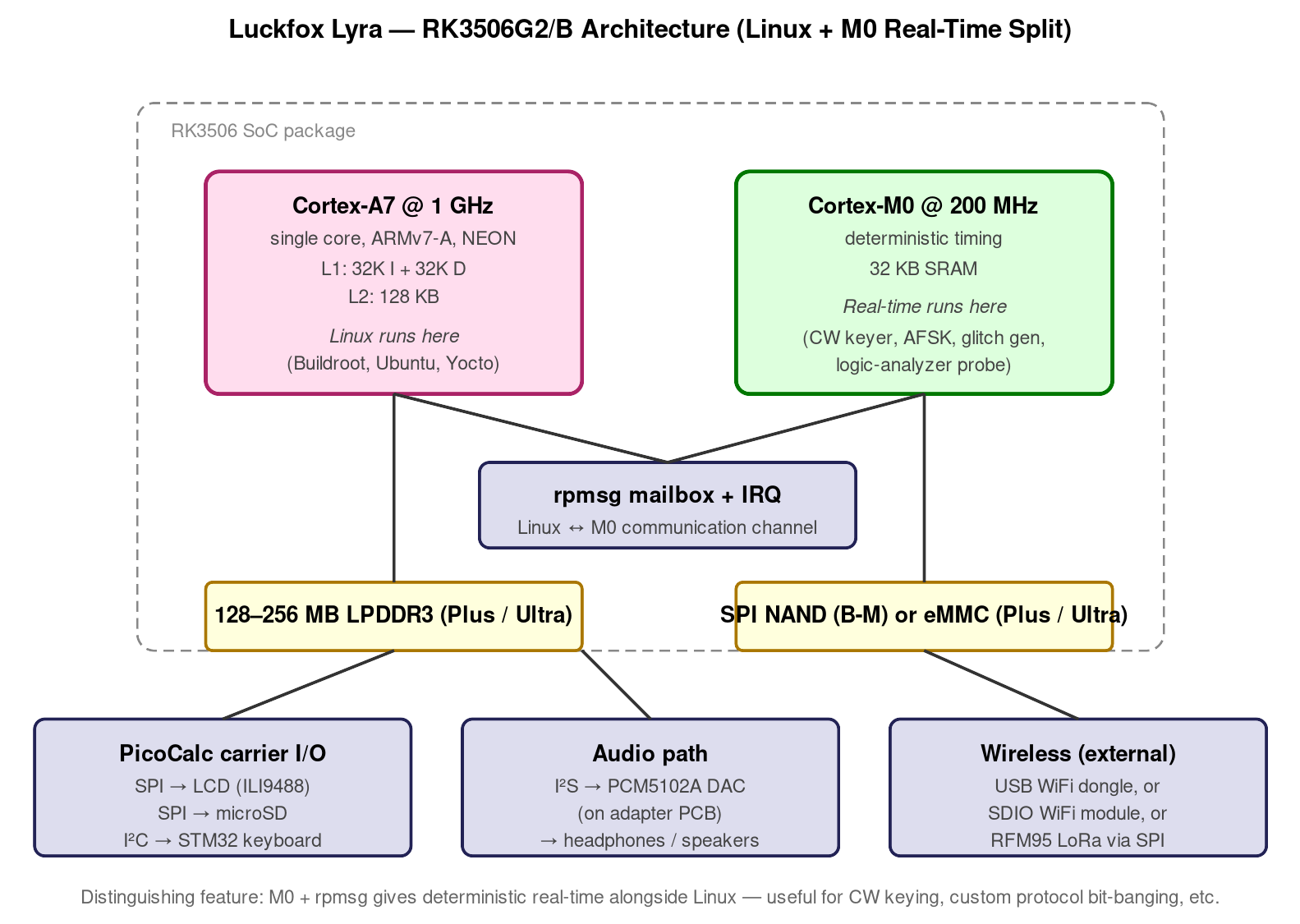
rpmsg mailbox, exchanging payloads while sharing access to GPIO and selected peripherals. The combination is the distinguishing feature versus Pi Zero — clean real-time alongside Linux.Figure 3.0 — RK3506 architecture. Source: Luckfox Lyra wiki + RK3506G2 datasheet, §3.
3.1 The A7 cluster
A single Cortex-A7 at 1 GHz on a 22 nm process1. ARMv7-A architecture, 32-bit, NEON SIMD, no NEON-FMA. Cache: 32 KB L1-I + 32 KB L1-D + 128 KB L2. Linux scheduler views it as a single-core machine.
Performance: roughly 50% of Pi Zero 2 W’s BCM2710A1 single-core. Adequate for digital-mode ham, terminal use, basic web browsing in lightweight browsers; tight for emulation beyond NES/SMS class; insufficient for desktop-class workloads (Firefox, Chromium, GIMP).
3.2 The M0 co-processor
A Cortex-M0 at 200 MHz. 32 KB SRAM directly addressable. Wakeup from rpmsg interrupt; can be commanded by the A7 via standard kernel rpmsg API. The two CPUs share access to GPIO, the SD I/O, and a few other peripherals via a hardware mailbox.
This is the practical difference between Lyra and Pi Zero. Real-time workloads that require microsecond-level timing — CW key timing on an AFSK modem, software-implemented UART at unusual baud rates, sub-1µs SPI-bit-banging — go on the M0 while Linux on the A7 does the heavy-lifting that doesn’t have hard timing requirements.
3.3 Display interface — MIPI-DSI vs SPI
RK3506G2 has a native MIPI-DSI display controller. The Lyra exposes those pins on its module connector. The PicoCalc carrier’s LCD is SPI-only (Volume 2 §5.1) — so the Lyra adapter PCB has to either:
- Bridge MIPI-DSI to a chip that drives the carrier’s SPI LCD interface (uncommon — adds complexity).
- Use the Lyra’s SPI peripheral to drive the carrier’s LCD as if it were a Pico — software framebuffer, slower frame rate.
Most Lyra adapters (premade and DIY) use the SPI path, accepting the slower frame rate.
3.4 Other peripherals
The RK3506G2 exposes I²S, I²C, SPI, UART, ADC. PWM. The Lyra adapter wires the carrier’s keyboard I²C to the SoC’s I²C2 (M0-accessible). The audio is routed via I²S (so a PCM5102A I²S DAC works directly without needing the carrier’s PWM-audio path; this is a benefit over the Pico/Pi-Zero topologies).
4. Adapter PCB
4.1 What the adapter does
Same role as the ZeroCalc adapter (Volume 8 Chapter 3), with three main differences:
- Different physical mount: the Lyra is a smaller module than the Pi Zero, so the adapter is more compact. It sits flush in the case.
- Different power: Lyra draws ~80 mA active — well within the carrier’s 3V3 budget, so no separate regulator needed (vs. Pi Zero’s 250 mA which mandates one).
- Different audio path: includes a PCM5102A I²S DAC on the same PCB, since the Lyra’s I²S is the natural audio out.
Schematic-level treatment in Volume 7 §10. This volume focuses on use.
4.2 Where to source
| Variant | Source | Approx price | Notes |
|---|---|---|---|
| Luckfox-spec adapter | https://www.luckfox.com/ direct | $15-20 | Variant-specific; verify Lyra fit |
| ClockworkPi forum custom | Forum sellers (search “Lyra adapter”) | $20-25 | Hand-assembled |
| 3D-printable backs | 05-resources/3D Print Files/B05LY*.stl (this project) | self-print | Variant-specific cutouts |
5. Operating Systems
5.1 Buildroot (Luckfox official) — recommended
Luckfox publishes a Buildroot-based Linux image2 tuned for the Lyra. Supports all variants. ~30 MB rootfs, boots in ~10 seconds, includes BusyBox + minimal Python + SSH. Daily-driver-tolerable on Lyra B-M and up.
5.2 Ubuntu 22.04 (Luckfox official)
The same-source Ubuntu Server build for Lyra. ~600 MB rootfs. Boots in ~25 seconds. RAM-tight on Lyra B-M (128 MB) — barely comfortable. Comfortable on Lyra Plus / Ultra.
5.3 Yocto
Build your own from https://www.yoctoproject.org/. Useful for production embedded work. Steeper learning curve than Buildroot.
5.4 Community Trixie / Debian ports
Forum-published Debian Trixie ports exist. Stability varies; consider these “advanced user” territory.
5.5 OpenWrt and DietPi (experimental)
Limited Lyra support. OpenWrt is intriguing for AP-mode use (the Lyra-as-WiFi-router scenario). DietPi has not officially added Lyra to its supported boards as of 2026-Q1.
5.6 Download links (canonical)
| OS | URL |
|---|---|
| Luckfox Buildroot | https://wiki.luckfox.com/Lyra/Lyra-download |
| Luckfox Ubuntu 22.04 | same |
| Yocto Project | https://www.yoctoproject.org/ |
| RK3506 BSP (kernel + bootloader) | https://github.com/LuckfoxTECH/luckfox-pico |
6. Installation Walkthroughs
6.1 Path A — Buildroot to microSD (recommended starting point)
- Download
Lyra-Buildroot-SD.img.gzfrom Luckfox. - Decompress:
gunzip Lyra-Buildroot-SD.img.gz. - Flash to a 16 GB or larger microSD with
dd(Linux/Mac) or balenaEtcher / Rufus (Windows). - Insert SD into PicoCalc.
- Power on. ~10 seconds of black screen, then login prompt on LCD.
- Default credentials:
root / luckfox. - SSH in to install the PicoCalc kernel modules (display driver, keyboard driver) — see §6.5.
6.2 Path B — Buildroot to SPI NAND (Lyra B / B-M)
For variants with on-module NAND, you can boot from NAND so the SD is free for user data:
- Connect the Lyra to a host PC via USB-C (the Lyra’s own USB).
- Hold the maskrom button on the Lyra while plugging USB-C — the host sees a Rockchip USB device.
- Use Rockchip’s
RKDevTool(Windows) orrkdeveloptool(Linux): https://github.com/rockchip-linux/rkdeveloptool. - Flash
MiniLoaderAll.bin,parameter.txt,boot.img,rootfs.imgto the appropriate offsets per Luckfox’s docs. - Disconnect, plug the Lyra into the PicoCalc carrier, power on.
This path is more involved but gives you a clean separation between the OS (on NAND) and user data (on SD).
6.3 Path C — Ubuntu 22.04 to microSD
Identical procedure to Path A, with the Ubuntu image. Login: pi / pi or ubuntu / ubuntu depending on image revision. First-boot apt update && apt install adds typical utilities; expect this to take ~15 minutes on Lyra B-M.
6.4 Path D — Custom Buildroot
For maximum control. Build skeleton:
git clone https://github.com/LuckfoxTECH/luckfox-pico.git
cd luckfox-pico
./build.sh lunch    # pick Lyra-Plus or your variant
./build.sh          # ~45 minutes on a desktop
Resulting output/image/update.img flashes via rkdeveloptool (Path B procedure).
6.5 PicoCalc bring-up tasks (any path)
After first boot, install the PicoCalc kernel modules:
git clone https://github.com/clockworkpi/lyra-picocalc-modules.git
cd lyra-picocalc-modules
make
sudo insmod picocalc_display.ko
sudo insmod picocalc_keyboard.ko
Add to /etc/modules-load.d/picocalc.conf to load on boot.
Verify: dmesg | tail should show “picocalc-display: registered fb0” and similar for the keyboard. The console should redirect to the LCD; the keyboard becomes /dev/input/event0.
7. The M0 Co-Processor
The M0 is the Lyra’s distinguishing feature for real-time work. Linux runs on the A7; the M0 runs separate firmware that the A7 starts/stops via standard kernel APIs.
7.1 Build M0 firmware
The Luckfox SDK provides an example M0 project. Skeleton:
// m0_firmware/main.c
#include "m0_runtime.h"
void main() {
    while (1) {
        // your real-time logic here
        // e.g., toggle GPIO, watch a pin, send rpmsg to A7
    }
}
Build via the Luckfox-provided arm-none-eabi-gcc toolchain. Output: m0_firmware.bin ready to load.
7.2 Load on the M0 from Linux
# /sys/class/remoteproc/remoteproc0/firmware
echo m0_firmware.bin > /sys/class/remoteproc/remoteproc0/firmware
echo start > /sys/class/remoteproc/remoteproc0/state
The M0 starts running. To stop: echo stop > /sys/class/remoteproc/remoteproc0/state.
7.3 Communicate via rpmsg
Linux side (Python):
import os
fd = os.open('/dev/rpmsg0', os.O_RDWR)
os.write(fd, b'hello m0')
data = os.read(fd, 64)
print(data)
M0 side: m0_rpmsg_send_message() and m0_rpmsg_recv_callback() in the Luckfox SDK.
7.4 What to put on the M0
Concrete examples that play to the M0’s strengths:
- CW keyer: precise dot/dash timing under 1 ms accuracy. Linux on A7 can’t guarantee that under load; M0 trivially does.
- AFSK 1200 modem: continuous bitrate-clocked output. M0 generates the FSK waveform via PWM; A7 feeds payload bytes via rpmsg.
- Logic-analyzer probe: 16-channel sample-and-buffer at MHz rates. M0 fills a buffer; A7 reads it for analysis.
- Custom protocol bit-banging: anything that needs sub-µs control. M0’s deterministic instruction timing makes this clean.
- Watchdog: the M0 can monitor A7 health and reset the system if A7 hangs.
8. Wireless on the Lyra
The Lyra has no on-module wireless. Three paths to add it:
8.1 USB WiFi (simplest)
Plug an RTL8188EUS or similar USB WiFi dongle into the Lyra’s USB port. Kernel driver loads automatically; configure with wpa_supplicant.
8.2 SDIO WiFi (cleaner mechanical)
For variants with the SDIO bus accessible (Lyra B-M, Plus, Ultra), an SDIO WiFi module wires directly. Requires:
- BCM43436 or similar SDIO module (sourced from broken phone-screen kits or AliExpress).
- Custom adapter wiring SDIO pins (4 data + clock + cmd + 3V3).
- Out-of-tree kernel module.
More work than USB; cleaner mechanical fit if the case can’t accommodate a USB dongle.
8.3 Bluetooth
Most USB WiFi dongles include BT 4.x. Configure with bluetoothctl. Functional for hands-free / file-transfer; less polished than full Linux desktops.
8.4 Ethernet (Lyra Plus only)
The Lyra Plus exposes RGMII pins on its connector. With an external PHY (LAN8720 or RTL8201F), Ethernet is feasible — but the case has no RJ45 cutout, so this is a project-specific mod.
9. Performance Benchmarks
| Benchmark | Pi Zero 2 W | Lyra Plus |
|---|---|---|
| sysbench CPU prime (1 thread) | ~1700 events/s | ~850 events/s |
| dhrystone (1 thread, MIPS) | ~2200 | ~1100 |
| coremark | ~5500 | ~2700 |
| LZ4 decompression | ~120 MB/s | ~80 MB/s |
dd if=/dev/zero of=/dev/null bs=1M count=100 | 1.2 GB/s | 0.8 GB/s |
| ALSA latency (period 1024) | ~22 ms | ~14 ms |
| Boot time (cold to login) | ~30 s | ~10 s |
| Idle current (display on) | ~140 mA | ~80 mA |
The Lyra is roughly half the raw CPU performance of Pi Zero 2 W, but boots 3× faster and draws 2× less power. For real-time workloads via the M0, it has no comparable Pi Zero capability.
10. Use-Case Playbooks
10.1 Linux IoT gateway
Lyra B with Buildroot, USB WiFi dongle, MQTT broker (mosquitto), node-red optional. ~50 MB rootfs, boots in 8 seconds, runs comfortably on 64 MB RAM. Useful for an always-on, low-power home-automation gateway.
10.2 Real-time + Linux split
The killer app for the Lyra:
- A7 runs Linux: SSH, fldigi GUI, log-aggregation.
- M0 runs CW keyer firmware with sub-1µs timing accuracy.
- A7 and M0 talk via rpmsg: A7 sends “send
CQ DE N0CAL,” M0 keys the rig accordingly.
This split is something the Pi Zero cannot match without significant kernel preemption and PRU-style hacks.
10.3 Smart-display application
Static-content display (clock, weather, calendar widget) that the Lyra Plus updates over WiFi every minute. Power-efficient enough to run for days on USB-C without battery management concerns.
10.4 Embedded prototyping bench
Lyra Plus + GPIO breakout + a benchtop power supply. Linux for high-level orchestration; M0 for protocol-level tinkering. The PicoCalc keyboard makes it usable as a standalone dev environment without an external monitor.
10.5 Niche Linux applications
When you want Linux but don’t need Pi Zero’s RAM and don’t care about its faster CPU. Particularly compelling: low-power deployments where battery life matters and Pi Zero’s 4-hour limit is unworkable.
10.6 Ham radio on Lyra
The interesting role: a portable digital-mode display + rig controller, with the M0 handling timing-critical work.
- fldigi: works fine on A7. Comparable to Pi Zero performance.
- JS8Call: works, but tighter on RAM; close all other apps.
- WSJT-X: borderline. CPU is fine but the Qt-based UI is heavy. Skip in favor of a slimmer mode encoder.
- CW keyer on M0: the natural fit. Microsecond-accurate keying with no host-side timing surprises.
- Custom AFSK 1200 modem on M0: feasible, with the modulator firmware on M0 and the link-layer protocol on A7.
- hamlib: standard. CAT cable to rig via USB-serial.
This is the only one of the five compute paths that gives you a real-time co-processor for free. For ham digital-mode operating, that’s a clear differentiator.
10.7 Retro emulation
Lyra Plus runs:
- NES, GB, GBC, SMS, GG: full speed.
- GBA: ~70-80% (mGBA on libretro, software-only — no GPU).
- SNES: tight, game-dependent.
- PSX: not playable.
Pi Zero is generally a better retro-emulation target because of higher per-thread CPU. Pick Lyra for retro emulation only if power/boot-time is the binding constraint.
10.8 Lyra as a hacking tool
Compared to Pi Zero with Kali: Lyra has no native Kali support. Workload-by-workload:
- Wireless auditing: no monitor mode without specialized USB WiFi adapter; significantly worse than Pi Zero with Kali.
- Sub-GHz / LoRa via side-header CC1101 / RFM95: yes, works fine.
- Network scanning: nmap, masscan, etc. all work — install via
aptif Ubuntu. - Bluetooth: bluetoothctl works.
- Logic analysis: M0 makes this a clean target.
- Side-channel / power analysis: still no shunt amp; same as Pico path.
Verdict: Pi Zero remains the better hacking-tool path unless you specifically want Lyra’s lower power.
11. Power and Battery Life
| Workload | Average current | Battery (2× 35E) duration |
|---|---|---|
| Idle, screen on, WiFi off | ~80 mA | ~9 h |
| SSH session, LCD on | ~110 mA | ~6.5 h |
| fldigi RX | ~140 mA | ~5 h |
| M0 CW keyer running, A7 idle | ~85 mA | ~8.5 h |
| Compile job (Buildroot package) | ~180 mA | ~4 h |
| WiFi associated, transfer | ~210 mA | ~3.5 h |
Roughly 2× the battery life of Pi Zero in equivalent workloads. For a portable Linux-class device, this is meaningful.
12. Troubleshooting
| Symptom | Cause | Fix |
|---|---|---|
| Boot hangs at black screen | Rootfs corrupt or wrong variant | Reflash; verify variant matches |
| Display blank, kernel boots | picocalc-display module missing | insmod picocalc_display.ko |
rpmsg device missing | M0 firmware not loaded | Check /sys/class/remoteproc/remoteproc0 |
apt install fails (Ubuntu) | RAM low; /tmp full | apt clean, increase swap |
| Audio missing | I²S DAC not in /etc/asound.conf | Configure the device alias |
| WiFi USB dongle not detected | Driver not loaded | Check kernel logs; possibly add module |
| eMMC corruption | Power loss during write | Reflash via maskrom mode |
| Lyra reboots unexpectedly | Brownout (cell voltage too low) | Check cell voltage; charge |
13. Resources
| Resource | Link |
|---|---|
| Luckfox shop (Lyra family) | https://www.luckfox.com/ |
| Luckfox wiki (Lyra) | https://wiki.luckfox.com/Lyra/ |
| RK3506G2 datasheet | https://wiki.luckfox.com/Lyra/RK3506G2-Datasheet |
| luckfox-pico SDK | https://github.com/LuckfoxTECH/luckfox-pico |
| rkdeveloptool | https://github.com/rockchip-linux/rkdeveloptool |
| RKDevTool (Windows) | https://www.rock-chips.com/a/en/downloadcenter/ |
| Luckfox Buildroot downloads | https://wiki.luckfox.com/Lyra/Lyra-download |
| Yocto Project | https://www.yoctoproject.org/ |
| ClockworkPi forum (Lyra adapter thread) | https://forum.clockworkpi.com/c/picocalc/ |
| 3D-printable Lyra backs | 05-resources/3D Print Files/B05LY*.stl (this project) |
| fldigi | http://www.w1hkj.com/ |
| WSJT-X | https://wsjt.sourceforge.io/ |
| hamlib | https://hamlib.github.io/ |
14. Index
| Topic | Section |
|---|---|
| A7 cluster | §3.1 |
| Adapter PCB | Chapter 4, Vol 7 §10 |
| Audio path | §3.4, §4.1 |
| Battery life | Chapter 11 |
| Benchmarks | Chapter 9 |
| Bluetooth | §8.3 |
| Boot time | Chapter 9 |
| Buildroot install | §6.1, §6.2 |
| CW keyer on M0 | §10.6 |
| Display interface (MIPI vs SPI) | §3.3 |
| eMMC (Lyra Plus / Ultra) | §2.4, §2.5 |
| Ethernet | §8.4 |
| Ham radio playbook | §10.6 |
| Linux IoT gateway | §10.1 |
| Luckfox download links | §5.6 |
| Lyra base | §2.1 |
| Lyra B / B-M | §2.2, §2.3 |
| Lyra Plus | §2.4 |
| Lyra Ultra | §2.5 |
| M0 co-processor | Chapter 7 |
| Maskrom mode | §6.2 |
| MIPI-DSI | §3.3 |
| OS download links | §5.6 |
| Power consumption | Chapter 11 |
| Real-time + Linux split | §10.2 |
| Retro emulation | §10.7 |
| RK3506G2 architecture | Chapter 3 |
| rpmsg | §7.3 |
Footnotes
-
Rockchip RK3506G2 datasheet: https://wiki.luckfox.com/Lyra/RK3506G2-Datasheet. The full reference manual is available on Luckfox’s wiki under the same path. ↩
-
Luckfox Buildroot images: https://wiki.luckfox.com/Lyra/Lyra-download. Updated quarterly. ↩