DSTIKE Hackheld · Volume 11
DSTIKE Hackheld Volume 11 — Writing Your Own Code II — PlatformIO + Advanced Patterns
Production-grade development, async patterns, OTA, a Spacehuhn fork, and starter apps
11.1 Why PlatformIO
PlatformIO is what you graduate to when the Arduino IDE feels limiting. The wins:
- Version-pinned dependencies:
lib_deps = adafruit/Adafruit SSD1306 @ ^2.5.7— exact version captured per project. - CLI-first:
pio run,pio upload,pio device monitor— scriptable, CI-able, no GUI required. - Multiple environments: build the same code for both
esp8266andesp32from one project; develop on a fast desktop, deploy to multiple device variants. - Better static analysis:
pio checkruns cppcheck / clang-tidy / etc. against your code. - VS Code integration: superior to Arduino IDE 2.x for any non-trivial project; full IntelliSense, debugger support (where the chip supports it).
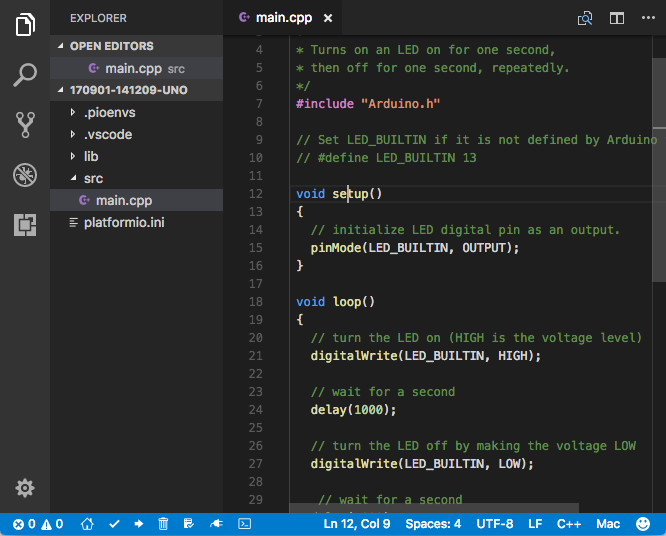
Figure 11.1 — PlatformIO. Photo via Wikimedia Commons (CC-licensed; see photo_credits.txt).
11.2 Installation
pip install platformioFor VS Code integration, install the PlatformIO IDE extension from the VS Code marketplace. The extension wraps the CLI and adds project-tree + build-status panels.
Verify:
pio --version
pio device list   # Should show the CH340 COM port when Hackheld is plugged in
11.3 Project layout
A typical PlatformIO project for the Hackheld:
my-hackheld-project/
├── platformio.ini         ← config: target board, dependencies, build flags
├── src/                   ← main code (.cpp / .h)
│   └── main.cpp
├── lib/                   ← project-private libraries (not from registry)
├── include/               ← project-wide headers
├── data/                  ← files to flash to LittleFS partition
└── .pio/                  ← build outputs (gitignored)
Create a new project:
mkdir hackheld-test
cd hackheld-test
pio project init --board esp12e
This generates a skeletal platformio.ini you then customize.
11.4 platformio.ini reference
A working config for the Hackheld:
; PlatformIO config — DSTIKE Hackheld

[platformio]
default_envs = hackheld

[env:hackheld]
platform = espressif8266
board = esp12e
framework = arduino

; Flash settings to match the Hackheld's ESP-12 module
board_build.flash_mode = dio
board_build.f_cpu = 80000000L
board_build.filesystem = littlefs

; Build / upload
upload_speed = 460800
monitor_speed = 115200
upload_port = /dev/ttyUSB0     ; adjust per host

; Compile flags
build_flags =
    -D HACKHELD
    -D OLED_ADDR=0x3C
    -Wno-unused-variable
    -Os                          ; size-optimised (matters on 80 KB DRAM)

; Library dependencies — pinned versions
lib_deps =
    adafruit/Adafruit GFX Library @ ^1.11.5
    adafruit/Adafruit SSD1306 @ ^2.5.7
    thomasfredericks/Bounce2 @ ^2.71
    me-no-dev/ESPAsyncTCP @ ^1.2.2
    me-no-dev/ESP Async WebServer @ ^1.2.3
    bblanchon/ArduinoJson @ ^7.0.0

; Optional: arrange for an OTA fallback environment
[env:hackheld-ota]
extends = env:hackheld
upload_protocol = espota
upload_port = 192.168.4.1
upload_flags =
    --auth=hackheld_ota_pw
Then:
pio run                      # build
pio run --target upload      # build + upload
pio device monitor           # serial monitor
pio run -e hackheld-ota --target upload  # OTA upload
11.5 Building the Spacehuhn firmware
The Spacehuhn esp8266_deauther upstream is an Arduino-IDE project, but it builds cleanly under PlatformIO with the right platformio.ini:
[env:spacehuhn]
platform = espressif8266
board = esp12e
framework = arduino
board_build.flash_mode = dio
board_build.f_cpu = 80000000L
upload_speed = 460800
monitor_speed = 115200

src_filter = +<*> -<.git/> -<.svn/>
src_dir = esp8266_deauther/esp8266_deauther
build_flags =
    -D DEAUTHER_VERSION="\"2.6.1-custom\""
    -D USE_HACKHELD
Clone the upstream:
git clone https://github.com/SpacehuhnTech/esp8266_deauther.git
cd esp8266_deauther
# Now in the repo root. Copy the platformio.ini above here.
pio run
pio run --target upload
This builds the same binary as the Arduino IDE produces — useful for custom modifications.
11.6 The async event loop
ESP8266 doesn’t have a preemptive RTOS by default (only NONOS / cooperative). The Arduino-ESP8266 core’s loop() is the single thread; long blocking operations starve the Wi-Fi stack and trigger watchdog resets.
The pattern:
void loop() {
    // Bad: blocks for 5 seconds
    delay(5000);

    // Good: non-blocking
    static uint32_t lastTick = 0;
    if (millis() - lastTick > 5000) {
        lastTick = millis();
        do_periodic_work();
    }
    yield();    // Give the Wi-Fi stack a chance to run
}
Three async patterns that work well on the Hackheld:
Pattern A — Periodic timer in loop() (shown above). Simple. Works for tasks that run every few seconds.
Pattern B — Ticker library (built-in to Arduino-ESP8266):
#include <Ticker.h>
Ticker scanTicker;

void scanCallback() {
    int n = WiFi.scanNetworks();
    Serial.printf("Found %d APs\n", n);
}

void setup() {
    scanTicker.attach(30.0, scanCallback);  // scan every 30 seconds
}

void loop() {
    yield();
}
Ticker callbacks must be fast (a few ms max) — long ticker callbacks trigger watchdog. For long-running work, set a flag in the callback and do the work in loop():
volatile bool scanFlag = false;

void scanCallback() { scanFlag = true; }

void loop() {
    if (scanFlag) {
        scanFlag = false;
        WiFi.scanNetworks();  // Long-running, but in loop() not in interrupt context
    }
    yield();
}
Pattern C — ESPAsyncWebServer event-driven: the web server (used in Vol 10 §10) is non-blocking by design. Request handlers run very fast and return. For long-running work, kick off a background task and return immediately.
11.7 Persistent state with LittleFS
LittleFS replaces SPIFFS in newer Arduino-ESP8266 cores. Same API surface; better performance; recoverable from power failure (SPIFFS isn’t always).
#include <LittleFS.h>

void setup() {
    Serial.begin(115200);
    if (!LittleFS.begin()) {
        Serial.println("LittleFS mount failed; formatting");
        LittleFS.format();
        LittleFS.begin();
    }

    // Write a file
    File f = LittleFS.open("/state.txt", "w");
    f.println("captured at " + String(millis()));
    f.close();

    // Read it back
    f = LittleFS.open("/state.txt", "r");
    Serial.println(f.readString());
    f.close();
}
For structured state, use ArduinoJson:
#include <ArduinoJson.h>

void saveState() {
    JsonDocument doc;
    doc["last_attack_time"] = lastAttackTime;
    doc["attack_count"] = attackCount;

    File f = LittleFS.open("/state.json", "w");
    serializeJson(doc, f);
    f.close();
}

void loadState() {
    File f = LittleFS.open("/state.json", "r");
    if (!f) return;

    JsonDocument doc;
    deserializeJson(doc, f);
    lastAttackTime = doc["last_attack_time"];
    attackCount = doc["attack_count"];
    f.close();
}
In platformio.ini set board_build.filesystem = littlefs and PlatformIO does the right thing on upload.
11.8 OTA updates
Once your custom firmware works, you don’t need to plug in USB-C for every update. The ESP8266 Arduino-ESP8266 core has built-in OTA support — wire it in once, then pio run --target upload --upload-port 192.168.4.1 flashes over Wi-Fi.
#include <ArduinoOTA.h>

void setup() {
    // ... existing setup ...

    ArduinoOTA.setHostname("hackheld-custom");
    ArduinoOTA.setPassword("hackheld_ota_pw");  // Required to prevent random OTA writes
    ArduinoOTA.begin();

    Serial.println("OTA ready");
}

void loop() {
    ArduinoOTA.handle();
    // ... rest of loop ...
}
In platformio.ini:
[env:hackheld-ota]
extends = env:hackheld
upload_protocol = espota
upload_port = 192.168.4.1
upload_flags =
    --auth=hackheld_ota_pw
Now:
pio run -e hackheld-ota --target uploadWatch the device’s OLED — it should briefly show “OTA in progress” and reboot into the new firmware.
Don’t put OTA in production firmware without authentication. A device with OTA + no password is one accidentally-discoverable AP away from being remotely re-flashed by anyone.
11.9 Watchdog and crash recovery
The ESP8266 has a hardware watchdog that triggers a reset if the chip doesn’t service it within ~3 seconds. Tight loops without yield() cause this.
When a watchdog fires, the chip reboots and the next-boot console output shows:
ets Jan  8 2013,rst cause:4, boot mode:(3,7)

wdt reset
rst cause:4 = watchdog reset. To recover: fix the offending loop in your code.
For crashes (exceptions, panics):
Exception (29):
epc1=0x40220cd1 epc2=0x00000000 epc3=0x00000000 excvaddr=0x00000000 depc=0x00000000
Use EspExceptionDecoder (Arduino IDE) or pio device monitor with the symbol-decoding filter to translate the address into a function name and line number.
Tools → Erase Flash → "Sketch + WiFi Settings" (Arduino IDE) or pio run -t erase (PlatformIO) sometimes fixes mysterious post-crash boot loops by wiping persistent state.
11.10 Sample app — beacon-logger
A custom firmware that does one thing well: passively log every beacon seen, with timestamp + RSSI + channel + SSID, to LittleFS. No attacks. No web UI. Just a station that catches and saves.
// apps/beacon-logger/src/main.cpp
#include <ESP8266WiFi.h>
#include <LittleFS.h>

extern "C" {
    #include "user_interface.h"
}

File logFile;

void sniffer_cb(uint8_t *buf, uint16_t len) {
    // Beacon frames start with frame type 0x80 0x00 in the 802.11 header
    if (len < 36) return;
    if (buf[12] != 0x80) return;   // not a beacon

    // RSSI is in the prepended PHY header
    int8_t rssi = (int8_t)buf[0];

    // SSID is in the management frame's variable fields
    // For brevity, just log RSSI + first 6 bytes of source MAC (BSSID)
    if (logFile) {
        logFile.printf("%lu,%d,%02x:%02x:%02x:%02x:%02x:%02x\n",
                       millis(), rssi,
                       buf[22], buf[23], buf[24], buf[25], buf[26], buf[27]);
        logFile.flush();
    }
}

void setup() {
    Serial.begin(115200);
    LittleFS.begin();
    logFile = LittleFS.open("/beacons.csv", "a");

    WiFi.mode(WIFI_STA);
    WiFi.disconnect();
    wifi_set_channel(1);
    wifi_promiscuous_enable(false);
    wifi_set_promiscuous_rx_cb(sniffer_cb);
    wifi_promiscuous_enable(true);
}

void loop() {
    static uint32_t lastHop = 0;
    static int channel = 1;
    if (millis() - lastHop > 1000) {
        lastHop = millis();
        channel = (channel % 14) + 1;
        wifi_set_channel(channel);
    }
    yield();
}
Leave running on battery. Pull /beacons.csv over USB-serial (or by re-flashing with a “read LittleFS” sketch) when done.
11.11 Sample app — Spacehuhn fork with hardcoded allowlist
To use deauth in the lab while eliminating the risk of accidentally targeting a third-party network: fork Spacehuhn and gate the attack engine on a hardcoded MAC allowlist.
Pseudo-diff against Spacehuhn Attack.cpp (you’d patch the actual file in the cloned repo):
// Add at top of Attack.cpp:
static const uint8_t ALLOWED_BSSIDS[][6] = {
    {0xAA, 0xBB, 0xCC, 0x11, 0x22, 0x33},   // My test AP #1
    {0xAA, 0xBB, 0xCC, 0x11, 0x22, 0x34},   // My test AP #2
    // ... add MACs of YOUR equipment only ...
};
const int N_ALLOWED = sizeof(ALLOWED_BSSIDS) / 6;

static bool is_allowed(const uint8_t *mac) {
    for (int i = 0; i < N_ALLOWED; i++) {
        if (memcmp(mac, ALLOWED_BSSIDS[i], 6) == 0) return true;
    }
    return false;
}

// Then in the deauth-send function, before emitting:
if (!is_allowed(target_bssid)) {
    Serial.println("[ATTACK BLOCKED] target not in allowlist");
    return;
}
Rebuild + flash. The firmware now physically refuses to deauth any AP that isn’t in the hardcoded list. Lab discipline as code.
The same pattern applies to beacon spam and probe spam — gate the attack functions on an allowlist defined in source. For lab use this is dramatically safer than “I’ll just be careful with the targets.”
11.12 Memory + performance discipline
Five rules for the 80 KB DRAM:
- Watch
ESP.getFreeHeap(). Print it periodically. If it drops below 10 KB, Wi-Fi will get unreliable. - Don’t use
String. Usechar[]+snprintf.Stringconcatenation fragments the heap mercilessly. - Mark static text
PROGMEM(orF("...")inSerial.print). Otherwise it sits in DRAM. yield()in long loops. The Wi-Fi stack needs frequent yields. A tight loop without it triggers WDT.- Prefer
inttoint32_tfor stack variables. Most ARM code defaults to int32, but on ESP8266 even 8/16-bit ops are cheaper than 32-bit floats — and floats are software-emulated and slow.
CPU: at 80 MHz the chip can do simple work (toggle a GPIO, push a byte to I²C) in microseconds. Boost to 160 MHz (board_build.f_cpu = 160000000L in platformio.ini) when you’re doing real compute — e.g., parsing JSON or running cryptographic hashes.
11.13 What’s next
→ Vol 12 — Workflows, Comparison, Legal/Ethics, Cheatsheet — operational recipes, comparison vs the modern alternatives, legal posture, and a laminate-ready cheatsheet.
Comments (0)