Ducky Script · Volume 10
Ducky Script Volume 10 — The Key Croc
The observe-then-act device — a keylogger that passes keystrokes through, logs them, and fires payloads on a keyword or regex match
Contents
1. About this volume
The Key Croc is the odd one out in the family — and understanding why is the key to the whole volume. The Rubber Ducky, the Bash Bunny, and (mostly) the O.MG are act-first devices: you plug them in (or trigger them) and they do something. The Key Croc is an observe-first device. Its primary job is to sit inline on a keyboard connection and log every keystroke that passes through it. The keystroke injection — the Ducky Script part — is secondary, and it is triggered by what the Key Croc observes: when the target types a word or pattern the Croc is watching for, the matching payload fires.
So the Key Croc is a keylogger with a keystroke-injection device bolted on, wired together by a pattern-matching trigger engine. That architecture — watch, match, then act — is unique in the family and is what this volume is really about.
Research-baseline note. tjscientist owns a Key Croc. The hardware figures below are from Hak5 documentation; a
doc-auditpass should confirm them and the firmware version against the actual unit.
2. What the Key Croc is — the patient device
   The family, by WHEN the payload fires
   ════════════════════════════════════════════════════════

   USB Rubber Ducky ──► fires on plug-in. immediate.
   Bash Bunny       ──► fires on plug-in (after ~7s boot).
   O.MG             ──► fires on remote/geo trigger. you decide.
   Key Croc         ──► fires when the TARGET types a trigger.
                        the device decides — by watching.

   The Croc is the only one whose payload timing is driven by
   the target's own behaviour. You install it and walk away.
   It waits — patiently, indefinitely — and acts when the
   condition it was told to watch for actually happens.
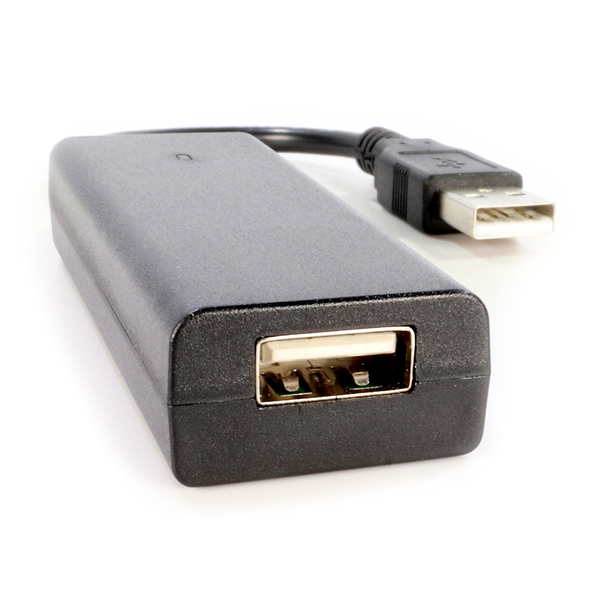
The Key Croc’s form factor reflects this: it is an inline USB adapter — it sits between a keyboard and the computer (or between any USB device and the computer). It is meant to be installed and left. That “install and leave” model is operationally and legally distinct from the plug-and-pull devices, and Vol 16 treats it specifically — a left-behind implant is a continuing presence on the target system.
3. The hardware
| Component | Spec (research-baseline) |
|---|---|
| CPU | quad-core 1.2 GHz ARM |
| Storage | 8 GB desktop-class SSD |
| Connectivity | USB 2.0; 2.4 GHz Wi-Fi (2.412–2.4835 GHz) |
| Size | 74 × 27 × 14 mm |
| Power | 5 W (USB 5 V / 1 A) |
| Operating temp | ~35–45 °C |
| Form factor | inline USB adapter — sits between a USB device and the host |
Two specs define its capabilities: it is a Linux box (quad-core ARM + 8 GB SSD — like the Bash Bunny, it boots and runs a real userland, which is what the pattern-matching engine and the logging need), and it has Wi-Fi — which the Rubber Ducky and Bash Bunny do not. The Wi-Fi is what makes “install and walk away” practical: the operator does not have to come back for the device to get value out of it (§7).
4. The pass-through keylogger
The Key Croc’s baseline behaviour, before any payload fires:
   Pass-through keylogging
   ════════════════════════════════════════════════════════

   keyboard ──USB──► [ KEY CROC ] ──USB──► host
                          │
                          │ every keystroke is:
                          │   1. passed through to the host
                          │      (the target notices nothing —
                          │       their keyboard just works)
                          │   2. simultaneously LOGGED to the
                          │      Croc's 8 GB SSD
                          │   3. fed to the match engine (§5)
                          ▼
                     log file on SSD  +  (optionally) streamed
                                          over Wi-Fi
The crucial property: it is transparent. The keyboard plugged into the Croc works exactly as it always did — the target types, the characters appear, nothing is laggy or wrong. Meanwhile every keystroke is being written to the Croc’s SSD. “More than just recording” — Hak5’s phrasing — the Croc can also stream the keystroke log online (over its Wi-Fi) so the operator sees it live, and it feeds the same stream into the match engine.
This is genuine keylogging — passive, persistent, and (because it is hardware, inline, below the OS) invisible to host-based anti-keylogger software. It is also the part of the Key Croc with the sharpest legal edges — capturing someone’s keystrokes is wiretap-adjacent in many jurisdictions even before any payload fires. Vol 16 carries the framing; this volume just flags that the logging itself, not only the injection, is the consequential capability here.
5. The match-and-trigger engine
This is the Key Croc’s defining feature. As keystrokes pass through, the Croc compares the typed stream against a set of match patterns the operator configured. When the stream matches, the payload associated with that match fires.
   The match-and-trigger model
   ════════════════════════════════════════════════════════

   target types: ... l o g i n . t o . t h e . v p n ...
                              │
                              ▼
                   match engine compares the stream against
                   configured patterns:
                     MATCH password   ─┐
                     MATCH vpn         ─┼─► "vpn" matched!
                     MATCH ^admin.*$   ─┘
                              │
                              ▼
                   the payload bound to that match FIRES
                   (a DuckyScript payload — §6)
What the engine can match:
- A simple keyword —
MATCH password,MATCH sudo, the target types it, the payload fires. - An advanced regular expression —
MATCHwith a regex, for sophisticated triggers (a pattern of input, a command shape, a credential format). - Typo-tolerant matching — Hak5’s documentation is explicit that the match still works even if the target makes a typo and hits backspace. The engine tracks the intended input, not just the raw keystrokes — so a fat-fingered “passowrd”→backspace→“word” still matches
password.
That last property is what makes the engine practical rather than brittle: real humans typo constantly, and a match engine that broke on every backspace would almost never fire. Because it survives typos, you can configure a trigger on a word the target will eventually type correctly, and trust it to catch it.
Each match is bound to a payload. You can have many matches configured, each with its own payload — so one installed Key Croc can have a small library of conditional payloads, each waiting for its own trigger.
6. Payloads — DuckyScript plus the match
A Key Croc payload has two parts: the match (the trigger condition) and the action (what runs when it fires — and the action is where Ducky Script lives).
   The shape of a Key Croc payload
   ════════════════════════════════════════════════════════

   MATCH password              # the trigger: when "password"
                               # is typed, this payload fires

   # ... the action ...
   # the Key Croc is a Linux box, so the action can be a
   # script — and the keystroke-injection part of that
   # action is DuckyScript:

   QUACK STRING <something>    # inject keystrokes (DuckyScript,
   QUACK ENTER                 # invoked the way the Bunny does it)
   # ... plus whatever else the Linux userland can do ...
The relationship to the rest of the manual:
- The injection part is DuckyScript — everything in Vols 3-7 applies. The Croc, like the Bash Bunny, runs DuckyScript as the keystroke-injection layer within a larger payload.
- The Croc is a Linux box (Vol 10 §3) — so, like the Bunny, the payload can do more than inject: run programs, process the keylog, use the Wi-Fi.
- What is unique to the Croc is the
MATCH— theMATCHline is what makes the payload conditional on the target’s behaviour. Take theMATCHaway and you have a Bash-Bunny-style payload; theMATCHis the Key Croc.
The operational pattern this enables is powerful: capture-then-act. The Croc logs the target typing their password (capture). It matches on a trigger word that means “the target is now in a useful state” — and then fires a payload that acts on that state (act). The device does not have to guess the right moment (the Rubber Ducky’s whole problem, Vol 5) — it waits for the target to create the right moment.
7. Multi-vector emulation and remote access
Like the Bash Bunny, the Key Croc emulates more than a keyboard. Hak5’s description: “By emulating trusted devices like serial, storage, HID and Ethernet, it opens multiple attack vectors — from keystroke injection to network hijacking.” So the Croc has the same multi-vector ATTACKMODE-style capability the Bunny has (Vol 9 §5) — HID for injection, storage, serial, and ethernet for network attacks.
What it adds on top, courtesy of its Wi-Fi:
- Remote access. The operator can reach the installed Croc over its Wi-Fi — check the keylog, change the configured matches/payloads, retrieve loot — without physically returning to the device. For an install-and-leave implant, this is the difference between “useful” and “useful only if you can get back to it.”
- Live keystroke streaming. The keylog can be streamed online as it happens.
- Cloud C2 integration. Like the rest of the Hak5 family, the Key Croc can be managed through Hak5 Cloud C2 (Vol 14) — fleet management, remote loot retrieval, centralised control.
   Why Wi-Fi changes the Key Croc's operational model
   ════════════════════════════════════════════════════════

   Without remote access, an install-and-leave keylogger is:
     install ──► (it logs, blind to you) ──► you must RETURN
                                              to get anything

   With Wi-Fi remote access, it becomes:
     install ──► monitor the keylog LIVE, retrieve loot,
                 re-task the matches/payloads — all remotely.
     You return only to remove it (or not at all).
8. The operating modes — arming, attack, config
The Key Croc, being a Linux box you have to configure (matches, payloads, Wi-Fi, Cloud C2 enrollment), has distinct modes:
| Mode | What it is | When |
|---|---|---|
| Attack / armed | the normal operating state — logging, matching, ready to fire payloads | deployed on the target |
Arming / udisk | the Croc presents as a USB flash drive (a “udisk”) so you can edit its config, matches, and payloads from your own computer | when you set it up or re-task it |
| Config | the Wi-Fi-and-settings configuration state | initial setup, network enrollment |
The udisk arming mode is the Croc’s equivalent of the Rubber Ducky’s microSD card and the Bash Bunny’s arming-position switch: it is how you get your payloads and config onto the device. You enter arming mode, the Croc mounts as a drive on your machine, you edit the files (the match definitions, the payload scripts, the config), you eject, and the Croc returns to its armed state. Vol 12 covers this in the cross-device deploy workflow.
9. Strengths, limits, and when to reach for it
| Strengths | Limits |
|---|---|
| Keylogging — passive, persistent, hardware-level, invisible to host AV | it is an implant — install-and-leave means a continuing presence (legal weight — Vol 16) |
| Match-and-trigger — payloads fire on the target’s own behaviour; no guessing the moment | bigger commitment than a plug-and-pull device — you have to install it inline |
| Wi-Fi remote access — monitor, re-task, retrieve loot without returning | the keylogging itself is the most legally sensitive capability in the family |
| Multi-vector (HID/storage/serial/ethernet), a Linux box | not a “fast smash-and-grab” tool — its value is patience |
| Cloud C2 manageable | requires physical inline installation on a keyboard connection |
When to reach for the Key Croc (full comparison in Vol 17):
- You need to observe before you act — capture what the target types, and fire a payload only when a meaningful condition occurs.
- The engagement supports install-and-leave — you can place the device inline and return later (or never).
- Keylogging itself is an objective — credential capture, behaviour capture.
- You want conditional payloads — a small library of payloads each waiting for its own trigger word/pattern.
- You can reach it over Wi-Fi (or accept that you cannot) for monitoring and re-tasking.
It is the wrong tool for a fast, one-shot, in-and-out injection — that is the Rubber Ducky’s job. The Croc’s value is entirely in patience and observation.
10. Operating the owned unit
First-contact sequence for tjscientist’s Key Croc (and doc-audit checklist):
- Enter arming/
udiskmode, mount it on your own machine, and inspect — firmware version, existing matches/payloads, Wi-Fi config. Record the firmware version inMY_GEAR/inventory.yaml. - Configure Wi-Fi on an owned network — the remote-access and streaming capabilities depend on it; confirm they work in the lab.
- Write one
MATCHpayload — a trigger word, a simpleQUACKaction — and test it inline on an owned keyboard/computer: type the trigger, confirm the payload fires. - Confirm the pass-through keylog — verify keystrokes are logged to the SSD and that the keyboard still behaves transparently to the user.
- Test typo-tolerant matching — type the trigger word with a deliberate typo+backspace, confirm it still matches.
- Decide on Cloud C2 — enroll it only if fleet management is wanted (and note the attack-surface implications, Vol 14).
- Record the unit in
MY_GEAR/inventory.yaml; create its00-inventory/narrative page. Note: because the Croc is the most legally sensitive device, the narrative page should explicitly state the owned-hardware / authorized-use-only posture.
11. Resources
- Key Croc docs: https://docs.hak5.org/key-croc/
- Key Croc by Hak5 (overview): https://docs.hak5.org/key-croc/keycroc-by-hak5/
- Ducky Script commands on the Key Croc: https://docs.hak5.org/key-croc/writing-payloads/ducky-script-commands/
- Key Croc payload development: https://docs.hak5.org/key-croc/writing-payloads/payload-development/
- The official Key Croc payload repository: https://github.com/hak5/keycroc-payloads
- Vols 3-7 — the DuckyScript that goes in the
MATCHpayload’s action - Vol 9 — the Bash Bunny, the Croc’s closest sibling (Linux box, multi-vector)
- Vol 16 — the posture framing for keylogging and install-and-leave implants
This is Volume 10 of an 18-volume series. Next: Vol 11 covers the O.MG family — Cable, Plug, and Adapter — the covert implants that hide in a charging cable or wall plug, function normally as the thing they look like, and are triggered remotely over Wi-Fi from a web UI.