Ducky Script · Volume 11
Ducky Script Volume 11 — The O.MG Family: Cable, Plug & Adapter
The covert implants — hidden in a charging cable or wall plug, fully functional as the thing they look like, triggered remotely over Wi-Fi
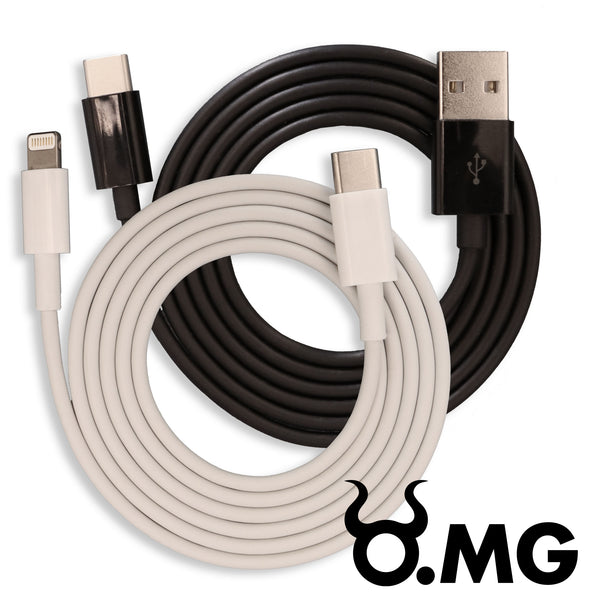
Contents
1. About this volume
The O.MG family — the O.MG Cable, Plug, and Adapter — is the covert member of the device family, and “covert” here means something specific and stronger than the Rubber Ducky’s “looks like a flash drive.” An O.MG device looks exactly like an ordinary cable, wall plug, or USB adapter, and fully functions as one — while concealing a keystroke-injection implant that the operator triggers remotely, over Wi-Fi, from a web UI.
The O.MG line was created by Mike Grover (MG) and is sold and supported through Hak5. It runs an ESP-based implant with open firmware (the O-MG firmware project on GitHub). Of the four owned device families, this is the one whose distinguishing trait is concealment plus remote control — and that combination changes the whole operational model from “I plug it in” to “it is already there, and I trigger it when I choose.”
Research-baseline note. tjscientist owns O.MG Cable / Plug / Adapter devices. The tier (Basic vs Elite — §6) and exact hardware revisions need confirmation against the actual units; a
doc-auditpass should pin them and record them inMY_GEAR/inventory.yaml.
2. What the O.MG family is — the covert implants
   The four devices, by how visible the implant is
   ════════════════════════════════════════════════════════

   USB Rubber Ducky  "looks like a flash drive" — but presents
                     to the host as a keyboard. Visual cover only.
   Bash Bunny        looks like a chunky flash drive. Conspicuous.
   Key Croc          looks like an inline USB adapter. Visible if
                     someone looks at the cable run.
   O.MG Cable        IS a cable. Charges your phone. Transfers
                     data. The implant is invisible — physically
                     and (when idle) to the host.
   O.MG Plug         IS a USB wall charger. Charges things.
   O.MG Adapter      IS a USB adapter. Passes data through.

   The O.MG family's cover is not "it looks like X" — it's
   "it IS X, and also something else." That is a different,
   stronger kind of covert.
The other three devices are tools you bring. An O.MG device is an object you leave — or an object that replaces something already in the environment. A target’s own charging cable, swapped for an O.MG Cable, is an implant that the target carries around, plugs into their own machines, and never suspects, because it is — genuinely, functionally — a charging cable.
3. Cable, Plug, Adapter — the three form factors
Three form factors, same core implant, each suited to a different placement:
| Form factor | What it is / replaces | Placement scenario |
|---|---|---|
| O.MG Cable | a USB charging/data cable (various connector combinations) | swap for / supply a target’s cable; the most “carried by the target” option |
| O.MG Plug | a USB wall charger / power adapter | a wall charger left in a workspace, a meeting room, a hotel — small, keychain-friendly, “the perfect DuckyScript tool” per Hak5 for everyday carry |
| O.MG Adapter | a USB adapter — the active (Type-C) side transmits payloads; supports USB 2.0 data passthrough when idle | inline on an existing cable run; the implant stays undetectable to the host while passing data through |
All three share the implant, the Wi-Fi, the web UI, and the DuckyScript dialect. The choice between them is a placement decision — which physical object best fits the environment you are operating in. The O.MG Plug’s small keychain form factor makes it the everyday-carry choice; the Cable is the one a target is most likely to end up using on their own machines; the Adapter is the inline option.
4. The architecture — an ESP-based Wi-Fi implant
The O.MG’s internals are fundamentally different from the rest of the family — and the difference explains everything else about it:
   The O.MG implant — what's inside a cable
   ════════════════════════════════════════════════════════

   ┌─ inside the connector/plug housing ──────────────┐
   │                                                  │
   │   ESP-based implant ── Wi-Fi ──► operator's       │
   │   (microcontroller     (the device         web UI│
   │    + Wi-Fi)             hosts/joins              │
   │      │                  Wi-Fi)                    │
   │      │ drives                                     │
   │      ▼                                            │
   │   USB HID  ──────────────────────► target host    │
   │   (keystroke injection)                           │
   │      │                                            │
   │      └─ + USB 2.0 passthrough so the cable/        │
   │         adapter STILL WORKS as a cable/adapter     │
   └──────────────────────────────────────────────────┘

   The ESP + Wi-Fi is the whole point: it's how payloads get
   IN (you push them over Wi-Fi) and how triggering happens
   (you fire them over Wi-Fi). No SD card, no switch, no
   physical access needed after placement.
Key architectural facts:
- ESP-based. The implant is built on an ESP-class microcontroller-with-Wi-Fi. That is what gives every O.MG device a network — and the network is what makes it remote-controllable.
- Open firmware. The O.MG firmware is an open project (the O-MG GitHub organisation) — unusually transparent for a covert implant, and useful for an engineer who wants to understand exactly what the device does.
- Wi-Fi as the I/O channel. Where the Rubber Ducky uses a microSD card and the Bash Bunny uses a switch + filesystem, the O.MG uses Wi-Fi for everything — getting payloads onto the device, triggering them, retrieving results. The device can host its own access point or join an existing network.
- It is still the physical thing. Crucially, the implant does not break the cable/plug/adapter’s normal function — §8.
5. The web UI — authoring and triggering over Wi-Fi
The O.MG’s entire operating surface is a web UI, reached over the device’s Wi-Fi. This is the O.MG’s equivalent of the Rubber Ducky’s encode-and-SD-card workflow — but it is live and remote:
   The O.MG operating loop
   ════════════════════════════════════════════════════════

   1. Connect to the O.MG's Wi-Fi (its AP, or a shared network).
   2. Open the web UI in a browser — desktop or mobile.
   3. Author / paste a DuckyScript payload into a SLOT.
   4. Configure it — keyboard layout (Vol 7!), trigger
      conditions, geo-fence (§7).
   5. TRIGGER it — remotely, when you choose — or let a
      configured condition trigger it.
   6. Review results / re-task — all from the same web UI.
What this buys, operationally:
- No physical access after placement. Once the device is in place, everything — writing payloads, changing them, triggering them — happens over Wi-Fi. You never touch the device again until you retrieve it (if you retrieve it).
- Author in the field. You can write or adjust a payload on site, from a phone, reacting to what you see — something none of the other three devices allow.
- Industry-leading speed. Hak5 cites up to 890 keys/sec on the Elite tier — the fastest injection in the family.
- The layout setting lives here. The web UI’s payload configuration is where you set the keyboard layout (Vol 7) — and getting it wrong here fails exactly the way Vol 7 describes.
Hak5’s framing — “owners of the O.MG Cable will be right at home with the DuckyScript deployment web UI” and the O.MG Plug as “the perfect DuckyScript tool” for everyday carry — both come down to this: the web UI makes DuckyScript deployment fast and remote, and that is the O.MG’s whole value proposition for the language.
6. Basic vs Elite — the tiers
The O.MG line is tiered — Basic and Elite — and the tier materially changes what the device can do:
| Basic | Elite | |
|---|---|---|
| Payload slots | 8 | 50–300 |
| Max payload size | 4,000 keystrokes | 1,500,000 keystrokes |
| Injection speed | 120 keys/sec | 890 keys/sec |
| Geo-fencing | yes | yes |
| USB passthrough | yes (Cable / Adapter) | yes (Cable / Adapter) |
The gap is large. The Elite tier is not “a bit better” — it is two orders of magnitude more payload capacity, ~7× the speed, and dozens-to-hundreds of slots instead of eight. For anything beyond simple, short payloads — anything that stages a real tool, carries a library of payloads, or needs to run fast enough to minimise the on-screen window — the Elite tier is the one that matters.
This is a doc-audit priority: which tier are tjscientist’s O.MG units? It changes the realistic payload design space significantly, and it should be recorded per-unit in MY_GEAR/inventory.yaml.
7. Geo-fencing and conditional triggers
Both tiers support geo-fencing — and this is a capability nothing else in the family has. A geo-fenced payload is configured to only trigger (or only be allowed to trigger) within — or outside — a defined geographic area.
   Why geo-fencing matters for a covert implant
   ════════════════════════════════════════════════════════

   The risk with an install-and-leave implant: it triggers
   in the WRONG place. The cable goes home with the target,
   gets plugged into a personal machine, fires there — an
   uncontrolled, unintended, and legally catastrophic event.

   Geo-fencing constrains it:
     "only operate inside the authorized site"
     "self-disable if it leaves the engagement boundary"

   It is, properly used, a SAFETY and SCOPE-CONTROL feature
   as much as an operational one — it keeps a covert implant
   inside the authorization boundary (Vol 16).
That framing matters: geo-fencing is most valuable read as a scope-enforcement control. A covert implant that travels is a liability; geo-fencing is how you bound where it is allowed to act, which is exactly the kind of technical control that keeps an engagement inside its authorization (Vol 16). It is also an operational trigger — “act when the device is at location X” — but the scope-control reading is the one a disciplined operator leads with.
Beyond geo-fencing, the web UI supports other conditional triggering — the device need not fire on a simple remote command; it can be configured to act on conditions. The detail is firmware-version-dependent (the open O-MG firmware evolves) and is a doc-audit item.
8. USB passthrough — being a real cable
The single most important covertness fact: an O.MG device still works as the thing it looks like. Hak5’s spec: “USB 2.0 (480 Mbps) passthrough data speed for O.MG Cable & O.MG Adapter when active end is connected to a USB host,” and the implant “stays undetectable to the host” when not transmitting payloads.
   Passthrough — why the cover holds
   ════════════════════════════════════════════════════════

   target plugs the O.MG Cable into their laptop and phone:
     • the phone charges. normally.
     • data transfers. at full USB 2.0 speed.
     • the laptop sees... a cable. nothing else.
     • the implant sits idle, undetectable to the host.

   the target has NO behavioural reason to suspect it,
   because there is NO behavioural difference. It is a
   working cable that is also, sometimes, when triggered,
   a keyboard.

   THIS is what "covert" means for the O.MG, and it is
   categorically stronger than "looks like a flash drive."
The implant only becomes a keyboard when triggered. The rest of the time it is dormant and the host sees a normal cable/adapter. There is no “it’s been plugged in for 10 seconds and the screen did something weird” — the giveaway every other device risks — because the O.MG does nothing until the operator (or a configured condition) tells it to.
9. Strengths, limits, and when to reach for it
| Strengths | Limits |
|---|---|
| Genuinely covert — is a working cable/plug/adapter | implant compute is modest (an ESP-class device, not a Linux box) |
| Remote — author, trigger, re-task over Wi-Fi; no physical return | Wi-Fi is a dependency and a detectable signal (Vol 15) |
| Geo-fencing — scope/safety control nothing else has | Basic tier is genuinely limited (8 slots, 4k keystrokes, 120 keys/s) |
| Fast — up to 890 keys/sec (Elite) | not a Linux box — no ATTACKMODE ETHERNET, no on-device tooling (Bunny) |
| Passthrough — the cover never breaks | install-and-leave = continuing presence (legal weight — Vol 16) |
| Open firmware — auditable | the most “spy gadget” device in the family — handle the posture accordingly |
When to reach for an O.MG device (full comparison in Vol 17):
- Covertness is the requirement — the device must be indistinguishable from an ordinary object and must keep functioning as that object.
- You need remote control — to trigger when you choose, from a distance, possibly reacting to what you observe.
- You need conditional / geo-fenced triggering — including using the geo-fence as a scope-enforcement safety control.
- The engagement is install-and-leave or swap-the-target’s-own-object, and you may not get physical access again.
It is the wrong tool for a fast, hands-on, in-and-out injection where covertness is not the constraint (Rubber Ducky), or where you need a Linux box’s tooling and networking (Bash Bunny), or where you need to observe-then-act on the target’s typing (Key Croc).
10. Operating the owned units
First-contact sequence for tjscientist’s O.MG devices (and doc-audit checklist):
- Identify each unit’s form factor and tier — Cable / Plug / Adapter, Basic / Elite. The tier especially (§6) shapes everything. Record per-unit in
MY_GEAR/inventory.yaml. - Connect to each device’s web UI over its Wi-Fi; note the firmware version (the O-MG firmware is open and versioned — record it).
- Author a hello-world payload in a slot, set the keyboard layout (Vol 7) deliberately, and trigger it against an owned test machine.
- Confirm passthrough — verify the Cable/Adapter still charges and transfers data normally with the implant idle. This is the covertness guarantee; confirm it.
- Test geo-fencing in the lab — configure a geo-fence, confirm the device respects it. Then adopt geo-fencing as standard practice (§7, Vol 16) — a covert implant should be scope-bounded by default.
- Decide on Cloud C2 — enroll only if fleet management is wanted; weigh the attack-surface implications (Vol 14).
- Record each unit in
MY_GEAR/inventory.yamlwith form factor, tier, firmware version; create00-inventory/narrative pages. As with the Key Croc, these pages should explicitly state the owned-hardware / authorized-use-only posture — the O.MG is the most “spy gadget” device in the lineup and the inventory record should say so.
11. Resources
- O.MG Cable: https://shop.hak5.org/products/omg-cable · O.MG Plug: https://shop.hak5.org/products/omg-plug · O.MG Adapter: https://shop.hak5.org/products/omg-adapter
- O.MG tier comparison: https://shop.hak5.org/pages/omg-tier-compare
- O.MG firmware (open source): https://github.com/O-MG/O.MG-Firmware
- Vols 3-7 — the DuckyScript dialect the O.MG web UI deploys
- Vol 7 — keyboard layouts: set this in the web UI, get it wrong and the payload types garbage
- Vol 16 — the posture framing for covert install-and-leave implants; geo-fencing as scope control
This is Volume 11 of an 18-volume series. Next: Vol 12 closes Part II with the encode-and-deploy workflow — how a payload actually gets from a text file onto each of the four devices, the official Hak5 editor Payload Studio (with usage tips), the legacy and community encoders, and the testing discipline that catches a broken payload before the engagement does.