Ducky Script · Volume 9
Ducky Script Volume 9 — The Bash Bunny
A full Linux box that also injects keystrokes — ATTACKMODE, QUACK, the bash payload environment, and multi-vector attacks
Contents
1. About this volume
The Bash Bunny is the Rubber Ducky’s bigger, smarter sibling — and the comparison is the fastest way to understand it. Where the Rubber Ducky is a microcontroller that does one thing (Vol 8), the Bash Bunny is a full Linux computer that also does keystroke injection, and can pretend to be a flash drive, a serial port, or a USB ethernet adapter — sometimes several at once.
The throughline of this volume: Ducky Script is one tool in the Bunny’s toolbox, not the whole toolbox. A Bash Bunny payload is a bash script with Hak5 helper commands; QUACK-ing Ducky Script is one thing that script can do, alongside running real Linux programs, mounting filesystems, and bringing up network interfaces.
Research-baseline note. tjscientist owns a Bash Bunny. The hardware figures below are from Hak5 documentation; a
doc-auditpass should confirm the generation (Mark I vs Mark II) and firmware version against the actual unit.
2. What the Bash Bunny is — a Linux box that injects
   Rubber Ducky vs Bash Bunny — the essential difference
   ════════════════════════════════════════════════════════

   USB RUBBER DUCKY            BASH BUNNY
   ────────────────            ──────────
   a microcontroller           a quad-core Linux computer
   no OS                       boots a Linux userland
   does: keystroke injection   does: keystroke injection
                                     + mass storage emulation
                                     + serial emulation
                                     + USB-ethernet emulation
                                     + anything bash can do
   ready instantly             boots in ~7 seconds ("plug to pwn")
   payload = inject.bin        payload = a bash script (+ DuckyScript)
   one job, perfectly          many jobs, scriptable
The Bash Bunny’s own documentation frames its language precisely: it is “DuckyScript… consisting of simple commands specific to the Bash Bunny hardware, some helper functions and the full power of the Bash Unix shell and command language.” That last clause is the whole device. The Bunny is not “a Rubber Ducky plus extras” — it is a Linux box whose party trick is that it can be a keyboard.
3. The hardware
| Component | Spec (research-baseline) |
|---|---|
| CPU | quad-core (the Mark II is described as having an optimized quad-core CPU) |
| Storage | desktop-class SSD |
| RAM | doubled on the Mark II vs the original |
| Boot time | ~7 seconds (“plug to pwn”) on the Mark II |
| I/O | a 3-position selector switch, an RGB LED |
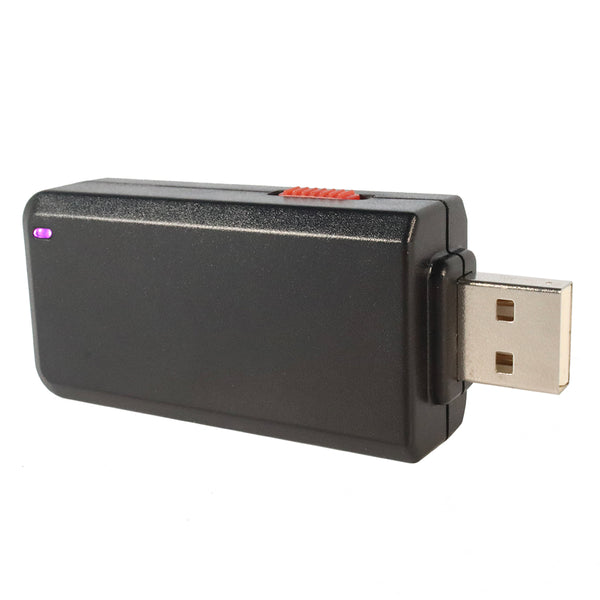
| Connector | USB-A (the device’s body is the connector — flash-drive-ish form factor, chunkier than a Ducky) |
| Language | bunny script (bash + Hak5 helpers + QUACK for DuckyScript) |
The two figures that matter operationally: it boots (so there is a ~7-second latency the Rubber Ducky does not have — your payload’s opening logic must account for “the device itself is still coming up”), and it has real storage and RAM (so it can carry tools, capture meaningful volumes of data, and run actual programs).
4. The payload language — bunny script
A Bash Bunny payload is a file (payload.txt) that is, at its core, a bash script — with three things layered in:
- Hak5 helper commands —
ATTACKMODE,QUACK,LED,GET,ATTACKMODE, and others — bash functions/commands the Bunny’s environment provides. QUACK— the command that runs Ducky Script (§6).- The full bash shell — loops, conditionals, variables, pipes, and every Linux program on the device.
   The shape of a Bash Bunny payload
   ════════════════════════════════════════════════════════

   #!/bin/bash
   #
   # A Bash Bunny payload is a bash script. The Hak5
   # environment adds device-specific commands; the rest
   # is ordinary shell.

   LED SETUP                       # Hak5 helper: LED state
   ATTACKMODE HID STORAGE          # Hak5 helper: emulate keyboard+drive
   GET SWITCH_POSITION             # Hak5 helper: which switch slot

   QUACK STRING "hello from the bunny"   # run DuckyScript inline
   QUACK ENTER
   QUACK /payloads/$SWITCH_POSITION/keys.txt   # ...or from a file

   LED FINISH
Two mental-model corrections for someone coming from the Rubber Ducky:
- There is no
inject.bin. The Bunny does not pre-encode a payload into a binary blob. The payload is the script; the device interprets it at run time. - DuckyScript is invoked, not assumed. On the Rubber Ducky, the whole payload is Ducky Script. On the Bunny, you are in bash, and you call
QUACKwhen you want to inject keystrokes.
5. ATTACKMODE — the multi-vector core
ATTACKMODE exists on the Rubber Ducky too (Vol 6 §2), but on the Bash Bunny it is the central command — because the Bunny can emulate far more than the Ducky:
ATTACKMODE target | The Bunny presents to the host as… | Use |
|---|---|---|
HID | a keyboard | keystroke injection (the QUACK channel needs this) |
STORAGE | a USB mass-storage device | carry tools onto the host / capture files off it |
SERIAL | a USB serial device | a console channel; talk to the host over a COM/tty port |
ECM_ETHERNET / RNDIS_ETHERNET | a USB ethernet adapter | the big one — see below |
AUTO_ETHERNET | ethernet, auto-selecting the mode the host accepts | maximise host compatibility for the network attack |
OFF | nothing | go quiet |
Multiple ATTACKMODEs can be combined and re-issued mid-payload — ATTACKMODE HID STORAGE is a keyboard and a drive, just like on the Ducky, but the Bunny adds the networking modes the Ducky never had.
The USB-ethernet capability is the Bash Bunny’s signature. When the Bunny presents as a USB ethernet adapter, many hosts will automatically route traffic through it — and now the Bunny, a Linux box, is a network device the host is talking to. That is the foundation of the Bunny’s network-based attacks (credential capture via responder-style techniques, DHCP/DNS games, etc.) — none of which the keyboard-only Rubber Ducky can do. QUACK (keystroke injection) and ATTACKMODE ETHERNET (be the network) are the Bunny’s two hands, and a sophisticated payload uses both: inject keystrokes to set something up, be the network to capture the result.
   Why "multi-vector" matters
   ════════════════════════════════════════════════════════

   The Rubber Ducky has ONE vector: the keyboard.
   The Bash Bunny has SEVERAL, switchable in one payload:

     QUACK ──────────────── inject keystrokes (it's a keyboard)
     ATTACKMODE STORAGE ──── stage/exfil files (it's a drive)
     ATTACKMODE SERIAL ───── a console channel (it's a COM port)
     ATTACKMODE ETHERNET ─── BE the network (it's a NIC)

   A payload can do all four in sequence: type a command,
   present a drive for that command to read, bring up a
   fake network, capture what flows through it.
6. QUACK — Ducky Script on the Bash Bunny
QUACK is the bridge from bash back to Ducky Script. It runs Ducky Script — inline or from a file:
QUACK STRING ipconfig /all          # inline: one DuckyScript line
QUACK ENTER
QUACK GUI r                         # inline: a named-key press
QUACK /payloads/$SWITCH_POSITION/d.txt   # from a file: a whole DuckyScript payload
Key facts:
ATTACKMODEmust includeHIDforQUACKto do anything —QUACKinjects keystrokes, and that needs the keyboard vector active.- The Bunny is compatible with USB Rubber Ducky DuckyScript text files — Hak5 explicitly designed for this. A
.txtDuckyScript payload written for the Ducky can beQUACK-ed by the Bunny. (Caveat: the Bunny runs the language as its own dialect; very new 3.0-specific behaviours should be tested, not assumed.) - The layout problem (Vol 7) still applies —
QUACK STRINGtypes scan codes; the Bunny’s payload sets the language/layout, and it must match the target.
So the Rubber Ducky skills transfer directly: everything you know about writing DuckyScript (Vols 3-7) is what you put after QUACK. The Bunny just also gives you bash around it.
7. The switch, the LED, and the payload slots
The Bash Bunny’s physical I/O is built around carrying multiple payloads:
- The 3-position selector switch. The switch has three positions — two “arming” payload slots and a third position that is arming mode (the Bunny mounts as a normal flash drive so you can edit its files from your computer). You pick which payload runs by physically setting the switch before plugging in.
GET SWITCH_POSITIONlets the payload read its own slot. - The RGB LED. A multi-colour status indicator — the Hak5 environment uses LED states (
LED SETUP,LED ATTACK,LED FINISH,LED FAIL, etc.) so a payload can signal its phase. Same operator-feedback logic as the Rubber Ducky’s LED (Vol 8 §5), with more states because the payloads are more complex. - Arming mode. Set the switch to the arming position, plug into your own machine, and the Bunny presents its filesystem — you copy payloads into the slot folders, edit
payload.txt, manage the tools the payload carries. This is the Bunny’s equivalent of “writinginject.binto the microSD card,” and Vol 12 covers it in the deploy workflow.
   The 3-position switch
   ════════════════════════════════════════════════════════

   position 1 ──► run payload slot 1
   position 2 ──► run payload slot 2
   position 3 ──► ARMING MODE — mounts as a drive on your
                  machine; edit payloads, manage files

   You choose the payload with your THUMB, before the device
   ever touches the target. No menu, no UI — a physical switch.
8. What the Linux box buys you
The single reason the Bash Bunny exists rather than “just use a Rubber Ducky” — what having a real Linux computer in the payload path actually buys:
| Capability | Why the Rubber Ducky can’t | What the Bunny does |
|---|---|---|
| Be the network | it is HID-only | ATTACKMODE ETHERNET — the host routes through the Bunny |
| Carry and run real tools | a microcontroller, no userland | Linux binaries on the SSD, run by the bash payload |
| Process data on-device | no compute, no storage to speak of | grep/awk/python on captured data, on the Bunny itself |
| Capture meaningful volumes | exfil is lock-key-rate (Vol 6) | a desktop-class SSD; capture freely |
| Real logic | 3.0 IF/WHILE over integers | full bash — conditionals, loops, pipes, every coreutil |
| Multi-stage payloads | linear-ish, even in 3.0 | bash orchestrates: stage 1 injects, stage 2 networks, stage 3 processes |
The trade for all that is boot latency (~7 seconds the Ducky doesn’t have) and complexity (a bash script with multiple ATTACKMODEs is more to get right, and more to go wrong, than a linear DuckyScript payload). The Bunny is the tool when the job needs the Linux box. When the job is “just type a thing,” the Rubber Ducky’s instant, deterministic simplicity wins (Vol 17).
9. Strengths, limits, and when to reach for it
| Strengths | Limits |
|---|---|
| Multi-vector — HID + storage + serial + ethernet | ~7-second boot latency (it is a computer) |
| A full Linux userland in the payload path | bigger, more conspicuous than a Ducky; not covert |
| Real storage + RAM — carry tools, capture volume | more complex payloads = more to get wrong |
Runs USB Rubber Ducky DuckyScript files via QUACK | runs on plug-in; no “install and wait” trigger (Key Croc) |
| The 3-position switch carries two ready payloads | no Wi-Fi / remote trigger (O.MG) |
When to reach for the Bash Bunny (full comparison in Vol 17):
- The job needs more than typing — be a network adapter, carry and run tools, process captured data on-device, multi-stage orchestration.
- You want network-based attacks delivered over USB — the
ATTACKMODE ETHERNETfamily. - You need real logic around the injection — bash, not just DuckyScript 3.0’s integer-and-
IFmodel. - You can afford the ~7-second boot and you do not need a covert form factor or an install-and-wait trigger.
10. Operating the owned unit
First-contact sequence for tjscientist’s Bash Bunny (and doc-audit checklist):
- Identify the generation — original vs Mark II. The Mark II is the ~7-second-boot, optimized-quad-core, doubled-RAM version. Record it in
MY_GEAR/inventory.yaml. - Set the switch to arming mode, plug into your own machine, and inspect the filesystem — firmware version, what payloads are in the slots, what tools are present.
- Note the firmware version — it determines the
ATTACKMODEtargets and helper commands available. - Write a hello-world payload —
ATTACKMODE HID, aQUACK STRING, anLED FINISH— into a slot, against an owned test machine, layout matched (Vol 7). - Exercise one
ATTACKMODE ETHERNETpayload in the lab — this is the Bunny’s signature capability and the one most worth confirming hands-on. - Record the unit in
MY_GEAR/inventory.yaml; create its00-inventory/narrative page.
11. Resources
- Bash Bunny docs: https://docs.hak5.org/bash-bunny/
- DuckyScript on the Bash Bunny: https://docs.hak5.org/bash-bunny/writing-payloads/duckyscript-on-the-bash-bunny/
QUACK: https://docs.hak5.org/bash-bunny/writing-payloads/quack/- Bash Bunny payload development: https://github.com/hak5/bashbunny-wiki/blob/master/payload_development.md
- The official Bash Bunny payload repository: https://github.com/hak5/bashbunny-payloads
- Vol 6 —
ATTACKMODEas introduced on the Rubber Ducky - Vols 3-7 — the DuckyScript that goes after
QUACK - Vol 17 — Bunny vs the other three devices
This is Volume 9 of an 18-volume series. Next: Vol 10 covers the Key Croc — the only device in the family built around observation: a keylogger that passes keystrokes through while logging them, and fires payloads when the target types a keyword or matches a regex.