AirTags · Volume 10
AirTags Volume 10 — DIY: OpenHaystack & Macless-Haystack
Turning a $5 ESP32 or an nRF52 into a Find My beacon: the original macOS-app-plus-Mail-plugin architecture, why the anisette server replaced the Mac, the P-224 key-gen → flash → advertise → fetch → decrypt pipeline that reuses Vol 2's payload byte-for-byte, a build BoM with the honest battery-life math, and the posture envelope for riding Apple's network without an MFi certificate
10.1 About this Volume
This is the last of the “trackers themselves” half of the series (Vols 2–10) before the deep dive flips to counter-surveillance (Vols 11–14). It is the volume that makes the cryptography of Vol 2 tangible: instead of reading the Find My offline-finding mechanism, here you become a Find My tag. A generic, $5 BLE chip — an ESP32 you may already have on the bench, or the same nRF52 class the real AirTag uses (Vol 5) — is flashed to broadcast a public key you generated, and from then on Apple’s ~1-billion-device network (Vol 2 §8.1) locates it for you, for free, with no Apple hardware involved and no MFi certificate (Vol 8). You hold the private key; you, and only you, can decrypt where the network has seen your beacon.
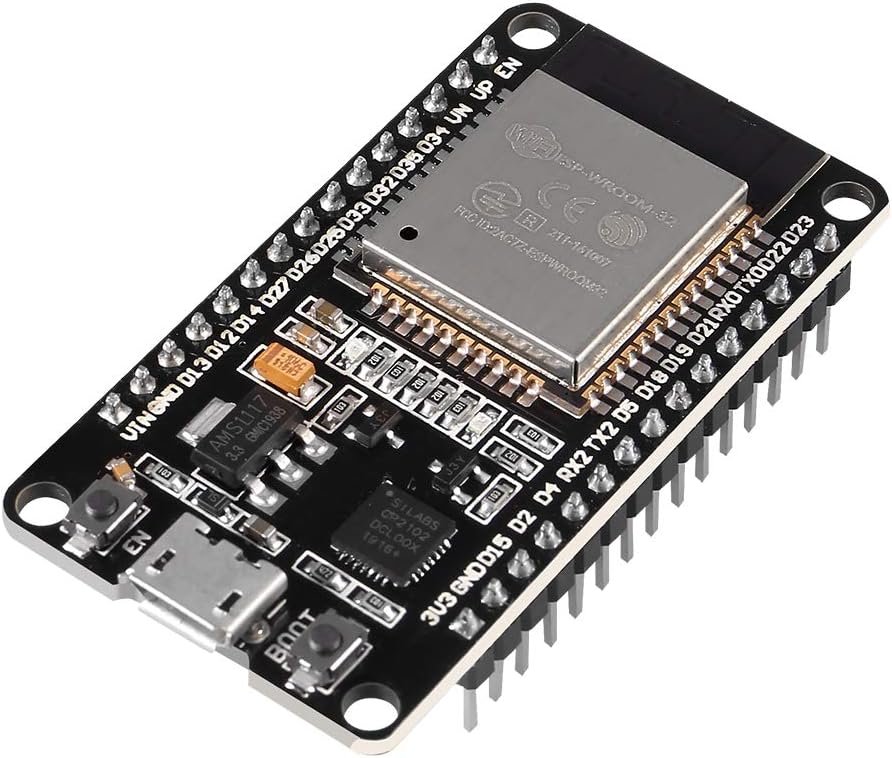
Two open-source projects make this possible, and they are generations of the same idea. OpenHaystack (TU Darmstadt’s SEEMOO lab, 2021 — the project that shipped alongside the PETS 2021 paper this whole series leans on) proved the trick but chained you to a Mac. Macless-Haystack (a community successor, principally dchristl) removed the Mac. This volume covers both, because understanding why OpenHaystack needed a Mac is the cleanest way to understand what Macless-Haystack’s anisette server actually does.
What this volume covers, and what it reuses. Here: the two projects and their architectures (§2), the five-step DIY pipeline (§3), generating the keypair (§4), the target-hardware decision and flashing (§5–§6), the advertising step — which deliberately reuses Vol 2’s exact byte layout rather than re-deriving it (§7), the fetch-and-decrypt step (§8), a complete custom-tracker build with an honest power budget (§9), and the Terms-of-Service / anti-stalking posture envelope (§10). Reused wholesale from earlier volumes: the FF 4C 00 12 advertising frame and the P-224 / ECIES crypto (Vol 2), the silicon comparison against the AirTag’s nRF52832 + CR2032 (Vol 5), the anti-stalking sound that a DIY beacon conspicuously lacks (Vol 4), and the MFi-certified path that the commercial tags took and this one does not (Vol 8). The detection consequence — that a well-formed DIY beacon is still catchable by the Vol 11/12 detectors even though it never chirps — is flagged here and worked in those volumes. The legal/ethical line is _shared/legal_ethics.md and Vol 14.
Spec-sourced, attributed to the upstream projects. As of 2026-06-25 no DIY beacon has been built on this bench (the spec’s bench trajectory puts that under the AirTags
projects/tree when Jeff flashes one). Nothing here is a live capture. The byte-level claims trace back to Vol 2’s sourcing — Heinrich, Stute, Kornhuber & Hollick, PETS 2021^[Alexander Heinrich, Milan Stute, Tim Kornhuber, Matthias Hollick, “Who Can Find My Devices? Security and Privacy of Apple’s Crowd-Sourced Bluetooth Location Tracking System”, PoPETs 2021(3), pp. 227–245, DOI 10.2478/popets-2021-0045. The paper that reverse-engineered offline finding and motivated OpenHaystack.] — and the tooling claims to the two project repositories: OpenHaystack^[OpenHaystack, SEEMOO Lab / TU Darmstadt — https://github.com/seemoo-lab/openhaystack. A macOS app + Apple Mail plugin + firmware for ESP32 / nRF51822 (BBC micro:bit) / Linux-HCI. The reference implementation; every “OpenHaystack does X” claim here is to this repo and itsREADME/firmware.] and Macless-Haystack^[Macless-Haystack, dchristl (and contributors) — https://github.com/dchristl/macless-haystack. Bundles the OpenHaystack ESP32/nRF firmware, a self-hosted report endpoint, an anisette server, and a cross-platform (Flutter mobile/web) app; authenticates the report fetch with an Apple ID rather than borrowing a Mac’s Mail session. The actively-maintained successor.]. Where an exact repository detail (an API name, a CLI flag, a file path) is not nailed down, this volume attributes the behavior to “the OpenHaystack / Macless-Haystack project” and writes the code idiomatically and explicitly labelled illustrative, rather than asserting a specific function signature as bench-fact. When a beacon is on the bench, the snippets get replaced with the exact upstream invocations and committed underprojects/.
10.2 Two projects: OpenHaystack and Macless-Haystack
The DIY-beacon world has had two eras, and the boundary between them is one component: who supplies the Apple-account authentication needed to read the location reports. Generating keys and flashing firmware was never the hard part — broadcasting a chosen public key as a BLE advert is trivial. The hard part is the fetch: Apple’s location-report endpoint requires a valid, authenticated Apple-account session, and the entire difference between the two projects is how they get one.
10.2.1 OpenHaystack — the macOS app and the Mail plugin
OpenHaystack, released by SEEMOO in early 2021 alongside the PETS paper, has three pieces:
- A macOS application. It generates the EC P-224 keypairs (the same curve Vol 2 §4.1 explains was chosen because a 28-byte X-coordinate is the largest EC key that fits a single legacy BLE advertisement), exports the public key for flashing, plots the decrypted location reports on a map, and manages your set of “accessories.”
- Firmware for a handful of BLE targets — ESP32, nRF51822 (as found on the BBC micro:bit), and Linux (advertising via HCI on any Bluetooth adapter) — that takes one public key and broadcasts it as a Find My advertisement.
- An Apple Mail plugin. This is the unintuitive piece, and it is the whole trick (§2.2).
The flow on classic OpenHaystack: generate a keypair in the app, flash the public key into the firmware, the beacon advertises, and then the macOS app — via the Mail plugin — queries Apple’s endpoint for reports filed under the hash of that key, decrypts them with the private key the app is holding, and drops a pin on a map. Everything happens on, and depends on, a Mac.
10.2.2 Why a Mail plugin — the authentication problem
Reading Find My reports is not an open API. The owner-side query of Vol 2 §6.2 — “Apple, do you have any reports filed under this batch of SHA-256(public-key) hashes?” — is authenticated to an Apple-account session for rate-limiting and abuse prevention. You cannot just curl the endpoint; Apple wants to see a logged-in Apple device’s credentials, including a per-request anisette bundle (a set of one-time, device-and-time-bound authentication data that Apple’s clients attach to account-server requests).
In 2021, the path of least resistance to a legitimately authenticated Apple session sitting on a Mac was: borrow one that already exists. Apple Mail, when you have an iCloud account configured, holds a live, authenticated Apple-account session and already knows how to mint anisette data. OpenHaystack’s Mail plugin loads into Mail’s process and reuses Mail’s authenticated session to issue the report query. It is not exploiting Mail so much as parasitizing the fact that a signed-in Mac already has exactly the authenticated context the report fetch needs. Elegant, and also the project’s biggest limitation: you need a Mac, signed into iCloud, running a specific older-ish macOS with a Mail plugin that Apple’s later hardening kept breaking.
The Mail plugin was the bottleneck, not the beacon. Re-read what the three OpenHaystack pieces do: the firmware (any BLE chip) and the key-gen (pure math) are trivial and portable. The thing that pinned the whole project to Apple hardware was authentication to read the reports. Every later development in this space — Macless-Haystack, the various Python fetchers — is fundamentally an answer to one question: “how do I produce a valid, authenticated Apple-account request without a Mac and its Mail session?” Keep that lens and the architecture comparison in §2.4 reads as a single substitution.
10.2.3 Macless-Haystack — anisette, an endpoint, no Mac
Macless-Haystack answers that question by self-hosting the authentication instead of borrowing it. It bundles four things — the same beacon firmware, plus a replacement for the Mac:
- The OpenHaystack ESP32 / nRF firmware — unchanged in spirit; broadcast a public key.
- A self-hosted report endpoint — a small server (Python) you run yourself that performs the actual query to Apple’s
gsa/Find-My report servers and returns the encrypted reports to your app. - An anisette server — the component that generates the Apple authentication data the Mail plugin used to provide. Anisette servers (the open-source
anisette-v3-serverlineage, often run in Docker) reproduce the one-time authentication bundles Apple’s clients attach to account requests, so a non-Apple machine can present a request Apple’s servers accept. - A cross-platform app — a Flutter application (Android, iOS, desktop, web) that replaces the macOS-only map app: manage keys, see decrypted locations, no Mac required.
You authenticate the endpoint with an Apple ID — and the strong recommendation, which §10 and the key-material callout in §4.4 both reinforce, is to use a throwaway Apple ID, not your primary account, because you are using it in an unsanctioned way and a ban risk (however small) is real. With the anisette server supplying authentication and the endpoint doing the query, the entire pipeline runs on a Linux box, a Raspberry Pi, even a NAS — no Apple computer in the loop. This is the modern recommended path, and it is what the AirTags projects/ build (§9.4) targets.
10.2.4 The architecture comparison
This is the required architecture-comparison diagram. The left column is OpenHaystack (2021); the right is Macless-Haystack. Note that the bottom three rows are identical — the beacon, the curve, and Apple’s network never changed. The substitution is entirely in the authentication-and-fetch layer: the Mac + Mail plugin (left) is replaced by the anisette server + self-hosted endpoint + cross-platform app (right).
   OpenHaystack (2021)                    Macless-Haystack (successor)
   ════════════════════                   ════════════════════════════

   ┌─────────────────────────┐            ┌─────────────────────────┐
   │   macOS APP             │            │  CROSS-PLATFORM APP     │
   │  • P-224 key-gen        │            │  (Flutter: Android/iOS/ │
   │  • map of reports       │            │   web/desktop)          │
   │  • manages accessories  │            │  • key-gen + map        │
   └───────────┬─────────────┘            └───────────┬─────────────┘
               │                                      │
   ┌───────────▼─────────────┐            ┌───────────▼─────────────┐
   │  APPLE MAIL PLUGIN      │            │  SELF-HOSTED ENDPOINT   │
   │  ── borrows Mail's      │            │  (your Python server)   │
   │     authenticated       │   ───►     │  does the report query  │
   │     iCloud session +    │  replaced  └───────────┬─────────────┘
   │     anisette data       │    by                  │ needs auth data
   │  ⇒ NEEDS A MAC, signed  │            ┌───────────▼─────────────┐
   │    into iCloud          │            │  ANISETTE SERVER        │
   └───────────┬─────────────┘            │  generates the Apple    │
               │                          │  auth bundle the Mail   │
               │                          │  plugin used to supply  │
               │                          │  (Docker; throwaway     │
               │                          │   Apple ID)             │
               │                          └───────────┬─────────────┘
               │     ── identical below ──            │
   ┌───────────▼──────────────────────────────────────▼─────────────┐
   │            APPLE FIND MY REPORT ENDPOINT (gsa / acsnservice)    │
   │            authenticated query: SHA-256(pubkey) → ciphertexts   │
   └───────────────────────────────┬────────────────────────────────┘
                                    │  (reports gathered by the
                                    │   ~1B-device network, Vol 2 §8.1)
   ┌────────────────────────────────▼───────────────────────────────┐
   │   BEACON FIRMWARE  ── ESP32 / nRF51822 / nRF52 / Linux-HCI ──    │
   │   advertises ONE chosen P-224 public key as FF 4C 00 12 …        │
   │   (the exact Vol 2 §3 payload)                                   │
   └─────────────────────────────────────────────────────────────────┘
10.2.5 Component-by-component
The same substitution as a table — what each project uses for each job, and what it costs you:
Table 1 — The same substitution as a table — what each project uses for each job, and what it costs you
| Job | OpenHaystack | Macless-Haystack | Notes |
|---|---|---|---|
| Key generation | macOS app | Flutter app / CLI | Pure P-224 math; portable either way (§4) |
| Beacon firmware | ESP32 / nRF51822 / Linux-HCI | Same firmware (+ nRF52 targets) | Unchanged — broadcast a public key (§5–§7) |
| Apple authentication | Mail plugin (borrows iCloud session) | anisette server (self-hosted) | The whole difference |
| Report query | Mail plugin → Apple endpoint | Self-hosted endpoint → Apple endpoint | Right needs a (throwaway) Apple ID |
| Report decryption | macOS app (holds private key) | App / endpoint (holds private key) | Same ECIES, Vol 2 §6.3 |
| Map / UI | macOS app (Mac-only) | Flutter app (any platform) | Right is cross-platform |
| Hard requirement | A Mac signed into iCloud | A Linux host + Docker + a throwaway Apple ID | The reason Macless-Haystack won |
| Maintenance status | Largely static (2021-era) | Actively maintained | Apple hardening broke Mail plugins over time |
The takeaway: if you are starting today, you reach for Macless-Haystack. OpenHaystack is the historically important reference (and the source of the firmware and the byte layout), but its Mac-plus-Mail-plugin dependency aged badly as Apple tightened macOS plugin loading. The rest of this volume describes the Macless-Haystack-style pipeline, noting where OpenHaystack did it differently.
10.3 The end-to-end flow
Strip away the project branding and the DIY beacon is five steps. Three of them (generate, advertise, decrypt) are pure restatements of Vol 2’s crypto with you in the owner’s seat; two (flash, fetch) are the new mechanical work this volume adds.
10.3.1 Five steps, mapped to earlier volumes
   The DIY Find My beacon pipeline (five steps)
   ════════════════════════════════════════════

   (1) GENERATE          (2) FLASH             (3) ADVERTISE
   ┌──────────────┐      ┌──────────────┐      ┌──────────────┐
   │ P-224 keypair│      │ public key   │      │ beacon emits │
   │ d (private)  │ ───► │ bytes → into │ ───► │ FF 4C 00 12  │
   │ P (public)   │      │ ESP32/nRF FW │      │ + P  (~every │
   │ keep d SECRET│      │ (esptool/PIO)│      │  2 s, Vol 2) │
   └──────────────┘      └──────────────┘      └──────┬───────┘
        Vol 2 §4              §5–§6                    │ §7
        + §4 here                                      ▼
                                            ┌──────────────────────┐
   (5) DECRYPT          (4) FETCH           │  ~1B-device Apple     │
   ┌──────────────┐     ┌──────────────┐    │  network sees it,     │
   │ ECIES with d │     │ anisette auth│    │  files encrypted      │
   │ d·Pe → AES-  │ ◄── │ + query by   │ ◄──│  reports under        │
   │ GCM → lat/lon│     │ SHA-256(P)   │    │  SHA-256(P) (Vol 2 §5)│
   └──────────────┘     └──────────────┘    └──────────────────────┘
      Vol 2 §6.3           §8                  (you never run this;
                                                strangers' phones do)
10.3.2 What is reused versus what is new
Table 2 — 3.2 What is reused versus what is new
| Step | Reused from / new | Authority |
|---|---|---|
| 1. Generate P-224 keypair | Reused crypto, new context (you generate, not the AirTag’s pairing) | Vol 2 §4; §4 here |
| 2. Flash firmware with the public key | New — the mechanical DIY work | §5–§6 |
3. Advertise the FF 4C 00 12 frame | Reused byte-for-byte from Vol 2 §3 | Vol 2 §3; §7 here |
| (network gathers reports) | Reused — strangers’ phones do exactly Vol 2 §5 | Vol 2 §5, §8.1 |
| 4. Fetch reports (anisette + query by hash) | New — the auth problem of §2.2 | §8 |
| 5. Decrypt with your private key | Reused ECIES from Vol 2 §6.3 | Vol 2 §6.3; §8 here |
The honest summary: two-fifths of this is new engineering, three-fifths is Vol 2 with you holding the keys. That is why §7 (advertise) is deliberately short and points back to Vol 2 rather than re-printing the byte map — the payload is identical, and duplicating it here would only invite the two copies to drift.
10.4 Step 1 — Key generation
The beacon advertises a public key; you keep the matching private key; that asymmetry is the entire security model (and the entire stalking risk — §4.4). This step generates one or more P-224 keypairs and renders the public key into the byte form the firmware advertises and the byte form (a hash) the fetcher queries.
10.4.1 From a P-224 keypair to advertising-key bytes
Recall the curve choice from Vol 2 §4.1: NIST P-224 / secp224r1, picked because its public-key X-coordinate is exactly 28 bytes / 224 bits — the largest EC key that fits the offline-finding split across a single 31-byte legacy BLE advertisement (Vol 2 §3.3). The DIY pipeline uses the same curve, for the same reason: the firmware has to fit the key into the same advertisement.
The objects you produce per beacon:
- A private key
d— a 28-byte scalar. This is the secret. It never goes on the beacon; it stays in your key store and is later used to decrypt reports (§8.2). - A public key
P = d·G— a curve point. Its 28-byte X-coordinate is what gets advertised, split across the BLE address and payload exactly as Vol 2 §3.3 describes. (The firmware does the splitting; you hand it the 28 bytes.) - A lookup index
SHA-256(P_x)— the 32-byte hash that both finders file reports under and you query for (Vol 2 §5.2, §6.2).
One difference from the real AirTag is worth stating up front and is detailed in §7.2: a stock AirTag derives a rotating chain of keys from a pairing seed (Vol 2 §4.2), advertising a fresh one every ~15 minutes. A simple DIY beacon typically advertises one static key (or cycles through a small pre-generated list). That is a meaningful behavioral and privacy difference, not a detail — §7.2 treats it.
10.4.2 The key-gen snippet
Here is an illustrative, OpenHaystack-style key generator: produce a P-224 keypair, extract the 28-byte X-coordinate the firmware advertises, and compute the report-lookup hash. This is idiomatic Python written to be correct-in-spirit and attributed to the OpenHaystack / Macless-Haystack key-gen tooling; the upstream tools wrap exactly this math with their own file formats. It uses the cryptography library for the curve and is deliberately explicit about the byte extraction, because the byte extraction is the part that matters.
# DIY Find My beacon — generate one P-224 keypair and render the
# advertising-key bytes + the report-lookup index.
# Illustrative; attributed to the OpenHaystack / Macless-Haystack project.
# P-224 chosen so the 28-byte X-coord fits one BLE advert (Vol 2 §4.1).

import hashlib
from cryptography.hazmat.primitives.asymmetric import ec
from cryptography.hazmat.primitives import serialization

def generate_beacon_key():
    # SECP224R1 == NIST P-224 == the Find My curve.
    priv = ec.generate_private_key(ec.SECP224R1())
    pub  = priv.public_key()

    # Private scalar d: 28 bytes. THE SECRET. Goes to your key store,
    # NEVER onto the beacon (the beacon only ever advertises the public key).
    d = priv.private_numbers().private_value
    priv_bytes = d.to_bytes(28, "big")

    # Public key X-coordinate: 28 bytes. THIS is what the firmware advertises,
    # split across the BLE address + payload per Vol 2 §3.3.
    x = pub.public_numbers().x
    adv_key = x.to_bytes(28, "big")

    # Report-lookup index: finders file under this, you query for it (Vol 2 §5/§6).
    index = hashlib.sha256(adv_key).digest()

    return {
        "private_key_b": priv_bytes,          # keep secret (§4.4)
        "advertising_key_b": adv_key,          # flash into firmware (§6)
        "lookup_index_b": index,               # query the endpoint with (§8)
    }

if __name__ == "__main__":
    import base64
    k = generate_beacon_key()
    print("advertising key (b64):", base64.b64encode(k["advertising_key_b"]).decode())
    print("lookup index (hex)   :", k["lookup_index_b"].hex())
    # The private key is intentionally NOT printed to a shared terminal.
    # Write it to a 0600 file outside the repo; see the .env note in §4.4.
The OpenHaystack macOS app and the Macless-Haystack generator both do this and then serialize the keys into their own keychain/JSON formats and, for the firmware, often emit the public key as a base64 string or a C array ready to paste into the build (§6). The math above is the load-bearing part; the file formats are project conventions.
10.4.3 The artifacts and where each one goes
Three byte-strings come out of §4.2 and they go to three very different places. Getting this routing right is the difference between a working, private beacon and one that either does not work or leaks:
Table 3 — Three byte-strings come out of §4.2 and they go to three very different places. Getting this routing right is the difference between a working, private beacon and one that either does not work or leaks
| Artifact | Size | Goes to | Secret? | Used for |
|---|---|---|---|---|
Private key d | 28 B | your key store (a 0600 file / the app keychain) | YES | Decrypting reports (§8.2) — and only you can |
Advertising key (P X-coord) | 28 B | the beacon firmware (flashed in, §6) | No (it’s broadcast) | The BLE advertisement (§7) |
Lookup index SHA-256(P_x) | 32 B | the fetcher / endpoint query | No (it’s an opaque hash) | Asking Apple for reports (§8) |
| (derived) BLE address bytes | 6 B | firmware computes from the adv key | No | Vol 2 §3.3 address-resident key bytes |
The private key is the only secret, and it is the one that must never reach the beacon. A beacon that has been physically captured (it is, after all, an object you may hide on your own car or in your own luggage) reveals only its public key — which is already being shouted into the air anyway. The private key staying off the device is what makes the system safe to deploy on hardware you might lose.
10.4.4 Key-material handling
This is the required key-material callout, and it is not boilerplate — for a tracker the private key is the tracker.
Treat the private keys like the secrets they are — they ARE the tracker. Anyone holding a beacon’s private key
dcan decrypt every location report the network has ever filed for that beacon — i.e. they can locate it, historically and continuously, exactly as you can. The public key (advertised, hashed) reveals nothing; the private key is the whole game. Three concrete rules:
- Never commit private keys. The AirTags
projects/tree and the repo.gitignoredeliberately ignore.env(and key files); keepdin an.env/ a0600-permission file / the app’s keychain, never in tracked source, never pasted into a chat or a public gist. A keypair leaked to a public repo is a beacon anyone can follow.- Use a throwaway Apple ID for the fetch. The account that authenticates the report query (§8.1) is used in an unsanctioned way; isolate it from your real iCloud so a (low-probability) ban or lockout costs you nothing.
- Scope the blast radius. Generate per-beacon keys, store them encrypted at rest, and treat the key store the way you would an SSH private-key directory. If you build several beacons, one leaked key compromises one beacon — not all of them.
The same property that makes Find My private for you (only the holder of
dcan read locations — Vol 2 §7) makesdcatastrophic to leak. Author and store accordingly; the posture framing is_shared/legal_ethics.mdand Vol 14.
10.5 Step 2a — The target hardware
Any BLE chip that can emit a non-connectable advertisement with arbitrary manufacturer-specific data can be an OpenHaystack beacon — the air-side requirement is just “put these bytes in an ADV_NONCONN_IND.” The interesting engineering is the tradeoff: cost versus power versus portability. The original OpenHaystack firmware targets ESP32, nRF51822 (micro:bit), and Linux-HCI; Macless-Haystack adds friendlier nRF52 support. This section is the decision.
10.5.1 The hardware-target matrix
This is the required target-hardware table — flash method, rough cost, realistic battery life on a small cell, and what each is actually good for.
Table 4 — 5.1 The hardware-target matrix
| Target | Flash method | ~Cost | Radio | Battery life (small LiPo / coin) | Best for |
|---|---|---|---|---|---|
| ESP32 (WROOM/WROVER dev board) | esptool / PlatformIO over USB-UART | ~$5 | Wi-Fi + BLE | Days–weeks w/o deep-sleep; weeks–months with aggressive deep-sleep | Cheapest start; you likely already own one |
| ESP32-C3 / C6 / S3 | esptool / PlatformIO (USB-CDC) | ~$5–8 | BLE (C6 also 802.15.4) | Similar; C3/C6 lower deep-sleep µA than classic | Better deep-sleep than WROOM; same toolchain |
| nRF51822 (BBC micro:bit v1) | OpenOCD / pyOCD over SWD; micro:bit USB mass-storage | ~$15 (micro:bit) | BLE | Weeks–months (low sleep µA) | The original OpenHaystack nRF target |
| nRF52832 / nRF52840 | nrfutil / SWD (J-Link, CMSIS-DAP); dongle = DFU | ~$10–30 | BLE (52840 also 802.15.4, USB) | Months–~1 yr with proper deep-sleep | The AirTag’s own class (Vol 5); best power |
| Linux box (any BLE dongle) | none — runs hcitool/BlueZ HCI on a host | (host cost) | host’s BLE adapter | n/a (mains/host-powered) | Fixed “is my network reachable” research beacon |
The headline tradeoff is ESP32 is cheapest and most familiar but power-hungry; nRF52 is the AirTag’s silicon and gets real battery life; Linux is not portable but is the simplest fixed research beacon. §5.2–§5.4 take each in turn, and §9.3 does the honest battery math against a real AirTag.
10.5.2 ESP32 — cheapest, thirstiest
The ESP32 is where most people start, for one reason: it is ~$5 and probably already on your bench — the same class of chip behind the ESP32 Marauder Firmware/ deep dive and the AWOK / Game Over modules. The OpenHaystack ESP32 firmware is a tiny ESP-IDF / Arduino application: set up a non-connectable advertisement, drop in the 28 advertised key bytes (split per Vol 2 §3.3), and broadcast.
The catch is power. The classic ESP32-WROOM is a Wi-Fi + BLE part with a relatively thirsty active draw and a deep-sleep current that, while low, is much higher than an nRF52’s unless you are careful. A naive “advertise forever” sketch will flatten a small LiPo in days to a couple of weeks. With aggressive deep-sleep — wake on the RTC, fire a burst of advertisements, sleep — you can stretch that to weeks or a couple of months, but you are fighting the silicon. The newer ESP32-C3 / C6 parts have meaningfully lower deep-sleep current and are the better choice if you are committing to ESP32 and care about runtime, while keeping the identical esptool/PlatformIO toolchain (§6). Either way: see §9.3 — an ESP32 beacon is a days-to-weeks device next to the AirTag’s ~1 year (Vol 5 §8.2) unless you engineer the sleep hard.
10.5.3 nRF51822 and nRF52 — the AirTag’s own silicon class
If battery life matters, the answer is the same silicon Apple chose. The nRF51822 was the original OpenHaystack non-ESP target — conveniently, it is the BLE SoC on the BBC micro:bit v1, so a $15 micro:bit is a ready-made flashable beacon (drag-and-drop a hex over its USB mass-storage interface, or SWD via pyOCD/OpenOCD). The nRF52832 / nRF52840 are the modern choice and are the AirTag’s own class — Vol 5 §4 identifies the AirTag’s brain as an nRF52832-QFAA. An nRF52 BLE-only beacon with a proper deep-sleep duty cycle (the Vol 5 §8.2 model: sleep at single-digit µA on the 32 kHz RTC, wake for a few-millisecond advertising burst) can approach a real AirTag’s battery life, because at that point you are running essentially the AirTag’s own power architecture minus the U1 and the NFC tag.
Flashing the nRF parts uses the Nordic toolchain rather than esptool: nrfutil DFU for the USB-capable nRF52840 dongle, or SWD (a J-Link, or a cheap CMSIS-DAP probe) for bare modules — the same SWD/JTAG flashing world the Bus Pirate 6/ and the broader bench already live in. §6.4 sketches the path.
10.5.4 Linux / HCI — a fixed research beacon
The third original OpenHaystack target is not a microcontroller at all: any Linux box with a Bluetooth adapter can advertise the Find My frame directly through BlueZ’s HCI layer (hcitool/btmgmt setting the advertising data). There is no firmware to flash — you set the advertising payload from userspace on the host. This is not portable (it is a computer, not a coin-cell puck) and it does not pretend to be a tracker you hide in a bag. What it is good for is a fixed research beacon: a Raspberry Pi on your desk that advertises a known key so you can watch the full pipeline end-to-end — does my beacon get reports? how quickly? how accurate? — on hardware you fully control, before committing to a battery build. It is the cleanest way to learn the system and to validate your fetch/decrypt stack (§8) against a beacon whose key you know.
10.6 Step 2b — Flashing the advertising firmware
With a target chosen and an advertising key in hand (§4), flashing is the mechanical step. The good news for this bench: the flashing toolchains are ones the rest of the Hack Tools hub already uses.
10.6.1 The toolchain overlap with the rest of the bench
A DIY Find My beacon introduces no new flashing infrastructure. The ESP32 path is esptool + PlatformIO over USB-UART — exactly the toolchain the ESP32 Marauder Firmware/ deep dive documents for flashing Marauder onto the AWOK Dual Touch V3 and the Flipper WiFi devboard, and the same one the Flipper Zero/ ecosystem leans on for ESP32 companion boards. The nRF path is SWD/DFU — the same SWD world used elsewhere on the bench. In other words, if you can flash Marauder, you can flash an OpenHaystack beacon; the only thing that changes is which firmware image and which key it carries.
Table 5 — 6.1 The toolchain overlap with the rest of the bench
| Target | Tool | Transport | Same as elsewhere on the bench? |
|---|---|---|---|
| ESP32 / C3 / C6 / S3 | esptool.py, PlatformIO | USB-UART (or USB-CDC) | Yes — the ESP32 Marauder Firmware/ flash flow |
| nRF52840 dongle | nrfutil DFU | USB | Nordic DFU (drag-or-CLI) |
| nRF52832 / bare nRF | pyocd / OpenOCD / J-Link | SWD | Yes — the bench’s SWD/JTAG path |
| micro:bit (nRF51822) | mass-storage copy / pyocd | USB | micro:bit drag-and-drop |
| Linux-HCI | btmgmt / hcitool | (none) | Host BlueZ — no flash at all |
10.6.2 esptool / PlatformIO flash
This is the required flash code block. Two equivalent ESP32 paths — raw esptool writing a prebuilt binary, and PlatformIO building-and-uploading from source. The exact partition offsets and the firmware image name are OpenHaystack/Macless-Haystack project details; the invocations below are the standard ESP32 flash forms, attributed to that tooling.
# ── ESP32 beacon flash — Path A: esptool, prebuilt firmware image ──
# (the OpenHaystack / Macless-Haystack project ships an ESP32 firmware.bin;
#  the public key is either compiled in or written to a known NVS offset)

# 1. Identify the serial port (USB-UART bridge: CP2102 / CH340 / native).
#    Linux: /dev/ttyUSB0 | macOS: /dev/cu.SLAB_USBtoUART | Win: COMx

# 2. Erase, then flash the firmware at the standard ESP32 app offset.
python -m esptool --chip esp32 --port /dev/ttyUSB0 --baud 460800 erase_flash
python -m esptool --chip esp32 --port /dev/ttyUSB0 --baud 460800 \
    write_flash -z 0x1000 firmware.bin

# 3. (Project-specific) write the 28-byte advertising key from §4 into the
#    key partition the firmware reads — illustrative offset; see upstream:
python -m esptool --chip esp32 --port /dev/ttyUSB0 \
    write_flash 0x210000 advertising_key.bin

# 4. Watch it boot and confirm it is advertising.
python -m esptool version >/dev/null   # sanity
# then a serial monitor (115200) should show the beacon announce its key/MAC.
# ── ESP32 beacon flash — Path B: PlatformIO, build from source ──
# (clone the project's firmware, drop your key into the config, build+upload)
git clone https://github.com/dchristl/macless-haystack # or seemoo-lab/openhaystack
cd macless-haystack/firmware/ESP32 # path is illustrative
# Put your base64 advertising key (from §4.2) into the firmware config header,
# e.g. a `#define ADVERTISEMENT_KEY "<base64>"` or a generated key array.
$EDITOR main/openhaystack_main.c # illustrative; see upstream README
pio run # build for the configured env (e.g. esp32dev)
pio run -t upload # flash over USB
pio device monitor # 115200 — watch it advertise10.6.3 A PlatformIO project config
An optional-but-useful artifact: a minimal platformio.ini for an ESP32 beacon env, showing the board, framework, monitor speed, and the deep-sleep-relevant build flag knobs you would tune for battery life (§9.3). Illustrative — the upstream project ships its own.
; platformio.ini — illustrative ESP32 Find My beacon env
; (attributed to the OpenHaystack / Macless-Haystack firmware layout)

[env:esp32-beacon]
platform   = espressif32
board      = esp32dev          ; or esp32-c3-devkitm-1 for lower sleep µA (§5.2)
framework  = espidf            ; OpenHaystack ESP32 fw is ESP-IDF based
monitor_speed = 115200
upload_speed  = 460800

build_flags =
    -D CORE_DEBUG_LEVEL=0
    ; --- battery-life knobs (see §9.3): longer sleep between adverts
    ;     trades locate-frequency for runtime ---
    -D BEACON_ADV_INTERVAL_MS=2000     ; advertise cadence (illustrative)
    -D BEACON_SLEEP_SECONDS=0          ; >0 → RTC deep-sleep between bursts

; A real battery build sets BEACON_SLEEP_SECONDS and wakes the radio for a
; short burst — the duty-cycle discipline that gives the AirTag ~1 yr (Vol 5 §8.2).
10.6.4 The nRF path
For the nRF targets the firmware image is a .hex/.zip rather than an ESP .bin, and the flasher is Nordic’s:
# ── nRF52840 dongle (USB DFU) ──
nrfutil dfu usb-serial -pkg beacon_dfu.zip -p /dev/ttyACM0   # illustrative pkg

# ── bare nRF52832 / nRF52840 over SWD (J-Link or CMSIS-DAP probe) ──
pyocd flash -t nrf52840 beacon.hex
#   or: openocd -f interface/cmsis-dap.cfg -f target/nrf52.cfg \
#               -c "program beacon.hex verify reset exit"

# ── BBC micro:bit (nRF51822) — drag-and-drop ──
cp beacon-microbit.hex  /media/$USER/MICROBIT/      # mounts as USB mass storage
As with ESP32, the advertising key is either compiled into the image you build or written to a known location the firmware reads. The OpenHaystack/Macless-Haystack repos document the exact mechanism per target; the point for this volume is that none of these flashers are new to the bench.
10.7 Step 3 — Advertising (the reused payload)
This section is deliberately the shortest substantive one in the volume, and that is the point: the DIY beacon advertises the exact same frame Vol 2 §3 dissected, and re-deriving it here would only create a second copy to drift. What is worth saying is what is different about a DIY beacon’s advertising behavior versus a stock AirTag’s.
10.7.1 The same FF 4C 00 12 frame as Vol 2
The beacon firmware emits an ADV_NONCONN_IND (non-connectable, undirected — Vol 2 §2.2) whose payload is Apple Manufacturer-Specific-Data: AD type 0xFF, company ID 4C 00 (Apple 0x004C), Apple type 0x12 (Find My), the status byte, and the 28-byte public key split across the BLE random-static address and the payload exactly as Vol 2 §3.2–§3.3 lay out. The firmware’s only real job is to render your 28 advertising-key bytes into that split and key the BLE address’s top two bits to 0b11. For the byte-by-byte layout, the split-key reconstruction, and an annotated hexdump, see Vol 2 §3 — it is the specification this firmware implements, and it is reproduced nowhere else in the series to keep the two from diverging.
The consequence, restated from Vol 2 §8.1: once the beacon advertises this frame, strangers’ Apple devices do all the work — they recover your public key, ECIES-encrypt their own GPS fix to it (Vol 2 §5), and upload it to Apple under SHA-256(P_x), with no knowledge that it is a DIY beacon and not a genuine AirTag. The network cannot tell the difference, which is exactly why this works and exactly why §10 is a necessary section.
10.7.2 One static key versus a rotating chain
Here is the most important behavioral difference between a DIY beacon and a real AirTag, and it cuts both ways. A stock AirTag derives a rotating chain of keys from its pairing seed (Vol 2 §4.2) and advertises a fresh one every ~15 minutes (Vol 2 §4.3), so there is no stable identifier on the air — the address rotates with the key (Vol 2 §8.2). A simple OpenHaystack beacon, by contrast, typically advertises one static public key (or cycles a small, pre-generated list).
Table 6 — 7.2 One static key versus a rotating chain
| Property | Real AirTag | Simple DIY beacon |
|---|---|---|
| Keys advertised | Rotating chain, fresh ~every 15 min | Usually one static key (or a short list) |
| BLE address | Rotates with the key (no stable MAC) | Effectively stable (one key → one address) |
| Owner key store | Pairing seed → recompute the whole chain | The one private key (or the small list) |
| Report query | Batch of ~96 hashes/day (Vol 2 §6.1) | Query the one SHA-256(P) |
| Trackability of the beacon itself | Low — rotation defeats MAC correlation | Higher — a static key is a stable identifier |
| Anti-stalking detection | Detectors correlate the Find My signature | Same — plus the static address makes it easier to flag |
The static-key simplification has two faces. For you, it makes the fetch trivial — you query one hash, not 96 a day — and it makes the math easy to reason about. Against you (and this is the privacy honesty), a static advertising key is a stable identifier: anyone who logs BLE in your vicinity sees the same address over and over, which is exactly the MAC-correlation tracking that the AirTag’s rotation was designed to defeat (Vol 2 §8.2). A more sophisticated DIY build can pre-generate a key list and rotate through it to mimic the AirTag’s unlinkability, at the cost of having to query many hashes. The simple build trades the owner’s-own privacy for implementation simplicity — worth knowing before you pin a static-key beacon to something you carry every day.
10.7.3 A DIY beacon is detectable — and silent
A DIY OpenHaystack beacon is detectable as a Find My tracker, even though it never makes a sound — and that asymmetry is the whole anti-stalking problem. Because the beacon advertises the standard
FF 4C 00 12Find My signature (§7.1), every signature-keyed detector in the counter-surveillance half of this series sees it: the OS-native unwanted-tracker alerts, AirGuard, and a Flipper/Marauder/nRF BLE scan all key on the radio signature, not on any chirp (Vols 11–12 do this in detail). So a well-formed OpenHaystack advert is flaggable as a Find My tracker. But — and this is the danger — a DIY beacon implements none of the anti-stalking countermeasures the real AirTag does: there is no separated-state audible chirp (Vol 4), no DULT-conformant behavior, no manufacturer registration. It is, by construction, a silent Find My tracker. That is precisely why building one to track a person is illegal and unethical and out of scope for this series: the safety mechanism a victim relies on hearing (Vol 4) simply is not there. The detectors can still catch it by signature — but the audible safety net is gone. Keep DIY beacons to your own property and research; the bright lines are §10,_shared/legal_ethics.md, and Vol 14.
10.8 Steps 4–5 — Fetch and decrypt the reports
The beacon is advertising and the network is filing reports under SHA-256(P_x). Now you read them. This is the half OpenHaystack needed a Mac for (§2.2) and Macless-Haystack solved with anisette (§2.3).
10.8.1 The throwaway Apple ID and anisette
To ask Apple’s report endpoint “do you have reports under these hashes?” you present an authenticated Apple-account request. Macless-Haystack supplies the authentication with a self-hosted anisette server (the anisette-v3-server lineage, typically run in Docker) that generates the per-request authentication bundle Apple’s clients attach, plus an Apple ID you log in with. The strong recommendation — reinforced in §4.4 — is a throwaway Apple ID: you are using the account in a way Apple did not sanction (§10.1), and isolating it from your primary iCloud means a worst-case ban or lockout costs you nothing. The anisette server + endpoint together do what the Mail plugin used to do, on hardware you control.
# Bring up the auth + endpoint side (illustrative; see the Macless-Haystack README)
docker run -d --restart=always --name anisette -p 6969:6969 \
    dadoum/anisette-v3-server                      # the anisette provider

# Then run the project's endpoint/fetcher, pointed at the anisette server and
# logged in with a THROWAWAY Apple ID (§4.4). First run does the Apple-account
# login (handles 2FA); the session is cached for subsequent fetches.
python3 mh_endpoint.py --anisette http://localhost:6969    # name illustrative
10.8.2 Query by hash, decrypt by private key
Once authenticated, the fetch-and-decrypt is pure Vol 2 §6, with you as the owner:
- Build the query — the
SHA-256(P_x)index for each beacon key (one hash for a static-key beacon; a batch if you pre-generated a list — §7.2). - Ask the endpoint, which authenticates (anisette) and queries Apple, returning the encrypted reports filed under those indices.
- For each report, run ECIES decryption with your private key
d: ECDHd·P_eagainst the report’s ephemeral public key reproduces the finder’s shared secret, the X9.63 KDF reproduces the AES key + IV, and AES-GCM decrypts to(lat, lon, timestamp, accuracy). This is the reciprocal of the finder’s encryption and is identical to Vol 2 §6.3 — the only difference is that the private key is yours, generated in §4, not derived from an Apple pairing.
Apple, throughout, remains the zero-knowledge relay of Vol 2 §7: it stored ciphertext under an opaque hash, returned it on an authenticated query, and never read a location. The DIY twist is simply that you hold the keypair Apple’s design assumed an AirTag-owner would.
10.8.3 The fetch-and-decrypt snippet
This is the required report-fetch/decrypt code block. Conceptual and illustrative, attributed to the Macless-Haystack fetcher / OpenHaystack decryptor; the real tools wrap exactly this shape with their own request and report-parsing code. The decryption body is the Vol 2 §6.3 routine, reused.
# DIY beacon — fetch reports for your beacon key(s) and decrypt to lat/lon.
# Conceptual; attributed to the Macless-Haystack / OpenHaystack project.
# Auth via a self-hosted anisette server + a THROWAWAY Apple ID (§8.1, §4.4).

import hashlib

def locate_my_beacon(advertising_key_b, private_key_d, endpoint, since):
    # 1. The lookup index — the SAME hash finders filed under (Vol 2 §5.2).
    index = hashlib.sha256(advertising_key_b).digest()

    # 2. Authenticated query through the self-hosted endpoint (anisette + Apple ID).
    #    The endpoint POSTs the hash(es) to Apple's report server and returns
    #    the encrypted reports — Apple never learns which beacon this is (Vol 2 §6.2).
    reports = endpoint.fetch_reports(indices=[index], since=since)

    fixes = []
    for r in reports:
        # 3. ECIES decrypt with YOUR private key — reciprocal of the finder's
        #    encryption; identical to Vol 2 §6.3.
        P_e   = parse_ephemeral_pubkey(r.payload)       # 57-B uncompressed P-224 pt
        S     = scalar_mult(private_key_d, P_e)         # ECDH: d·P_e == d_e·P
        keyiv = kdf_x963(S.x.to_bytes(28, "big"),
                         shared_info=serialize(P_e), out_len=32)
        aes_key, iv = keyiv[:16], keyiv[16:]
        loc = aes_gcm_decrypt(aes_key, iv, r.ciphertext, r.tag)  # raises on bad tag

        lat = s32(loc[0:4]) / 1e7                       # signed deg * 1e7 (Vol 2 §6.3)
        lon = s32(loc[4:8]) / 1e7
        acc = loc[8]
        fixes.append((lat, lon, r.timestamp, acc))

    return fixes        # every place a network finder walked past your beacon

# The private key d is read from your 0600 key store / .env — NEVER from the
# beacon and NEVER from tracked source (§4.4).
The output is the same breadcrumb list a real AirTag owner sees in Find My — (lat, lon, time, accuracy) for every place a stranger’s phone happened to pass your beacon — rendered on the Macless-Haystack app’s map. The accuracy and cadence are a function of finder density (Vol 2 §8.1): minutes in a city, hours in the wilderness.
10.9 Building a custom tracker
Theory and toolchain settled, this section is the actual workshop build: an ESP32 (or nRF52) plus a battery plus an enclosure, with the BoM, the block diagram, and — the part the brief insists be honest — the battery-life reality against a real AirTag (Vol 5).
10.9.1 The build BoM
This is the required build BoM — a baseline ESP32 beacon with a small LiPo, plus the nRF52 upgrade path noted. Prices are rough 2026 hobby-quantity figures.
Table 7 — 9.1 The build BoM
| # | Item | Example part | ~Price | Function / note |
|---|---|---|---|---|
| 1 | MCU / radio | ESP32-WROOM-32 dev board (or ESP32-C3 for lower sleep µA) | ~$5 | The beacon (§5.2); flashed §6.2 |
| 1a | (power upgrade path) | nRF52840 dongle / nRF52832 module | ~$10–30 | Swap in for ~AirTag battery life (§5.3, §9.3) |
| 2 | Battery | 3.7 V LiPo, 500–1000 mAh, JST-PH | ~$6–9 | Runtime driver — see §9.3 |
| 2a | (coin-cell alt) | CR2032 + holder (nRF builds) | ~$1 | The AirTag’s own cell (Vol 5 §8); only viable with nRF deep-sleep |
| 3 | Charge / protection | TP4056 USB-C LiPo charger+protection board | ~$1–2 | Recharge the LiPo; over-discharge protection |
| 4 | Power switch | SPST slide switch | ~$0.50 | Physically kill the beacon (and the BLE leak, §7.2) |
| 5 | Enclosure | Small 3D-printed / project box | ~$2–5 | Mount; keep it RF-transparent (no metal can over the antenna) |
| 6 | Wiring / misc | JST pigtail, heat-shrink, hookup wire | ~$2 | Assembly |
| — | Baseline total (ESP32 + LiPo) | — | ~$16–22 | Days-to-weeks runtime (§9.3) |
| — | nRF52 + CR2032 variant | — | ~$13–35 | Approaches ~1 yr with deep-sleep (§9.3) |
Two BoM notes worth their own line. (4) the power switch is a posture feature, not just convenience — being able to physically de-energize the beacon is the clean way to stop it advertising (and stop the static-key BLE leak of §7.2) when you are not using it. (5) keep the enclosure RF-transparent — the same lesson as the AirTag’s plastic-not-steel top (Vol 5 §2.2): do not seal your 2.4 GHz antenna inside a metal box, or the network will never hear it.
10.9.2 The beacon block diagram
The baseline ESP32 build, as a block:
   DIY Find My beacon — baseline ESP32 build
   ═════════════════════════════════════════

        USB-C ──► ┌──────────────┐
                  │  TP4056      │  charge + over-discharge protection
                  │  LiPo charger│
                  └──────┬───────┘
                         │ 3.7 V
        ┌────────────────┴───────────────┐
        │  LiPo 500–1000 mAh             │  ◄── runtime driver (§9.3)
        └────────────────┬───────────────┘
                         │  via SPST switch (kill/posture, §9.1 #4)
                         ▼
                  ┌──────────────┐        2.4 GHz BLE
                  │  ESP32       │ ───────────────────►  RF-transparent
                  │  (WROOM/C3)  │   FF 4C 00 12 + P     enclosure window
                  │  beacon FW   │   (Vol 2 §3 payload)        │
                  │  • adv key P │                              ▼
                  │  • deep-sleep│                     strangers' iPhones
                  │    duty cycle│                     file encrypted
                  └──────────────┘                     reports (Vol 2 §5)

   Swap ESP32 → nRF52 + CR2032 for ~AirTag battery life (§5.3, §9.3).
   No speaker. No U1 (no Precision Finding). No NFC tag. (vs Vol 5.)
The three things a DIY beacon omits versus the teardown of Vol 5 are worth reading off the diagram: no speaker (so no locate chirp and no anti-stalking sound — §7.3, the posture crux), no U1 (so no Ultra-Wideband Precision Finding — Vol 3; you get BLE-network locates only, no inch-level “point me to it” finish), and no NFC tag (no Lost-Mode tap — Vol 4). A DIY beacon reproduces the find-my-network half of the AirTag and none of the close-range or safety hardware.
10.9.3 The battery-life reality, against the real AirTag
This is the required battery-life-reality callout, with the math against Vol 5’s one-CR2032-year budget.
The honest battery-life number: an ESP32 beacon is a days-to-weeks device, not a one-year device. Vol 5 §8.2 showed the real AirTag closing a ~1-year budget on a 225 mAh CR2032 by running an nRF52832 at a single-digit-µA deep-sleep average — advertise a few-ms burst, sleep on the 32 kHz RTC, repeat. An ESP32 cannot match that out of the box: its active draw is higher and, more importantly, a naive “advertise forever” sketch never deep-sleeps, pulling tens of mA continuously and flattening a 500–1000 mAh LiPo in days to about two weeks. With aggressive deep-sleep (RTC wake → short advertising burst → back to sleep, the AirTag’s own discipline), an ESP32 — better an ESP32-C3/C6 for its lower sleep µA — stretches to weeks, maybe a couple of months. To genuinely approach the AirTag’s ~1 year you must move to an nRF52 on a coin cell and replicate the Vol 5 §8.2 duty cycle, at which point you are essentially rebuilding the AirTag’s power architecture. The rule of thumb: ESP32 = convenient and cheap but thirsty (days–weeks); nRF52 = the AirTag’s silicon and the AirTag’s battery life (months–~1 yr) if you do the deep-sleep work. Plan the build around which of those you actually need; do not expect coin-cell-year runtime from a WROOM.
A compact comparison, all on a comparable small cell with a comparable duty cycle:
Table 8 — A compact comparison, all on a comparable small cell with a comparable duty cycle
| Build | Cell | Realistic runtime | Why |
|---|---|---|---|
| ESP32-WROOM, no deep-sleep | 1000 mAh LiPo | days | Tens of mA continuous |
| ESP32-WROOM, deep-sleep | 1000 mAh LiPo | ~weeks | Sleep dominates; wake bursts cost |
| ESP32-C3/C6, deep-sleep | 1000 mAh LiPo | weeks–~2 mo | Lower sleep µA than WROOM |
| nRF52, deep-sleep | CR2032 (225 mAh) | months–~1 yr | The Vol 5 §8.2 architecture |
| Real AirTag (reference) | CR2032 (225 mAh) | ~1 yr | nRF52832 @ ~10–18 µA avg (Vol 5 §8.2) |
10.9.4 Where the code lives — the projects/ tree
When this beacon goes from spec to bench, the firmware, the key-gen, and the fetch/decrypt host code belong in the AirTags projects/ directory — which exists exactly for this. projects/README.md calls out a “DIY Find My beacon — an OpenHaystack / Macless-Haystack–style ESP32 or nRF52 firmware that broadcasts as a Find My tracker, plus the host-side key generation + report decryption” as a primary use of that tree. The convention there is one subdirectory per project with its own README.md (build + flash steps), src/, and build config (platformio.ini for the ESP32 firmware; the nRF SDK for the Nordic targets); source is tracked, build output (.pio/, *.bin, *.uf2, *.elf) is git-ignored. Critically, per §4.4, the private keys and the .env stay out of the tree — the repo .gitignore already ignores .env. This volume is the design document; the projects/ build is where it becomes real, and the snippets in §4, §6, and §8 get replaced with the exact, tested upstream invocations.
10.10 The ToS, posture, and privacy envelope
A DIY beacon does something genuinely consequential: it rides Apple’s billion-device network without Apple’s permission and without any of Apple’s safety hardware. That is fine for research on your own gear and unacceptable for anything else, and the line is bright enough to draw in one section.
10.10.1 Riding an un-MFi network
The commercial Find My tags — Chipolo, Pebblebee, and the rest of Vol 8 — joined Apple’s network through the MFi (Made for iPhone) “Find My network accessory” program: a certification path with required behaviors, registered keys, and mandated anti-stalking compliance. An OpenHaystack beacon takes none of that path. It is an uncertified, unregistered device impersonating a Find My accessory, accepted by the network only because the network cannot tell it apart from a real one (§7.1). Two honest consequences:
Table 9 — The commercial Find My tags — Chipolo, Pebblebee, and the rest of Vol 8 — joined Apple's network through the MFi (Made for iPhone) "Find My network accessory" program: a certification path with required behaviors, registered keys, and mandated anti-stalking compliance. An OpenHaystack beacon takes none of that path. It is an uncertified, unregistered device impersonating a Find My accessory, accepted by the network only because the network cannot tell it apart from a real one (§7.1). Two honest consequences
| Dimension | MFi tag (Vol 8) | DIY OpenHaystack beacon |
|---|---|---|
| Network participation | Sanctioned, certified | Unsanctioned — tolerated, not authorized |
| Anti-stalking compliance | Required (DULT, chirp, registration) | None (no chirp, no registration — §7.3) |
| Key registration with Apple | Yes | No |
| Stability against Apple changes | Protected (certified) | At risk — Apple could reject non-MFi keys |
| Account used to read reports | Normal iCloud | Throwaway Apple ID advised (§4.4, §8.1) |
The stability point is real engineering risk, not just legalese: because the beacon is unsanctioned, Apple can change the network at any time to reject non-MFi keys, tighten the report endpoint, or break the anisette path — and has tightened adjacent surfaces before (the macOS Mail-plugin hardening that pushed the community from OpenHaystack to Macless-Haystack in the first place — §2.2). A DIY beacon is a research artifact on infrastructure you do not control and that owes you nothing.
10.10.2 No chirp: why this is research-and-own-gear only
A DIY beacon is a silent Find My tracker with no safety mechanism — so it is for your own property and research, full stop. The defining ethical fact, from §7.3: an OpenHaystack/Macless-Haystack beacon advertises the standard Find My signature (so the network locates it) but implements none of the anti-stalking countermeasures a real AirTag carries — no separated-state audible chirp (Vol 4), no DULT-conformant alerting behavior, no manufacturer registration. The audible warning a potential victim relies on does not exist on this hardware. That makes building one to track a person not merely a Terms-of-Service question but an illegal and unethical act in most jurisdictions — the exact covert-tracking harm the entire counter-surveillance half of this series (Vols 11–14) exists to counter. The legitimate envelope is narrow and clear: locate your own property (your car, your luggage, your bike), consenting family on shared gear, and research on hardware you own — understanding the protocol, validating your fetch/decrypt stack, testing whether the Vol 11/12 detectors catch your own beacon. Note the one reassurance for the defensive reader: because the beacon is signature-detectable (§7.3), a victim’s OS-native alert or an AirGuard scan can still flag it despite the missing chirp — the radio gives it away even when the speaker is absent. Author and build strictly within this envelope; the bright lines and the statute pointers are Vol 14 and
_shared/legal_ethics.md, mirroring the lab discipline that governs every tool in this hub.
10.11 Cheatsheet updates
This volume’s contributions to the Vol 15 laminate-ready cheatsheet:
- Two projects, one difference. OpenHaystack (SEEMOO/TU Darmstadt, 2021) = macOS app + Apple Mail plugin (borrows the Mac’s authenticated iCloud session to read reports) + firmware. Macless-Haystack (dchristl) = same firmware + self-hosted endpoint + anisette server (generates the Apple auth the Mail plugin used to) + cross-platform app + a throwaway Apple ID. The whole difference is who supplies the report-fetch authentication. Use Macless-Haystack today.
- Five steps: (1) generate a P-224 keypair; (2) flash the 28-byte public key into ESP32/nRF firmware; (3) the beacon advertises the
FF 4C 00 12frame (the exact Vol 2 §3 payload — not re-derived); (4) fetch reports via anisette auth, queried bySHA-256(public key); (5) decrypt with your private key (ECIES, Vol 2 §6.3) → lat/lon. Steps 1/3/5 are Vol 2 with you as owner; 2/4 are the new work. - Hardware: ESP32 ~$5, Wi-Fi/BLE, days–weeks battery (thirsty; weeks–months with hard deep-sleep; C3/C6 better). nRF51822 (micro:bit) original target. nRF52 = the AirTag’s own silicon (Vol 5), months–~1 yr with deep-sleep — the choice for battery life. Linux-HCI = a fixed, non-portable research beacon (no flash).
- Flash toolchain = the bench’s existing one: ESP32 via
esptool/PlatformIO over USB-UART (same asESP32 Marauder Firmware/); nRF vianrfutilDFU / SWD (pyocd/OpenOCD); micro:bit drag-and-drop. - Static key ≠ rotating chain. A simple DIY beacon advertises one static key → a stable BLE address → it is itself MAC-trackable (the very thing the AirTag’s 15-min rotation defeats, Vol 2 §8.2). Pre-generate and rotate a key list to mimic the AirTag’s unlinkability (at the cost of querying many hashes).
- It is detectable but silent. A well-formed beacon is flaggable by signature-keyed detectors (OS alerts, AirGuard, Flipper/Marauder/nRF scan — Vols 11–12) because it emits the standard Find My signature — but it has no anti-stalking chirp (Vol 4), no DULT compliance, no registration. The radio gives it away; the speaker safety net is absent.
- Key-material = the tracker. The private key decrypts every location — never commit it (
.gitignoreignores.env), keep it0600/in a keychain, off the beacon. Public key (advertised/hashed) leaks nothing; private key leaks everything. - Posture: rides Apple’s network un-MFi / unsanctioned (vs the certified Vol 8 tags) → Apple can reject non-MFi keys at will. Own property + consenting family + research only. Tracking a person is illegal and unethical — the safety chirp simply is not there. Use a throwaway Apple ID. See Vol 14 +
_shared/legal_ethics.md. - What it omits vs a real AirTag (Vol 5): no speaker (no chirp/alert), no U1 (no Precision Finding — Vol 3), no NFC tag (no Lost Mode — Vol 4). It reproduces the find-my-network half only.
- Where the build lives: the AirTags
projects/tree — firmware (platformio.ini/nRF SDK), host-side key-gen + fetch/decrypt; source tracked, binaries and.envgit-ignored.
This is Volume 10 of a fifteen-volume series, and the last of the “trackers themselves” half. Next: Vol 11 opens the counter-surveillance half — detection devices for hidden/unwanted tags (the OS-native alerts, Apple Tracker Detect, AirGuard, the commercial sweepers, and the Apple+Google DULT spec), where the §7.3 promise — that a silent DIY beacon is still catchable by its radio signature — gets cashed out into actual detection workflows.
Comments (0)