AWOK Dual Touch V3 · Volume 1
AWOK Dual Touch V3 — Module Deep Dive
Hardware, firmware comparison (Marauder vs Ghost ESP vs Bruce), install procedures, standalone operation, mods, and legal posture
Firmware ↔ Device matrix. The Dual Touch V3 is a host for ESP32 Marauder Firmware (the bench daily-driver, v1.12.x) — and also runs Ghost ESP and Bruce. The firmware deep dive covers Marauder’s build, flash, and operation in a platform-neutral way. (Part of the Firmware ↔ Device “runs on” matrix.)
A reference and decision aid for the AWOK Dynamics Dual Touch V3 — third-party dual-ESP32 wardriving / Wi-Fi audit module for the Flipper Zero.
Scope. Catalog-style coverage already lives in the Flipper Zero Vol 9 third-party-modules series (§ 2.3). This document is a comprehensive, standalone reference focused on what to buy, what to flash, and how to operate the board. Most of its bulk is the firmware comparison and install-procedure section, because that is the live decision the series documents.
1.1 About this document
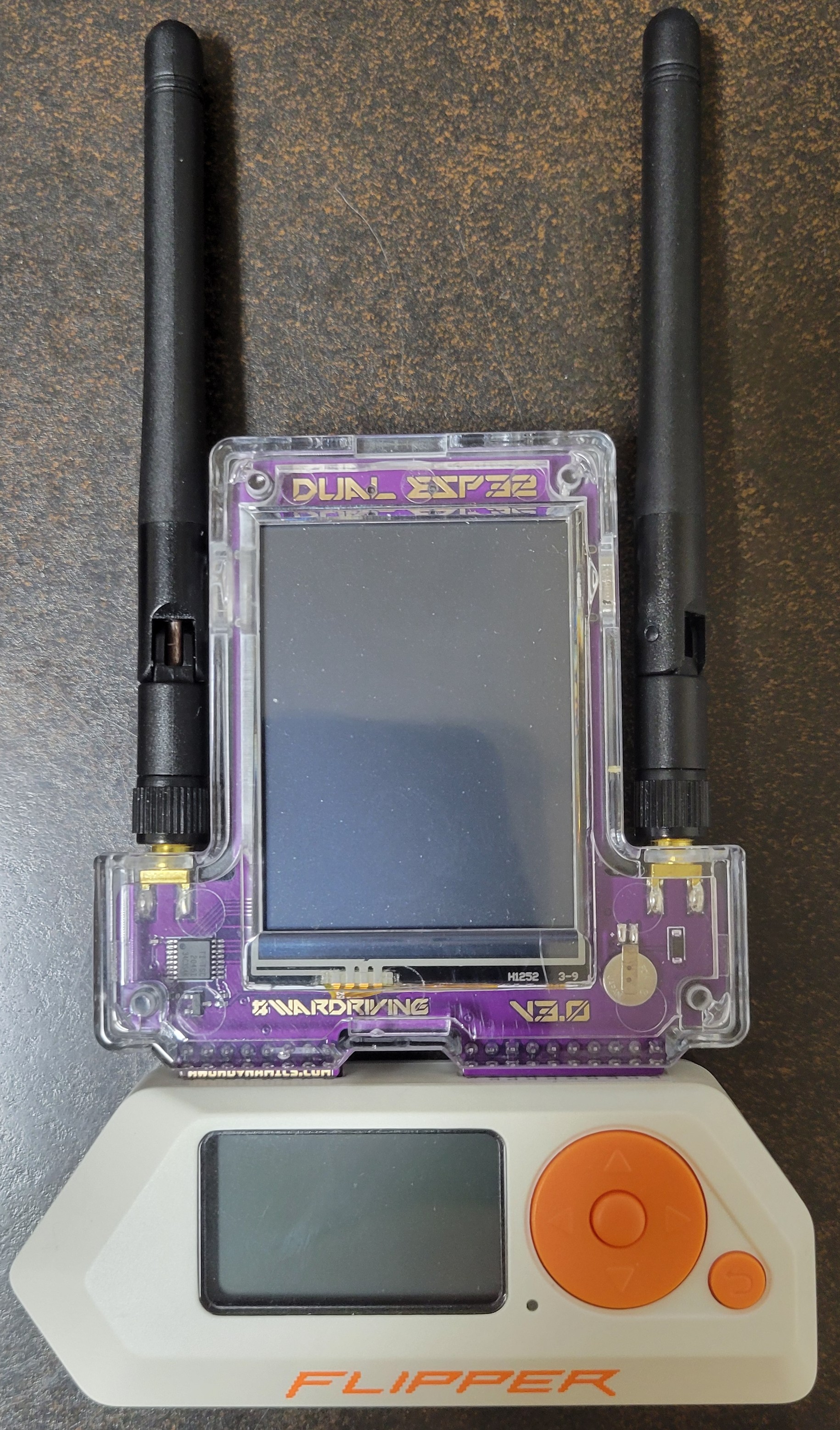
The AWOK Dual Touch V3 is a third-party Flipper Zero accessory. It mounts on the Flipper’s 18-pin GPIO header, but it can also run standalone powered from one of its two USB-C ports — that dual-mode operation is its defining trait. Two ESP32-WROOM modules and a resistive touchscreen turn it from “another GPIO board” into a self-contained handheld Wi-Fi auditor.
The board is a development platform, not a productized appliance: AWOK ships it with no firmware, and you pick what to install. The choice of firmware is what determines the personality of the board, and the choice matrix is non-obvious. This document’s center of gravity is therefore § 5 (“Firmware options — the comparison”), § 6 (“Install procedures”), and § 7 (“Operating the firmware”).
Convention reminder. This deep dive is module-scoped, not tool-scoped. The umbrella Flipper Zero deep-dive (Vols 1–12 in
03-outputs/html/) treats AWOK as one entry in a large catalog. This file does the opposite: it treats the AWOK as the centerpiece and treats the Flipper as one possible host.
1.2 Identity, lineage, and “what’s in the box”
Maker. AWOK Dynamics (US). “AWOK” is the founder’s handle, not an
acronym. Direct sales at awokdynamics.com. EU distribution via Lab401.
Reseller listings exist on Tindie (“Unlimited Coverage” / ucshop) and at
Virtus Fab.
Product family. AWOK Dynamics’ Flipper-add-on lineup currently includes the Dual Touch (V1 → V2 → V3 progression) and the Dual Mini (smaller, no touchscreen). This document is exclusively about the Dual Touch V3. V2 still sees community use but is mechanically and electrically different; binaries are not interchangeable (see § 3.5).
The “Dual Touch” name refers to the two distinguishing traits of this generation: (a) dual ESP32-WROOM modules on a single PCB, and (b) an on-board resistive touchscreen. It is not a reference to a specific touch-IC architecture. Earlier marketing copy and forum posts sometimes imply a high-end capacitive touch matrix — that is incorrect, see § 3.3.
In the box (stock V3).
- One Dual Touch V3 PCB with two ESP32-WROOMs, ILI9341-class TFT, internal GPS, antenna SMA jacks, and 18-pin Flipper-header pad
- Clear ABS slide-on case (transparent — light-pipes the status LEDs)
- Two 2.4 GHz external SMA Wi-Fi antennas (small dipole “rubber ducky” pattern — short, omnidirectional)
- USB-C cable (sometimes — varies by reseller and revision)
Not in the box. No external GPS antenna (board uses an internal ceramic patch — see § 3.4), no firmware (must be flashed — see § 6), no documentation beyond a card pointing at AWOK’s product/FAQ pages.
Buy-decision bottom line. The V3 sits in the $140–$180 price band depending on seller and stock state. The closest direct competitors are the Apex 5 (ESP32-C5, dual-band Wi-Fi 6, similar price) and the FlipMods Combo. AWOK V3’s distinguishing pitch over both is the on-board touchscreen (fully standalone operation) and the dual-ESP architecture (one for screen UI, one for the Flipper-side bridge — they can run independent firmwares). Apex 5 wins on radio modernity (5 GHz Wi-Fi 6). FlipMods Combo wins on price and triple-radio integration. AWOK V3 wins when you want a handheld Wi-Fi auditor that doesn’t need a Flipper to be useful.
1.3 Hardware reference
This section is a schematic-grade walk-through. The board has been around long enough that its identity is stable, but a couple of facts in circulation are wrong (see § 3.10), so I’m being explicit.
1.3.1 Block diagram (architectural)
         ┌───────────────────────────────────┐
         │          AWOK Dual Touch V3       │
         │                                   │
         │  ┌──────────────┐                 │
SMA ──┐  │  │ ESP32-WROOM  │  USB-C (white)  │
      ├──┼──┤  "Screen"    ├─────[ flash ]──►│
SMA ──┘  │  │  ILI9341 TFT │                 │
         │  │  XPT2046 TS  │                 │
         │  └────┬─────────┘                 │
         │       │ shared GPS UART (DIPs)    │
         │  ┌────┴─────────┐                 │
         │  │  GPS module  │ internal patch  │
         │  │  (u-blox-cls)│ antenna         │
         │  └────┬─────────┘                 │
         │       │                           │
         │  ┌────┴─────────┐  USB-C (orange) │
         │  │ ESP32-WROOM  ├─────[ flash ]──►│
         │  │  "Flipper"   │                 │
         │  │  UART bridge │                 │
         │  └────┬─────────┘                 │
         │       │                           │
         └───────┼───────────────────────────┘
                 │
        18-pin GPIO header (mates to Flipper Zero)
Two ESPs share only the GPS UART through a DIP-switch matrix (§ 3.4). They do not share SPI or I²C, and they do not talk to each other directly — they’re effectively two parallel Wi-Fi/BLE radios with one optional GPS feed each.
1.3.2 The two ESP32-WROOMs
Both chips are ESP32-WROOM-class modules. Each has its own:
- 4 MB internal flash (typical WROOM-32 SKU)
- USB-UART bridge (Silicon Labs CP210x or CH340C, varies by batch — driver matters for the host machine; see § 6.2)
- Boot-strap pins routed to the user-accessible BOOT/RESET buttons on the PCB. Pressing-and-holding BOOT while pressing RESET drops the chip into the ROM bootloader — that’s how you flash it.
The two chips are not interchangeable at the firmware level. Even though both are WROOMs, their bootstrap config and UART routing differ between the screen-side and the Flipper-side, and firmware images are specific to each port (see § 5 and § 6).
Documentation drift. Several older AWOK product pages and Tindie listings describe the Flipper-side ESP as an ESP32-S2-WROVER. That matched some V3 batches but not the current production. The reliable test is to read the silk on the metal can directly. If it says “ESP32-WROOM-32”, use the WROOM binaries; if it says “S2-WROVER”, you’ve got a transitional batch and must use the older binary names. Marauder’s V2 binary for that port (
..._flipper.bin) was retained partly to support those transitional boards.
1.3.3 The display and “touch”
- Display: 2.8” SPI TFT-LCD, ILI9341 controller, 320×240 RGB565, resistive touch overlay. Orientation rotated 90° so the long axis is vertical when the board is held like a phone.
- Touch IC: XPT2046 — a four-wire resistive ADC controller. Not capacitive. Earlier theories about TT21100 / GT911 / CY8CMBR3110 capacitive ICs are wrong.
- Implication: Touch is single-point, pressure-actuated, and the layer is exposed as a separate SPI peripheral on the screen-side ESP. It needs a stylus or fingernail tip pressure — not a flat pad. Marauder’s UI is designed around this and uses oversized touch zones; Ghost ESP and Bruce, where ported, are designed for capacitive touch and feel sluggish.
- Bezel-edge issue. The clear ABS case bezel can press the very edge of the resistive layer hard enough to register a constant “down” near a corner. Symptom: lists auto-scroll without input. Documented fix: shave ~0.3 mm off the inside of the case bezel where it contacts the screen border. AWOK acknowledges this in their FAQ.
1.3.4 GPS subsystem
- Receiver: u-blox-class GPS module (specific part number varies by batch; common candidates are NEO-6M and ATGM336H from clone u-blox). Outputs NMEA at 9600 baud over UART by default.
- Antenna: internal ceramic patch antenna on the PCB. No external GPS antenna in the box. The SMA jacks on the side are for Wi-Fi, not GPS. There is no factory-fitted u.FL GPS pigtail to bring out.
- DIP-switch GPS routing. A small DIP-switch block (typically 2-position)
on the back of the PCB controls which ESP receives GPS NMEA. Three useful
settings:
- GPS → Screen ESP only
- GPS → Flipper-side ESP only
- GPS → both ESPs in parallel (UART tee)
- Cold-fix performance. Cold fix in clear sky: 30–90 s typical. Cold fix indoors near a window: usually never (the patch antenna has poor out-of-window sensitivity and no LNA). Plan an external active antenna mod if you intend serious wardriving — § 10.
1.3.5 V2 vs V3 hardware diff
The V3 introduced two non-trivial board changes:
- Flipper-side ESP boot/UART routing changed to match the
“Marauder Dev Board Pro” reference design. This is why Marauder ships a
distinct binary for the V3 flipper port (
..._marauder_dev_board_pro.bin) versus the V2 flipper port (..._flipper.bin). Crossing them will brick nothing but will refuse to boot or will boot with broken Flipper UART. - Touchscreen mounting / bezel changed to address the V2’s touch-glitch issue. V3 reduces but does not eliminate it.
The screen-side binary (..._v6_1.bin) is the same on V2 and V3 because the
screen-side hardware is unchanged. Always think of “V2 vs V3” as a
Flipper-side-only distinction.
1.3.6 RF: antennas and front-ends
- Two 2.4 GHz Wi-Fi antennas via SMA jacks on the side. Each ESP has its own antenna path — one chain to the screen ESP, one to the Flipper-side ESP. They are not combined or diversity-switched. Each ESP’s onboard radio uses one antenna.
- No 5 GHz support. Both ESP32-WROOMs are 2.4 GHz only — by silicon, not by firmware. If you need 5 GHz Wi-Fi auditing, you want the Apex 5 (ESP32-C5) instead.
- No NRF24, no CC1101, no LoRa. Despite some confused listings, the Dual Touch V3 is Wi-Fi/BLE only, plus GPS. The “Dual” in the name is about the two ESPs, not about dual-band radio.
1.3.7 Power
- USB-C inputs: two — one per ESP. Either or both can power the board.
- Flipper 3V3 rail: the board can be powered from the Flipper’s 3V3 GPIO pin alone, but AWOK’s own FAQ recommends external USB-C for any serious work because two ESPs running Wi-Fi peaks well above the community-rated ~150 mA continuous limit on the Flipper rail.
- GPS + screen + dual ESP at full pelt is 150–400 mA average with transient peaks well over 500 mA during Wi-Fi TX bursts. Plan to power via USB-C (or via the official battery backpack, see § 8).
- AWOK Dynamics’ “Dual Board Battery Backpack” ($37) is the vendor’s answer for true handheld standalone operation — BYO 3.7 V 1S LiPo cell in a screw-on case with integrated over-charge / over-discharge protection. Full discussion in § 8.
- 3D-printed community shells with sandwiched LiPo + boost converter exist on Printables / Thingiverse and predate the official backpack; they remain a valid DIY route.
⚠ Power-input topology hazard — unverified. AWOK Dynamics publishes no schematic for the V3, and no public teardown documents how the three power sources (USB-C #1, USB-C #2, Flipper 3V3 via GPIO header, and now the battery backpack’s JST-PH2.0 input) are combined on the PCB. Diode-ORing, power-input selection switching, and protection against back-feeding into the Flipper’s 3V3 rail are all unconfirmed. Until the topology is verified — by asking AWOK Discord, scoping the 3V3 rail under each source independently, or reverse-engineering the PCB — do not connect more than one power source at a time. See § 8.4 for recommended verification procedure and a draft question to send AWOK support before mixing sources.
1.3.8 Storage
- microSD slot — yes, on V3. Push-push holder at the top-center of the rear PCB, between the two USB-C ports. The slot is documented in AWOK’s FAQ but is not called out on the product-page bullet list (which is where the persistent “AWOK has no SD” community confusion comes from). The vendor specifies: ≤ 32 GB capacity, FAT32 format (not exFAT), SanDisk recommended, not hot-swappable — power-cycle the board after inserting or removing a card. AWOK also sells pre-formatted 16/32/64 GB AWOK-branded cards (the 64 GB option exists in the store despite the 32 GB limit — assume those are partitioned or relabeled).
- What gets written there: PCAPs (sniffer / deauth / beacon / probe /
EAPOL captures), WiGLE-format wardrive CSV (
wardrive_*.csv), Evil Portal HTML assets, operator-supplied wordlists, raw log files. The SD is also the canonical exfil path off-device for downstream analysis (Wireshark, hashcat, wigle.net upload). - Marauder SD support landed in v1.8.4 (2025-08-06) and is current through v1.12.1. The “Marauder V6 / AWOK Dual Touch and Mini do not have SD card support” line that appears in earlier release notes was a pre-v1.8.4 limitation that has since been resolved — that line is the source of most documentation drift on this topic.
- Ghost ESP SD support is missing on AWOK boards. This is a firmware- side gap, not a hardware gap — the Spooks4576 Ghost_ESP “Board-Specific Guide” wiki page states “Marauder V6 and AWOK variants: No SD card support.” See § 5.2 for what this means operationally.
- Bruce SD support — Bruce has generic SD support but no AWOK-V3-specific build verified to write to it. Treat as unconfirmed until tested.
1.3.9 GPIO header (Flipper-facing)
The 18-pin header presents the standard Flipper GPIO footprint and primarily carries:
- 3V3 power and ground (passes through to the board so the Flipper can power it if you really want)
- UART TX/RX between the Flipper’s GPIO 13/14 and the Flipper-side ESP (this is the “bridge” path the Marauder companion FAP uses)
- A small set of additional GPIOs for control signaling that varies by firmware
The screen-side ESP does not connect to the Flipper header. It is only flashable and operable via its own white-USB-C port.
1.3.10 Common misconceptions to clear up
Table 1 — 3.10 Common misconceptions to clear up
| Myth | Reality |
|---|---|
| ”Capacitive multitouch screen” | Resistive single-point ILI9341 + XPT2046 |
| ”Has 5 GHz Wi-Fi” | 2.4 GHz only — both ESP32s are WROOM-32 class |
| ”Has external GPS antenna” | Internal ceramic patch only; SMAs are Wi-Fi |
| ”Has no microSD slot” | False — push-push holder at top-center between the USB-Cs; documented in AWOK FAQ; ≤ 32 GB FAT32; Marauder writes to it from v1.8.4 onward |
| ”Can sniff NRF24” | No — no NRF24 silicon on the board |
| ”V2 and V3 binaries interchangeable” | Screen-side: yes. Flipper-side: no. |
| ”AWOK = acronym” | No — the founder’s handle |
1.4 What it can do (capability matrix)
Capabilities are mostly determined by firmware (§ 5). The table below captures the board-level ceiling — what the silicon allows, regardless of firmware. A given firmware exposes a subset.
Table 2 — 4. What it can do (capability matrix)
| Capability | Possible on AWOK V3? | Notes |
|---|---|---|
| 2.4 GHz Wi-Fi scanning (probe / beacon / SSID) | Yes | Both ESPs |
| 2.4 GHz Wi-Fi deauth | Yes, in firmware that allows it | Legal: see § 11 |
| Evil Portal / captive-portal phishing | Yes | Marauder + Ghost ESP both ship it |
| BLE scanning + advertising | Yes | Including BLE spam in some firmwares |
| 5 GHz Wi-Fi | No | Hardware doesn’t have it |
| Sub-GHz (433/868/915 MHz) | No | No CC1101 onboard |
| NRF24 / 2.4 GHz mousejacking | No | No NRF24 onboard |
| GPS NMEA logging / wardriving | Yes | Internal antenna; expect outdoor only |
| WiGLE-format export | Yes with Marauder ≥ v1.8.4 | Writes wardrive_*.csv to onboard SD (≤ 32 GB FAT32); upload to wigle.net |
| PCAP capture | Yes — to SD | Onboard microSD with Marauder; Ghost ESP/Bruce currently flash-only on AWOK |
| Standalone (no Flipper) operation | Yes | Touchscreen + USB-C power |
| Flipper-bridged operation (Marauder companion FAP) | Yes | Orange-USB ESP runs the bridge firmware |
| Both at once (screen UI + Flipper UI) | Yes | Each ESP runs its own firmware |
| Two-ESP cooperation (e.g. coordinated attack) | Limited | They share only GPS UART |
1.5 Firmware options — the comparison
This is the core decision for a freshly-acquired V3. The board has no factory-installed firmware, and three firmware projects are realistic candidates as of mid-2026: ESP32 Marauder, Ghost ESP, and Bruce. A fourth path — building your own from Espressif’s IDF — is a serious-effort DIY route reserved for § 5.5.
1.5.1 ESP32 Marauder (justcallmekoko / upstream)
TL;DR. The default. The reference firmware. The one AWOK Dynamics assumes you’re running. Pick this one if you don’t know what you want.
Repo: github.com/justcallmekoko/ESP32Marauder
Project shape. Active since 2020. Single primary maintainer
(justcallmekoko). Has a sizable issues backlog but releases ship regularly.
Distribution: pre-built .bin files in GitHub Releases plus a project wiki
of hand-written install steps. No package manager — you flash binaries.
Current version (mid-2026): v1.12.1 (released 2026-05-05). Notable recent cutoffs that matter for AWOK V3 specifically:
- v1.8.4 (2025-08-06) — first release with microSD support on
AWOK Dual Touch V3 and Dual Mini. Resolves the long-standing “no SD”
community claim. PCAPs and
wardrive_*.csvnow write to the onboard SD if a card is present andSavePCAPis enabled in settings. - v1.12.0 — Fox Hunt (formerly Signal Monitor) became channel-hopping; AP-only scan was removed in favor of unified AP+Station scan; wardrive channel weighting rebalanced.
- v1.12.1 —
Apple JuiceBLE-spam CLI command added; Flock Sniff (LPR-camera detection) gained channel-hop + OUI filter.
1.5.1.1 AWOK V3 binary mapping
This is the most important practical detail in this entire document — get
it wrong and your board appears bricked even though it’s just refusing to
boot a wrong-target image. The two ESPs are NOT pin-compatible across
hardware revisions (V2 was an S2-WROVER, V3 is plain WROOM-32) — flashing
a V2-era _flipper.bin to the V3 orange-port ESP bricks it and requires
ROM-bootloader recovery to undo.
Table 3 — 5.1.1 AWOK V3 binary mapping
| Port | What it is | Marauder binary (v1.12.1 names) |
|---|---|---|
| White USB | Screen-side ESP-WROOM-32, drives the 2.4” touchscreen + GPS | esp32_marauder_v1_12_1_v6_1.bin |
| Orange USB | Flipper-side ESP-WROOM-32, UART-bridges to Flipper GPIO header | esp32_marauder_v1_12_1_marauder_dev_board_pro.bin |
The _v6_1 suffix refers to Marauder display-chain version 6.1
(TFT_eSPI + XPT2046 stack). The _marauder_dev_board_pro suffix names
the reference UART/headless platform whose boot routing the V3’s
Flipper-side ESP mirrors.
The two ESPs on the V3 do not communicate with each other. They share power and the GPS antenna (DIP-switch-selectable per ESP) and nothing else. Treat them as two independent radios sharing a PCB.
1.5.1.2 Touchscreen UI navigation (screen-side ESP)
Marauder uses a three-zone touch scheme designed for resistive panels — no swipes, no multi-touch, no virtual keyboard:
- Top third of screen — scroll up in a list / increase a numeric setting
- Bottom third of screen — scroll down / decrease
- Center — select / confirm / enter submenu
- Tap anywhere on screen during an active scan or attack — stop
(replaces the CLI’s
stopscancommand)
Resistive touch wants a stylus, fingernail, or pen-cap — a flat fingerpad won’t trigger reliably. The on-bench experience is roughly “thumbstick navigation on an old Game Boy”; functional, not slick.
Main-menu tree:
- WiFi → Sniffers / Attacks / General
- Bluetooth → Sniffers / Attacks
- GPS → GPS Data / Wardrive / Bluetooth Wardrive
- Settings → SavePCAP / SaveLog / TX power / Channel pin / Web Server / etc.
- Device Info — firmware version, free heap, free flash, free SD
- Update Firmware — OTA via Web Server (not the same as the Web-Serial-flash path used for first install)
1.5.1.3 Feature catalogue (relevant to AWOK V3, v1.12.1)
Wi-Fi Sniffers
- AP Scan — list visible APs with channel, RSSI, encryption, bssid; tap to add to target list for later attacks
- Station Scan — list clients per AP from probe/beacon traffic
- Probe Request Sniff — passive, logs
(client MAC, requested SSID)pairs to SD with timestamps - Beacon Sniff — log AP advertisements
- Channel Analyzer — bar-graph of 2.4 GHz channel utilization; useful pre-attack
- Deauth Sniff — passive deauth-frame detector (defensive: detects hostile deauth in your environment)
- EAPOL / PMKID Scan — capture WPA2/3 handshake material to PCAP; combine with a Targeted Deauth in a second session to force a re-assoc
- Pwnagotchi Detector — passive detection of Pwnagotchi devices in the area
- Pineapple Detector — Wi-Fi Pineapple beacon-fingerprint check
- Fox Hunt — RSSI tracker for a target MAC, channel-hopping (v1.12.0+); useful for direction-finding rogue APs
- SAE Commit Monitor — WPA3-SAE handshake observer (research / attack-prep)
- Flock Sniff — Flock LPR-camera detection (v1.12.1 added channel- hop + OUI filter)
- Wardrive — combined Wi-Fi sniff + GPS log → WiGLE-format CSV on SD
- Bluetooth Wardrive — same but for BLE devices
Wi-Fi Attacks (use only on owned networks or with written authorization — see § 11)
- Deauth Flood — broadcast deauth against all APs on the current channel
- Deauth Targeted — deauth a specific AP (and optionally a specific client) from the target list
- Beacon Spam — broadcast SSID list (operator-supplied or random)
- Probe Flood — generate probe-request floods
- AP Clone (Karma) — Karma-style probe-response attack: respond to any probe for any SSID, attracting clients
- Evil Portal — captive-portal phishing. The portal HTML is loaded from the SD card at runtime (Settings → Select EP HTML File). Captured credentials write to serial output, the on-screen log, and a log file on SD. Drop new portals onto the SD without reflashing.
- Rick Roll Beacon — broadcast SSIDs that spell Rickroll lyrics
- Sleep-Deprivation — variant designed to interrupt power-save mode client behavior
- SAE Commit Flood — WPA3 SAE-commit flood
Bluetooth (BLE)
- BT Sniff — passive BLE-advertisement logger
- Flipper Detect — detect nearby Flipper Zeros from BLE advertising
- AirTag Sniff — log AirTag advertising packets
- AirTag Spoof — replay captured AirTag advertising bytes
- Skimmer Detect — detect credit-card skimmer BLE signatures
BLE-spam variants (Bluetooth → Attacks): each targets a different device-side pairing dialog:
Table 4 — device-side pairing dialog
| Variant | Target devices | Effect |
|---|---|---|
| Sour Apple | iOS up through iOS 17 | Crash; iOS 18+ shows pair-prompt only, no crash |
| Swift Pair | Windows 10/11 with Swift Pair pairing | Pair-prompt spam |
| Samsung BLE Spam | Samsung Galaxy / Buds | Pair-prompt spam (Galaxy ecosystem) |
| Google FastPair | Android with FastPair enabled | Pair-prompt spam (Pixel / Pixel Buds / etc.) |
| Apple Juice | iOS misc. (v1.12.1 CLI command) | Newer iOS pair-prompt variant |
| Flipper-Zero spam | Other Flippers in BLE range | BLE-pairing prompt spam targeting Flipper devices |
| BT Spam All | Aggregate | Cycles through all the above variants in turn |
These are denial-of-service-class attacks. Range is ~10–30 m. Don’t run in public.
GPS
- GPS Data — live NMEA display (satellites, lat/lon, altitude, fix-quality). Cold-start indoors will linger on “No Fix” — this is normal for the internal patch antenna (§ 3.4).
- Wardrive and Bluetooth Wardrive — see Wi-Fi Sniffers above. Wardrive will not write a row without a GPS fix. Verify lock before walking your route.
1.5.1.4 End-to-end command recipes
Deauth a specific AP (owned-network test):
WiFi → Sniffers → AP Scan. Wait 10–30 s.- Tap the target AP — it joins the target list.
WiFi → Attacks → Deauth Targeted. Pick the entry from the list.- Tap screen to stop.
Capture a WPA2 EAPOL handshake (owned-network test):
- Settings → SavePCAP = ON, verify SD card is present in Device Info.
- AP Scan → tap target → adds to target list.
WiFi → Sniffers → EAPOL/PMKID Scan. Leave running.- Open a second session in parallel:
WiFi → Attacks → Deauth Targetedon the same target. This forces the client to re-associate, producing a 4-way handshake. - After capture confirmation flashes on-screen, stop both sessions.
- PCAP is on SD as
pcap_<timestamp>.pcap. Pull via Web Server or physical SD removal (power off first — V3 SD is not hot-swap).
Wardrive a route:
- Settings → SavePCAP and SaveLog as desired. Settings → confirm GPS is routed to the screen ESP (DIP switches, § 7.5).
GPS → GPS Data. Wait for fix. Lat/lon must show real numbers, not “0.000”.GPS → Wardrive(or Bluetooth Wardrive for BLE-only).- Walk / drive your route. Card writes
wardrive_<timestamp>.csvcontinuously. - Stop with screen tap. Card filename rotates per session.
- Upload at wigle.net/upload. Counts toward your wigle.net stats.
BLE-spam target selection:
Bluetooth → Attacks. Pick a variant from the list (Sour Apple, Swift Pair, Samsung BLE Spam, Google FastPair, Apple Juice, Flipper Spam, or BT Spam All).- Tap to start. Tap to stop.
- CLI equivalent (via Web Server CLI or Flipper FAP):
blespam -t apple|samsung|swiftpair|all.
Evil Portal (red-team / training scenario only):
- Prepare your portal HTML on the SD card under
/portals/. Use the examples in Marauder’s repo as a template. - Settings → Select EP HTML File → pick your portal.
WiFi → Attacks → Evil Portal. Configure the SSID the AP will broadcast.- Tap to start. Client connections show on-screen and write to log.
1.5.1.5 WiGLE CSV format
Wardrive output is standard WiGLE format, suitable for direct upload at wigle.net:
MAC,SSID,AuthMode,FirstSeen,Channel,Frequency,RSSI,
CurrentLatitude,CurrentLongitude,AltitudeMeters,
AccuracyMeters,Type
Bluetooth Wardrive produces the same schema with Type = BLE and the
MAC field holding the BLE advertising address. WiGLE accepts both in
the same upload.
1.5.1.6 Companion FAP (orange-port ESP, Flipper-side)
The orange-port ESP, once running _marauder_dev_board_pro.bin, expects
the Marauder companion FAP on the Flipper. Canonical source:
0xchocolate/flipperzero-wifi-marauder. The FAP is bundled with
Momentum (mntm-012+), Unleashed, RogueMaster, and Xtreme — the
AWOKflip unit gets it for free from its Momentum app set.
What it does:
- Bridges the Flipper’s GPIO UART (pins 13/14) to the orange-port ESP’s
CLI. The Flipper screen becomes a scrollable Marauder UI mirroring the
ESP’s CLI:
scanap,attack -t deauth,sniffraw,evilportal,wardrive, etc. - PCAPs from the orange-port ESP save to the Flipper’s SD card under
apps_data/marauder/. This is the second storage path: the orange ESP can either go to its own (currently uninstrumented) flash, or hand data to the Flipper over UART for the Flipper to write to its much larger SD. The white-port screen ESP runs independently of the FAP — you can operate the touchscreen AND the FAP simultaneously, two parallel radios with two parallel log streams.
1.5.1.7 Settings and quirks
- Settings → SavePCAP — must be ON for sniffers to write to SD on the screen ESP. OFF by default in some builds. If “SD initializing but nothing being saved” — this is the toggle.
- Settings → Channel pin — lock a single channel instead of channel- hopping. Useful for EAPOL capture against a known target.
- Settings → TX Power — calibrate against legal limits in your jurisdiction. Default is high.
- Settings → Web Server — turn on the SoftAP for OTA firmware update
and file browsing; default SSID is
ESP32 Marauderwith a published password. - Random list-scroll without touch input — bezel pressing the resistive screen edge. Trim the case bezel (§ 10.1).
- Cross-flash bricks — V2
_flipper.binon V3 orange port → ROM- recovery required. - No GPS fix indoors — internal patch antenna, no LNA. External active antenna mod (§ 10.2) for serious wardriving, or feed an external NMEA stream.
Strengths.
- Most thoroughly tested on AWOK V3 of any firmware. AWOK’s own FAQ defaults to assuming Marauder.
- Largest ecosystem — most YouTube tutorials, most forum threads, most community PRs are written against Marauder.
- Touchscreen UI is purpose-built for resistive screens (three-zone scheme).
- Best Flipper-side integration via the companion FAP — including SD storage via the Flipper.
- Onboard SD support for PCAPs, wardrive CSV, Evil Portal HTML, and logs (Marauder ≥ v1.8.4).
- Active feature development; release cadence ~6 weeks.
Weaknesses.
- UI is functional but dated — green-on-black serial-terminal aesthetic. Newer firmwares (Ghost ESP, Bruce) feel more modern.
- Some BLE-spam variants land in Ghost ESP first.
- Evil Portal HTML is runtime-loadable from SD (good), but the bundled portal set is small; expect to write your own for serious use.
- No native NRF24 / sub-GHz / 5 GHz — those are board limitations, not Marauder’s fault.
Recommended as a starting point for almost everyone.
1.5.2 Ghost ESP (Spooks4576)
TL;DR. The “modern alternative.” More aggressive feature set, nicer UI, but no SD support on AWOK V3 as a firmware-side gap — Ghost ESP simply hasn’t ported its SD layer to AWOK / Marauder-V6 boards. The hardware slot is there (§ 3.8); other firmwares (Marauder ≥ v1.8.4) write to it; Ghost ESP doesn’t yet.
Repo: github.com/Spooks4576/Ghost_ESP
Site: ghostesp.net
Tagline: “ESP32 Wireless Security Testing Platform”
Project shape. Newer than Marauder, more active commit pace, larger maintainer team. Releases on GitHub plus a Web Flasher hosted on the project site. Has a Flipper Zero companion FAP (Ghost ESP FAP) that gives parity-ish UI between phone-controlled and Flipper-controlled modes.
Feature surface (relevant to AWOK V3):
- Wi-Fi: Beacon / deauth / Evil Portal (with runtime-loadable HTML), DNS spoof, packet flooding
- BLE: scan, spam (Sour Apple, Samsung, Microsoft), Skimmer detection
- IR: receive/replay (only on boards with IR — AWOK V3 has none)
- NFC: only on boards with NFC silicon — not AWOK
- GPS wardriving with WiGLE export — but no SD writes on AWOK class yet (firmware-side gap, see TL;DR; logs land in internal flash only, exfil via Web UI)
- Web UI for browser-based control over Wi-Fi
- “Cast Random Video” / Chromecast disruption / Printer Power FAP novelty features
AWOK V3 specific status. From the project’s own Board-Specific Guide wiki page: “Marauder V6 and AWOK variants: No SD card support.” This is a firmware-side limitation, not the hardware constraint earlier documentation implied — the SD slot is physically present and Marauder v1.8.4+ writes to it without trouble. Ghost ESP just hasn’t ported its SD I/O layer to the AWOK / Marauder-V6 board family. Logs on Ghost ESP + AWOK go to internal flash partition (small) and exfil over the Web UI. If you need persistent on-board capture storage, run Marauder on the screen ESP and reserve Ghost ESP for live-attack work where exfil-by-Wi-Fi is acceptable.
The screen-ESP UI on AWOK is functional but designed for capacitive touchscreens like the M5Stack Cardputer — on AWOK’s resistive panel some buttons are awkward to hit reliably.
Strengths.
- Best-in-class BLE-spam variants (more device targets than Marauder).
- Captive-portal HTML is runtime-loadable — you can swap portals from USB without reflashing.
- Active feature development; major releases every few months.
- Better Flipper-side companion FAP UI than Marauder’s.
Weaknesses.
- No SD writes on AWOK V3 — firmware-side gap; Ghost ESP wiki documents the limitation as “no plans” for AWOK / Marauder-V6 boards. Card is physically present and works under other firmwares, but Ghost ESP can’t use it. Logs are flash-only, exfil via Web UI.
- Touchscreen UI ergonomics worse than Marauder on resistive screens.
- “Move-fast-and-break-things” pace: occasional regressions, releases sometimes need a follow-up patch.
- Some features (Cast Random Video, Printer Power) are gimmicky and add UI surface area without genuine red-team value.
Recommended for: users who want runtime-loadable Evil Portal HTML, modern BLE spam, or who already use Ghost ESP elsewhere. Realistic to dual-flash — Marauder on one ESP, Ghost ESP on the other — to get parallel access to both feature sets.
1.5.3 Bruce (BruceDevices / pr3y)
TL;DR. ESP32 multi-tool firmware originally for the M5Stack Cardputer and CYD (“Cheap Yellow Display”) class. Officially-supported-device list does not currently include AWOK V3. Community ports exist but are unofficial.
Repo: github.com/BruceDevices/firmware
Site: bruce.computer
Project shape. Heavy active development. Architectured as a multi-board firmware with configuration flags per board. Excellent UX on the boards it officially supports.
Feature surface (full Bruce — varies by board):
- Wi-Fi attacks (subset of Marauder’s, plus Beacon Spam variants)
- BLE attacks (similar surface to Ghost ESP)
- IR / NFC / Sub-GHz on boards with the silicon (Cardputer, T-Embed CC1101)
- File-manager UI, SD-card-aware
- USB HID injection on USB-OTG-capable boards
- GPS wardriving where hardware supports
AWOK V3 specific status. Bruce’s official Supported Devices list covers M5Stack family (Cardputer, StickC, etc.), LilyGo T-Watch / T-Deck / T-Embed, the CYD (“Cheap Yellow Display”) and the Marauder Mini. AWOK Dual Touch V3 is not in the supported-devices matrix as of this writing. Community ports may exist (search “bruce awok” on GitHub forks) but should be treated as experimental: pin maps and bootstrap config must be matched manually against AWOK’s two-ESP architecture, and there’s no official build for the Flipper-side ESP.
Strengths.
- Cleanest UI in the ESP32-multi-tool space.
- Excellent on capacitive-touch boards.
- Single binary covers all features (no Marauder-style “do I want the v6_1 binary or the dev_board_pro binary?” dance).
Weaknesses for AWOK V3 specifically.
- Officially unsupported on AWOK V3 — installation requires either a community fork or a custom build with hand-edited pin configs.
- Resistive-touch ergonomics not great.
- No Flipper-side companion FAP; the Flipper-side ESP would be left running Marauder or Ghost ESP regardless.
Recommended for: Skip on AWOK V3 unless you have a specific reason. If you love Bruce’s UI, the Cardputer is a much better host platform — that device is in your Hack Tools roadmap anyway.
1.5.4 Less-relevant alternatives (mentioned for completeness)
Table 5 — 5.4 Less-relevant alternatives (mentioned for completeness)
| Firmware | AWOK V3 status | Notes |
|---|---|---|
| Marauder (kashmir54 / VoyagerRF) | Compatible — fork of Marauder with extra Flipper integrations | Web flasher at kashmir54.github.io/voyagerrf/ |
| FlipperHTTP (jblanked) | Compatible on Flipper-side ESP only | Replaces Marauder companion entirely; turns the ESP into an HTTP/JSON bridge for FAPs that need internet. Not what you want for wardriving — they’re alternative roles. |
| Black Magic Probe (flipperdevices/blackmagic-esp32-s2) | Officially S2-only | Won’t run on V3’s WROOM-32 Flipper-side ESP. |
| Custom IDF builds | Possible | Pin map and partition table must be hand-authored. Useful only if you have a specific feature gap and time to build. § 5.5. |
1.5.5 Custom builds (DIY route)
Both ESPs run plain ESP-IDF underneath. You can clone the ESP32 Arduino
core, point your platformio.ini at the AWOK pin map, and build any
ESP-Arduino sketch you want. The reference pin maps live in:
justcallmekoko/ESP32Marauder/configs/marauder_dev_board_pro.h(orange)justcallmekoko/ESP32Marauder/configs/marauder_v6_1.h(white)
Realistic custom-build projects:
- Bare-bones probe-request logger with 16 MB external flash module wired to the screen ESP’s free SPI (a true storage upgrade, but a hardware mod — not for V3 stock).
- NMEA-only GPS-passthrough firmware on the screen ESP that turns the AWOK into a USB-C GPS dongle for a laptop. Niche.
- Wi-Fi-tagged BLE beacons using ESP-NOW for cross-device coordination between the two ESPs (would require routing a hardware UART between them, currently absent).
For a first install, don’t go custom — start with Marauder and get fluent.
1.5.6 Decision matrix
Table 6 — 5.6 Decision matrix
| You want | Pick |
|---|---|
| The default, just works, biggest ecosystem | Marauder on both ESPs |
| Runtime-loadable Evil Portal HTML | Ghost ESP on the screen ESP |
| Best of both | Marauder on the Flipper-side ESP + Ghost ESP on the screen ESP |
| To use Bruce’s UI | Skip — wrong board for Bruce; use a Cardputer |
| Flipper-side HTTP/JSON bridge for custom FAPs | FlipperHTTP on Flipper-side ESP, Marauder on screen |
| Wardriving with WiGLE export | Marauder + GPS routed to whichever ESP captures |
| To break things on purpose | Build IDF from source — § 5.5 |
Recommended starting config. Flash Marauder on both ESPs. Run for a week. Decide if you want to swap the screen ESP to Ghost ESP for the runtime-loadable portal feature.
1.6 Install procedures
This section is the operational sequence for each firmware option, in the order you’d actually do it.
1.6.1 What you need before you start
- A laptop with a real USB-C port (or USB-A + dongle).
- Chrome or Edge (for Web Serial flashing — Firefox does not support Web Serial).
- A USB-C data cable that’s not power-only. Test cables vary; power-only USB-C cables are sadly common and present as “device not enumerating” symptoms.
- The Silicon Labs CP210x driver if Windows doesn’t auto-install it.
macOS and modern Linux work out of the box. Some AWOK batches ship with
CH340C bridges instead — drivers from
wch.cnthen. - The AWOK powered only via the port you intend to flash. Some users report that having both USB-Cs plugged into different host machines simultaneously confuses the bus enumeration.
- A stylus or pen tip for the touchscreen post-flash sanity check.
1.6.2 Flash both ESPs with Marauder via FZEE Flasher (recommended)
FZEE Flasher (fzeeflasher.com) is a browser-based Web Serial flasher
that handles board selection, binary download, and flashing in one flow.
It’s the simplest path and what AWOK Dynamics’ own FAQ now points users at.
Flash the screen ESP (white USB):
- Plug the AWOK into your laptop via the white USB-C port only.
- Open Chrome →
https://fzeeflasher.com/. - Click Connect. In the Web Serial dialog, pick the new COM/tty port
that just appeared (e.g.
COM7on Windows,/dev/cu.SLAB_USBtoUARTon macOS). If multiple ports appear, you can wiggle the cable to identify which one disappears/reappears. - Under Select Board, choose AWOK Dual Touch V3 — Screen (white port). (Wording varies by FZEE update; the key is “Screen / V6_1”.)
- Under Firmware, choose Marauder, latest version.
- Click PROGRAM. Wait. The flash takes 60–120 s.
- When you see “FLASHING PROCESS COMPLETED!”, press the RESET button on the AWOK (or unplug-replug). The touchscreen should boot into the green-on-black Marauder home screen.
Flash the Flipper-side ESP (orange USB):
- Unplug the white cable. Plug into the orange USB-C port instead.
- Repeat steps 2–4, but pick AWOK Dual Touch V3 — Flipper (orange
port) for the board (the suffix is
_marauder_dev_board_pro). - Pick Marauder, latest version, PROGRAM, wait, RESET.
- Mount the AWOK on a Flipper Zero. On the Flipper, run the WiFi Marauder companion FAP. The FAP should display the Marauder version banner from the orange-side ESP within a few seconds. If it shows “No response from ESP”, check cable orientation, that the ESP is powered (LED behavior on the orange side), and that the FAP is a recent build (Momentum mntm-012 ships a fine one).
1.6.3 Flash via Marauder’s own web flasher (alternative)
justcallmekoko.github.io/ESP32Marauder/flasher.html (search the wiki for
the current URL) is the upstream-blessed equivalent of FZEE Flasher. Same
steps, slightly less polished UI. Use this if FZEE is down or if you need
a Marauder-specific build that FZEE hasn’t picked up yet.
1.6.4 Flash via FZEasyMarauderFlash (Python CLI)
github.com/SkeletonMan03/FZEasyMarauderFlash — a Python script wrapping
esptool.py. Useful if you’re on Linux without a Web-Serial-capable
browser, or if you want to script repeated flashes for fleet work.
git clone https://github.com/SkeletonMan03/FZEasyMarauderFlash
cd FZEasyMarauderFlash
python3 -m pip install --user esptool
python3 EasyInstall.py
The script is interactive: it prompts for board, port, and firmware. Pick the V3-screen or V3-flipper option in the menu.
1.6.5 Flash Ghost ESP via the Ghost ESP Web Flasher
The Ghost ESP project hosts a Web Flasher on ghostesp.net. Procedure
mirrors § 6.2 — the AWOK V3 screen is recognized as a target; the
Flipper-side AWOK is handled via the project’s “Marauder Devboard Pro”
preset (since the boot/UART routing matches). Do this in addition to,
not instead of, having a Marauder build at hand — it’s easier to revert
to Marauder if Ghost ESP misbehaves than the other way around.
1.6.6 Flash via raw esptool.py (the always-works fallback)
When everything else fails:
# Find the right binary on github.com/justcallmekoko/ESP32Marauder/releases
# Screen ESP (white):
esptool.py --chip esp32 --port /dev/ttyUSB0 --baud 921600 \
    write_flash 0x1000 esp32_marauder_v0.13.0_v6_1.bin

# Flipper-side ESP (orange):
esptool.py --chip esp32 --port /dev/ttyUSB0 --baud 921600 \
    write_flash 0x1000 esp32_marauder_v0.13.0_marauder_dev_board_pro.bin
Adjust the version string and the offset for your binary’s release notes
(some Marauder releases include a separate bootloader + partition image
and require multi-offset flashing — read the release notes in those
cases). The 0x1000 offset works for most monolithic releases. Use this
path if you’re already comfortable with esptool.py from prior ESP work
(this is the path with the smallest amount of “magic” for users already comfortable with ESP tooling).
1.6.7 Recovery if you brick
The ESP32 ROM bootloader is un-brickable from software alone — the mask-ROM bootloader is in silicon. To recover from a bad flash:
- Hold BOOT on the affected ESP’s button block.
- While holding BOOT, press RESET briefly and release.
- Release BOOT.
- The ESP is now in ROM bootloader mode. Re-run the flasher.
If the buttons themselves are flaky (a known V3 quirk on some batches), you can short the BOOT pin to GND with a tweezer tip while pressing RESET — same effect. Read the silk on the back of the PCB to find the pad.
If esptool.py reports “Failed to connect to ESP32: Timed out waiting for
packet header”, the chip is not in bootloader mode — repeat the sequence
above, slowly. ESP32 is forgiving; you cannot brick the bootloader itself.
1.6.8 Verifying a successful install
Screen ESP, post-flash:
- Touchscreen lights up within ~2 s of power-on.
- Marauder logo or main menu appears.
- Tapping any menu item produces a response (resistive touch — press firmly).
- Going to GPS Data menu shows NMEA arriving when DIP switches route GPS to this ESP.
Flipper-side ESP, post-flash:
- LEDs on the orange-side block blink at boot.
- Mounting on the Flipper and opening the Marauder companion FAP shows the Marauder version banner.
- A scan command from the FAP returns Wi-Fi networks.
Both together:
- Both ESPs scanning at the same time will produce two parallel result lists. There is no inter-ESP coordination — each is its own scanner.
1.7 Operating the firmware (day-to-day workflows)
This section assumes Marauder on both ESPs (the recommended starting config from § 5.6). Workflows for Ghost ESP are similar in shape.
1.7.1 Screen-side workflow (standalone, from the touchscreen)
Boot. Main menu.
- Wi-Fi → Sniffers → Probe Request Sniff — passive scan; logs probe requests with associated MAC addresses to internal flash. Run in a coffee shop for a few minutes; the device map you build is a good first reality-check that the board works.
- Wi-Fi → Sniffers → AP Scan — list all visible APs with RSSI and channel. Select an AP to deep-dive (clients, encryption, etc.).
- Wi-Fi → Attacks → Beacon Spam — broadcast a list of fake APs. Useful for SSID-disclosure tests. Legal: see § 11.
- Wi-Fi → Attacks → Deauth — deauth flood against a selected AP and client. Illegal in many jurisdictions; only on owned networks.
- Wi-Fi → Evil Portal — captive-portal phishing. Edit captured creds via the Web Server menu.
- BLE → BLE Scan — list BLE advertisements.
- BLE → Sour Apple — Apple-only AirDrop / proximity-pairing spam.
- GPS → GPS Data — verify NMEA fix. Cold-start indoors will linger on “no fix” — this is normal (§ 3.4).
- GPS → Wardrive — combined Wi-Fi scan + GPS log. WiGLE-compatible output. Walk a route with the AWOK powered via USB-C power bank, then pull the log over USB serial.
1.7.2 Flipper-bridged workflow (from the Flipper UI)
Boot the Flipper, mount the AWOK, open WiFi Marauder FAP.
- Settings → Send via UART → “scanap” — initiates an AP scan on the Flipper-side ESP, results stream back to the Flipper screen.
- The FAP exposes most Marauder commands as menu items; for unusual commands, you can drop into a CLI mode and type Marauder commands directly.
- Save log to SD writes the Flipper’s UART buffer to the Flipper’s microSD (not the AWOK’s flash) — if your Flipper has a sane SD card, this is your best long-session storage option.
1.7.3 Both at once
Useful pattern: leave the screen ESP passively wardriving (writing to its small internal flash) while you actively run targeted attacks from the Flipper-side ESP via the Marauder FAP. Two separate radios, two separate log streams — they don’t collide.
1.7.4 Pulling logs off
Three paths, in order of convenience:
- Power off the AWOK, remove the microSD card, mount on a laptop.
This is the canonical exfil path on Marauder ≥ v1.8.4. PCAPs land at
the SD root with
pcap_<timestamp>.pcap; wardrives atwardrive_<timestamp>.csv; Evil Portal credentials in the log files. Card is not hot-swap per AWOK FAQ — power-cycle before inserting/removing or you risk filesystem corruption. Open PCAPs in Wireshark, upload CSVs directly at wigle.net/upload. - In-place over the Web Server (Marauder screen ESP) — Settings →
Web Server. The ESP becomes a SoftAP (
ESP32 MarauderSSID, default password in the Marauder wiki). Connect from phone/laptop, browse to its IP, download files. Works for both SD contents and internal- flash logs. Slower than physical card removal but doesn’t require power-cycling. - From the Flipper’s SD via the companion FAP — orange-port ESP
captures (those that flow over UART rather than going to the AWOK’s
own SD) land in
apps_data/marauder/on the Flipper’s microSD. Pull via qFlipper or by removing the Flipper’s card.
Ghost ESP has no SD-write path on AWOK V3 (§ 5.2). Its captures write to internal flash; exfil is the Web UI only.
The screen ESP’s SD is the canonical capture target on V3 — bigger
than internal flash by orders of magnitude (up to 32 GB FAT32 vs.
hundreds of KB), survives device reboot, and is mountable on any
laptop. The Flipper’s SD via the FAP is the right answer when
running a Flipper-bridged session and you want the captures in the
Flipper’s apps_data/marauder/ tree anyway.
1.7.5 GPS DIP switch routing in practice
Table 7 — 7.5 GPS DIP switch routing in practice
| Use case | DIP routing |
|---|---|
| Pure standalone wardriving with screen UI | GPS → Screen ESP only |
| Flipper-driven wardriving (Marauder FAP shows GPS coords) | GPS → Flipper-side ESP only |
| Both ESPs logging WiGLE in parallel | GPS → both (UART tee) |
Flip the DIPs with the board powered off — hot-flipping can confuse the UART line state.
1.8 Standalone operation and the Dual Board Battery Backpack
The V3’s defining trait is its dual-mode operation: it can run mounted on a Flipper Zero, where the Flipper provides UI + (via the FAP) SD storage and forms the chassis, OR it can run fully standalone — touchscreen UI, onboard GPS, onboard SD, all driven from its own power source. This section covers the standalone path: the official battery accessory, how to operate the device without a Flipper attached, and the unresolved electrical-safety question around mixing power sources.
1.8.1 Why standalone matters
Three concrete scenarios where standalone is the right answer:
- Pocket wardriving — AWOK on the battery backpack, in a jacket pocket, walking a city block. The Flipper stays home. Wardrive runs on the screen ESP, writes WiGLE CSV to the onboard SD, GPS pulls from the internal patch (or external if modded).
- Stationary Wi-Fi survey — AWOK on a power bank, on a desk, in another room. Sniffs probe traffic for hours. No Flipper needed.
- Field demo — show someone “what an ESP32 wardriving handheld looks like” without a Flipper. The touchscreen and dual-radio visual are the demo.
The screen ESP’s Marauder UI is feature-complete for these scenarios — the only thing standalone-mode loses is the Flipper-side ESP’s UART bridge to the Flipper’s UI, which has no consumer in standalone mode anyway.
1.8.2 The “Dual Board Battery Backpack” accessory
AWOK Dynamics sells a dedicated backpack at awokdynamics.com/products/dual-board-battery-backpack.
Table 8 — 8.2 The "Dual Board Battery Backpack" accessory
| Spec | Value |
|---|---|
| Price | $37 USD |
| What’s in the box | PCB + 3D-printed case + JST-PH2.0 adapter wire (with PH2.0-to-PH1.25 included) + 2× M3×5 mm screws |
| Battery | BYO — single 3.7 V 1S LiPo, user-supplied |
| Case envelope (Touch variant) | 75 × 45 × 10 mm internal LiPo pouch |
| Case envelope (Mini variant) | 65 × 35 × 10 mm |
| Protection | Integrated over-charge / over-discharge per vendor listing |
| Compatible models | Dual Mini, Dual Touch V2 / V3 / C5 — same backpack covers the family |
| Charging interface | Implicit via the AWOK’s own USB-C inputs feeding the JST-PH2.0; no dedicated USB-C charging port on the backpack itself |
| Runtime estimate | Vendor publishes none. Practical: a 2000–2500 mAh / ~7.4–9.3 Wh cell in the case envelope at ~250 mA average draw → ~30–37 Wh-divided runtime, conservatively 4–8 hours depending on scan/attack activity |
Mechanical integration. The backpack screws into the Flipper-mount slot on the back of the AWOK PCB — i.e., it physically takes the role the Flipper would otherwise occupy. The 3D-printed case forms a “wide base” so the unit can stand upright on a desk. With the backpack attached, the AWOK is no longer mountable on a Flipper without unscrewing the backpack first.
Choosing a cell. Common 3.7 V 1S LiPo cells in the 75 × 45 × 10 mm envelope:
Table 9 — 75 × 45 × 10 mm envelope
| Capacity | Wh | Source | Notes |
|---|---|---|---|
| 1500 mAh (40 × 70 × 6 mm typical) | 5.5 Wh | Adafruit #1781, Sparkfun PRT-13854, AliExpress | Fits with room to spare; conservative pick |
| 2000 mAh (40 × 50 × 7 mm) | 7.4 Wh | Adafruit #2011 (“rectangular 2000 mAh”), generic AliExpress | Common sweet spot |
| 2500 mAh (45 × 60 × 8 mm) | 9.25 Wh | Generic AliExpress, hobby drone packs | Maximum capacity in the case envelope |
| 18650 cell + carrier | 9–12 Wh | Cylindrical, won’t fit the AWOK backpack | Use a USB-C power bank instead if you want 18650 |
Confirm the JST-PH2.0 connector polarity on the cell before connecting — many AliExpress LiPos ship with arbitrary polarity. Wrong polarity is the #1 way to instantly kill an integrated protection circuit. Use a multimeter; AWOK’s backpack expects standard (JST-PH-2.0 red = +, black = −).
1.8.3 Standalone operating procedure
With the backpack screwed on and a charged LiPo plugged in:
- Power on — press/hold the power switch on the backpack PCB (AWOK may also auto-power-on when the cell connects; check the listing for the specific backpack rev).
- Screen ESP boots into whatever firmware you flashed (Marauder most likely). Touchscreen lights up within ~2 s. GPS starts cold- acquiring (move outdoors for first fix).
- Operate from the touchscreen — three-zone navigation per § 5.1.2. All Marauder features work without the Flipper present.
- Captures write to the onboard microSD card (§ 3.8). Power-cycle to insert / remove the card.
- Charge — plug a USB-C cable into the screen-side (white) USB-C port. One source at a time. See § 8.4.
Note: the Flipper-side (orange) ESP is still powered when running
on the backpack, but it has no consumer for its UART traffic without a
Flipper attached. It will sit idle running whatever firmware it has
(typically _marauder_dev_board_pro.bin) and consume ~30–50 mA. If
you want to save those mA over a long session, flash the orange ESP
with a low-power sketch or accept the modest drain.
1.8.4 ⚠ Power-input safety — the unresolved question
The AWOK V3 has four distinct power-input paths:
- USB-C #1 (white port, screen ESP side)
- USB-C #2 (orange port, Flipper-side ESP)
- Flipper GPIO header — 3V3 in/out when the AWOK is mounted on a Flipper
- Battery backpack JST-PH2.0 — 3.7 V LiPo direct
AWOK Dynamics publishes no schematic for the V3. The community has no documented teardown of the V3 power-input topology. Specifically unanswered as of this writing:
- Is the 3V3 rail diode-OR’d between the four inputs, or are they hard-tied?
- Is there a power-input selector switch?
- Does plugging USB-C into one or both ports back-feed onto the Flipper’s 3V3 rail through the GPIO header (which would push current the wrong way through the Flipper’s regulator and could damage it)?
- Does the battery backpack include input-OR’ing or does it just parallel-connect to the same rail?
Until the topology is verified, follow this rule: one power source at a time.
Practical guidance:
Table 10 — Practical guidance
| Mode | Plug | Don’t plug |
|---|---|---|
| Standalone on battery backpack | LiPo into backpack JST | USB-C, Flipper |
| Standalone on USB-C | Either USB-C (your pick) | The other USB-C, Flipper, backpack |
| Flipper-mounted operation | Flipper provides 3V3 via GPIO | USB-C ports, backpack |
| Charge the backpack LiPo | USB-C into the white port only | The other USB-C, Flipper |
Verification procedure (do this before mixing sources):
- Power off everything. Disconnect the AWOK from the Flipper.
- Plug only USB-C #1 (white) into a benchtop supply with current limit at 1.5 A. Power on. Scope the 3V3 rail at the GPIO header (or measure with a DMM). Record voltage and idle current.
- Repeat with USB-C #2 (orange) only.
- Repeat with the battery backpack only (LiPo connected, USB-Cs disconnected).
- Carefully — with the Flipper disconnected — apply two sources at once (e.g. both USB-Cs) and watch for: (a) higher than expected 3V3 rail voltage, (b) unexpected current flow when one source is raised slightly above the other (indicating no isolation diode), (c) any thermal anomaly on the AWOK’s voltage regulator IC.
- If steps 1–4 show clean isolation, you can then try Flipper-attached
- single-USB-C with a current meter in series with the Flipper’s USB.
- Only after the above does NOT show back-feed, mix sources in normal use.
Draft question to send AWOK Discord support before the above (worth asking first; vendor may have an authoritative answer that saves you the bench work):
Question about Dual Touch V3 power-input topology: the board has four possible power inputs (USB-C ×2, Flipper 3V3 via GPIO header, battery backpack JST-PH2.0). Could you describe the power-merge circuitry? Specifically:
1. Are the four inputs diode-OR’d, or does the board rely on a selector or external isolation? 2. With the module on a Flipper AND USB-C plugged in to one or both AWOK ports — does the AWOK back-feed the Flipper’s 3V3 rail through the GPIO header? 3. Is plugging the battery backpack while USB-C is also connected a supported configuration (for charging the LiPo from USB-C), or do you recommend strictly one source at a time? 4. Is there a schematic available for the V3?
Thanks — trying to write up safe-operation guidance for our lab.
The answer set will tell you which of the configurations in the table above are vendor-blessed vs. user-beware. Update this section when AWOK responds.
1.8.5 Community alternatives to the official backpack
For completeness:
- USB-C power bank — any sane 5 V power bank (Anker, INIU, etc.) with a USB-C output works. Plug into one of the AWOK’s USB-C ports. This is the simplest standalone-power answer if you don’t want the $37 backpack and don’t mind dangling a cable.
- 3D-printed battery sandwich shell — predates the official backpack on Printables / Thingiverse. Same idea (LiPo + boost converter) in a community-designed shell. Search “AWOK Dual Touch V3 battery” on Printables.
- External 18650 holder + USB-C output — common power-bank pattern. More capacity (typically 3000–3500 mAh / 11–13 Wh) than the LiPo cells that fit the backpack envelope, at the cost of bulk.
1.8.6 Wireless control of a standalone AWOK — Marauder’s Web UI
When the AWOK is operating standalone on the battery backpack (or a USB-C power bank) and you want a remote control surface — a larger screen, a real keyboard, or just keeping the AWOK in your pocket / bag — the zero-code answer is Marauder’s built-in Web UI.
Procedure:
- On the AWOK (screen-side ESP, Marauder running): Settings →
Web Server. The ESP brings up a SoftAP (default SSID
ESP32 Marauder; default password documented in the Marauder wiki). - On the client device: connect to that SoftAP. Browse to the AP’s
IP (typically
192.168.4.1). The page exposes:- Live status (free heap, free SD, scan state)
- Command CLI matching the touchscreen feature surface
- File browser for the onboard microSD (download PCAPs, CSV, logs; upload Evil Portal HTML)
- OTA firmware updater
- Run scans/attacks from the browser. Results stream back over the SoftAP link. Captures land on the AWOK’s SD as usual.
- When done, Settings → turn the Web Server off (it consumes ~30 mA extra and weakens BLE range slightly when active).
Why this beats a Flipper-controlled-over-BLE workflow:
- Works today, zero code to write.
- Larger UI surface than the Flipper’s 128×64 OLED.
- File browser + downloads built in — no Flipper-side FAP shuffle.
- Any Wi-Fi-capable device with a browser is a candidate controller: phone, laptop, tablet, uConsole (the obvious pick once the uConsole is up and running — its 5″ 720p screen plus real Linux Chromium is ideal for this; until then, an Android phone is the fallback). A Flipper- with-BLE-central-firmware-fork was the alternative that lost (see feasibility analysis in the project Progress Log).
Limitations:
- The Marauder SoftAP is a single-purpose AP — while the Web Server is on, the screen ESP can’t also be scanning hostile APs on the same radio (they share the chip). For “Web UI + scanning” you operate the Flipper-side (orange) ESP as the scan/attack radio while the screen ESP runs the SoftAP — the V3’s dual-ESP architecture is exactly built for this split.
- The SoftAP password is published — anyone in range can connect. For sensitive work change the password in Settings before bringing it up, or run only in environments where that doesn’t matter.
- Range is short (10–20 m typical) and clear-line-of-sight preferred. This is BLE-class range, just over Wi-Fi.
Recommended workflow when uConsole comes online: AWOK on the battery backpack in pocket → AWOK’s screen ESP runs SoftAP + Web UI → uConsole (also pocket) joins the SoftAP → uConsole’s browser is the control surface. Scans/attacks run on the AWOK’s Flipper-side ESP; captures land on the AWOK’s SD; uConsole pulls them over the Web UI when convenient. Closest thing to “AWOK as a wireless-controlled standalone hacking puck” that doesn’t require writing a single line of code.
1.9 Known issues and mitigations
Consolidated from the AWOK FAQ, community forums, Marauder release notes, and Ghost ESP docs.
Table 11 — 9. Known issues and mitigations
| Issue | Why | Mitigation |
|---|---|---|
| Lists auto-scroll without input | Bezel pressing the resistive touch edge | § 10.1 — bezel-trim mod |
| GPS never gets a cold fix indoors | Internal ceramic patch + no LNA | § 10.2 — external active GPS antenna mod |
| ”No response” from Flipper-side ESP in the FAP | Wrong binary flashed (V2 binary on V3 hardware) | Reflash with _marauder_dev_board_pro.bin |
| One ESP works, the other refuses to boot | USB-C cable may be data-only on one port | Swap cable, retry; some USB-C cables are weird |
| Touchscreen unresponsive after flash | Marauder build mismatched the screen IC | Ensure binary suffix is _v6_1 |
| Bootloops on Wi-Fi attack burst | Power brownout (Flipper rail used) | Power via USB-C, not the Flipper |
| Boot LED doesn’t light | Boot button pressed during reset | Release BOOT, hit RESET briefly, retry |
| Companion FAP can’t connect | Flipper UART speed mismatch | Marauder FAP defaults to 115200; recent builds support higher — match in FAP settings |
| Web Server SSID never appears | Non-screen-ESP firmware running | Verify you flashed _v6_1.bin to the screen ESP |
| FZEE Flasher fails to connect | Driver missing on Windows | Install Silicon Labs CP210x driver from silabs.com |
| Two-laptop mode confuses ports | Kernel enumerator choosing different /dev nodes | Flash from one machine, both ports sequentially |
1.10 Modding the AWOK V3
1.10.1 Bezel-trim (essential if you see auto-scroll)
Why: the inside lip of the clear ABS case presses the resistive touchscreen edge against its frame, registering a constant near-corner “down” event. UI lists then scroll without input.
Tools: X-Acto knife, fine sandpaper (400 grit), or a Dremel with a sanding drum.
Steps:
- Pop the case open (slides apart from the bottom).
- Identify the corner where the auto-scroll is centered (you’ll feel a slight bezel-screen contact when assembled).
- Shave 0.3–0.5 mm off the inside of the bezel along that corner.
- Reassemble. Verify: no input, list does not scroll.
This is a 5-minute fix and is documented in AWOK’s FAQ.
1.10.2 External active GPS antenna
Why: the internal ceramic patch + no LNA combination is unreliable for cold fix anywhere except clear sky. For genuine wardriving you want a real antenna.
Approach: the GPS module on the AWOK is a u-blox-class module with a u.FL connector pad on the PCB next to the patch antenna. Remove (or just disconnect) the patch and solder a u.FL pigtail to the pad, then route to an SMA bulkhead on a 3D-printed back shell. Use any active GPS antenna (3.3 V LNA at the antenna head — common cheap automotive ones do the job).
This is a delicate mod on a multilayer PCB. Practice on a junk u-blox module first if you haven’t done one.
Alternative: clip a TTL-level NMEA stream from an external GPS (an M5Stack GPS Hat or even a Cardputer running a GPS sketch) into the AWOK’s GPS UART pin via the DIP-switch header. This is faster, less risky, and equivalent in function — it just bulks up the kit.
1.10.3 Aftermarket case / 3D-printed shell
The community has at least three 3D-printed back-shells published on Printables and Thingiverse:
- Battery sandwich shell — adds a 1S Li-Po + boost converter to the back, turning the AWOK into a true handheld.
- Antenna pigtail bulkhead shell — relocates the SMA jacks for a more ergonomic antenna angle.
- Shoulder-rig shell — for body-mounted long-duration logging.
None of these are “official” mods but all are reproducible from open STL files. Search Printables for “AWOK Dual Touch V3” — typical state for this kind of niche hardware.
1.10.4 Soldering a 16-MB external flash to the screen ESP (largely obsolete)
The screen ESP exposes a free SPI bus on a few unused pads, and pre-v1.8.4
this was the recommended path for getting real capture storage onto a V3.
With Marauder v1.8.4+ writing to the onboard SD slot (§ 3.8), the mod is
no longer load-bearing — the SD slot does what this mod was for, but
larger and without rework. Keep this as a reference for anyone wanting to
add a third storage path or build custom firmware that wants flash
plus SD. Not a beginner mod. Pinout reference: marauder_v6_1.h.
1.10.5 Section update (2026-05)
The bezel-trim, external GPS antenna, and case mods remain the practical ones. The flash-mod (§ 10.4) and the community LiPo-sandwich (§ 10.3) have both been largely superseded — by Marauder SD support and by the official Battery Backpack (§ 8.2) respectively.
1.11 Legal and ethical posture
The AWOK V3 is a monitoring board by AWOK’s marketing claim — but the hardware is fully capable of active Wi-Fi attacks, and the firmware options described above expose them. The “monitor only” disclaimer on the AWOK product page is legal cover, not a hardware constraint. The chip will transmit deauth frames if you flash deauth-capable firmware and tell it to.
Concrete rules of engagement. Apply these on every use:
- Own the network or have written authorization. Wi-Fi deauth is an FCC Part 15 violation in the United States and the equivalent in EU (RTTE / RED) and most other jurisdictions. Penalties are real (fines, not warnings).
- Captive portals (Evil Portal) are computer-fraud territory in every developed jurisdiction the moment they capture credentials from a non-consenting user. Legitimate uses: red-team engagements with written scope, training environments with informed participants, your own home network for security awareness.
- BLE spam (Sour Apple, Samsung, Microsoft variants) is a denial-of- service against nearby devices. Range is ~10–30 m. Don’t use it in public.
- Wardriving (passive Wi-Fi + GPS scan) is generally legal in the US and most of the EU — it logs publicly-broadcast information. Posting wardrive logs that include credentials or detailed AP locations is another matter.
- PCAP capture of your own traffic is fine. PCAP capture of third-party traffic on a network you don’t own is wiretapping in many jurisdictions.
- The Flipper Zero context. When mounted on a Flipper, the same rules apply. The Flipper does not magically grant authorization.
This list is not legal advice; it is an operating discipline for the
Hack Tools lab. The cross-tool legal/ethics notes in
Hack Tools/_shared/legal_ethics.md apply.
1.12 AWOK Dual Touch V3 in the Hack Tools lab
Where AWOK fits relative to the other tools on the bench:
Table 12 — Where AWOK fits relative to the other tools on the bench
| Job | AWOK V3 | Alternative on the bench |
|---|---|---|
| 2.4 GHz Wi-Fi probe / deauth / Evil Portal | Best handheld option in the lab | WiFi Devboard (ESP32-S2) on the Flipper — no screen, lower polish |
| BLE scanning / spam | Yes | Flipper Zero stock BLE — no spam, scan only |
| Sub-GHz | No | Flipper Zero (CC1101); HackRF One (full SDR) |
| Wideband signal capture | No | HackRF One (full SDR) |
| 5 GHz Wi-Fi | No | None on the bench yet — Apex 5 would fill this gap |
| GPS NMEA logging only | Possible (use as USB-GPS dongle) | Standalone u-blox module |
| Wardriving (Wi-Fi + GPS combined) | Best on the bench | None of the others combine both natively |
Pairing recommendations:
- AWOK V3 + Flipper Zero (mounted): full coverage of 2.4 GHz Wi-Fi, BLE, plus the Flipper’s sub-GHz / NFC / IR / iButton subsystems. The natural “everything below 6 GHz that isn’t a real SDR” handheld.
- AWOK V3 + HackRF One PortaPack: AWOK does the protocol work (Wi-Fi audit, captive-portal); HackRF does signal capture and analysis. Two complementary handhelds in the same kit.
- AWOK V3 standalone: a Wi-Fi auditor in your pocket. No Flipper required. The dual-USB-C makes this work — power from a power bank, operate from the touchscreen.
References
Primary sources
- AWOK Dynamics — Dual Touch V3 product page
- AWOK Dynamics — Dual Board Battery Backpack product page
- AWOK Dynamics — FAQ (microSD limits, SanDisk recommendation, FAT32, not-hot-swap)
- Lab401 — AWOK Dual Touch V3 (EU reseller)
- Tindie — AWOK Dual Touch V3 (UCShop reseller)
Firmware projects
- ESP32 Marauder — repo
- ESP32 Marauder — releases (v1.8.4 = first AWOK SD support, v1.12.1 = current)
- ESP32 Marauder — issue #890 (AWOK V3 binary mapping)
- ESP32 Marauder — Update Firmware wiki
- ESP32 Marauder — Flipper Zero wiki page (companion FAP details)
- ESP32 Marauder — Wardrive wiki
- ESP32 Marauder — Sour Apple wiki
- ESP32 Marauder — Swift Pair Spam wiki
- ESP32 Marauder — AirTag Sniff / Spoof wiki
- ESP32 Marauder — BT Spam All wiki
- Marauder companion FAP — 0xchocolate/flipperzero-wifi-marauder
- Ghost ESP — repo
- Ghost ESP — site
- Ghost ESP — Board-Specific Guide wiki (no-SD-on-AWOK statement)
- Ghost ESP — supported boards
- Bruce — repo
- Bruce — site
- Bruce — supported devices (DeepWiki mirror)
- FlipperHTTP — repo
Flashing tools
Community guidance
- Flipper Community Wiki — Installing Marauder
- Flipper Forum — Marauder flashing thread
- RogueMaster — awesome-flipperzero-withModules
Cross-references inside this project
- Vol 9 § 2.3 of the Flipper Zero deep dive (catalog-form summary)
—
Hack Tools/Flipper Zero/03-outputs/html/vol09.html - Module ecosystem research notes
—
Hack Tools/Flipper Zero/02-inputs/volume_sources/research_notes/modules_owned.md - Cross-tool decision matrix
—
Hack Tools/_shared/comparison.md - Lab legal/ethics rules
—
Hack Tools/_shared/legal_ethics.md
End of deep dive. Last updated 2026-05-12. Substantial 2026-05-12 revision: corrected the “no microSD” claim (slot exists, Marauder v1.8.4+ writes to it); substantially expanded § 5.1 Marauder coverage (v1.12.1 catalogue, BLE-spam variants, touchscreen navigation, command recipes, companion-FAP detail); added § 8 standalone-operation + Dual Board Battery Backpack + power-input safety advisory; rewrote § 7.4 logs-exfil for SD workflow; renumbered §§ 9–13 to make room. If hardware or firmware facts change (V4 release, Marauder major version, Ghost ESP gaining SD support on AWOK class, AWOK publishing a V3 schematic), update both this file and Vol 9 § 2.3.
Comments (0)