Flipper Zero · Volume 9
Flipper Zero Volume 9 — Third-Party Modules
Ruckus Game Over (full chapter), AWOK Dual Touch V3 (full chapter), Mayhem, Apex 5, EvilCrow, GPS, sensors, ~25 catalog entries
9.1 About this Volume
The third-party module ecosystem is large and changing fast. This volume gives full-depth chapters to the two boards in the lineup (Game Over and AWOK Dual Touch V3) and a catalog-with-key-facts treatment of everything else. For each entry: what it is, hardware, firmware pairing, FAP support, power notes, known issues, vendor URL.
Cross-cutting power rule first: the 3V3 rail is rated ~150 mA continuous. Multi-radio modules peak well above that. Treat the Flipper rail as logic; power high-current modules from their own USB-C when one exists.
9.2 Multi-radio All-in-Ones
9.2.1 Mayhem v2 (Erwin Ried)
- What: 2 MP camera + flashlight, microSD, ESP32-S Wi-Fi/BLE, optional NRF24L01 or CC1101 (mutually exclusive on v2).
- Vendor: Tindie (eried). Kit $103.55, pre-built $160.55, “Deluxe Ultimate” with CC1101 $165.30.1
- Firmware: ESP32 Marauder fork.
- Compatible Flipper FW: Momentum / Unleashed first-class. Official lacks the camera FAP.
- Headline use: the camera. Snap pictures from the Flipper UI.
- Known issues: mutual exclusion of NRF24/CC1101 means you pick one per session.
9.2.2 Game Over (Ruckus // section80)
Owned. Full chapter.
See also: full module deep dive. A standalone, comprehensive eight-volume reference for Game Over — series intro, schematic-grade hardware reference, firmware ecosystem & sourcing (the supply-chain caveat investigated in detail), step-by-step install procedures for every firmware path (vendor
dirty_flasher, upstream Marauder via web flasher / esptool / Flipper UART bridge, Ghost ESP, custom IDF builds), Flipper-firmware compatibility matrix, operating workflows (standalone / Flipper-bridged / web-server), known issues including a factual investigation of the alleged Flipper-bricking issue with concrete safety rules, mods, legal/ethics, lab fit, and references — lives atRuckus Game Over/03-outputs/game_over_complete.html(single-file all-in-one) orRuckus Game Over/03-outputs/game_over/index.html(per-volume). Note: as of 2026-05-11 the Game Over module is its own top-level Hack Tools project atRuckus Game Over/; this Flipper Zero series retains the catalog entry for context, but module-state, firmware decisions, and lab-specific operating workflows live in that project. Use this section for the at-a-glance summary; jump to the standalone project when actually flashing or operating the board.
9.2.2.1 What it is
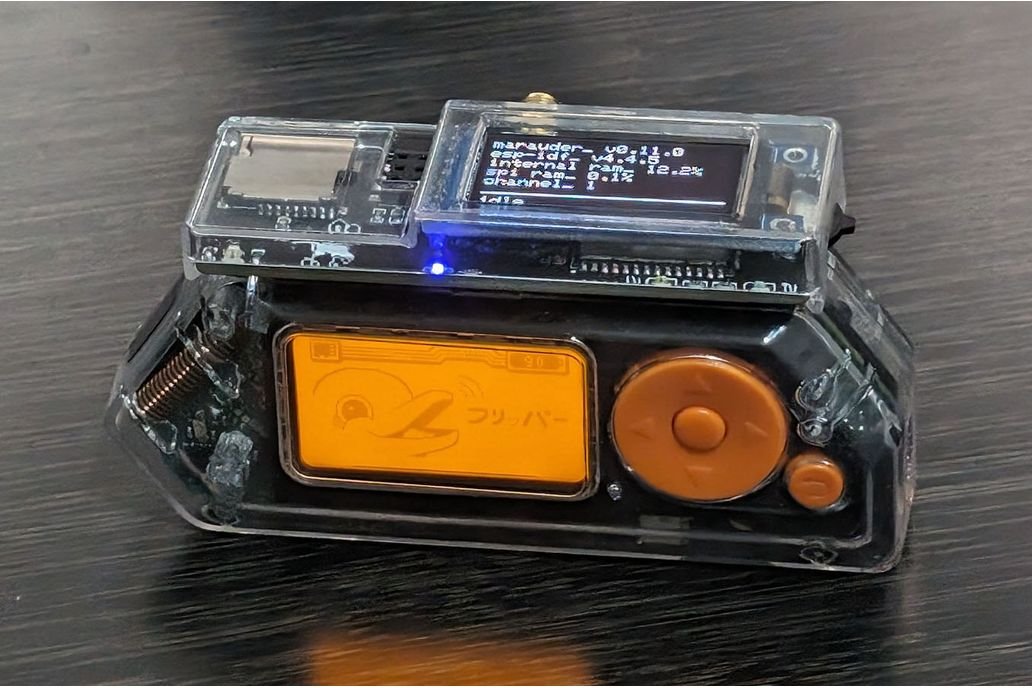
Third-party all-in-one wireless-pentest GPIO board from ruckus // section80 (Australia), sold on Tindie. Successor to their earlier “End Game” module. Adds Wi-Fi/BLE, sub-GHz, and 2.4 GHz radios plus an OLED, joystick, and microSD to the Flipper. Usable both tethered to the Flipper and standalone (powered via the module’s USB-C, attacks driven from the OLED + joystick).
Vendor: https://www.tindie.com/products/ruckus/game-over-flipper-zero-wifi-gpio-module/.
9.2.2.2 Hardware
- Wi-Fi/BLE/host MCU: ESP32-S3 (runs the WiFi Marauder firmware fork). Flashable directly from the Flipper via USB-UART bridge or via USB-C.
- Sub-GHz: TI CC1101 (extended-range 433/900 MHz, separate from the Flipper’s onboard CC1101).
- 2.4 GHz: Nordic nRF24L01+ (mousejacking / NRF sniffing).
- Expansion slot: 8-pin recessed slot accepts a CC1101 or NRF24
daughter module. Pinout (Flipper net names):
1:GND, 2:3V3, 3:B2, 4:A4 (CS), 5:B3, 6:A7 (MOSI), 7:A6 (MISO), 8:1W (GD0/IRQ). Same convention as the WiFi-dev-board / Marauder pinning. - Peripherals: SSD1306-class OLED (128×64), 3-way joystick (up / push / down), boot/reset buttons, RGB status LED, RX/TX LEDs, microSD slot for PCAP capture, external SMA antenna, transparent acrylic case.
- Power: 3V3 GPIO rail is the primary source; under heavy Wi-Fi TX peaks can exceed 500 mA. Vendor recommends running on a charged Flipper or external USB power; thin 3V3 traces on the Flipper can brown out otherwise.
9.2.2.3 Firmware pairing
- On-board ESP32-S3: ships pre-flashed with a custom WiFi Marauder
fork by ruckus tailored to the Game Over’s OLED + joystick. Updates
via Ruckus’s
dirty_flasherflow (BETA), or by holding BOOT and usingesptool.pyover USB-C, or via the Flipper’s USB-UART bridge using the standard Marauder companion FAP “Update ESP32”. - Flipper side: no custom Flipper firmware required. Stock OFW
- WiFi Marauder companion FAP (
0xchocolate/flipperzero-wifi-marauderbuild) + NRF24 mousejacker FAPs is enough. Momentum and RogueMaster both bundle these.
- WiFi Marauder companion FAP (
9.2.2.4 FAP / app compatibility
- WiFi Marauder companion FAP — deauth, beacon spam, sniff, evil portal, BLE attacks
- NRF24 Mousejack / NRF24 Sniffer FAPs
- ESP32 flasher FAP (for module-side firmware updates)
The board can capture PCAP to its own microSD — the Flipper-side companion FAP isn’t required for capture; you can run scans from the joystick + OLED standalone.
9.2.2.5 Workflow
1. Mount the daughter radio (CC1101 or NRF24) into the expansion slot.
2. Snap to Flipper. Power on.
3. Open WiFi Marauder companion FAP — confirm UART link.
4. Run scans/attacks from either the Flipper UI or directly on the OLED
   via joystick.
5. PCAP files written to the on-board microSD; pull them out and open
   in Wireshark.
For long-running scans, plug the module’s USB-C into a battery pack — removes the 3V3 rail from the equation.
9.2.2.6 Known issues / gotchas
- Power dips on long deauth runs. Mitigation: external USB to the module.
- Daughter-radio expansion slot is keyed but unforgiving — wrong-orientation insert kills the NRF24.
- Marauder fork lags upstream by weeks. New attacks land on
justcallmekoko/ESP32Marauderfirst; the Game Over fork tracks behind. - CC1101 daughter shares antenna ground with Flipper’s internal CC1101. Don’t TX on both simultaneously.
- No public GitHub for the firmware fork as of this writing —
supply-chain caveat. Distribution is via the seller’s
dirty_flasher.
9.2.2.7 Where to buy
- Vendor: https://www.tindie.com/stores/ruckus/
- The Game Over product page above
- The earlier “End Game” predecessor exists but Game Over supersedes it in feature set
9.2.3 AWOK Dual Touch V3 (AWOK Dynamics)
Owned. Full chapter.
See also: full module deep dive. A standalone, comprehensive reference for AWOK Dual Touch V3 — schematic-grade hardware walk-through, firmware option comparison (Marauder vs Ghost ESP vs Bruce), step-by-step install procedures for each, day-to-day operating workflows, modding guide, and legal/ethics posture — lives at
AWOK Dual Touch V3/03-outputs/AWOK_Dual_Touch_V3_Complete.html. Note: as of 2026-05-11 the AWOK Dual Touch V3 module is its own top-level Hack Tools project atAWOK Dual Touch V3/; this Flipper Zero series retains the catalog entry for context, but module-state, firmware decisions (Marauder vs Ghost ESP vs Bruce), and lab-specific operating workflows live in that project. Use this section for the at-a-glance summary; jump to the standalone project when you’re actually flashing the board.
9.2.3.1 What it is
Third-party Wi-Fi wardriving / auditing GPIO board from AWOK Dynamics (US). Sold direct, plus via Lab401 (EU), Tindie (“Unlimited Coverage” reseller), Virtus Fab.2 The “Dual Touch” name refers to the dual-ESP architecture plus on-board resistive touchscreen. “AWOK” appears to be the maker’s handle, not an acronym.
9.2.3.2 Hardware
- Two ESP32 chips on one PCB. One ESP32-WROOM drives the touchscreen UI and runs ESP32 Marauder. The second is also an ESP32-WROOM (older product descriptions list ESP32-S2-WROVER for the Flipper-controlled side; the current v3 product page says both are WROOM — known documentation drift; verify by reading silk on your actual board).
- Touchscreen IC: generic resistive touch via an ILI9341-class TFT with XPT2046 controller — not a capacitive sensor. Multiple buyer reviews and AWOK’s own product page warn the bezel can press the screen edge and cause auto-scrolling; documented fix is to trim/ shave the bezel inner edge.
- GPS: on-board u-blox-class receiver with internal ceramic patch antenna (no external GPS antenna in the box; SMA hole is for Wi-Fi). DIP switches on the back independently route GPS to either or both ESP32s.
- Wi-Fi antennas: 2× external 2.4 GHz SMA, plus a Wi-Fi SMA mount hole.
- Case: clear ABS, optional SMA cutout. STL files for printing your own are public.
9.2.3.3 Firmware pairing
Ships with no firmware (deliberate) — AWOK markets it as a development board. The user flashes Marauder, Ghost ESP, or custom builds.
Marauder binary mapping (from
justcallmekoko/ESP32Marauder releases — this is the canonical
V2-vs-V3 hardware-diff evidence):
- “AWOK V2/V3 screen (white-USB port)” →
..._v6_1.bin - “AWOK V2 flipper (orange-USB port)” →
..._flipper.bin - “AWOK V3 flipper (orange-USB port)” →
..._marauder_dev_board_pro.bin
The naming difference is the cleanest evidence of the V2-vs-V3 hardware change: the Flipper-side ESP on V3 wires up like the “Marauder Dev Board Pro” reference, which means improved UART routing and a different boot-strap configuration than V2.
Flipper side: stock OFW + WiFi Marauder companion FAP works. Momentum / RogueMaster also fine. No custom Flipper firmware required.
9.2.3.4 Workflow
1. Flash both ESPs with appropriate Marauder binaries:
   - White-USB port for the screen ESP   ⇒ v6_1.bin
   - Orange-USB port for the Flipper ESP ⇒ marauder_dev_board_pro.bin
2. Set DIP switches on the back to route GPS to one or both ESPs.
3. Mount to Flipper or just power via USB.
4. Operate scan/sniff/attack via the touchscreen, or send commands from
   the Flipper.
5. PCAP/WiGLE logs to onboard storage.
Because the screen-side ESP is autonomous, you can wardrive walking around with no Flipper attached at all — just a battery on the board’s USB-C.
9.2.3.5 Known issues / gotchas
- Resistive touchscreen is twitchy. Bezel-trim fix is documented on the product page.
- Internal-only GPS ceramic antenna means cold-fix times are 30 s+ in clear sky and may never lock indoors. Plan to mod in an external active GPS antenna for serious wardriving.
- V3 is “monitor only” per AWOK’s disclaimer (firmware-enforced, not hardware-enforced — the chip can still TX if you flash deauth-capable firmware; the disclaimer is legal cover).
- AWOK GitHub
AWOK559/Flipper_Zero_Boardsis sparsely maintained — primary docs live on the product pages and FAQ. - ESP-chip identity drift: older listings say S2-WROVER for the Flipper-side ESP; current product page says WROOM. Read the actual silk on your board before flashing — wrong chipset → bricked ESP.
9.2.3.6 Where to buy
- AWOK direct: https://awokdynamics.com/products/dual-touch-v3
- Lab401 (EU): https://lab401.com/products/awok-dual-touch-v3
- Tindie “Unlimited Coverage” reseller: https://www.tindie.com/products/ucshop/flipper-zero-dual-touch-v3-esp32-wi-fi-board-gps/
9.2.4 ESP32-Marauder-5G “Apex 5” (HoneyHoneyTeam)
- What: ESP32-C5 (dual-band Wi-Fi 6, 2.4 + 5 GHz) + dual sub-GHz CC1101 (433 + 868 MHz) + NRF24 + GPS, single-board.
- Released: 2026-02-12 on Tindie at $99.
- Repo:
HoneyHoneyTeam/ESP32-Marauder-5G-Apex-5-Module---For-Flipper-Zero. - Headline: the 5 GHz Wi-Fi capability is unique among Flipper modules. ESP32-C5 is also a recent silicon — supports BLE 5 + Wi-Fi 6.
- Power: high — peaks > 500 mA on Wi-Fi TX. Use the module’s own USB-C.
9.2.5 Rabbit-Labs ESP32-C5 multi-board
- What: Competing ESP32-C5 design — dual-band Wi-Fi 6, CC1101, GPS, microSD, USB-C.
- Vendor: rabbit-labs.com.
- Coverage: CNX-Software March 2026 review.
9.2.6 FlipMods Combo / Ultra V3 (Sacred Labs)
- What: 3-in-1: ESP32 + NRF24 + CC1101, 4 antennas, microSD, USB-C.
- Vendor: Tindie + Amazon. ~$105.
- Firmware: pre-flashed Marauder.
- Notes: power-switch per radio (only one active at a time — electrical, not just firmware).
9.2.7 Rek5 QUAD Module
- What: ESP32 + CC1101 + NRF24 + GPS, 4 external antennas, SD slot.
- Vendor: rek5lab.com. ~$80–100.
9.2.8 CaracalDB ESP32+NRF24+CC1101 (with 3D-printed case)
- What: Same triple-radio class as FlipMods, with a printed case + antennas in the box.
- Vendor: Tindie. ~$85.
9.3 Single-Purpose Modules
9.3.1 EvilCrow RF v2 (Joel Serna)
- Not strictly a Flipper add-on but pairs tightly: dual-CC1101
SDR-style RF tool that reads the Flipper’s
.subfile format with h-RAT’s custom firmware (EvilCrowRF_Custom_Firmware_CC1101_FlipperZerorepo). - Use case: replay/jam research with one device while the Flipper does another job in parallel.
- Custom firmware required on the EvilCrow side (h-RAT’s), not on the Flipper.
- Sibling products EvilCrow-Cable and EvilCrow-Keypad are not Flipper-specific but exist in the same family.
9.3.2 Rabbit-Labs IR Blaster / iotmug Dazzler
- What: 14–32 high-intensity 940 nm LEDs driven from the 5 V rail (not 3V3 — important).
- Range: 30–100 ft.
- Firmware requirement: Unleashed/Xtreme/RogueMaster. Official firmware does not route IR to external GPIO. See Vol 6 §2.7.
- Setting: IR app → GPIO setting → Send=A7, Ext 5V=ON.
- Vendor: Tindie. ~$25–45.
9.3.3 Flipper-Zero GPS modules (NEO-6M, u-blox)
- Hardware: UART NMEA on pins 13/14, 3V3 + GND on 9/11.
- FAPs:
ezod/flipperzero-gps— basic NMEA display + logSil333033/flipperzero-gps-lpuart— low-power UART variant- liamur’s u-blox-over-I²C app — also syncs Flipper RTC to GPS time
- Compatibility: all firmwares.
- Vendor: YIHANG sells a pre-built “GPS Module with Unleashed Firmware” on Tindie; bare NEO-6M is on Aliexpress for $5–10.
9.3.4 Nibble Zero (Retia.io) — Meshtastic/Meshcore companion
- What: Seeed WIO-SX1262 LoRa node with a Flipper-compatible interface (UART/I²C/SPI breakouts).
- Note: Companion rather than a true GPIO add-on — the Flipper acts as UI/relay for the LoRa node.
- Coverage: demoed at 39C3 (CCC Dec 2025).
- Limitation: no official Meshtastic board support inside the Flipper firmware — community FAPs only.
9.3.5 ChameleonUltra (Proxgrind) — companion, not piggyback
- What: NRF52840-based RFID/NFC emulator. No published “piggyback” hardware mounts a ChameleonUltra on Flipper GPIO; they coexist as separate tools.
- Why mention it here: community wishlist threads keep asking; worth knowing the answer is “they don’t combine, they cooperate”.
- Use case: the Flipper’s own ST25R3916 is fine for read/clone, the ChameleonUltra is better for emulation/MFKey32.
9.3.5.1 Working with the Chameleon Ultra
The practical relationship between the Flipper Zero and the Chameleon Ultra is one of complementary specialisation rather than competition. The Flipper Zero is the multi-modal field tool in this lineup: it handles sub-GHz door-entry systems via the CC1101, IR-controlled appliances, BadUSB injection over USB HID, iButton reads, and BLE experimentation — all on the same device that also reads and emulates RFID/NFC cards. The Chameleon Ultra is the single-purpose emulation platform: 8 HF and 8 LF card slots, independent BLE-selectable slot switching, and a full Crypto1 attack suite running on its nRF52840 natively. For an engagement that has an RFID/NFC component alongside any of the Flipper’s other capability domains, the two devices occupy adjacent, non-overlapping roles.
Within the RFID/NFC domain specifically, the Chameleon Ultra outperforms the Flipper Zero in two structural respects. First, the slot architecture: the Flipper maintains one active card identity at a time, and switching between captured credentials requires navigating the on-device menu and re-loading the target card. The Chameleon Ultra’s 8+8 slot model — eight HF and eight LF slots, pre-loaded and BLE-selectable in under a second — allows an operator to cycle through a credential inventory far faster than the Flipper’s per-card UI flow permits. For an engagement that requires testing eight different MIFARE Classic credentials against a single reader in rapid succession, the Chameleon Ultra’s operational tempo is substantially higher. Second, the Crypto1 attack depth: the Chameleon Ultra’s firmware includes DarkSide, Nested, StaticNested, and HardNested as on-device attack routines, plus MFKEY32 v2 for sniff-based key recovery. The Flipper Zero’s mainline firmware supports a more limited Crypto1 attack suite; community firmwares (Momentum, Xtreme) extend this meaningfully but the full HardNested implementation that recovers keys from hardened cards with no known sector key is incomplete in mainline and most community builds as of mid-2026.
The Flipper Zero does outperform the Chameleon Ultra in one important RFID-adjacent dimension: card-type fingerprinting at the initial identification step is fast and readable on the Flipper’s display without a companion phone. The Chameleon Ultra has no on-device display; its card-type reporting requires the ChameleonUltraGUI application running on a phone or laptop. In a scenario where the operator wants to quickly identify a card type before committing to the attack workflow, the Flipper’s immediate read-and-display UX is more ergonomic than the Chameleon Ultra’s phone-dependent reporting. The natural hand-off pattern is: Flipper Zero for the initial card-type fingerprint and preliminary read; Chameleon Ultra for the extended emulation campaign once the card’s identity and key state are understood.
Dump data flows between the two devices through ChameleonUltraGUI. Card data captured by the Flipper Zero and saved to its microSD card can be exported to the host and imported into ChameleonUltraGUI, which then loads the dump into a Chameleon Ultra HF or LF slot for emulation. The reverse hand-off — a card read by the Chameleon Ultra, then analysed using the Flipper’s community RFID tools — is equally valid. In practice, many operators run both devices simultaneously on the same engagement: the Flipper assigned to the sub-GHz door-entry transmitters, IR-controlled devices, and USB HID vectors present at the site; the Chameleon Ultra assigned to the RFID/NFC emulation workflow. The Flipper handles breadth; the Chameleon Ultra handles depth within the NFC domain. Neither device’s presence on an engagement makes the other redundant. See Chameleon Ultra for the complete integration reference from the Chameleon’s perspective, including how the Flipper’s RFID output feeds the Chameleon’s slot-loading workflow and the full works-with decision matrix.
9.3.6 Flipper Zero SWD/JTAG breakouts
Two FAP routes rather than dedicated boards:
g3gg0/flipper-swd_probe— auto-detects valid SWD pin pairs by beep/pinout.sfjuocekr/flipper-app-dap-link— CMSIS-DAP debug.
The “hardware” is just jumper wires + a ribbon adapter from the Flipper GPIO pins 10/12/8 to the target’s SWD header. Black Magic Probe via the WiFi Devboard is a more capable path (Vol 8 §2.5); a $75 1BitSquared Black Magic Probe is the dedicated tool when you need full GDB.
9.3.7 Logic-analyzer FAPs (no dedicated hardware)
andr0423/flipper-logic-analyzerg3gg0/flipper-logic_analyzer
8-channel SUMP protocol; USB-CDC enumerates as a Saleae Logic. Works in PulseView/sigrok. Sample rate limited by USB-CDC and the STM32 — fine for serial-bus protocols (UART, I²C, SPI at ≤ 1 MHz), not for high-speed work. Use a real Saleae or Bus Pirate 5 for fast signals.
9.3.8 Environmental-sensor modules
- Unitemp (
quen0n/unitemp-flipperzero) — drives DHT11/22, DS18B20, BMP280, BME280, HTU21. - bme680_flipper_zero (
kamylwnb) — adds gas/IAQ. - Commercial: “Flipper Zero Environmental Sensor Module” with MH-Z19 CO2 + BME280 (Amazon, ~$35). I²C on pins 15/16.
- No mature SCD40 (Sensirion CO2) FAP found — DIY opportunity.
9.4 The Apex 5 / Marauder-5G Detail
A note on the highest-end commercial third-party module currently available:
Table 1 — available
| Spec | Apex 5 |
|---|---|
| Wi-Fi | 2.4 GHz + 5 GHz Wi-Fi 6 (ESP32-C5) |
| BLE | BLE 5 |
| Sub-GHz | dual CC1101 (433 + 868 MHz on separate antennas) |
| 2.4 GHz keyboard | NRF24 |
| GPS | yes |
| microSD | yes |
| USB-C | yes |
| Price | $99 |
This is the closest thing to “the next-generation WiFi Devboard” — and the official Devboard hasn’t been refreshed since the ESP32-S2 era. The 5 GHz capability alone justifies the upgrade for serious Wi-Fi work; modern enterprise Wi-Fi is increasingly 5 GHz-only.
9.5 Mounting and Stacking
Most Flipper modules consume the entire 18-pin header. Two modules cannot stack unless one provides a pass-through header — uncommon. For multi-module workflows you swap modules between sessions.
The mechanical envelope of the GPIO header (above the device) is documented at flipper.wiki — DIY Vol 10 covers it. Most third-party modules respect a similar form factor; AWOK V3, Game Over, Apex 5, and the WiFi Devboard all fit similar enclosures.
9.6 Compatibility Matrix at a Glance
Table 2 — 6. Compatibility Matrix at a Glance
| Module | Stock OFW | Momentum | Unleashed | RogueMaster |
|---|---|---|---|---|
| Mayhem v2 | partial (no camera) | full | full | full |
| Game Over | full | full | full | full |
| AWOK V3 | full | full | full | full |
| Apex 5 | full | full | full | full |
| Mayhem-class others | varies | full | full | full |
| EvilCrow companion | n/a (Flipper FW agnostic) | n/a | n/a | n/a |
| Rabbit-Labs IR | no | no | yes | yes |
| GPS modules | yes | yes | yes | yes |
| ChameleonUltra companion | n/a | n/a | n/a | n/a |
| SWD/JTAG FAPs | yes | yes | yes | yes |
| Logic analyzer FAPs | yes | yes | yes | yes |
| Sensor modules | yes | yes | yes | yes |
9.7 Power Budget Master Table
Source rail:         3V3 GPIO pin
Continuous limit:    ~150 mA (community-rated, varies by board batch)
Transient peak before MCU reset: ~300-400 mA momentarily

Module class            Idle    Active peak    Recommendation
─────────────────────────────────────────────────────────────────
Single-radio (CC1101)   30 mA   100-200 mA     OK on Flipper rail
NRF24                    1 mA    14 mA         Trivial
WiFi Devboard           80 mA   250 mA         Borderline; OK
GPS (NEO-6M)            30 mA    50 mA         OK
Mayhem v2 + Wi-Fi TX    100 mA  450 mA         Use module USB-C
Game Over (any radio)   80 mA   500 mA peak    USE EXTERNAL USB
AWOK V3 (both ESPs)     150 mA  600 mA peak    USE EXTERNAL USB
Apex 5 (5 GHz TX)       150 mA  600 mA+ peak   USE EXTERNAL USB
The “use external USB” recommendation isn’t optional for the multi-radio boards under load. Brown-out resets during a deauth scan are unpleasant and have caused reports of bricked SD cards (corrupted on mid-write power loss).
9.8 Legal / Ethics Posture (every module)
Capabilities exposed by these modules — deauth, beacon spam, BLE spam, sub-GHz amp TX, NRF24 keyboard injection, evil portal — all intersect federal RF regulation and computer-misuse statutes. The hub rule applies:
Own the hardware, or have written authorization. The modules don’t change the legal calculus — they just give you more capability per watt of effort. Lab use into a dummy load + Faraday cage is the safe default for any TX-side experimentation.
9.9 Coverage Gaps Worth Knowing About
These were searched for and not found:
- “FlipperShark / FlipperCN0566” — no public project pairs the Analog Devices CN0566 phased-array kit with a Flipper. Treat as non-existent until evidence surfaces.
- “Predator” as a discrete product — closest match is Apex 5; no product line is currently sold under “Predator” branding for Flipper.
- Mature SCD40 CO2 sensor FAP — none found. DIY opportunity.
- Modern ESP32-C6 / H2 first-party Devboard — Flipper Devices has not refreshed the WiFi Devboard from ESP32-S2. Apex 5 is the closest commercial answer with ESP32-C5.
9.10 Recommended Loadout for Specific Jobs
Table 3 — 10. Recommended Loadout for Specific Jobs
| Job | Pick from this list |
|---|---|
| Wi-Fi pen-test in the field | Apex 5 (5 GHz) > Game Over > AWOK V3 > WiFi Devboard |
| Sub-GHz field replay 70–150 m | External CC1101 amp (Vol 8 §5) |
| MouseJack / NRF24 attack | Bare NRF24 module (Vol 8 §4) |
| Wardriving while walking | AWOK V3 standalone with battery |
| Long-range IR | Rabbit-Labs IR Blaster (Vol 9 §3.2) |
| GPS-tagged Wi-Fi capture | AWOK V3 (built-in GPS) |
| Custom RF research with Flipper as field tool | EvilCrow RF v2 (companion) |
| Embedded SWD debugging | WiFi Devboard with Black Magic firmware |
| Logic analysis (slow protocols only) | Logic-analyzer FAP, no extra hardware |
| Environmental data logger | Unitemp + BME280 |
9.11 What’s next
Vol 10 — DIY Modules. The GPIO header reference for KiCad work, the mechanical envelope, sample DIY projects, and the PCB-from-scratch checklist for a small-scale PCB-fab and assembly lab.
Footnotes
-
https://www.cnx-software.com/2024/09/10/mayhem-v2-expansion-for-flipper-zero-adds-wi-fi-ble-camera-microsd-card-slot-and-nrf24-or-cc1101-radio-support/ ↩
-
https://awokdynamics.com/products/dual-touch-v3; https://lab401.com/products/awok-dual-touch-v3; https://www.tindie.com/products/ucshop/flipper-zero-dual-touch-v3-esp32-wi-fi-board-gps/. ↩
Comments (0)