M5Stick S3 · Volume 6
M5Stack M5StickS3 Volume 6 — Firmware Ecosystem
Evil-M5Project + Bruce-for-stick + Marauder ports + MicroHydra + UiFlow + stock factory + retro
6.1 About this volume
Vol 6 covers the firmware ecosystem for M5StickS3. The pattern is similar to the Cardputer ADV’s firmware story (Vol 6 in that series) but with stick-form-factor adaptations:
- Fewer-button UI (2 buttons vs Cardputer ADV’s 56-key QWERTY)
- Smaller screen (135×240 portrait vs 240×135 landscape)
- Audio as a first-class feature (every firmware should consider how to use the audio chain)
- No microSD on-board (firmwares assume SD via Hat2 or rely on flash/PSRAM)
Cross-reference: many firmware fundamentals (M5Launcher catalog system, partition layout, web flasher mechanics, Evil-M5Project architecture) are covered in depth in the Cardputer ADV deep dive — Vol 6. This volume covers the stick-specific deltas without re-authoring the shared content.
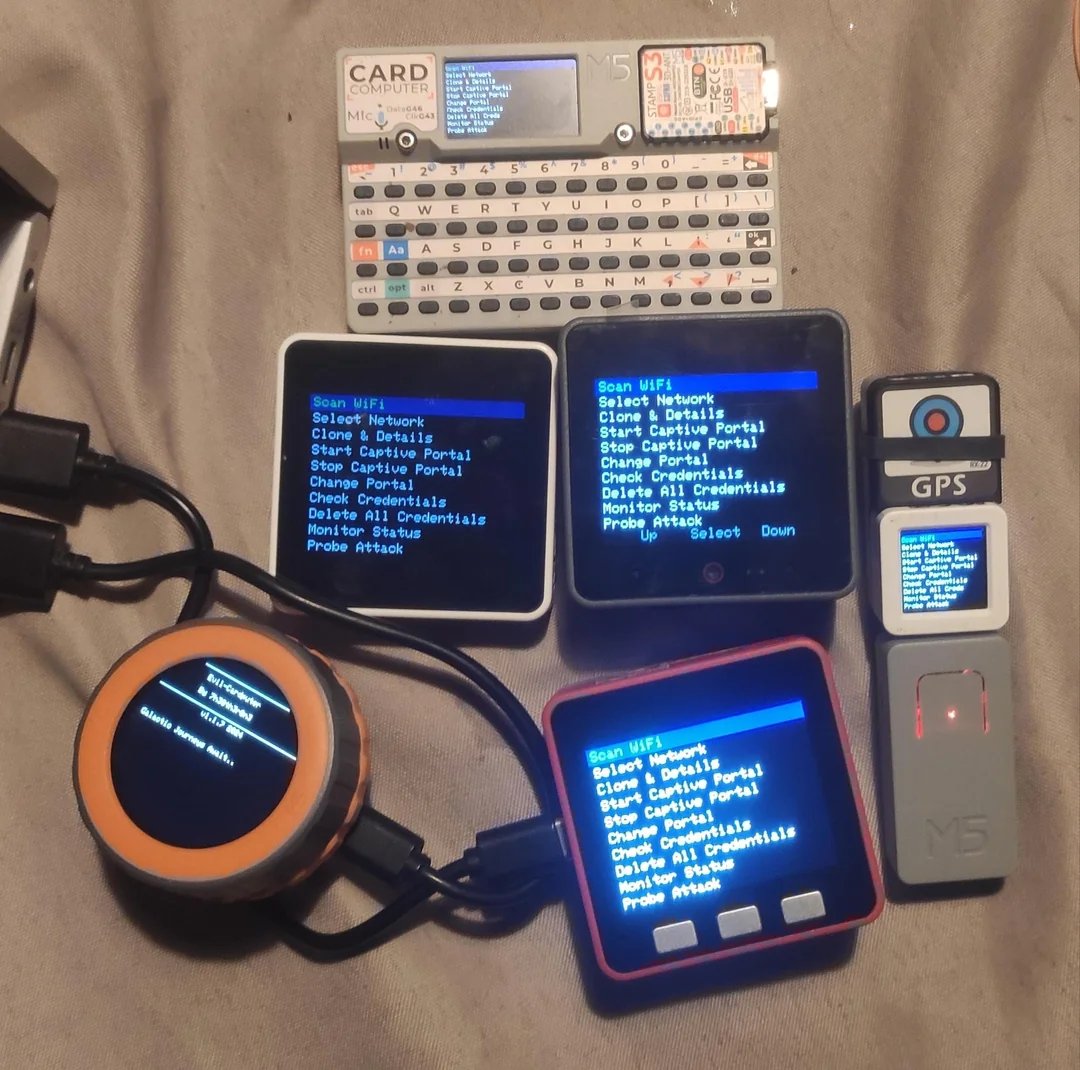
Open questions about M5StickS3-specific firmware support (as of 2026-05-13):
- Has upstream Evil-M5Project merged dedicated M5StickS3 support, or is the port via a community fork?
- Does Bruce ship a built M5StickS3 binary in its release catalog?
- Is M5Launcher (bmorcelli) M5StickS3-aware, or does it lump under generic “ESP32-S3 stick”?
Verify these on actual hardware purchase before committing to a specific firmware path.
6.2 Decision tree — which firmware first?
                What's the primary use case?
                         │
       ┌─────────────────┼─────────────────┐
       │                 │                 │
   Pentest /         Off-grid mesh?       Audio
   red-team          (LoRa/Meshtastic)    work?
       │                 │                 │
       ↓                 ↓                 ↓
   Evil-M5Project   N/A — no LoRa     Custom audio
   (preferred)      hardware. Use     firmware OR
                    Cardputer ADV     ESP-NOW walkie
   Or:              + Cap LoRa.       OR RHesus-RAdio
   Bruce-for-stick                    OR esp-skainet
   (if exists)                        wake-word
   Or:
   ESP32 Marauder
   Cardputer port
   (UI-cramped)

       │                 │                 │
   Embedded         Block coding     Home automation
   dev?             / education?     / Home Assistant?
       │                 │                 │
       ↓                 ↓                 ↓
   Arduino +        UiFlow 2          ESPHome
   M5Unified        (m5stack-published
   PlatformIO       block IDE)

   For first-time M5StickS3 owners: stock factory firmware as bring-up
   baseline → UiFlow 2 to learn the device → Evil-M5Project or
   audio-specific firmware for the real use case.
6.3 Stock M5Stack factory firmware
The firmware that ships with the M5StickS3 from M5Stack. Useful as the known-good baseline for hardware bring-up validation.
Features (typical M5Stack factory firmware for stick-form-factor devices):
- Wi-Fi station + AP demonstration
- BLE peripheral demonstration
- Audio playback demo (chime / tone)
- IR TX/RX demonstration
- IMU display (live accel + gyro values)
- Display test patterns
- Battery telemetry
Source: M5Stack publishes factory firmware binaries via M5Burner. Search M5Burner for “M5StickS3 factory” or “M5StickS3 demo.”
Use case: confirm hardware functions before flashing anything custom. If a custom flash misbehaves, restoring factory firmware verifies the hardware is intact and the issue is the custom firmware.
Backup: before flashing anything else, use esptool.py to backup the as-shipped factory image (Vol 8 § 5).
6.4 Evil-M5Project family (the canonical pentest fork)
Repo: github.com/7h30th3r0n3/Evil-M5Project. Author: 7h30th3r0n3.
Position: the canonical Evil-* family for M5Stack devices. M5Stack-aware firmware specifically designed around M5Stack’s hardware family.
Variants in the Evil- family*:
Table 1 — Variants in the Evil- family
| Variant | Target | Notes |
|---|---|---|
| Evil-Cardputer | M5Cardputer (original + ADV) | Most polished — full QWERTY keyboard |
| Evil-StickC-Plus (or equivalent) | M5StickC Plus / Plus 2 | Smaller-screen UI patches; classic ESP32 |
| Evil-M5StickS3 (presumed name) | M5StickS3 | TBD upstream merge status |
| Evil-Core / Evil-Core2 | M5Stack Core / Core2 | Larger device variant |
Likely Evil-M5StickS3 capabilities:
- Wi-Fi scan + deauth + Evil Portal
- BLE scan + spam (with caveats — the BLE-spam-iOS-lockup edge case applies; Vol 11 § 2)
- IR TV-B-Gone + on-device IR remote code learning (M5StickS3 has IR RX — unique vs Cardputer ADV)
- Audio attack variants — uses the M5StickS3 audio chain (specific attacks: voice-prompt social engineering, audio-tone-based device interaction)
- Wardriving with Grove GPS Unit (since M5StickS3 has no on-board GNSS)
UI adaptation for stick form factor:
- 2-button navigation (A=advance, B=back)
- Smaller menu density — typically 5-6 items per screen at default font
- Audio feedback for menu actions (the M5StickS3 has a speaker; firmware leverages it)
- IMU gesture as alternative input (shake-to-trigger)
Cross-reference: the platform-neutral Marauder/Evil-* coverage is in ../../../ESP32 Marauder Firmware/03-outputs/ESP32_Marauder_Firmware_Complete.html. The specifics for ESP32-S3 silicon (BLE 5.0 only, no BT classic) apply to the M5StickS3.
6.5 Bruce — stick form-factor port
Repo: github.com/BruceDevices/firmware. License: AGPLv3.
Position: actively-developed multi-modal pentest firmware. Cardputer ADV is a first-class Bruce target; stick form-factor support is community-contributed and may lag.
Likely M5StickS3 Bruce status (2026-05-13):
- Build env exists in
platformio.inias[env:m5sticks3](or community fork) — verify on Bruce repo - Wi-Fi + BLE + IR modules supported
- Sub-GHz (CC1101) module requires CC1101 Grove Unit attached
- RFID module requires Unit RFID2 / PN532 attached
- BadUSB works via USB-C OTG with adapter
- LoRa NOT supported (no LoRa hardware on M5StickS3)
Stick form-factor compromises in Bruce UI:
- Stripped-down menus (Cardputer ADV has 6+ menu items per screen at full density; M5StickS3 limited to ~4-5)
- 2-button navigation pattern enforced
- No QWERTY-driven text input (any text fields require button-cycle alphabet — slow but functional)
When to pick Bruce over Evil-M5Project:
- More features per binary (Bruce’s catalog is larger)
- Better polish on the multi-modal attacks
- More community support / documentation
When to pick Evil-M5Project over Bruce:
- M5Stack-specific UI design (designed around M5Stack hardware from day one)
- More mature stick form-factor support
- Better audio integration (Evil-M5Project authors are M5Stack-focused)
Most casual users will run Evil-M5Project as primary + Bruce as secondary for the multi-modal features Evil-M5Project lacks.
6.6 Marauder — Cardputer port adapted for stick (with caveats)
Repo: github.com/justcallmekoko/ESP32Marauder. PlatformIO env: search for m5sticks3 or community ports.
Status on stick: ESP32 Marauder is most polished on Koko’s reference hardware (Marauder v6.1) and the preferred daily-driver host (AWOK Dual Touch V3). The Cardputer ADV port works. M5StickS3 port may be community-only — verify on repo.
Caveats:
- Marauder’s UI assumes a directional pad / 4-button navigation; M5StickS3’s 2-button + IMU input is a poor fit
- Marauder’s strength is PCAP capture; without a microSD slot (M5StickS3 has none), the captures must go to flash or Hat2 SD
- Marauder ports tend to remove features for smaller boards (less screen real estate, less RAM, etc.) — the M5StickS3 port may be feature-thin
Recommendation: for pentest work on M5StickS3, Evil-M5Project is the better fit unless Marauder’s PCAP export is specifically needed. For PCAP work: use Cardputer ADV with Marauder, not M5StickS3.
For platform-neutral Marauder coverage (mainline architecture, fork landscape, attack mechanics): ../../../ESP32 Marauder Firmware/03-outputs/ESP32_Marauder_Firmware_Complete.html.
6.7 MicroHydra (MicroPython app switcher)
Repo: github.com/echo-lalia/MicroHydra. License: GPLv3.
Position: MicroPython-based “OS-like” app switcher. Likely M5StickS3-compatible given M5Unified’s Python bindings.
Pattern (same as Cardputer ADV):
- Apps as
.pyfiles on SD (or flash) at/apps/<AppName>/__init__.py - App switcher UI lets user pick + launch
- Apps communicate with hardware via M5Unified Python bindings (mic, speaker, IMU, IR, display, buttons)
M5StickS3-specific app patterns:
- Voice memo recorder — ~50 lines of MicroPython
- Audio FFT visualizer — using
arduinoFFTPython equivalent - IR remote learner + replayer — using M5Stack IR Python bindings
- Gesture-triggered actions — IMU + GPIO output
Compatibility verification: M5StickS3 needs to be in MicroHydra’s boards/ config. As of 2026-05-13, this may require a community fork or upstream PR. Verify on repo.
6.8 UiFlow 2 (block coding)
Position: M5Stack’s official block-coding IDE. M5StickS3 is a first-class UiFlow 2 target.
Workflow:
- Flash UiFlow 2 firmware to M5StickS3 via M5Burner (M5Burner has the UIFlow binary for M5StickS3).
- Browser-pair to https://flow.m5stack.com via USB-CDC (Web Serial).
- Drag blocks. Compile to MicroPython under the hood. Run on device.
Available block categories:
- M5StickS3-specific hardware blocks (display, buttons, IMU, IR, mic, speaker)
- Wi-Fi / BLE blocks (scan, connect, send/receive)
- Audio blocks (record, play, FFT visualization)
- Grove Unit blocks (auto-detected blocks for every M5Stack Grove Unit)
- Logic / math / control flow blocks
- Variables / functions
- Timer / event blocks
Use case: lowest-barrier development path for the M5StickS3. Useful for prototyping, education, demos. Power users graduate to Arduino + PlatformIO or MicroPython.
6.9 ESPHome (Home Assistant satellite)
Repo: github.com/esphome/esphome. License: GPLv3.
Position: YAML config → Home Assistant device. M5StickS3 works as an ESPHome device with the right board target.
Sample ESPHome YAML for M5StickS3 wearable / desk display:
esphome:
  name: m5sticks3_kitchen
  platformio_options:
    board_build.arduino.memory_type: qio_opi   # ← OPI PSRAM mandatory

esp32:
  board: esp32-s3-devkitc-1
  framework:
    type: arduino

wifi:
  ssid: "HomeNetwork"
  password: !secret wifi_password

api:
  encryption:
    key: !secret api_key

display:
  - platform: st7789v2     # ST7789P3 driver may need patch — ST7789V2 close-enough
    cs_pin: GPIO15
    dc_pin: GPIO16
    reset_pin: GPIO17

binary_sensor:
  - platform: gpio
    pin: GPIO0
    name: "Button A"

sensor:
  - platform: adc
    pin: GPIO10
    name: "Battery Voltage"
    attenuation: 11db
Use cases:
- Wall-mount wearable running ESPHome to display Home Assistant status
- BLE proxy — extends HA’s BLE range with the M5StickS3’s BLE radio
- Sensor pod — Grove ENV IV → ESPHome → HA dashboards
- Voice prompt — HA scripts can play audio to M5StickS3’s speaker via the audio component
The M5StickS3’s small size + magnetic back makes it well-suited to wall/fridge-mount ESPHome devices.
6.10 Audio / signal niche firmwares
The M5StickS3’s distinctive firmware family:
Table 2 — The M5StickS3's distinctive firmware family
| Firmware | What it does |
|---|---|
| RHesus-RAdio (ported) | Internet radio receiver. Shoutcast / Icecast / MP3 URLs → ES8311 → speaker. Vol 5 § 8. |
| m5Cardputer_audiospectrum (ported) | Real-time FFT of MEMS mic, 16-band bar graph. Vol 5 § 5. |
| esp-now-talkie (ported) | ESP-NOW walkie-talkie. Vol 5 § 7. |
| Custom voice memo recorder | MEMS mic → SD-via-Hat2 or flash. Authorized engagements only. Vol 5 § 4. |
| esp-skainet integration | Wake-word + speech-command recognition. Voice-activated menus. Vol 5 § 6. |
| Audio FX prototyper | Real-time filter / echo / delay. Limited but possible. Vol 5 § 9. |
| Audio-tone-based device interaction | Synthesized tones interact with target audio devices (e.g., DTMF dialing). Research / education only. |
These are the unique-value firmwares for M5StickS3 — they leverage the audio subsystem in ways the rest of M5Stack’s lineup can’t.
6.11 Retro emulation (limited on stick)
The 135×240 screen + 2-button input limits retro emulation:
Table 3 — The 135×240 screen + 2-button input limits retro emulation
| Emulator | Feasibility on M5StickS3 | Notes |
|---|---|---|
| ZX Spectrum | ✓ possible | 256×192 screen scales reasonably to 135×240 |
| Commodore 64 | ✓ possible | 320×200 needs cropping |
| Atari 2600 | ✓ moderate | 160×192 fits comfortably |
| NES (cardputer-nofrendo port) | ⚠ cramped | 256×240 needs significant downscaling |
| Game Boy / GBC | ⚠ borderline | 160×144 portrait fits with cropping |
| Doom (m5cardputer_doom) | ⚠ poor fit | Designed for Cardputer ADV’s 240×135 landscape + QWERTY input |
| Tetris / Snake / 2048 | ✓ simple custom 2D | M5GFX-based; ~100 lines of code |
Practical recommendation: for retro gaming, use the Cardputer ADV (much better screen + keyboard). The M5StickS3 retro emulators are niche / proof-of-concept.
Tamagotchi-class virtual pet (raising-hell-cardputer port) works well on M5StickS3 — small screen is fine for a pet sprite, and IMU shake-to-feed is intuitive.
6.12 The fork landscape — when to use which
For pentest work:
Table 4 — For pentest work
| Need | Firmware | Why |
|---|---|---|
| Polished M5Stack-aware pentest | Evil-M5Project | M5Stack-specific design |
| Maximum features | Bruce (if stick port good) | Larger catalog, active dev |
| PCAP export specifically | Marauder Cardputer port (if M5StickS3 variant exists) | Cleaner PCAP than Bruce |
| Defensive / BadUSB inspection | NEMO (if stick port) | BadUSB Hunter feature |
For development:
Table 5 — For development
| Need | Path | Why |
|---|---|---|
| Block coding / education | UiFlow 2 | Lowest barrier |
| MicroPython scripting | MicroHydra | Live REPL iteration |
| Compiled binary, multi-file | PlatformIO + Arduino | Production-grade |
| Low-level / custom partition | ESP-IDF | Full control |
For audio:
Table 6 — For audio
| Need | Firmware | Why |
|---|---|---|
| Voice memos | Custom (Vol 5 § 4) | Simple workflow |
| Internet radio | RHesus-RAdio (port) | Battery-life caveat (Vol 5 § 11) |
| Walkie-talkie | esp-now-talkie (port) | Two-device pairing |
| Voice-activated menus | esp-skainet integration | <5% CPU continuous |
| Audio recording for engagement | Custom (with legal cover) | Authorized use only — Vol 5 § 10 |
For home automation:
Table 7 — For home automation
| Need | Firmware | Why |
|---|---|---|
| Home Assistant satellite | ESPHome | YAML config, official integration |
Most M5StickS3 owners will run:
- M5Launcher on factory (if M5StickS3 support exists — verify) for runtime fork-switching
- Evil-M5Project on ota_0 for pentest
- Custom audio firmware on ota_1 (or one of: RHesus-RAdio / esp-now-talkie / wake-word demo / audio FFT)
The stick-form-factor + audio + small battery shapes most operational uses toward “short-duration burst” rather than “sustained engagement.”
6.13 Migration between firmwares
Pattern (parallels Cardputer ADV Vol 7 § 8):
- Backup SD card (if applicable — M5StickS3 has no built-in SD; only Hat2 SD-accessory or flash content).
- Use M5Launcher Catalog (if M5StickS3 supported) OR manually flash via M5Burner / web flasher.
- First-boot of new firmware creates any missing directories (in flash or SD-Hat2).
- Settings reset to defaults — re-configure region, MAC randomization, Wi-Fi creds.
SD compatibility (if using Hat2 SD-accessory): pcap captures + Evil Portal HTML + wordlists generally portable across firmwares. Per-firmware settings files (settings.txt format) differ — re-configure each firmware.
Time: ~5 minutes via web flasher; ~10-15 minutes via M5Burner with backup + reflash + re-configure.
6.14 Resources
Repos
- Evil-M5Project: https://github.com/7h30th3r0n3/Evil-M5Project
- Bruce: https://github.com/BruceDevices/firmware
- ESP32 Marauder (for context): https://github.com/justcallmekoko/ESP32Marauder
- MicroHydra: https://github.com/echo-lalia/MicroHydra
- ESPHome: https://github.com/esphome/esphome
Web flashers
- M5Stack UiFlow flasher: https://uiflow.m5stack.com/
- Bruce installer (if S3-stick supported): https://bruce.computer/
- Evil-M5Project’s web flasher: linked from
github.com/7h30th3r0n3/Evil-M5Project
Libraries
- M5Unified: https://github.com/m5stack/M5Unified
- M5GFX: https://github.com/m5stack/M5GFX
Cross-references
- Cardputer ADV firmware ecosystem (canonical reference):
../../../M5Stack Cardputer ADV/03-outputs/Cardputer_ADV_Complete.htmlVol 6 - ESP32 Marauder Firmware (platform-neutral):
../../../ESP32 Marauder Firmware/03-outputs/ESP32_Marauder_Firmware_Complete.html - Audio firmwares detailed: Vol 5
- Custom firmware development: Vol 10
This is Volume 6 of a twelve-volume series. Next: Vol 7 covers programming environments — Arduino + PlatformIO + MicroPython + UiFlow 2 + ESP-IDF — with M5StickS3-specific deltas.
Comments (0)