Camera Detection · Volume 7
CameraDetection Volume 7 — Build Our Own: From Scratch (ESP32-S3)
Architecture · BOM · firmware pipeline design · OUI fingerprint DB · RSSI-walk localization · optional RF-sweep and lens-finder add-ons
7.1 About this volume
This volume presents the from-scratch design for a purpose-built Wi-Fi camera detector based on the ESP32-S3-WROOM-1-N8R8. It is a design document — architecture, BOM, firmware pipeline, and algorithm pseudo-code — not a completed build. The actual hardware assembly and projects/ firmware source are explicitly deferred to bench time per the project design decision recorded in the spec.^[docs/superpowers/specs/2026-06-25-cameradetection-deep-dive-design.md — “Device strategy: cover all three build paths, pick the actual build later. Vols 7–8 present the designs; the ‘which one I actually build’ call and the projects/ code are deferred to bench time.”]
Design-not-built callout: Everything in this volume is a build-ready design. No physical prototype has been assembled and no firmware has been flashed as of 2026-06-26. Detection-range figures, RSSI values, and timing estimates are spec-sourced pending bench verification. The design is grounded in the production ESP-IDF v5.x API surface, real IEEE OUI data, and the algorithms fully developed in Vol 3 §5 (traffic-rate/motion-correlation) and Vol 5 §5 (RSSI-walk localization); none of the underlying physics is speculative. The gap between this design and a working unit is bench time and a PCB run.
What this volume designs — a handheld, battery-powered Wi-Fi camera detector that:
- Runs 802.11 promiscuous-mode capture to passively collect every Wi-Fi frame in range without joining any network
- Extracts source MAC addresses from uplink data frames and matches them against an embedded camera-vendor OUI table stored in flash via RODATA_ATTR (or in SRAM via DRAM_ATTR for speed)
- Accumulates per-client uplink frame sizes and flags when the bitrate correlates with induced motion — the traffic-rate/motion-correlation technique from Vol 3 §5, realized in embedded firmware
- Displays a ranked list of suspected camera MACs on a 1.3” IPS TFT
- Implements RSSI-walk localization — EMA-smoothed RSSI with a real-time bar/needle display — to physically converge on the transmitter’s location (the Vol 5 §5 algorithm implemented in C)
- Exposes add-on headers for a CC1101 sub-GHz module and an IR-LED optical lens-finder ring
Volume map: Vol 3 §5 is the physics foundation for the traffic-rate pipeline in §4.4 here. Vol 5 §5 is the design specification for the RSSI-walk algorithm in §6. Vol 8 covers the alternative build paths (forking ESP32 Marauder, forking Nyan Box, the Raspberry Pi sniffer) and when to choose each over this from-scratch design.
Non-emitting camera callout: The Wi-Fi scanner at the core of this design is completely blind to SD-only and wired (non-emitting) cameras — no OUI match, no traffic-rate correlation, no RSSI-walk will detect a camera that transmits nothing. The optical lens-finder ring add-on (§7.3) partially patches this gap for the powered case; NLJD (REI ORION, ~$15k) is the definitive non-emitting method for any power state. This is constraint #1 from Vol 1 §7.1; it is restated here loudly and will not be buried.
7.2 Architecture
7.2.1 System overview
The design has four hardware layers plus two optional bolt-on paths:
Table 1 — The design has four hardware layers plus two optional bolt-on paths
| Layer | Subsystem | Primary role |
|---|---|---|
| Compute | ESP32-S3-WROOM-1-N8R8 | Dual-core LX7; Wi-Fi promiscuous capture on core 0; OUI match, EMA, display drive on core 1 |
| Display | ST7789V2, 1.3-in 240×240 IPS TFT, 4-wire SPI | Client list, suspicion scores, RSSI walk bar/needle |
| Power | 3.7 V LiPo 1000 mAh + IP5306 PMIC | USB-C charge in; 5 V boost out; charge LED; low-battery cutoff |
| I/O | 4 × tactile switches; optional SMA via U.FL | Mode, target lock, scroll, scan; external directional antenna |
| Add-on A | CC1101 SPI module (optional) | Sub-GHz (300–928 MHz) passive RF monitor — see §7.1 for scope |
| Add-on B | IR-LED ring + viewport (optional) | Active optical retroreflection — catches non-emitting cameras |
The ESP32-S3’s Wi-Fi radio handles all 802.11 layer-1/layer-2 work; the CPU sees only the decoded frame buffer and RX metadata (RSSI, channel, timestamp) via the promiscuous callback. No Linux kernel, no monitor-mode ioctl, no userspace pcap: the ESP-IDF provides this as a supported first-class API.
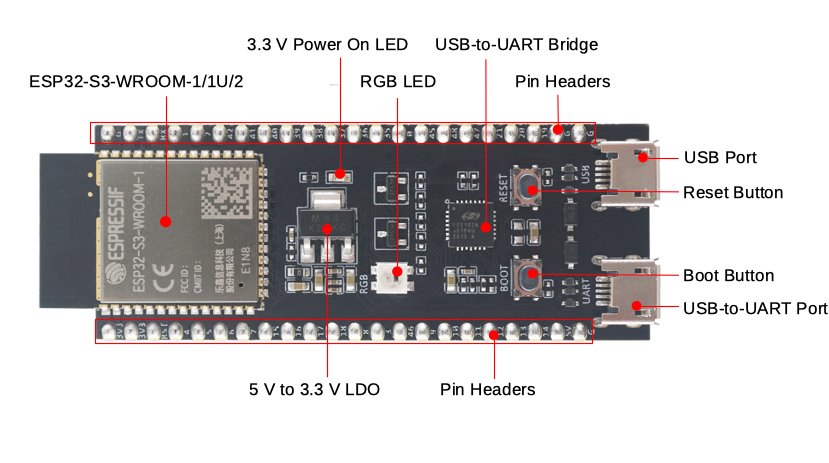
7.2.2 MCU: ESP32-S3-WROOM-1-N8R8
The ESP32-S3-WROOM-1-N8R8 is the right part for this application for three reasons:
1. Wi-Fi promiscuous mode is a first-class ESP-IDF feature. esp_wifi_set_promiscuous(true) enables the mode; esp_wifi_set_promiscuous_rx_cb() registers a callback that receives every frame the radio captures — management, control, and data frames from any transmitter in range, whether or not the device is associated to any AP. This is the entire capture front end.
2. 8 MB OPI PSRAM (the -N8R8 suffix: N8 = 8 MB NOR flash, R8 = 8 MB Octal-SPI PSRAM). The base ESP32-S3 has 512 KB internal SRAM. At 240×240×2 bytes = 115,200 bytes per full framebuffer, one frame fills 22% of internal SRAM before the client table, OUI table, and ring buffers are allocated. The 8 MB PSRAM holds the double-framebuffer, the client entry table (32 entries × 128 bytes each = 4 KB), per-client frame-size ring buffers (32 entries × 64 samples × 2 bytes = 4 KB), and the OUI lookup table with room to spare.
3. Dual-core Xtensa LX7 at 240 MHz. The ESP-IDF Wi-Fi task pins to core 0; the promiscuous RX callback also runs on core 0. Core 1 is free for the application loop — client table updates, OUI match, EMA computation, traffic-rate accumulation, display refresh. This prevents display and processing work from introducing latency into the capture path.
Module specifications (Espressif datasheet v1.8):^[ESP32-S3-WROOM-1 / WROOM-1U Datasheet v1.8, Espressif Systems, 2023. documentation.espressif.com/esp32-s3-wroom-1_wroom-1u_datasheet_en.pdf]
Table 2 — 2.2 MCU: ESP32-S3-WROOM-1-N8R8
| Parameter | Value |
|---|---|
| SoC | ESP32-S3 (Xtensa LX7 dual-core) |
| CPU frequency | Up to 240 MHz |
| Internal SRAM | 512 KB |
| Flash | 8 MB Quad-SPI NOR |
| PSRAM | 8 MB Octal-SPI (OPI), DDR mode up to 80 MHz |
| Wi-Fi standard | 802.11 b/g/n, 2.4 GHz only; promiscuous mode supported in all modes |
| Bluetooth | BT5.0 LE (also BLE 5.0 extended advertising / scanning) |
| Antenna (WROOM-1) | Onboard PCB trace; cannot connect external |
| Antenna (WROOM-1U) | U.FL external connector; PCB trace disconnected |
| Vcc range | 3.0–3.6 V |
| Module dimensions | 18 × 25.5 × 3.1 mm |
| LCSC part | C2913201 |
Variant choice for the RSSI-walk: The base design uses WROOM-1 (PCB antenna, lower cost). For the directional-antenna option in §6.3 — where you attach a biquad or Yagi to sharpen bearing resolution — swap in the WROOM-1U (U.FL connector variant of the same silicon, same firmware) and add a U.FL-to-SMA pigtail (~$1). LCSC stocks the WROOM-1U-N8R8 variant; search by SKU or “ESP32-S3-WROOM-1U-N8R8”.
What the ESP32-S3 does not cover: 5 GHz Wi-Fi (802.11ac/ax) is outside this module’s radio capability — 2.4 GHz is the only band. Analog wireless cameras transmitting FM-video carriers at 1.2 GHz, 2.4 GHz, or 5.8 GHz are not visible to the 802.11 promiscuous mode because they do not emit 802.11-format frames. Their signals are raw analog FM modulation, not OFDM/DSSS digital. See §7.1 and §7.2 for what can and cannot address those.
7.2.3 Display: ST7789 IPS
The display is a 1.3-inch 240×240 IPS TFT driven by the ST7789V2 controller over 4-wire SPI.
Table 3 — 2.3 Display: ST7789 IPS
| Parameter | Value |
|---|---|
| Display size | 1.3-in diagonal |
| Resolution | 240 × 240 pixels |
| Driver IC | ST7789V2 |
| Interface | 4-wire SPI: MOSI + SCLK + CS + DC; plus RST and BL (backlight PWM) |
| Color depth | 16-bit (RGB565) |
| Viewing angle | ≥ 160° H and V (IPS panel) |
| Backlight PWM | GPIO → MOSFET or direct; dim for battery saving |
| Module supply | 3.3 V |
| SPI max clock | ST7789V2 rated 62.5 MHz; most breakout modules sustain 40 MHz reliably |
| Framebuffer size | 240 × 240 × 2 bytes = 115,200 bytes (stored in PSRAM) |
Library choice: LVGL v8 (Apache 2.0) on ESP-IDF provides a widget set appropriate for the bar-graph, list, and needle UI in §6.2. For a minimal implementation without LVGL, direct SPI register-write rendering into the ST7789 is faster for the RSSI needle update path — the needle redraws every 200 ms and must not flicker.
Module sourcing: Dedicated ST7789V2 breakout modules are stocked by WeAct Studio, Adafruit (#2088 for the 240×240 round variant; look for 240×240 square 1.3-in), Waveshare, and AliExpress vendors. No single LCSC C-code covers all variants because these are assembled modules (the ST7789V2 bare IC is LCSC C2907242 but sourcing the bare panel separately is not practical for a one-off build). See §3.3 for sourcing guidance.
7.2.4 Power: LiPo and PMIC options
A handheld scanner needs 4–6 hours of runtime. Wi-Fi promiscuous mode on the ESP32-S3 draws roughly 100–180 mA (spec-sourced, varies with channel dwell and PSRAM activity); with display backlight, budget 200–250 mA average. At 250 mA average from a 1000 mAh LiPo: runtime ≈ 4 hours. A 2000 mAh cell extends this to ~8 hours.
Option A — IP5306 integrated PMIC (recommended):
The Injoinic IP5306 is a fully integrated power-bank SoC: a 2.1 A synchronous buck charger (5 V USB-C → LiPo at up to 2.1 A) combined with a 2.4 A synchronous boost converter (LiPo → 5 V output at up to 2.4 A, ~92% efficiency).^[IP5306 datasheet, Injoinic Technology Co., Ltd. datasheet4u.com/datasheets/Injoinic/IP5306.]
Table 4 — 2.4 Power: LiPo and PMIC options
| IP5306 parameter | Value |
|---|---|
| Charge input | 5 V USB (micro-USB or via USB-C PD adapter at 5 V) |
| Charge topology | Synchronous buck, 750 kHz |
| Charge current max | 2.1 A |
| Boost output | 5.0 V, up to 2.4 A (12 W) |
| Boost efficiency | ~92% at 1 A load |
| Cell voltage range | 3.0–4.2 V (single Li-ion / LiPo) |
| Integrated protections | OCP, OVP, SCP, thermal, under-voltage lockout |
| LED charge indicator | 4-LED bar graph (optional — GPIO-controlled) |
| Package | SOP-8 (easy to hand-solder) |
| LCSC | Search “IP5306 Injoinic” — part numbers vary by variant; confirm before ordering |
The 5 V boost output from the IP5306 feeds either:
- A dev board’s USB/VIN input (which has its own 3.3 V LDO onboard) — for a prototype on a DevKit
- An MCP1700T-3302E/TO (LCSC C128957) — 250 mA, 0.18 V dropout ultra-LDO providing 3.3 V to the WROOM-1 module and peripherals on a custom PCB. At 250 mA max, this LDO is sufficient for the module + display + CC1101; if current exceeds this (with all peripherals active), use an RT9013-33GB (500 mA, 0.25 V dropout, LCSC C56811) instead.
The IP5306 is the correct choice because its boost converter guarantees a stable 5 V output from the LiPo across the full discharge range (4.2 V down to 3.0 V), avoiding the regulator dropout issue that kills simpler LDO-only designs. A standard AMS1117-3.3 needs Vin ≥ ~4.3 V (3.3 V + ~1.0 V typical dropout, up to 1.3 V worst case) — but a single-cell LiPo charges to only 4.2 V fully charged, so the AMS1117-3.3 cannot regulate 3.3 V from a LiPo at any state of charge. Do not use AMS1117-3.3 directly from a LiPo; use the MCP1700 low-dropout LDO (or the IP5306 boost path) instead.
Option B — TP4056 + MCP1700T-3302E (minimal build, prototype only):
For a quick bench prototype where long battery life is not required:
- TP4056-42-ESOP8 (LCSC C16581): 1 A linear USB charger for a single LiPo cell; 4.2 V CV/CC termination; charge current set by an external resistor (R_prog = 1.2 kΩ for 1 A). Add a DW01A + FS8205A combo or use a TP4056 module that includes these for over-discharge and short-circuit protection.
- MCP1700T-3302E/TO (LCSC C128957): 250 mA LDO, 0.18 V dropout. Vin_min = 3.48 V for 3.3 V out — the LiPo can discharge to 3.48 V before the LDO faults, which is within the usable LiPo range. This is the correct LDO for direct LiPo use; the AMS1117-3.3 is not.
Limitation of Option B: The TP4056 is a linear charger — inefficient, runs warm at 1 A, and slow (1 A max into a 1000 mAh cell = 1.5–2 h to full charge). The IP5306 charges at up to 2.1 A with 92% efficiency and runs cool. Use Option B only for early prototyping with a dev board.
LiPo cell: 3.7 V 1000 mAh, 804040 form factor (roughly 40×40×8 mm, 25 g). Source from Adafruit (#1578), Sparkfun, or reputable AliExpress vendors. For 2000 mAh (8+ hour runtime), 804060 or 103450 format cells are common.
7.2.5 Wi-Fi front end and antenna
The ESP32-S3-WROOM-1 module’s onboard PCB trace antenna is a half-wave meandered trace tuned for 2.4 GHz. Typical receive sensitivity: −97 dBm at 1 Mbps (802.11b), −71 dBm at 54 Mbps (802.11g), per the module datasheet.^[ESP32-S3-WROOM-1 datasheet §2.3 RF performance.] Promiscuous mode receive sensitivity is the same; the distinction is that every received frame is delivered to the callback rather than only frames addressed to the device.
For the RSSI-walk use case, the PCB antenna (omnidirectional, ~0 dBi effective gain) is fine for following the gradient in a room. For directional bearing, swap in the WROOM-1U variant (U.FL connector) and attach a biquad or Yagi via a U.FL-to-SMA pigtail (see §6.3).
Channel coverage: 802.11 channels 1–13 (2412–2472 MHz). The firmware cycles through channels 1, 6, 11 (the three non-overlapping 20 MHz channels that dominate most AP deployments) during the initial scan phase. Once a suspected camera MAC is identified, the firmware locks to its channel for traffic-rate watching and RSSI-walk. Full 1–13 channel sweep is configurable via a menu option.
7.2.6 Optional add-on slots
Two physical add-on connectors are designed into the PCB header layout:
Add-on slot A — CC1101 SPI module:
- 7-pin 2.54 mm header: VCC (3.3 V), GND, MOSI, MISO, SCK, CSN, GDO0 (interrupt)
- The CC1101 connects via SPI bus 2 on the ESP32-S3 (separate SPI controller from the display SPI bus 1)
- Purpose: sub-GHz passive RF monitoring, 300–928 MHz (see §7.1 for the full scope and critical limitations)
- Populated only when the sub-GHz add-on is installed; header is present on all boards
Add-on slot B — IR-LED ring:
- 3-pin header: VCC (3.3 V via MOSFET switch), GND, CTRL (PWM GPIO)
- 8× 850 nm IR LEDs in a ring around the viewport aperture
- Driven at ~21 mA each (total ~168 mA via a BSS138 N-channel MOSFET gate)
- Purpose: optical lens retroreflection for non-emitting camera detection (see §7.3)
7.2.7 Block diagram
┌──────────────────────────────────────────────────────────────────────────────┐
│                   CamFinder — ESP32-S3 Block Diagram                         │
└──────────────────────────────────────────────────────────────────────────────┘

  USB-C 5 V ──►┌────────────┐        3.3 V rail ◄──────────────────────┐
               │  IP5306    │                                            │
               │  PMIC      ├──► 5 V boost ──► MCP1700T-3302E ──────►  │
               │  (charge + │               (ultra-LDO, 0.18 V drop)    │
               │   boost)   │                                            │
               └─────┬──────┘                                            │
                     │ LiPo charge                                       │
                     ▼                                                    │
              ┌──────────────┐                                            │
              │  3.7 V LiPo │ ◄── DW01A+FS8205 protection (Option B     │
              │  1000 mAh   │      only; IP5306 has integrated OVP)      │
              └─────────────┘                                            │
                                                                          │
  ┌──────────────────────────────────────────────────────────┐           │
  │              ESP32-S3-WROOM-1-N8R8                        │◄──── 3.3 V
  │                                                           │
  │  Core 0 (Wi-Fi task, pinned):                            │
  │    esp_wifi promiscuous RX callback                      │
  │    → raw 802.11 frame bytes → frame queue               │
  │                                                           │
  │  Core 1 (application task):                              │
  │    Dequeue frames                                         │
  │    → extract SA MAC + RSSI + frame_len                   │
  │    → OUI lookup (DRAM_ATTR table)                         │
  │    → update client_entry_t (rssi_ema, bytes_window)      │
  │    → traffic-rate accumulate                              │
  │    → update display                                       │
  │                                                           │
  │  GPIO:  BTN_A / BTN_B / BTN_C / BTN_D                   │
  │  SPI2:  ST7789 display (MOSI/SCLK/CS/DC/RST/BL)         │
  │  SPI3:  CC1101 (optional) (MOSI/MISO/SCK/CSN/GDO0)      │
  │  GPIO:  IR-LED PWM (optional)                            │
  │  GPIO:  Charge LED feedback from IP5306                  │
  └────────────────────────┬──────────────────────────────────┘
                           │ SPI2
                    ┌──────▼──────┐
                    │  ST7789V2   │
                    │  1.3" IPS   │
                    │  240×240    │
                    └─────────────┘

  Optional paths (dotted) ─────────────────────────────────────────────────

  ESP32-S3 SPI3 ──►┌─────────────┐
                   │   CC1101    │  Sub-GHz 300–928 MHz only
                   │   module    │  (NOT 1.2/2.4/5.8 GHz analog cams —
                   └─────────────┘  see §7.1)

  ESP32-S3 GPIO  ──►┌────────────────────────────────┐
  (PWM via MOSFET)  │  8× 850 nm IR LEDs             │
                    │  arranged as a ring around      │
                    │  a viewport aperture            │
                    │  → optical lens retroreflection │
                    └────────────────────────────────┘
7.3 BOM
7.3.1 Core BOM
Prices are indicative as of mid-2026 (spec-sourced; verify at point of order). All LCSC C-codes are confirmed against the LCSC product database; mark unknown codes accordingly.
Table 5 — 3.1 Core BOM
| # | Component | Description | Part / Module | LCSC C-code | Qty | Unit price (USD) |
|---|---|---|---|---|---|---|
| 1 | MCU module | ESP32-S3, 8 MB flash, 8 MB OPI PSRAM, PCB antenna | ESP32-S3-WROOM-1-N8R8 | C2913201 | 1 | ~$4.20 |
| 2 | Display module | 1.3-in 240×240 IPS SPI TFT, ST7789V2 driver | WeAct/generic ST7789 1.3-in module | see §3.3 | 1 | ~$5.00 |
| 3 | LiPo battery | 3.7 V 1000 mAh, 804040 form factor | 804040 LiPo cell | — | 1 | ~$5.00 |
| 4 | PMIC (Option A) | Integrated charge+boost; 2.1 A charge, 5 V/2.4 A boost | IP5306 (Injoinic), SOP-8 | search “IP5306” | 1 | ~$0.80 |
| 5 | Ultra-LDO (Option A) | 3.3 V, 250 mA, 0.18 V dropout (for custom PCB) | MCP1700T-3302E/TO | C128957 | 1 | ~$0.25 |
| 6 | Charger IC (Option B alt) | 1 A linear LiPo charger, 4.2 V CV/CC | TP4056-42-ESOP8 | C16581 | 1 | ~$0.09 |
| 7 | Battery protection (Option B) | DW01A + FS8205A combo for OVP/OCP/short | DW01A + FS8205A | C351050 (DW01A); C77832 (FS8205A) | 1 ea | ~$0.05 ea |
| 8 | Tactile buttons | 6×6 mm 4-pin SMD, 5 mm height | TS-1088R-02526 | C318884 | 4 | ~$0.03 ea |
| 9 | U.FL pigtail | U.FL to SMA-F, RG178, 100 mm (WROOM-1U builds only) | generic | — | 1 | ~$1.00 |
| 10 | Decoupling caps | 100 nF X7R 0402 (PSRAM + MCU supply) | GRM155R71C104JA88D or equiv | C14663 | 10 | ~$0.01 ea |
| 11 | Bulk caps | 10 µF X5R 0805 (PMIC output filter) | GRM21BR61A106KE18L or equiv | C15850 | 4 | ~$0.05 ea |
| 12 | Current-set resistor | 1.2 kΩ 1% 0402 (sets TP4056 charge current to 1 A, Option B) | generic 1.2 kΩ 0402 | C22765 | 1 | ~$0.01 |
| 13 | PCB | Custom 2-layer, ~80×50 mm, ENIG, 1.6 mm FR4 | custom gerbers (deferred to bench) | — | 1 | ~$2.00 (JLC prototype run) |
| 14 | Enclosure | 3D-printed PLA/PETG shell with viewport opening | custom STL (deferred) | — | 1 | ~$2.00 filament |
Core BOM total (Option A path): ~$20–25 in components, before PCB and enclosure. With PCB prototyping ($2–5 for 5 boards at JLCPCB) and enclosure: ~$25–35 total.
7.3.2 Optional add-ons BOM
Table 6 — 3.2 Optional add-ons BOM
| # | Component | Description | Part / Module | LCSC C-code | Qty | Unit price (USD) |
|---|---|---|---|---|---|---|
| A1 | CC1101 SPI module | Sub-GHz transceiver, 300–928 MHz, SPI | Texas Instruments CC1101 breakout | — (assembled module; search “CC1101 SPI module”) | 1 | ~$2.00 |
| A2 | 7-pin header (2.54 mm) | CC1101 socket header on PCB | generic 7-pin 2.54 mm female | C124375 | 1 | ~$0.10 |
| B1 | IR LED 850 nm | 5 mm through-hole, 850 nm, 20 mA continuous | KPS-3225P1C-850 or equivalent | search LCSC “850 nm LED 5mm” | 8 | ~$0.10 ea |
| B2 | N-channel MOSFET | IR-LED ring switch; VGS(th) < 1.5 V (3.3 V logic) | BSS138 SOT-23 | C52895 | 1 | ~$0.03 |
| B3 | Current-limit resistors | 100 Ω 0402, one per LED, limits IR LED current to ~21 mA from 3.3 V | generic 100 Ω 0402 | — | 8 | ~$0.01 ea |
| B4 | Viewport lens tube | 20–25 mm acrylic tube or binocular eyepiece as viewer | craft/optics supplier | — | 1 | ~$3.00 |
Add-on cost: CC1101 path adds ~$2–3. IR-LED ring adds ~$4–5 including the viewport.
7.3.3 BOM notes and sourcing
ESP32-S3-WROOM-1-N8R8 (LCSC C2913201): Also stocked by Mouser (#356-ESP32-S3-WROOM-1N8R8), DigiKey, and Adafruit (#5336 for the DevKitC-1 dev board). For prototyping, buying the DevKitC-1 board (~$12–15) is faster than a bare module; the dev board’s USB-C port handles programming and its onboard 3.3 V LDO handles power during bench work. Move to bare module + custom PCB for the final build.
ST7789V2 1.3-in 240×240 display: This is an assembled module, not a bare IC. Reliable sources include Adafruit #2088 (1.3-in 240×240, SPI), WeAct Studio (search “WeAct 1.3 inch TFT”), and various AliExpress vendors. The pinout (MOSI/SCLK/CS/DC/RST/BL) is consistent across modules; confirm the voltage level (3.3 V vs 5 V — most breakouts are 3.3 V compatible). There is no single LCSC C-code for the assembled module.
IP5306 LCSC note: Injoinic IP5306 is listed on LCSC; the exact C-code varies between SOP-8 and QFN variants and between Chinese platform listings. Search LCSC directly for “IP5306 Injoinic” and confirm the SOP-8 package variant for hand-soldering. Alternatively, pre-assembled IP5306 charge-boost modules are widely available on AliExpress for $0.80–$1.50 per unit, which simplifies the custom-PCB power section.
TP4056-42-ESOP8 (LCSC C16581): This is the ESOP-8 package (exposed-pad SOIC). There is also a SOT23-5 package variant under different C-codes. C16581 is the high-volume listing with the ESOP-8 footprint; confirm before ordering.
MCP1700T-3302E/TO (LCSC C128957): This is the TO-92 through-hole package. For SMD use, the MCP1700T-3302E/MB (SC-70) is more appropriate for a custom PCB; search LCSC for “MCP1700T-3302E” and select the SOT-23 or SC-70 variant.
CC1101 module: The CC1101 bare IC (Texas Instruments, LCSC search “CC1101”) requires a complete RF front end (inductors, capacitors, crystal, antenna matching) and is not practical for a one-off. Use a pre-assembled module ($1.50–$3) that includes the 26 MHz crystal, matching network, and SMA or onboard antenna. The SmartRF04EB class modules are overkill; simple 7-pin DIP-compatible breakouts are ideal.
IR LEDs: Any 850 nm, 5 mm, through-hole, 20–50 mA LED works. Verify the emission wavelength is 850 nm rather than 940 nm; 850 nm is more easily visible through the smartphone camera viewfinder used for glint confirmation. LCSC stocks multiple suitable parts; search “850nm LED” and filter to 5 mm through-hole.
7.4 Firmware pipeline
7.4.1 Pipeline overview and state machine
The firmware operates in one of four states, selectable via buttons B/C:
┌──────────────────────────────────────────────────────────────────────┐
│                 FIRMWARE STATE MACHINE                                │
└──────────────────────────────────────────────────────────────────────┘

                         ┌──────────┐
                 ┌───────►  SCAN    ◄──────────────────────────────┐
                 │       │  (hop    │                               │
                 │       │  CH 1–13)│                               │
                 │       └────┬─────┘                               │
                 │            │ OUI match found                     │
                 │            ▼                                      │
                 │       ┌──────────────┐                           │
                 │       │  WATCH       │  Lock to camera MAC+CH    │
                 │       │  (traffic-   │  Accumulate frame sizes   │
                 │       │   rate +     │  Watch for bitrate spike  │
                 │       │   RSSI EMA)  │  on motion induction      │
                 │       └────┬─────────┘                           │
                 │            │ [A] lock / [B] walk                 │
                 │            ▼                                      │
                 │       ┌──────────────┐                           │
                 │       │  WALK        │  RSSI-walk localization   │
                 │       │  (EMA RSSI   │  Bar + needle display     │
                 │       │   bar/needle)│  Follow the gradient      │
                 │       └────┬─────────┘                           │
                 │            │ [D] back to list                    │
                 │            ▼                                      │
                 │       ┌──────────────┐                           │
                 └───────┤  CONFIRM     │  LED ring on              │
                 [C] new │  (IR-LED     │  Look through viewport    │
                 scan    │   ring on,   │  for retroreflection glint│
                         │   if fitted) │                           │
                         └──────────────┘
Data flow through the pipeline:
802.11 frame (raw bytes) ─► promiscuous RX callback (Core 0, IRAM)
      │
      │  extract: SA MAC (6 bytes), RSSI (int8_t), frame_len (uint16_t)
      │  push to FreeRTOS queue (xQueueSendFromISR, non-blocking)
      │
      ▼
Application task (Core 1, 10 ms tick)
      │
      ├─► find_or_add_client(mac) → client_entry_t *
      │         table: MAX_CLIENTS = 32 entries, LRU eviction
      │
      ├─► oui_lookup(mac) → vendor_id  (DRAM_ATTR table, §5)
      │
      ├─► update_rssi_ema(client, rssi)  (§6.1)
      │
      ├─► update_traffic_rate(client, frame_len)  (§4.4)
      │
      └─► update_display()  (LVGL or custom SPI, 100 ms refresh)
The FreeRTOS queue between the ISR and the application task is the key decoupling point. The RX callback must complete in < a few microseconds (it cannot block, sleep, or call most ESP-IDF functions); the queue push is safe from ISR context. The application task dequeues and processes at its own pace.
7.4.2 Wi-Fi promiscuous initialization
The ESP-IDF Wi-Fi promiscuous API is stable across v5.x. The design-level initialization sequence:
// ─── Design pseudo-code — illustrative of the ESP-IDF API surface ───
// Full implementation deferred to projects/ at bench time.

#include "esp_wifi.h"
#include "esp_event.h"

// Frame type filter: capture data + management frames; skip control (ACKs, etc.)
wifi_promiscuous_filter_t frame_filter = {
    .filter_mask = WIFI_PROMIS_FILTER_MASK_DATA
                 | WIFI_PROMIS_FILTER_MASK_MGMT,
};

void wifi_promiscuous_init(void) {
    // 1. Initialize the underlying TCP/IP stack and event loop
    ESP_ERROR_CHECK(esp_netif_init());
    ESP_ERROR_CHECK(esp_event_loop_create_default());

    // 2. Initialize Wi-Fi with default config (no AP/STA association needed)
    wifi_init_config_t cfg = WIFI_INIT_CONFIG_DEFAULT();
    ESP_ERROR_CHECK(esp_wifi_init(&cfg));

    // 3. Set mode to NULL (no AP, no STA — just promiscuous)
    ESP_ERROR_CHECK(esp_wifi_set_mode(WIFI_MODE_NULL));

    // 4. Start the Wi-Fi driver
    ESP_ERROR_CHECK(esp_wifi_start());

    // 5. Enable promiscuous mode
    ESP_ERROR_CHECK(esp_wifi_set_promiscuous(true));

    // 6. Apply the frame-type filter
    ESP_ERROR_CHECK(esp_wifi_set_promiscuous_filter(&frame_filter));

    // 7. Register the RX callback (runs on Core 0, in IRAM)
    ESP_ERROR_CHECK(esp_wifi_set_promiscuous_rx_cb(&pkt_handler));

    // 8. Start on channel 6 (most common AP channel in North America)
    ESP_ERROR_CHECK(esp_wifi_set_channel(6, WIFI_SECOND_CHAN_NONE));
}
Key API types (from esp_wifi_types.h in ESP-IDF v5.x):
// The struct delivered to the promiscuous callback for every received frame.
// rx_ctrl holds radio-layer metadata; payload[] holds the raw 802.11 frame bytes.
typedef struct {
    wifi_pkt_rx_ctrl_t rx_ctrl;   // RSSI, channel, timestamp, MCS, etc.
    uint8_t payload[0];           // variable-length: raw 802.11 MAC frame
} wifi_promiscuous_pkt_t;

// Key fields in rx_ctrl:
//   .rssi          int8_t    received signal strength, dBm (negative, e.g. -55)
//   .channel       uint8_t   channel on which the frame was received (1–13)
//   .timestamp     uint32_t  microsecond timestamp (from ESP32-S3 timer)
//   .sig_len       uint16_t  length of the payload field in bytes
//   .mcs           uint8_t   MCS index (802.11n; 0xFF for 802.11b/g)
//   .cwb           uint8_t   channel bandwidth: 0 = 20 MHz, 1 = 40 MHz

// The callback signature:
typedef void (* wifi_promiscuous_cb_t)(
    void *buf,                        // cast to wifi_promiscuous_pkt_t *
    wifi_promiscuous_pkt_type_t type  // WIFI_PKT_DATA, WIFI_PKT_MGMT, etc.
);
7.4.3 MAC capture and OUI match
The 802.11 MAC frame header layout (for a data frame with ToDS=1, i.e., a client uploading to its AP — the camera uplink case):
Offset  Bytes  Field
──────────────────────────────────────────────────────────────────────
 0       2     Frame Control (type=2 data, subtype, ToDS=1, FromDS=0)
 2       2     Duration/ID
 4       6     Address 1 = BSSID (the AP's MAC address)
10       6     Address 2 = SA = Source Address (the camera's MAC) ← OUI here
16       6     Address 3 = DA = Destination Address
22       2     Sequence Control
24+             Frame Body (CCMP/TKIP encrypted if WPA2/WPA3)
For management frames (beacons), Address 2 is the AP/BSSID MAC — useful when the camera operates as its own AP.
// ─── Design pseudo-code — MAC extraction from the promiscuous callback ───

#define FRAME_CTRL_OFFSET   0
#define ADDR1_OFFSET        4
#define ADDR2_OFFSET       10   // SA for ToDS=1 data frames; AP MAC for beacons
#define ADDR3_OFFSET       16

// Macro: read the ToDS bit from Frame Control byte 1
#define IS_TODS(fc)   (((fc)[1] & 0x01) != 0)
#define IS_FROMDS(fc) (((fc)[1] & 0x02) != 0)

void IRAM_ATTR pkt_handler(void *buf, wifi_promiscuous_pkt_type_t type) {
    wifi_promiscuous_pkt_t *pkt = (wifi_promiscuous_pkt_t *)buf;
    uint8_t *frame = pkt->payload;
    int8_t rssi = pkt->rx_ctrl.rssi;
    uint16_t frame_len = pkt->rx_ctrl.sig_len;

    if (frame_len < 24) return;  // too short to contain MAC header

    uint8_t *fc = &frame[FRAME_CTRL_OFFSET];
    uint8_t *src_mac;

    if (type == WIFI_PKT_DATA && IS_TODS(fc) && !IS_FROMDS(fc)) {
        // Uplink data frame: client → AP. SA at offset 10 = the camera.
        src_mac = &frame[ADDR2_OFFSET];
    } else if (type == WIFI_PKT_MGMT) {
        // Beacon or probe response: BSSID at offset 10.
        // Useful if the camera is acting as its own AP.
        src_mac = &frame[ADDR2_OFFSET];
    } else {
        return;  // Skip downlink, control, and other frames
    }

    // Check multicast/broadcast bit (LSB of first byte of MAC).
    // Real client MACs are unicast; broadcast/multicast frames are noise.
    if (src_mac[0] & 0x01) return;

    // Push to application queue (non-blocking; drop on overflow)
    frame_event_t ev = {
        .rssi = rssi,
        .frame_len = (uint16_t)(frame_len & 0xFFFF),
        .channel = pkt->rx_ctrl.channel,
    };
    memcpy(ev.mac, src_mac, 6);
    xQueueSend(g_frame_queue, &ev, 0);
}
The OUI match happens in the application task on Core 1 (not in the ISR) by passing the captured MAC through the DRAM_ATTR / RODATA_ATTR table lookup described in §5.3.
7.4.4 Traffic-rate watch
The traffic-rate/motion-correlation algorithm (Vol 3 §5) in firmware: accumulate the total uplink bytes from each suspected client MAC over a rolling 500 ms window. When motion is induced in front of the suspected camera, the VBR encoder increases bitrate, which appears as a spike in the per-MAC frame-size accumulator. The spike is the detection confirm.
// ─── Design pseudo-code — traffic-rate accumulator ───

#define RATE_WINDOW_COUNT  10   // number of 500 ms slots in the ring
#define RATE_PERIOD_MS     500  // one accumulation slot = 500 ms
#define SPIKE_THRESHOLD_BPS  20000  // 20 KB/s spike = ~160 kbps increase

typedef struct {
    uint8_t  mac[6];
    int8_t   rssi_ema_fp;         // EMA, fixed-point × 10 (e.g., -503 = -50.3 dBm)
    uint32_t bytes_window[RATE_WINDOW_COUNT]; // bytes received per 500 ms slot
    uint8_t  window_idx;          // current slot index
    uint32_t bytes_per_sec;       // computed over the last RATE_WINDOW_COUNT slots
    uint8_t  vendor_id;           // 0 = no OUI match; >0 = camera vendor index
    uint8_t  suspicion;           // 0–100 score: OUI match + traffic spike + RSSI
    bool     cam_confirmed;       // traffic-rate spike observed on motion
    uint32_t last_seen_ms;        // system tick of most recent frame from this MAC
} client_entry_t;

#define MAX_CLIENTS 32
static client_entry_t clients[MAX_CLIENTS];
static uint32_t last_slot_tick_ms = 0;
static uint8_t current_slot = 0;

void update_traffic_rate(client_entry_t *c, uint16_t frame_len) {
    uint32_t now = xTaskGetTickCount() * portTICK_PERIOD_MS;

    // Advance the time slot if RATE_PERIOD_MS has elapsed
    if (now - last_slot_tick_ms >= RATE_PERIOD_MS) {
        current_slot = (current_slot + 1) % RATE_WINDOW_COUNT;
        // Zero the new slot across all clients
        for (int i = 0; i < MAX_CLIENTS; i++)
            clients[i].bytes_window[current_slot] = 0;
        last_slot_tick_ms = now;
    }

    c->bytes_window[current_slot] += frame_len;

    // Recompute bytes_per_sec (total bytes over the ring ÷ window duration)
    uint32_t total = 0;
    for (int i = 0; i < RATE_WINDOW_COUNT; i++)
        total += c->bytes_window[i];
    // total covers RATE_WINDOW_COUNT × RATE_PERIOD_MS milliseconds
    c->bytes_per_sec = total * 1000 / (RATE_WINDOW_COUNT * RATE_PERIOD_MS);

    // A spike above threshold while in WATCH mode flags the client
    if (c->bytes_per_sec > SPIKE_THRESHOLD_BPS)
        c->cam_confirmed = true;
}

// Suspicion score: combines OUI match (60 pts), traffic spike (30 pts), RSSI (10 pts)
uint8_t compute_suspicion(client_entry_t *c) {
    uint8_t score = 0;
    if (c->vendor_id > 0)      score += 60;  // OUI match → strong indicator
    if (c->cam_confirmed)      score += 30;  // traffic-rate spike → confirms
    if (c->rssi_ema_fp > -800) score +=  5;  // RSSI > -80 dBm → in range
    if (c->rssi_ema_fp > -600) score +=  5;  // RSSI > -60 dBm → close
    return score;
}
Motion induction in the sweep workflow: The firmware does not detect motion autonomously — it detects the bitrate change that motion causes. The user induces motion (walks in front of the suspected camera location, waves a hand, moves an object) while the WATCH display shows the per-client bitrate bar. A bitrate bar that spikes during motion is the confirm; a bar that stays flat means either the client is not a camera, the camera is in motion-triggered sleep mode, or it is using constant-bitrate (CBR) encoding (uncommon in IP cameras but possible). Full discussion of failure modes in Vol 3 §5.6.
7.4.5 RSSI-walk mode entry and display
RSSI-walk mode activates when the user selects a suspected camera MAC from the client list and presses [A] (lock target). The display switches from the client-list view to the walk view (see §6.2 for the UI mockup). The firmware locks the channel to the target MAC’s channel and begins updating the EMA at 5 Hz.
The transition logic:
// ─── Design pseudo-code — WALK mode entry ───

typedef enum {
    STATE_SCAN,    // channel-hopping, building client list
    STATE_WATCH,   // channel-locked to target; traffic-rate accumulating
    STATE_WALK,    // RSSI-walk mode; bar/needle display
    STATE_CONFIRM, // IR-LED ring on; optical glint check
} device_state_t;

void enter_walk_mode(client_entry_t *target) {
    g_walk_target = target;
    g_state = STATE_WALK;

    // Lock channel — stop hopping
    esp_wifi_set_channel(target->channel, WIFI_SECOND_CHAN_NONE);

    // Reset EMA history so it starts fresh from current position
    target->rssi_ema_fp = (int16_t)(target->rssi_ema_fp);  // already initialized
    g_walk_rssi_start = target->rssi_ema_fp;  // record starting RSSI for delta display

    // Update display to WALK layout (§6.2)
    display_set_mode(DISPLAY_WALK);
}
7.4.6 UI state machine and button handling
Four tactile buttons provide all navigation:
Table 7 — Four tactile buttons provide all navigation
| Button | SCAN mode | WATCH mode | WALK mode | CONFIRM mode |
|---|---|---|---|---|
| A | — | Lock target / enter WALK | Toggle EMA α (slow/fast) | — |
| B | Enter WATCH on highlighted client | Back to list | Back to WATCH | Back to WALK |
| C | Scroll client list ↓ | Scroll client list ↓ | — | — |
| D | Toggle CH hop / lock | Enter CONFIRM (IR ring on) | Enter CONFIRM (IR ring on) | IR ring off / back |
Long-press [A] from any mode initiates a full re-scan (clears client table, resumes channel hop).
7.4.7 Channel-hop scan vs channel-lock
During SCAN mode, the firmware hops among channels 1, 6, and 11 at 200 ms dwell time per channel. This 600 ms cycle ensures that every camera on the three primary non-overlapping channels is seen within one second. A configurable option (long-press [C]) enables a full 1–13 channel sweep at 100 ms dwell (~1.3 s per cycle), which catches cameras on non-standard channel assignments but increases the time to first OUI match.
// ─── Design pseudo-code — channel-hop task ───

static const uint8_t hop_channels[] = {1, 6, 11};  // primary sweep
static const uint8_t hop_all[] = {1,2,3,4,5,6,7,8,9,10,11,12,13}; // full sweep

void channel_hop_task(void *arg) {
    uint8_t idx = 0;
    const uint8_t *ch_list = g_full_sweep ? hop_all : hop_channels;
    uint8_t ch_count = g_full_sweep ? 13 : 3;

    while (g_state == STATE_SCAN) {
        esp_wifi_set_channel(ch_list[idx], WIFI_SECOND_CHAN_NONE);
        idx = (idx + 1) % ch_count;
        vTaskDelay(pdMS_TO_TICKS(g_full_sweep ? 100 : 200));
    }
    // When entering WATCH or WALK, this task is suspended and channel is locked
    vTaskDelete(NULL);
}
Once a camera MAC is identified, the hop task is deleted and the channel is locked. Channel-locking is essential for traffic-rate accumulation (you cannot accumulate frame sizes if the adapter is not on the camera’s channel) and for RSSI-walk (consistent RSSI readings require a stable channel).
7.5 The OUI fingerprint DB
7.5.1 Building the camera-vendor subset
The IEEE OUI database (standards-oui.ieee.org) is a 7 MB text file containing all registered 24-bit OUI blocks — over 30,000 entries as of mid-2026. The full database is far too large to embed in 8 MB of flash alongside firmware. The design uses a camera-vendor subset: only OUI blocks registered to manufacturers that produce IP cameras, NVRs, or camera SoC chipsets that appear in the hidden-camera threat model.
The build_oui_db.py host-side script (to be authored in projects/tools/ at bench time) does the following:
# ─── Design pseudo-code — build_oui_db.py ───
# Produces a C header (oui_table.h) ready for inclusion in the firmware.
# Run once to build; regenerate when the IEEE database is updated.

CAMERA_VENDORS = {
    # (vendor_id, display_name, list_of_OUI_prefixes_as_XX:XX:XX strings)
    "HIKVISION":  (1, "Hikvision",  ["C0:56:E3","BC:AD:28","44:19:B6",
                                      "54:8C:81","24:48:45","0C:75:D2",
                                      "D0:27:88","8C:E7:48","B4:A3:82"]),
    "DAHUA":      (2, "Dahua",      ["90:02:A9","3C:EF:8C","E0:50:8B",
                                      "38:AF:29","08:ED:ED","4C:11:BF"]),
    "WYZE":       (3, "Wyze",       ["2C:AA:8E"]),
    "REOLINK":    (4, "Reolink",    ["EC:71:DB"]),
    "AMCREST":    (5, "Amcrest",    ["90:02:A9","3C:EF:8C"]),  # shares Dahua OUIs
    "AXIS":       (6, "Axis",       ["00:40:8C","AC:CC:8E","B8:A4:4F"]),
    "TAPO":       (7, "TP-Link/Tapo",["54:AF:97","98:DA:C4","50:C7:BF"]),
    "EUFY":       (8, "Eufy/Anker", ["48:E1:E9","84:2E:27"]),
    "RING":       (9, "Ring",       ["78:8C:B5","A4:02:B9"]),
    "NEST":      (10, "Google Nest",["B8:9A:2A","18:B4:30","64:16:66"]),
    # ... add additional vendors; see Vol 3 §2.2 for the full reference table
    # All entries are spec-sourced; verify against current IEEE OUI DB before build
}

def parse_oui_hex(oui_str):
    """Convert 'C0:56:E3' → bytes [0xC0, 0x56, 0xE3]"""
    return bytes(int(b, 16) for b in oui_str.split(':'))

def generate_c_header(vendors, out_path):
    lines = [
        "// Auto-generated by build_oui_db.py — do not edit manually",
        "// Regenerate: python3 tools/build_oui_db.py > oui_table.h",
        "#pragma once",
        "#include <stdint.h>",
        "#include \"esp_attr.h\"",
        "",
        "typedef struct { uint8_t oui[3]; uint8_t vendor_id; } oui_entry_t;",
        "",
        "static const char * const VENDOR_NAMES[] = {",
        '    "Unknown",',
    ]
    for name, (vid, display, _) in sorted(vendors.items(), key=lambda x: x[1][0]):
        lines.append(f'    "{display}",  // vendor_id = {vid}')
    lines += ["};", ""]

    lines += ["static const oui_entry_t DRAM_ATTR oui_table[] = {"]
    for name, (vid, display, ouis) in vendors.items():
        for oui in ouis:
            b = parse_oui_hex(oui)
            lines.append(f"    {{{{0x{b[0]:02X},0x{b[1]:02X},0x{b[2]:02X}}}, {vid}}},  // {display}")
    lines += ["};", ""]
    lines.append(f"#define OUI_TABLE_COUNT {sum(len(v[2]) for v in vendors.values())}")

    with open(out_path, 'w') as f:
        f.write('\n'.join(lines) + '\n')
OUI accuracy note: The OUI prefixes above are sourced from Vol 3 §2.2 and the IEEE database cross-checks performed during the 2026-06-26 research pass. They are spec-sourced. Before building, download a fresh copy of oui.csv from standards-oui.ieee.org, pass it through build_oui_db.py, and cross-reference against current Hikvision and Dahua product listings — both vendors have added OUI blocks as their product volumes have grown.
7.5.2 Table format and DRAM_ATTR / RODATA_ATTR embedding
The embedded OUI table format is chosen for minimum size and O(n) sequential lookup (acceptable given the small table size):
// oui_table.h — auto-generated by build_oui_db.py

typedef struct {
    uint8_t oui[3];      // 3-byte IEEE OUI prefix
    uint8_t vendor_id;   // index into VENDOR_NAMES[]; 0 = no match
} oui_entry_t;           // 4 bytes per entry

// DRAM_ATTR places the table in internal SRAM (fast) rather than flash.
// Alternatively, RODATA_ATTR places it in flash (slow read, saves SRAM).
// For a 120-entry table (480 bytes), internal SRAM placement is preferred.
static const oui_entry_t DRAM_ATTR oui_table[] = {
    {{0xC0, 0x56, 0xE3}, 1},  // Hikvision
    {{0xBC, 0xAD, 0x28}, 1},  // Hikvision
    {{0x44, 0x19, 0xB6}, 1},  // Hikvision
    {{0x54, 0x8C, 0x81}, 1},  // Hikvision
    {{0x90, 0x02, 0xA9}, 2},  // Dahua
    {{0x3C, 0xEF, 0x8C}, 2},  // Dahua
    {{0x2C, 0xAA, 0x8E}, 3},  // Wyze
    {{0xEC, 0x71, 0xDB}, 4},  // Reolink
    // ... (additional entries generated by build_oui_db.py)
};
#define OUI_TABLE_COUNT 120   // typical count for the initial camera-vendor set
Attribute note: DRAM_ATTR (ESP-IDF macro) forces the table into internal DRAM. RODATA_ATTR places it in flash read-only data, which is cache-miss-sensitive on ESP32-S3 when read from a promiscuous callback. Since the OUI lookup happens on Core 1 (not in the ISR), either attribute works; DRAM placement eliminates any cache latency.
7.5.3 The lookup function
// ─── Design pseudo-code — OUI lookup ───

uint8_t oui_lookup(const uint8_t mac[6]) {
    // Only look at the first 3 bytes (the OUI)
    for (int i = 0; i < OUI_TABLE_COUNT; i++) {
        if (oui_table[i].oui[0] == mac[0] &&
            oui_table[i].oui[1] == mac[1] &&
            oui_table[i].oui[2] == mac[2]) {
            return oui_table[i].vendor_id;  // > 0 = camera vendor matched
        }
    }
    return 0;  // no match — may still be a camera (generic module OUI)
}
This is a linear scan of 120 entries. At 4 bytes each and with the table in DRAM, the scan takes < 5 µs on the LX7 at 240 MHz — negligible. If the table grows beyond ~500 entries, switch to binary search (sort by uint32_t OUI key for cache-friendly access) or a 256-entry hash table keyed on oui_table[mac[0]] for O(1) average lookup.
7.5.4 Table sizing
Table 8 — 5.4 Table sizing
| Scenario | Entries | Table size (DRAM) | Notes |
|---|---|---|---|
| Minimal (top 6 vendors) | ~40 | 160 bytes | Hikvision/Dahua/Wyze/Reolink/Axis/Tapo |
| Standard (15 vendors) | ~120 | 480 bytes | Adds Ring, Nest, Eufy, Amcrest, Bosch, Hanwha, etc. |
| Extended (30+ vendors) | ~300 | 1,200 bytes | Includes white-label and regional vendors |
| Full camera-vendor subset | ~600 | 2,400 bytes | All confirmed camera-related OUI registrations |
The standard 120-entry / 480-byte table fits entirely in internal SRAM with no impact on any other allocation. The full 600-entry subset at 2,400 bytes is still trivial in the context of 512 KB internal SRAM. The practical limit is the accuracy of the camera-vendor identification, not the memory budget.
A note on what the OUI table cannot do: A camera built on an Espressif ESP32 module will present Espressif OUIs (EC:FA:BC, A0:B7:65, etc.) regardless of brand. A Wyze Cam V3 uses an Espressif module internally; its 2C:AA:8E OUI is Wyze’s allocation because Wyze pays for a MAC block. But a white-label Chinese camera sold on Amazon under any of 50 brand names may present Espressif, Realtek (00:E0:4C), or MediaTek OUIs. The OUI table catches the easy cases; the traffic-rate algorithm (§4.4) is the fail-safe for what OUI misses. See Vol 3 §2.4 for the full fragility analysis.
7.5.5 Update story
The OUI table is compiled into firmware at build time. Updating it requires:
- Download a fresh
oui.csvfromstandards-oui.ieee.org - Re-run
build_oui_db.pyto regenerateoui_table.h - Rebuild and flash the firmware (OTA via ESP-IDF’s OTA partition scheme, or USB)
An OTA update path (ESP-IDF esp_https_ota) allows over-the-air table refreshes without physical access. For a personal-use device, manual reflash over USB is entirely adequate. The OUI database does not change frequently — major camera vendors hold their OUI blocks for years. A quarterly refresh is a reasonable cadence.
7.6 RSSI-walk localization
The RSSI-walk algorithm is fully specified in Vol 5 §5. This section describes its implementation in the ESP32-S3 firmware: the EMA filter in fixed-point arithmetic, the bar/needle display, the directional antenna option, and the procedural walk logic.
7.6.1 EMA filter design
Raw RSSI readings from the ESP32-S3’s promiscuous mode fluctuate ±3 to ±10 dBm on a stationary adapter due to multipath fading and receiver noise. Walking while measuring adds body-shadow effects. Averaging is mandatory before presenting a RSSI reading to the user.
The firmware implements an Exponential Moving Average (EMA) in 16-bit fixed-point arithmetic (units of 0.1 dBm) to avoid floating-point overhead in the update path:
// ─── Design pseudo-code — EMA RSSI filter ───
// rssi_ema_fp: stored as int16_t, units of 0.1 dBm
// e.g., -503 = -50.3 dBm.   Range: -1000 (-100.0 dBm) to -100 (-10.0 dBm).

// Alpha is selected based on current EMA value:
//   Far from camera (EMA < -60 dBm):  α = 0.2 — heavy smoothing, slow response
//   Medium range (-60 to -45 dBm):    α = 0.3 — moderate
//   Close (<  -45 dBm, i.e., > -45):  α = 0.5 — fast, less smoothing needed
// This matches Vol 5 §5.2's recommendation: step α as you close in.

void update_rssi_ema(client_entry_t *c, int8_t new_rssi_dbm) {
    // Convert new reading to fixed-point (×10)
    int16_t new_fp = (int16_t)new_rssi_dbm * 10;

    // Select alpha × 100 (integer arithmetic: 20/100, 30/100, 50/100)
    int alpha100;
    if (c->rssi_ema_fp < -600)       alpha100 = 20;   // α = 0.20 — far
    else if (c->rssi_ema_fp < -450)  alpha100 = 30;   // α = 0.30 — medium
    else                             alpha100 = 50;   // α = 0.50 — close

    // EMA(n) = α × new + (1-α) × EMA(n-1)
    // In fixed-point: EMA_fp = (alpha100 × new_fp + (100-alpha100) × old_fp) / 100
    c->rssi_ema_fp = (int16_t)(
        ((int32_t)alpha100 * new_fp + (int32_t)(100 - alpha100) * c->rssi_ema_fp)
        / 100
    );
}
Initialization: On first observation of a new MAC, set rssi_ema_fp = new_rssi * 10 (no averaging from zero, which would produce a slow ramp-up artifact).
Sample rate: The promiscuous callback fires on every received frame from the target MAC. At typical 802.11 frame rates (dozens to hundreds of frames per second from an active streaming camera), the EMA update rate is much higher than 5 Hz. The display refresh runs at 5 Hz (200 ms tick); it reads the current rssi_ema_fp value on each tick. This decoupling means the EMA is always current; the display just samples it.
Expected RSSI gradient (spec-sourced from Vol 5 §5.2, repeated here for firmware calibration):
Table 9 — Expected RSSI gradient (spec-sourced from Vol 5 §5.2, repeated here for firmware calibration)
| Distance (spec-sourced) | Approx. EMA RSSI (2.4 GHz) |
|---|---|
| 10 m from camera | −75 to −80 dBm |
| 5 m | −60 to −65 dBm |
| 3 m | −52 to −58 dBm |
| 1.5 m | −42 to −48 dBm |
| 0.5 m | −32 to −38 dBm |
| 0.1 m (on object) | −20 to −28 dBm (saturation in some implementations) |
These values are spec-sourced from the Friis free-space model adjusted for typical indoor path loss. Actual readings depend on AP TX power, antenna gain, wall material, and multipath. Bench verification will calibrate against a real camera.
7.6.2 Bar and needle UI
The WALK mode display on the ST7789V2 240×240 screen:
┌──────────────────────────────────────────────┐
│  CamFinder  ▶ WALK MODE        [CH: 6]       │
├──────────────────────────────────────────────┤
│  Target: BC:AD:28:7F:4A:E1                   │
│  Vendor:  Hikvision                          │
│                                              │
│  RSSI:  -48 dBm   (EMA: -50.2 dBm)          │
│                                              │
│  SIGNAL STRENGTH                             │
│  WEAK ◄──────────────────────────► STRONG   │
│  -90     ████████████████▒▒▒▒▒░░░░     -20  │
│                         ▲                    │
│                     current EMA              │
│                                              │
│  Δ from start: +14.8 dBm   ↑ WARMER         │
│  Start RSSI:   -65.0 dBm                     │
│                                              │
│  [A] α-fast  [B] back  [C] list  [D] IR-LED  │
└──────────────────────────────────────────────┘
Bar rendering: The bar spans the full display width (220 px usable). Map the RSSI range −90 dBm to −20 dBm (70 dB dynamic range) onto 220 px:
pixel_x = (int)((rssi_ema_dbm - (-90.0f)) / 70.0f * 220.0f);
pixel_x = MAX(0, MIN(219, pixel_x));
The bar fills from 0 to pixel_x in a solid color (green for RSSI > −55 dBm, yellow for −70 to −55, red for < −70). A short vertical needle (3 px wide, 10 px tall) marks the current EMA position; the bar renders in 3 segments: solid fill, needle, and dim fill beyond. This gives an analog-meter feel on a cheap digital TFT.
Delta display: Showing Δ from start: +14.8 dBm ↑ WARMER is more actionable than absolute dBm for a user who does not know what −48 dBm means. Positive delta = moving toward the camera; negative = moving away. The ↑ WARMER / ↓ COLDER text is updated every display tick.
Backlight: At 50% PWM, the ST7789 display is readable in indoor lighting and conserves battery. In WALK mode, the backlight stays on at full brightness (the user needs to read the display while moving).
7.6.3 Directional antenna integration
When using the WROOM-1U variant with an external antenna:
- Attach a biquad (“double biquad”) antenna via U.FL-to-SMA for bearing work in a room (≤ 10 m range). Gain: ~10 dBi (spec-sourced); beamwidth: ~60° half-power. At 3 m range and ±30° bearing error, this resolves to ±1.6 m lateral — sufficient to narrow the search to a furniture item.
- Attach a Yagi-Uda (7-element, ~12 dBi, 30–40° beamwidth) for larger spaces or through-wall scenarios. Commercial 2.4 GHz Yagis (TP-Link TL-ANT2409B class, $20–40) have SMA connectors and work directly with the WROOM-1U pigtail.
Bearing procedure (not automated in firmware — manual):
- Switch to WALK mode; note the current EMA RSSI as the baseline.
- Point the antenna at the left wall; wait 2 s for EMA to settle; note RSSI.
- Rotate 45° clockwise; repeat. Repeat across all 8 compass bearings.
- The bearing with the highest RSSI indicates the camera direction.
- Move 2 m along a perpendicular axis; repeat the bearing sweep.
- The intersection of the two peak-RSSI bearings is the camera location.
Firmware support: No changes are needed in the firmware for the directional antenna — the RSSI values reported to the EMA are the same regardless of antenna type. The hardware swap from the PCB trace antenna (WROOM-1) to the directional (WROOM-1U + external) is purely physical.
7.6.4 Walk procedure as implemented in firmware
The firmware does not autonomously navigate — it displays the EMA RSSI and the delta from starting position. The user follows the gradient. The firmware supports the procedure with these features:
Table 10 — The firmware does not autonomously navigate — it displays the EMA RSSI and the delta from starting position. The user follows the gradient. The firmware supports the procedure with these features
| Step | User action | Firmware support |
|---|---|---|
| 1. Target lock | Press [A] on selected client | Enter WALK mode; record rssi_start; lock channel |
| 2. Initial bearing | Face each wall; pause ~2 s | EMA settles during pause; delta readout shows relative |
| 3. Gradient follow | Walk toward higher RSSI | Bar needle moves right (stronger); Δ increases (warmer) |
| 4. Reversal | RSSI drops (wrong direction) | Bar needle moves left; Δ decreases (colder) |
| 5. Vertical check | Raise/lower device toward ceiling and floor | Same RSSI display — gradient applies in 3D |
| 6. Close approach | RSSI > −45 dBm | Firmware automatically steps α to 0.5 (faster EMA) |
| 7. Physical confirm | Press [D] | IR-LED ring on (if fitted); look through viewport for retroreflection glint |
The walk converges because the RSSI gradient increases monotonically as the user approaches the transmitter. Indoor multipath adds noise to individual measurements (±5 to ±10 dBm instantaneous), but the long-range gradient (20–30 dBm improvement over 5 m of approach) overwhelms the noise at the EMA timescale. Full justification in Vol 5 §5.4.
7.7 Optional RF-sweep and lens-finder add-ons
7.7.1 RF-sweep front end: what the CC1101 can and cannot do
Critical scope limitation: The CC1101 is a sub-GHz-only transceiver. Its tunable frequency range, per the Texas Instruments datasheet,^[CC1101 datasheet SWRS061I, Texas Instruments.
ti.com/lit/ds/symlink/cc1101.pdf] is: 300–348 MHz, 387–464 MHz, and 779–928 MHz. Its useful ISM-band coverage is 315 MHz, 433 MHz, 868 MHz, and 915 MHz. It does not cover 1.2 GHz, 2.4 GHz, or 5.8 GHz — the three bands used by analog wireless spy cameras.
What the CC1101 can usefully do in this design:
Table 11 — What the CC1101 can usefully do in this design
| Use case | Frequency | Usefulness |
|---|---|---|
| Sub-GHz RF bug detection (wireless microphones, trackers, sensors at 315/433 MHz) | 315/433 MHz | Moderate — these frequencies are used by some wireless sensors and remote controls, occasionally by older RF bugs |
| 868/915 MHz ISM devices (Z-Wave, LoRa, some wireless alarm sensors) | 868/915 MHz | Low relevance to spy cameras; useful context in a general TSCM sweep |
| Sub-GHz wireless cameras (rare) | 433/868 MHz | A small number of older or niche wireless cameras operate here; the CC1101 can detect the carrier |
| 1.2 GHz analog spy cam band | 1,180–1,220 MHz | Cannot reach — above CC1101 maximum of 928 MHz |
| 2.4 GHz analog spy cam band | 2,400–2,483 MHz | Cannot reach — out of range by > 1.4 GHz |
| 5.8 GHz analog spy cam band | 5,725–5,875 MHz | Cannot reach — out of range by > 4.8 GHz |
The CC1101 is not an analog spy-cam sweeper. It is a useful addition to this design as a general sub-GHz passive scanner — detecting RF activity in the 300–928 MHz range that may indicate wireless bugs, motion sensors used in camera trigger setups, or sub-GHz wireless cameras (rare in the modern threat model). But it adds zero capability against the primary analog spy-cam threat at 1.2/2.4/5.8 GHz.
Firmware integration of the CC1101: The CC1101 connects via SPI2 (separate from the display SPI1). In a passive receive mode, the CC1101 reports Received Signal Strength Indicator (RSSI, in dBm) on the GDO0 pin for the currently tuned frequency. A slow frequency-sweep routine on the ESP32-S3 steps the CC1101 through a list of spot frequencies (315, 433, 868, 915 MHz) at 500 ms dwell per channel and logs any anomalous signal — a carrier above the noise floor by > 10 dB that is not present on a reference measurement taken before the sweep began.
// ─── Design pseudo-code — CC1101 spot-frequency sweep ───

static const uint32_t subghz_spot_freqs_khz[] = {
    315000, 433920, 868350, 915000
};
#define SUBGHZ_FREQ_COUNT 4

void cc1101_sweep_task(void *arg) {
    for (int i = 0; i < SUBGHZ_FREQ_COUNT; i++) {
        cc1101_set_freq(subghz_spot_freqs_khz[i]);  // SPI write to CC1101 registers
        vTaskDelay(pdMS_TO_TICKS(500));              // dwell 500 ms
        int8_t rssi_dbm = cc1101_read_rssi();        // RSSI via STATUS register
        if (rssi_dbm > g_subghz_baseline[i] + 10) {
            // Anomalous signal detected at this frequency
            display_subghz_alert(subghz_spot_freqs_khz[i], rssi_dbm);
        }
    }
    vTaskDelay(pdMS_TO_TICKS(2000));  // pause before next sweep cycle
}
7.7.2 Analog-cam RF-sweep path: RTL-SDR and HackRF
Catching analog wireless cameras at 1.2/2.4/5.8 GHz requires a separate, capable wideband SDR — not a CC1101 and not an ESP32 Wi-Fi scan. The two practical paths in the Hack Tools lineup:
Table 12 — Catching analog wireless cameras at 1.2/2.4/5.8 GHz requires a separate, capable wideband SDR — not a CC1101 and not an ESP32 Wi-Fi scan. The two practical paths in the Hack Tools lineup
| Tool | Frequency coverage | Analog cam coverage | Bench action |
|---|---|---|---|
| RTL-SDR (R820T2 tuner) | ~24 MHz – 1,766 MHz (with gap) | 1.2 GHz band (1.18–1.22 GHz) fully covered; 2.4 GHz and 5.8 GHz NOT covered | Connect to laptop; run gqrx or SDR#; tune to 1.2 GHz |
| HackRF One | 1 MHz – 6 GHz | All three bands (1.2/2.4/5.8 GHz) fully covered | Connect to laptop; run gqrx; sweep 1.2/2.4/5.8 GHz in sequence |
| CC1101 | 300–928 MHz | None of the three standard analog spy cam bands | Sub-GHz only; not for analog cam detection |
For the analog wireless sweep and FM-video demodulation workflow, see Vol 6 §2. The payoff — demodulating the FM-video carrier to see exactly what the camera sees — is the most unambiguous confirmation available for analog cameras. The ESP32-S3 build cannot do this; it requires the HackRF One or RTL-SDR with GNU Radio.
The correct combined tool set for maximum coverage:
┌─────────────────────────────────────────────────────────────────┐
│  Coverage map: ESP32-S3 build + optional add-ons                │
│                                                                  │
│  Wi-Fi / IP cameras (2.4 GHz 802.11)  ─────►  ESP32-S3 ✓       │
│  Sub-GHz RF bugs (315/433/868/915 MHz) ───►  CC1101 add-on ✓   │
│  Analog spy cams (1.2 GHz)             ───►  RTL-SDR ✓ (ext.)  │
│  Analog spy cams (2.4 GHz)             ───►  HackRF/RTL-SDR ✓  │
│  Analog spy cams (5.8 GHz)             ───►  HackRF ✓ (ext.)   │
│  Cellular / 4G cameras                 ───►  not covered ✗      │
│  SD-only / non-emitting (powered)      ───►  IR-LED ring ✓ opt. │
│  SD-only / non-emitting (powered off)  ───►  NLJD only ✗        │
└─────────────────────────────────────────────────────────────────┘
The honest picture: this ESP32-S3 device, with both add-ons installed, handles Wi-Fi/IP cameras comprehensively, sub-GHz RF bugs marginally, and non-emitting (powered, lens-visible) cameras optically. It does not replace an HackRF One for analog cam sweeps or a NLJD for powered-off cameras.
7.7.3 Optical lens-finder ring
Non-emitting camera callout (restated): An SD-only camera installed in a picture frame or smoke detector produces no RF emission of any kind. The Wi-Fi scanner misses it entirely. The IR-LED ring add-on is the practical answer for this class in a handheld device — it exploits the retroreflection property of every camera lens, regardless of whether the camera is on, off, or recording.
Physics: A camera lens system acts as a retroreflector due to the concave-convex element arrangement. When an IR or red light source is held coaxially with the viewer’s eye (or viewfinder), a camera lens returns a distinctive bright glint — visible through the viewer against background illumination that does not retroreflect. The SpyFinder Pro (SF-103P) uses this principle commercially at ~$100 (see Vol 9 §5). The IR-LED ring replicates the technique in the DIY device.
Implementation:
- 8× 850 nm IR LEDs, 5 mm, arranged in a 30–40 mm diameter ring around a 20 mm diameter viewport aperture
- Each LED driven at ~21 mA (100 Ω current-limit resistor from 3.3 V: (3.3 − 1.2 V) / 100 Ω ≈ 21 mA)
- Total ring current: 8 × 21 mA ≈ 168 mA — switched via a BSS138 N-MOSFET (Vgs(th) ~0.8 V, usable with 3.3 V logic)
- The viewport is a 20 mm acrylic tube or binocular eyepiece that lets the user look through the ring center at the suspect object
- 850 nm is at the edge of visible human perception (~0% visible) but fully visible through a phone camera sensor lacking an IR-cut filter. The ring LEDs are also visible through the typical digital camera of the ESP32-S3 board itself if a camera is added — but the visual confirmation path for the ring is the user’s own phone camera pointed at the room.
Operational procedure (firmware CONFIRM mode):
- After narrowing location with RSSI-walk, press [D] to enter CONFIRM mode
- IR-LED ring turns on (firmware drives MOSFET PWM at 100% duty, LED ring at full power)
- User presses [D] again to toggle the ring off briefly, then on — any glint that appears when the LEDs are on and disappears when off is a lens retroreflection
- Alternatively: darken the room; look through the viewport while slowly scanning each object in the suspected area; a camera lens produces a distinct red pinpoint dot that is absent from non-lens surfaces
Scope: The ring detects camera lenses in the optical domain. It works whether the camera is powered, in standby, or fully off — the lens retroreflects regardless of electronics state. It is the most important add-on for any sweep that needs to address non-emitting cameras without NLJD access.
False positives: Eyeglasses lenses, small mirrors, metal concave surfaces, and some watch faces retroreflect. Each glint requires physical investigation to confirm whether it is a camera lens. The technique is sensitive and broad; it is not magic. See Vol 4 §5 for the full false-positive profile and discrimination techniques.
7.7.4 Hardware integration: GPIO and SPI pin assignments
The ESP32-S3 has flexible GPIO matrix routing. The pin assignments below are a reference design; any available GPIO can be reassigned in firmware. The SPI2 and SPI3 controllers on the ESP32-S3 are available for CC1101 and display.
Display — SPI2 controller (dedicated to ST7789):
Table 13 — Display — SPI2 controller (dedicated to ST7789):
| Signal | GPIO pin | Notes |
|---|---|---|
| SPI MOSI | GPIO 11 | Display data in |
| SPI SCLK | GPIO 12 | Display clock |
| Display CS | GPIO 10 | Chip select (active low) |
| Display DC | GPIO 13 | Data/command select |
| Display RST | GPIO 14 | Reset (active low) |
| Backlight PWM | GPIO 15 | LEDC PWM channel 0 |
CC1101 — SPI3 controller (separate from display):
Table 14 — CC1101 — SPI3 controller (separate from display):
| Signal | GPIO pin | Notes |
|---|---|---|
| SPI MOSI | GPIO 35 | CC1101 data in (SI pin) |
| SPI MISO | GPIO 37 | CC1101 data out (SO pin) |
| SPI SCLK | GPIO 36 | CC1101 clock |
| CC1101 CSN | GPIO 34 | Chip select (active low) |
| CC1101 GDO0 | GPIO 33 | Interrupt / RSSI-valid signal |
| CC1101 GDO2 | GPIO 38 | Optional: packet-received indicator |
Buttons and IR-LED ring:
Table 15 — Buttons and IR-LED ring:
| Signal | GPIO pin | Notes |
|---|---|---|
| Button A | GPIO 0 | Boot/mode — avoid GPIO 0 in production; use GPIO 1 instead |
| Button B | GPIO 2 | |
| Button C | GPIO 3 | |
| Button D | GPIO 4 | |
| IR-LED ring PWM | GPIO 5 | LEDC PWM channel 1; drives BSS138 gate |
| IP5306 charge LED | GPIO 6 | Optional: read charge-state from IP5306 STAT pin |
SPI bus sharing: The display (SPI2) and CC1101 (SPI3) use separate SPI controller instances on the ESP32-S3, allowing simultaneous operation without time-division multiplexing. The ESP-IDF spi_device_handle_t API manages both independently.
PCB layout notes (deferred): Decouple each power rail at the MCU and display with 100 nF + 10 µF per the ESP32-S3 hardware design guidelines.^[ESP32-S3 Hardware Design Guidelines, Espressif, v1.2.] Keep the U.FL footprint and antenna keepout zone clear of ground pour for the WROOM-1U variant. The IR-LED ring current (250 mA) returns via a ground pour; ensure the return path does not run under the antenna keepout zone.
7.8 Resources
ESP32-S3 and ESP-IDF
- ESP32-S3-WROOM-1 / WROOM-1U Datasheet v1.8 —
documentation.espressif.com/esp32-s3-wroom-1_wroom-1u_datasheet_en.pdf - ESP-IDF Wi-Fi API reference (promiscuous mode) —
docs.espressif.com/projects/esp-idf/en/stable/esp32s3/api-reference/network/esp_wifi.html - ESP32-S3 Hardware Design Guidelines v1.2 — Espressif application note, available at
espressif.com/en/support/documents/technical-documents - ESP-IDF FreeRTOS integration guide —
docs.espressif.com/projects/esp-idf/en/stable/esp32s3/api-reference/system/freertos.html - LVGL v8 for ESP32/ESP-IDF —
docs.lvgl.io— the display graphics library referenced in §4.1
CC1101
- CC1101 Low-Power Sub-1 GHz RF Transceiver Datasheet (SWRS061I) —
ti.com/lit/ds/symlink/cc1101.pdf- Frequency range: 300–348 MHz, 387–464 MHz, 779–928 MHz; does NOT cover 2.4 GHz or 5.8 GHz
- SmartRF Studio 7 — TI configuration tool for CC1101 register setup; useful for designing the SPI initialization sequence before implementing it in firmware
IEEE OUI database
- IEEE OUI Registration Authority —
standards-oui.ieee.org— downloadoui.csvfor thebuild_oui_db.pyscript - Camera-vendor OUI reference table — Vol 3 §2.2 (the source for the vendor list in §5.1)
TP4056 and IP5306
- TP4056-42-ESOP8 datasheet — LCSC C16581 product page — linear 1 A LiPo charger; 4.2 V CV/CC
- IP5306 datasheet — Injoinic Technology —
datasheet4u.com/datasheets/Injoinic/IP5306— integrated charge+boost PMIC; the correct power architecture for a LiPo-powered portable device (boost to 5 V before regulation, avoiding LDO dropout issues) - MCP1700T-3302E datasheet — Microchip — 250 mA ultra-LDO, 0.18 V dropout; LCSC C128957
Algorithm foundations — required reading before implementing firmware
- Vol 3 §5 — Traffic-rate / motion-correlation: the VBR encoder theory, academic lineage, test procedure, robustness analysis, and failure modes that §4.4 above implements
- Vol 5 §5 — RSSI-walk localization: the full algorithm specification — EMA filter design, directional antenna bearing, the warmer/colder walk procedure, and localization without network access — that §6 above implements in embedded C
- Friis transmission equation —
en.wikipedia.org/wiki/Friis_transmission_equation— the free-space path loss model behind the RSSI gradient table in §6.1
Build paths (comparison)
- Vol 8 — Fork ESP32 Marauder or Nyan Box vs build from scratch vs Raspberry Pi sniffer: the decision guide for when this from-scratch design is not the right choice
- Vol 5 §5.3 — Directional antenna options (biquad vs Yagi) and their gain/beamwidth characteristics — the spec source for the directional antenna section in §6.3
../Nyan Box/— native hidden-camera detection with 20+ brand fingerprint DB; the most direct comparison point for this build’s OUI database design../ESP32 Marauder Firmware/— the Wi-Fi promiscuous scan firmware base that Vol 8’s fork path builds on; shares the same ESP-IDF promiscuous API as this design
Optical lens retroreflection (the non-emitting complement)
- Vol 4 §5 — Optical lens retroreflection: physics, the LAPD ToF+ML research (SenSys 2021), the SpyFinder Pro / SF-103P technique, spectral-ratio discrimination, and false-positive profiles — the full background for the IR-LED ring add-on in §7.3
- SpyFinder Pro (SF-103P) — commercial reference implementation of the lens-finder technique; ~$100; the commercial analog of the §7.3 IR-LED ring. Vol 9 §5.
Legal and ethics
_shared/legal_ethics.md— hub-wide rules applicable to every technique documented here; relevant specifically to promiscuous-mode packet capture (own-equipment or written-authorization scope) and to the deauth-confirm technique (consenting-environment only; not implemented in this volume’s design but noted here for awareness)
This is Volume 7 of a fifteen-volume series. Next: Vol 8 covers the three alternative build paths — forking ESP32 Marauder on owned AWOK/Game Over hardware, forking Nyan Box firmware, and the Raspberry Pi monitor-mode sniffer — plus the fork-vs-scratch-vs-Pi decision guide that tells you when each path wins.
Comments (0)