HackRF One · Volume 6
HackRF One Volume 6 — GNU Radio Companion 3.10+ Workflows
From source/sink block to a working AM/FM/SSB/FSK demodulator and an OOT module
6.1 About this Volume
GNU Radio is the canonical signal-flow DSP environment for the open-source SDR community. Where Universal Radio Hacker (Vol 7) is a pre-built protocol-analysis toolkit, GNU Radio is a construction set — you assemble a flowgraph from primitives (sources, sinks, filters, demodulators, framers) and the runtime executes it as a streaming graph at sample rate.
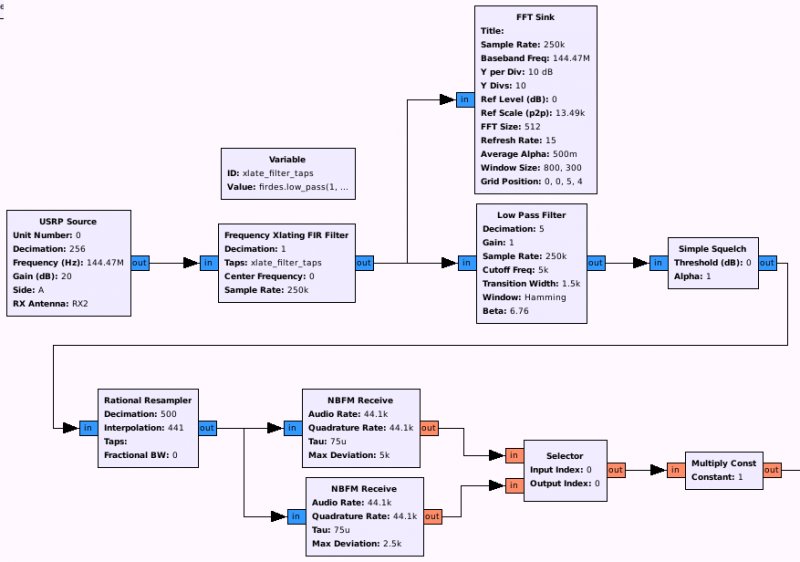
This volume covers GNU Radio Companion (the GUI flowgraph editor) version 3.10+, the version family used since 2022. Earlier 3.7/3.8 documentation is everywhere on the web; treat it as historical and translate the block names if you encounter it (most 3.7 examples have 3.10 equivalents with renamed/refactored blocks).
The four chapters of this volume cover: install, the source/sink for HackRF, a worked AM/FM example, a worked FSK example, and a quick OOT-module overview.
6.2 Installing GNU Radio 3.10+ with HackRF Support
6.2.1 Linux
sudo apt install gnuradio gnuradio-dev gr-osmosdr
gnuradio-companion &
gnuradio ships GNU Radio Companion (GRC), the runtime, and the standard block library. gnuradio-dev adds headers for OOT module development. gr-osmosdr is the osmocom block that provides SoapySDR-mediated source/sink for HackRF, RTL-SDR, USRP, BladeRF, LimeSDR, and more — you’ll use osmocom Source and osmocom Sink for HackRF flowgraphs.
For Kali users, the same packages are pre-installed in recent Kali releases.
6.2.2 macOS
brew install gnuradio gr-osmosdr
gnuradio-companion &
6.2.3 Windows
Use WSL2 (as in Vol 5 §2.3) — GRC’s GTK GUI launches over WSLg’s display server. Native Windows GNU Radio exists (gnuradio.org Windows installer) but the OOT-module ecosystem is sparse on Windows.
6.2.4 Verify
In GRC, drag an osmocom Source from the right-hand pane into the flowgraph. Set its parameters: device arguments hackrf=0, sample rate 2e6, centre freq 100e6. Drag a Frequency Sink (QT GUI), connect them, hit Run (▶). You should see live spectrum.
If osmocom Source is missing, gr-osmosdr is not installed. If the device fails to open, see Vol 5 §2.1 (udev rules).
6.3 The osmocom Source/Sink for HackRF
The osmocom block has roughly 30 parameters; the ones that matter for HackRF:
Table 1 — The osmocom block has roughly 30 parameters; the ones that matter for HackRF
| GRC parameter | HackRF mapping | Typical value |
|---|---|---|
Device Arguments | Selects the HackRF instance | hackrf=0 or hackrf=<serial> |
Sample Rate | sample rate in samples/s | 2e6 to 20e6 |
Ch0: Frequency | centre frequency in Hz | e.g. 433.92e6 |
Ch0: RF Gain | RF amp on/off (0=off, 14=on) | 0 or 14 |
Ch0: IF Gain | LNA gain, 0–40 in 8 dB steps | 16 |
Ch0: BB Gain | VGA gain, 0–62 in 2 dB steps | 24 |
Ch0: Bandwidth | MAX2837 IF filter (auto if 0) | 0 (auto) |
Ch0: Antenna | bias-T enable: empty = off, “TX/RX” = on | empty |
osmocom Source outputs complex float32 samples — the standard GNU Radio sample type. No format conversion needed for downstream blocks. (Compare to hackrf_transfer which writes int8; Vol 5 §4.)
6.4 Worked Example — Live FM Broadcast Receiver
A classic first GNU Radio flowgraph:
osmocom Source ──► Low-Pass Filter ──► WBFM Receive ──► Audio Sink
   (98e6 ctr)      (cutoff 100k)        (quad rate          (44.1 kHz)
   2e6 sr                                = 2e6,
                                         audio = 44.1k)
Block parameters:
Table 2 — Block parameters
| Block | Parameter | Value |
|---|---|---|
osmocom Source | sample rate | 2e6 |
| Ch0 Frequency | 98000000 (or your favourite FM station) | |
| Ch0 RF/IF/BB Gain | 0/16/16 | |
Low Pass Filter | cutoff freq | 100e3 |
| transition width | 50e3 | |
| sample rate | 2e6 | |
WBFM Receive | quadrature rate | 2e6 (input rate) |
| audio decimation | 5 (2e6 / 5 = 400k → 44.1k via Audio Sink rate change) | |
Audio Sink | sample rate | 44.1e3 |
Connect them in order, run. Adjust BB gain for clear audio without clipping.
The flowgraph is saved as .grc (XML) and generates a .py file when you Run. The generated .py is the actual program; GRC is just the editor.
6.5 Worked Example — FSK Decode
For a sub-GHz FSK protocol (typical of 433 MHz remotes), the flowgraph adds a few more stages:
osmocom Source ──► Low-Pass Filter ──► Quadrature Demod ──► Binary Slicer ──► Throttle ──► File Sink
                                       (gain = sample_rate /  (slice level     (rate cap)    (write bits)
                                       (2π × freq_dev))        from histogram)
The Quadrature Demod block does the FSK demodulation by computing the angle change between successive samples — the result is a real-valued signal whose sign tracks the FSK symbol. Binary Slicer thresholds it to bits. File Sink writes the bit stream for offline analysis.
This is the rough shape of what every “decode a 433 MHz remote” tutorial walks. URH (Vol 7) does this whole pipeline graphically and adds protocol-structure inference; GRC is what you reach for when URH’s heuristic decoder is wrong and you want to author the chain by hand.
6.6 Sample-Rate-vs-Bandwidth Trade-offs
A key thing to internalise about flowgraph design:
- Sample rate at the source sets the bandwidth captured. Lower = less data to push through USB and CPU.
- Decimation in mid-flowgraph trades sample rate for bandwidth. A
Decimating FIRat 5:1 reduces the rate by 5× and applies an anti-alias filter to keep what fits. - Audio-rate output (44.1 kHz typical) is far below most HackRF sample rates. Get there with progressive decimation: 2 MS/s → 200 kS/s → 50 kS/s → 25 kS/s → 12.5 kS/s, etc.
The general rule: keep the sample rate as low as possible without truncating the signal of interest. Capturing 20 MS/s when you only need 2 MS/s is 10× more CPU and 10× more disk for no benefit.
6.7 OOT Modules — When to Build Your Own
If the protocol you want to decode is published as a GNU Radio out-of-tree (OOT) module, install it rather than re-implement. Common OOT modules:
Table 3 — If the protocol you want to decode is published as a GNU Radio out-of-tree (OOT) module, install it rather than re-implement. Common OOT modules
| Module | What it decodes | Repo |
|---|---|---|
gr-air-modes | ADS-B (1090 MHz aviation transponder) | https://github.com/bistromath/gr-air-modes |
gr-rds | RDS metadata in FM broadcast | https://github.com/bastibl/gr-rds |
gr-gsm | GSM cellular (passive observation) | https://github.com/ptrkrysik/gr-gsm |
gr-iridium | Iridium satellite traffic | https://github.com/muccc/gr-iridium |
gr-paging | POCSAG / FLEX pager protocols | (multiple forks) |
gr-bluetooth | Bluetooth Classic + LE | https://github.com/greatscottgadgets/gr-bluetooth |
gr-zigbee | IEEE 802.15.4 / ZigBee | https://github.com/bkerler/gr-zigbee |
OOT modules are built from source against your installed GNU Radio (must match major version). Build pattern:
git clone https://github.com/bistromath/gr-air-modes
cd gr-air-modes
mkdir build && cd build
cmake ..
make -j$(nproc)
sudo make install
sudo ldconfig
After install, the new blocks appear in GRC’s right-hand pane under their module name.
6.8 Authoring an OOT Module Yourself
When the protocol you care about isn’t in any existing module, the bootstrap is gr_modtool:
gr_modtool newmod my_protocol      # create gr-my_protocol/ directory
cd gr-my_protocol
gr_modtool add -t general my_decoder    # create a new block
# edit lib/my_decoder_impl.cc — implement work() with your DSP
mkdir build && cd build
cmake .. && make -j$(nproc)
sudo make install && sudo ldconfig
A minimal work() for a custom block:
int my_decoder_impl::work(int noutput_items,
                          gr_vector_const_void_star &input_items,
                          gr_vector_void_star &output_items)
{
    const gr_complex *in = (const gr_complex *) input_items[0];
    char *out = (char *) output_items[0];

    for (int i = 0; i < noutput_items; i++) {
        out[i] = (std::abs(in[i]) > threshold_) ? 1 : 0;
    }
    return noutput_items;
}
For a real protocol decoder, the work() is more complex — it implements the demodulator, framer, and sometimes a state machine. The OOT-module-authoring book “GNU Radio for the Practical Engineer” by Tom Rondeau is the best reference, but PySDR^[https://pysdr.org/] covers the basics free.
6.9 Performance Tuning
GRC flowgraphs run as Python that calls into C++ blocks. CPU is sometimes the bottleneck:
- Profile with
topwhile running. If the GRCpython3process is at 100% CPU, the flowgraph is CPU-bound. - Reduce sample rate at the source if possible — the highest-leverage optimisation.
- Decimate early — push decimation as close to the source as the math allows.
- Use
Polyphase Arbitrary Resamplerrather than chained Decimating FIR filters when the rate-change ratio is non-integer. - Disable QT visualisations when running production flowgraphs —
Frequency SinkandWaterfall Sinkeach consume meaningful CPU. UseFile Sinkfor throughput-bound work and inspect output offline.
For multi-flowgraph parallel processing (e.g. simultaneous decoders for several frequencies in different bands), each flowgraph can lock to a CPU core via taskset:
taskset -c 0 python3 fm_decoder.py &
taskset -c 1 python3 ads_b.py &
6.10 Cheatsheet Updates from this Volume
For Vol 12:
osmocom Sourcedevice args:hackrf=0orhackrf=<serial>- Standard sample type: complex float32
- Common flowgraph: source → LPF → demod → sink
- Audio-rate output: progressive decimation 2e6 → 50e3 → 25e3 → 12.5e3 …
- OOT modules: build with cmake/make against installed gnuradio version
gr_modtool newmod NAMEto start a new OOT module- Performance: decimate early; disable QT GUIs in production
6.11 Resources
Table 4 — 11. Resources
| Resource | URL |
|---|---|
| GNU Radio main site | https://www.gnuradio.org/ |
| GNU Radio wiki | https://wiki.gnuradio.org/ |
| GNU Radio tutorials | https://wiki.gnuradio.org/index.php/Tutorials |
| gr-osmosdr (HackRF source/sink) | https://osmocom.org/projects/gr-osmosdr |
| PySDR — Marc Lichtman’s free book | https://pysdr.org/ |
| OOT module authoring guide | https://wiki.gnuradio.org/index.php/OutOfTreeModules |
| gr-air-modes (ADS-B) | https://github.com/bistromath/gr-air-modes |
| gr-rds | https://github.com/bastibl/gr-rds |
| gr-bluetooth | https://github.com/greatscottgadgets/gr-bluetooth |
| gr-gsm | https://github.com/ptrkrysik/gr-gsm |
Comments (0)