PWNagotchi · Volume 11
PWNagotchi Volume 11 — Programming: Custom Plugins, Themes, and Display Drivers
The Plugin class lifecycle hooks, writing a Fancygotchi face theme, and authoring an e-ink display driver from scratch
Every interesting Pwnagotchi customization lands as a plugin. The plugin API is the most-used extension point on the device — easier than modifying the daemon, more capable than tweaking config. Reasons to write one:
- Sidecar a workflow you do post-capture — auto-upload to a private S3 bucket, push notifications to your phone, run an on-device dictionary attack against captures, etc.
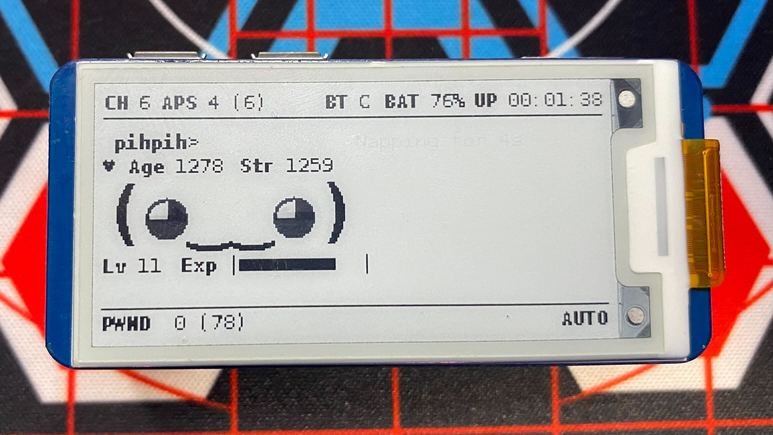
- Surface custom UI on the e-ink face — show CPU temp, network usage, peer count, time-to-next-train, etc.
- Integrate new hardware — a temperature sensor, a button board, an RGB LED, a small accelerometer.
- Implement an allow-list-only capture mode — mainline only does deny-lists; a plugin can intercept the capture pipeline and gate by SSID/BSSID allow-list.
- Add a custom voice / personality — replace the canned status messages with your own.
The bar is low. A useful plugin is often ~50-100 lines of Python.
11.1 Plugin skeleton
# /usr/local/share/pwnagotchi/custom-plugins/my_plugin.py

import logging

import pwnagotchi
import pwnagotchi.plugins as plugins


class MyPlugin(plugins.Plugin):
    __author__ = '<your-name>'
    __version__ = '1.0.0'
    __license__ = 'GPL3'
    __description__ = 'A starting-point plugin'

    def __init__(self):
        super().__init__()
        # Optional: read self.options dict for plugin-specific config
        # set in [main.plugins.my_plugin] in config.toml
        self.options = dict()

    def on_loaded(self):
        logging.info("[my_plugin] loaded with options: %s" % self.options)

    def on_ready(self, agent):
        logging.info("[my_plugin] ready — agent and bettercap initialized")

    def on_handshake(self, agent, filename, access_point, client_station):
        logging.info("[my_plugin] captured handshake: %s (%s ← %s)" % (
            filename,
            access_point.get('hostname', 'unknown'),
            client_station.get('mac', 'unknown'),
        ))

    def on_unload(self, ui):
        logging.info("[my_plugin] unloading")
Enable via config.toml:
[main.plugins.my_plugin]
enabled = true
some_option = "value"            # surfaced to plugin as self.options["some_option"]
Restart with sudo systemctl restart pwnagotchi. Watch journalctl -u pwnagotchi -f for [my_plugin] loaded.
11.2 The hook catalogue (the ones you actually use)
The lifecycle hooks, in expected call order:
11.2.1 Initialization hooks
Table 1 — 3.1 Initialization hooks
| Hook | Signature | When |
|---|---|---|
__init__() | (self) | Plugin instantiated. Read self.options. Don’t do heavy work here. |
on_loaded() | (self) | After config parse + import. Initial setup, library imports, hardware connection. |
on_ready(agent) | (self, agent) | Bettercap + UI + daemon all alive. agent is the daemon’s Agent object. |
on_internet_available(agent) | (self, agent) | Network reachable. Fire-and-forget upload tasks. |
11.2.2 UI hooks
Table 2 — 3.2 UI hooks
| Hook | Signature | When |
|---|---|---|
on_ui_setup(ui) | (self, ui) | UI is being built. Call ui.add_element('my_element', LabeledValue(...)) to add custom elements. |
on_ui_update(ui) | (self, ui) | UI is being refreshed (every ~2 sec by default). Update your element’s value. |
11.2.3 Wi-Fi event hooks
Table 3 — 3.3 Wi-Fi event hooks
| Hook | Signature | When |
|---|---|---|
on_handshake(agent, filename, ap, client) | (self, agent, filename, access_point, client_station) | EAPOL or PMKID handshake captured. filename is the path to the .pcap. |
on_association(agent, access_point) | (self, agent, access_point) | New AP observed (with full RSN info). |
on_deauthentication(agent, access_point, client_station) | Sent a deauth frame. Rare to handle. |
11.2.4 State-machine hooks
Table 4 — 3.4 State-machine hooks
| Hook | Signature | When |
|---|---|---|
on_bored(agent) | (self, agent) | Gotchi entered “bored” state. |
on_sad(agent) | (self, agent) | ”Sad” state. |
on_excited(agent) | (self, agent) | Just captured something. |
on_lonely(agent) | (self, agent) | Hasn’t seen peers in a while. |
on_epoch(agent, epoch_num, epoch_data) | Every ~30 sec the agent finishes an “epoch” — a snapshot. |
11.2.5 pwngrid hooks
Table 5 — 3.5 pwngrid hooks
| Hook | Signature | When |
|---|---|---|
on_peer(agent, peer) | (self, agent, peer) | New peer discovered. |
on_peer_lost(agent, peer) | Peer went out of range. |
11.2.6 Shutdown hooks
Table 6 — 3.6 Shutdown hooks
| Hook | Signature | When |
|---|---|---|
on_unload(ui) | (self, ui) | Plugin is being unloaded — clean shutdown. Save state, close hardware. |
11.3 Worked example 1 — log captures to local SQLite
A plugin that maintains a small SQLite database of every capture, with timestamp + AP info + GPS coordinates if available. Useful for offline analytics.
# /usr/local/share/pwnagotchi/custom-plugins/capture_log.py
import logging
import os
import sqlite3
from datetime import datetime

import pwnagotchi.plugins as plugins


class CaptureLog(plugins.Plugin):
    __author__ = '<your-name>'
    __version__ = '1.0.0'
    __license__ = 'GPL3'
    __description__ = 'Log captures to /root/captures.db (SQLite)'

    DEFAULT_DB = '/root/captures.db'

    def __init__(self):
        super().__init__()
        self.db_path = None
        self.conn = None

    def on_loaded(self):
        self.db_path = self.options.get('db_path', self.DEFAULT_DB)
        new_db = not os.path.exists(self.db_path)
        self.conn = sqlite3.connect(self.db_path, check_same_thread=False)
        if new_db:
            self._init_schema()
        logging.info("[capture_log] db ready at %s" % self.db_path)

    def _init_schema(self):
        self.conn.execute("""
            CREATE TABLE captures (
                id INTEGER PRIMARY KEY,
                timestamp TEXT NOT NULL,
                ap_essid TEXT,
                ap_bssid TEXT,
                ap_channel INTEGER,
                client_mac TEXT,
                filename TEXT,
                gps_lat REAL,
                gps_lon REAL
            )
        """)
        self.conn.commit()

    def on_handshake(self, agent, filename, access_point, client_station):
        gps_lat, gps_lon = None, None
        gps_file = filename + '.gps.json'
        if os.path.exists(gps_file):
            import json
            with open(gps_file) as f:
                g = json.load(f)
            gps_lat = g.get('Latitude')
            gps_lon = g.get('Longitude')

        self.conn.execute(
            "INSERT INTO captures "
            "(timestamp, ap_essid, ap_bssid, ap_channel, client_mac, filename, gps_lat, gps_lon) "
            "VALUES (?, ?, ?, ?, ?, ?, ?, ?)",
            (
                datetime.utcnow().isoformat() + 'Z',
                access_point.get('hostname'),
                access_point.get('mac'),
                access_point.get('channel'),
                client_station.get('mac'),
                filename,
                gps_lat, gps_lon,
            )
        )
        self.conn.commit()
        logging.info("[capture_log] logged %s" % filename)

    def on_unload(self, ui):
        if self.conn:
            self.conn.close()
Enable:
[main.plugins.capture_log]
enabled = true
db_path = "/root/captures.db"
Query later:
sqlite3 /root/captures.db "SELECT timestamp, ap_essid, gps_lat, gps_lon FROM captures LIMIT 20"11.4 Worked example 2 — show CPU temperature on the e-ink face
# /usr/local/share/pwnagotchi/custom-plugins/show_temp.py
import subprocess
import logging

import pwnagotchi.plugins as plugins
from pwnagotchi.ui.components import LabeledValue
from pwnagotchi.ui.view import BLACK


class ShowTemp(plugins.Plugin):
    __author__ = '<your-name>'
    __version__ = '1.0.0'
    __description__ = 'Show CPU temperature on the e-ink face'

    def on_loaded(self):
        logging.info("[show_temp] loaded")

    def on_ui_setup(self, ui):
        ui.add_element(
            'cpu_temp',
            LabeledValue(
                color=BLACK,
                label='TEMP',
                value='--C',
                position=(ui.width() - 70, 91),
                label_font=None,  # default font
                text_font=None,
            )
        )

    def on_ui_update(self, ui):
        try:
            out = subprocess.check_output(['vcgencmd', 'measure_temp']).decode()
            # output format: "temp=42.7'C\n"
            temp = out.split('=')[1].strip().rstrip("'C\n").split('.')[0] + 'C'
            ui.set('cpu_temp', temp)
        except Exception as e:
            logging.error("[show_temp] failed: %s" % e)

    def on_unload(self, ui):
        with ui._lock:
            try:
                ui.remove_element('cpu_temp')
            except Exception:
                pass
Enable:
[main.plugins.show_temp]
enabled = true
Result: a small “TEMP 42C” indicator on the e-ink status row, updating every ~2 sec. (Use on_ui_update only for cheap operations — it’s called frequently.)
11.5 Worked example 3 — push notifications on capture
A plugin that hits an external webhook (e.g., a Discord channel, a self-hosted ntfy server, or a Home Assistant automation) on every capture. Use carefully — see Vol 10 §6.
# /usr/local/share/pwnagotchi/custom-plugins/notify.py
import logging

import pwnagotchi.plugins as plugins
import requests


class Notify(plugins.Plugin):
    __author__ = '<your-name>'
    __version__ = '1.0.0'
    __description__ = 'POST a notification to an external webhook on capture'

    def on_loaded(self):
        self.webhook = self.options.get('webhook')
        if not self.webhook:
            logging.error("[notify] no webhook URL configured")
        else:
            logging.info("[notify] will POST to %s" % self.webhook)

    def on_handshake(self, agent, filename, ap, client):
        if not self.webhook:
            return
        try:
            requests.post(
                self.webhook,
                json={
                    'content': f'Pwnagotchi captured: {ap.get("hostname")} ({ap.get("mac")}) ← {client.get("mac")}'
                },
                timeout=5,
            )
        except Exception as e:
logging.error("[notify] webhook failed: %s" % e)[main.plugins.notify]
enabled = true
webhook = "https://discord.com/api/webhooks/XXX/YYY"11.6 Writing a Fancygotchi theme
The theme system is covered structurally in Vol 7 §4. Authoring a custom theme is a 30-minute exercise:
cp -r /etc/pwnagotchi/fancygotchi/themes/default /etc/pwnagotchi/fancygotchi/themes/my_theme- Edit
my_theme/theme.json:- Set
"name": "my_theme","author": "<your-name>" - Adjust
target_panelto match your e-ink - (Optionally) move UI elements around —
layout.face.position,layout.status_row, etc.
- Set
- Replace the face sprites:
- Open
faces/awake.png(or the equivalent for your target panel size) in GIMP / Inkscape - Edit to your aesthetic; save in the panel’s palette (Vol 7 §6)
- Repeat for each state (
happy.png,sad.png,excited.png, …)
- Open
- Preview without burning panel cycles:
sudo fancygotchi-render my_theme --state happy --output /tmp/preview.png feh /tmp/preview.png # or any image viewer - Apply:
sudo fancygotchi-theme apply my_theme
sudo systemctl restart pwnagotchi
The most-common authoring mistakes:
- Sprites with anti-aliasing → ugly dithering on e-paper. Use sharp edges, no transparency gradients.
- Sprites that don’t cover all face states → Fancygotchi falls back to
awake.pngwith a log warning. - Layout positions out-of-bounds → text clipped at the e-ink edge. Render preview first.
11.7 Writing a custom e-ink display driver
Rare — the mainline + Fancygotchi driver set covers most reasonable e-paper hardware — but occasionally a niche panel requires a custom driver. The integration point:
# Place at: /usr/local/share/pwnagotchi/pwnagotchi/ui/hw/my_display.py
import logging

from PIL import Image

from pwnagotchi.ui.hw.base import DisplayImpl


class MyDisplay(DisplayImpl):

    def __init__(self, config):
        super().__init__(config, 'my_display')

    def layout(self):
        # Return panel resolution as PIL-style (w, h) and any layout metadata
        fonts = config.get('ui.font.size', {})
        self._layout['width'] = 264
        self._layout['height'] = 176
        self._layout['face'] = (5, 10, 60, 60)        # x, y, w, h of the face region
        self._layout['status'] = (0, 0, 264, 12)      # status row
        return self._layout

    def initialize(self):
        # Bring up the panel via SPI / I2C / whatever
        # Most panels have a vendor library on PyPI you wrap here
        from waveshare_epd import epd_my_panel
        self._panel = epd_my_panel.EPD()
        self._panel.init()
        self._panel.Clear(0xFF)

    def render(self, canvas):
        # canvas is a PIL.Image at panel resolution; push to the panel
        self._panel.display(self._panel.getbuffer(canvas))

    def clear(self):
        self._panel.Clear(0xFF)
Then register in pwnagotchi/ui/hw/__init__.py:
elif config['display']['type'] == "my_display":
    from pwnagotchi.ui.hw.my_display import MyDisplay
    display = MyDisplay(config)
And in config.toml:
[ui.display]
type = "my_display"
The challenge is usually not the integration — it’s getting the vendor’s SPI library to actually drive your specific panel revision. e-paper vendor libraries are notoriously inconsistent. Plan to spend a weekend on a custom driver if the panel doesn’t have a pip install waveshare-epd already wired.
11.8 Custom voice / personality
The Pwnagotchi’s status-row messages (“Cracking handshakes…” “Watching the channels…” etc.) come from /usr/local/share/pwnagotchi/voice/. Each language has a <lang>.json with the message library.
To customize:
sudo cp /usr/local/share/pwnagotchi/voice/en.json /usr/local/share/pwnagotchi/voice/en.json.bak
sudo nano /usr/local/share/pwnagotchi/voice/en.json
Edit the messages. They support some basic templating: {name}, {epoch}, {aps}, etc. Restart the daemon. Your gotchi now talks differently.
This is a quick win for personalization — and is what most “I made a custom Pwnagotchi!” Reddit posts actually consist of.
11.9 Sharing your work
For plugins:
- Put the file in a Git repo under any name (e.g.,
pwnagotchi-myplugin). - Include a
README.mdwith the[main.plugins.<name>]block users need. - License explicitly (GPL3 matches the project’s license).
- Post in the Pwnagotchi Discord, the
r/pwnagotchisubreddit, or open a PR against jayofelony’s fork to land it in the bundled plugin set.
For themes: same flow, just inside /etc/pwnagotchi/fancygotchi/themes/<theme_name>/.
For drivers: only land in the daemon code itself — PR against jayofelony’s repo.
11.10 Debugging tips
Table 7 — 11. Debugging tips
| Issue | Approach |
|---|---|
| Plugin doesn’t load | journalctl -u pwnagotchi -n 200 looking for import / syntax errors |
| Plugin loads but hook never fires | Check hook signature matches the base class. from pwnagotchi.plugins import Plugin; help(Plugin) |
| Plugin breaks the daemon | Wrap your code in try/except; the daemon’s main loop is single-threaded — uncaught exception kills it |
| Plugin breaks the UI | If on_ui_setup or on_ui_update raises, your element vanishes. Same wrap pattern. |
| Want interactive testing | from pwnagotchi.agent import Agent; agent = Agent(...) in a Python REPL — but most plugins need full bettercap state, so this is limited |
| Want to test against pcap | Run bettercap standalone (sudo bettercap -caplet pwnagotchi.cap) and watch the RPC — easier than running the full daemon |
11.11 Cheatsheet updates from this volume
Items to roll into Vol 12 (laminate-ready cheatsheet):
- “Plugin lives in
/usr/local/share/pwnagotchi/custom-plugins/, filename must match[main.plugins.<name>].” (§1, §2)- “Most-used hooks:
on_loaded,on_ready,on_handshake,on_ui_setup,on_ui_update.” (§3)- “Use
logging.getLogger('pwnagotchi')—print()is dropped by systemd.” (§2)- “Theme = JSON descriptor + face PNG sprites in panel palette.” (§7)
- “Preview themes with
sudo fancygotchi-renderbefore applying.” (§7)
Comments (0)