PWNagotchi · Volume 12
PWNagotchi Volume 12 — Comparison vs Alternatives, Legal & Ethics, Laminate-ready Cheatsheet
Where Pwnagotchi sits in the broader Wi-Fi-capture lineup, the legal envelope you cannot ignore, and the laminate-ready field card synthesizing everything from Vols 1-11
Pwnagotchi sits in a category with a half-dozen other tools in this hub. Each was built for a different point in the design space.
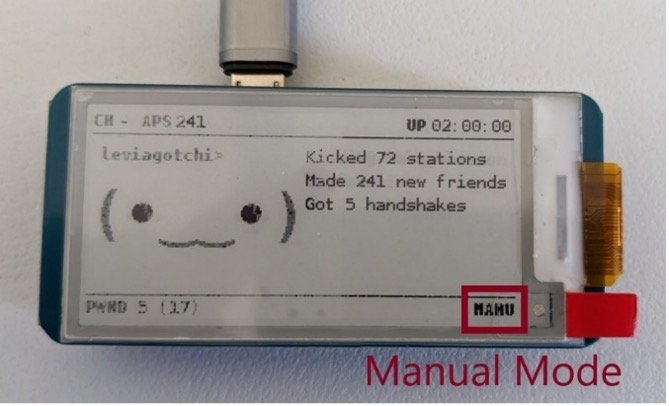
Table 1
| Tool | Substrate | Mode | Standalone? | RL/AI? | 5 GHz? | BLE? | Multi-radio? | Strength | Weakness |
|---|---|---|---|---|---|---|---|---|---|
| Pwnagotchi (this) | Pi Zero W | Autonomous | Yes | Yes | No | No | No | Set-and-forget RL capture | 2.4-only; broadcasts pwngrid beacons |
| Flipper WiFi Devboard | ESP32-S2 + Flipper Zero host | Operator-driven via Flipper UI | No (needs Flipper) | No | No | No | No | Tight Flipper integration | Slow UI; small fw set |
| AWOK Dual Touch V3 | 2× ESP32-WROOM | Operator-driven, touch UI | Yes (own battery) | No | No | Yes | 2× Wi-Fi + GPS | Touch UI, GPS, dual radio | Bulkier; 2.4-only |
| Ruckus Game Over | ESP32-S3 + slot for CC1101/NRF24 | Operator-driven, OLED + joystick | Yes (own battery) | No | No | Yes | Wi-Fi + sub-GHz + 2.4 | Multi-band radio | Larger; needs joystick |
| ESP32 Marauder (firmware) | Various ESP32 boards | Operator-driven, varied | Depends on board | No | No | Yes | Depends on board | Mature, broad fork ecosystem | Operator must drive |
| DSTIKE Hackheld | ESP8266 + DSTIKE WiFi+ PA | Operator-driven, OLED + buttons | Yes | No | No | No | No (just Wi-Fi) | Cheap, small, +25 dBm PA | ESP8266 limited frame injection |
| WiFi Pineapple (Hak5) | OpenWrt on custom HW | Operator-driven, web UI | Plugged in / battery | No | Yes (Mark VII AC, Enterprise) | No | 2× to 5× Wi-Fi radios | Lab-grade; KARMA + PineAP | Most $; most posture-sensitive |
| Quansheng UV-K5 + ext | DSP HT + Wi-Fi-via-SDR-trick | Receive-mostly | No | n/a | n/a | n/a | Not really Wi-Fi | Not actually for this | Wrong tool for this |
One-sentence summary of where each wins:
- Pwnagotchi — the only one that learns. Use when the gotchi moves around and you can’t pre-tune.
- Flipper WiFi Devboard — the right pick if you already carry a Flipper and want Wi-Fi recon as one of many tools at hand.
- AWOK Dual Touch V3 — the modern touch-screen ESP32 handheld with dual radios + GPS. Best for active multi-band recon.
- Ruckus Game Over — when you need 2.4 GHz Wi-Fi and sub-GHz in the same box.
- Marauder firmware — when you have a specific ESP32 board you want to repurpose.
- DSTIKE Hackheld — cheap, ESP8266, pocket form factor, +25 dBm PA. The “weekend warrior” of the lineup.
- WiFi Pineapple — the only real choice for venue / enterprise pen-test work. Lab-grade.
12.1 The Pwnagotchi differentiation, restated
After Vols 1-11, the case for Pwnagotchi over every other entry in the lineup is one sentence:
Pwnagotchi is the only Wi-Fi capture appliance that you can set down and forget for weeks, that will gradually learn the rhythms of the environment it’s deployed in, and that ships with a delightful cultural / aesthetic story making it a conversation piece rather than just a tool.
Everything else in this hub is a tool — you pick it up, do a thing, put it down. The Pwnagotchi is an appliance — it lives somewhere, it does its job autonomously, and over time it accumulates state (its trained brain, its peers database, its capture corpus) that makes it materially better at its job than it was on day one.
That said: if your goal is high-volume / high-quality capture, the Pineapple wins. If your goal is convenient capture while you do other things, the Flipper WiFi Devboard wins. The Pwnagotchi wins specifically when you want the autonomous + cultural angle.
12.2 The legal envelope — restated for emphasis
If you skip every other section of this deep dive, read this one.
The Pwnagotchi captures WPA2 handshake material by transmitting forged deauthentication frames at access points and their clients — frames that masquerade as the AP telling the client “we’re done; reconnect” — which is illegal in the US (CFAA 18 USC §1030 + Wiretap Act 18 USC §2511), the UK (Computer Misuse Act 1990 §§ 1-3), the EU (GDPR + national CFA equivalents in each member state), Canada (Criminal Code §342.1), Australia (Criminal Code Act 1995 §§ 477-478), and similar statutes in most other jurisdictions, unless one of the following applies:
- The target network is yours (you own or operate it).
- You have explicit written authorization from the operator (engagement letter, signed SOW, CTF rules, etc.).
- The traffic is captured inadvertently while testing your own network, and you immediately delete the inadvertent captures.
The Pwnagotchi’s AUTO and AI modes are especially legally hazardous because they by definition select their own targets. Claims of “I was just testing my own network” become difficult to substantiate when the device’s /root/handshakes/ directory contains the entire block’s worth of pcaps. The defense “I didn’t know the gotchi would attack my neighbor” is legally weak; the operator owns the device’s actions.
The only operational mitigation in mainline Pwnagotchi is the deny-list (main.whitelist in config.toml). There is no allow-list mode. To run an allow-list-only configuration you’d write a custom plugin (Vol 11) that intercepts the capture pipeline and discards captures from non-allow-listed targets.
Strongly recommended posture: Run with an aggressive whitelist (all your own + commonly-encountered networks). Capture in MANU or AUTO mode against pre-selected targets only. Avoid AI mode at any location where the targets aren’t all knowable in advance. Delete any inadvertent capture immediately.
12.3 Ethics beyond legality
Even where legal:
- WPA3 is mostly immune. Targeting WPA2-only networks (because that’s what the tool does) skews capture toward older, less-maintained infrastructure — often a senior or low-budget operator’s network. The Pwnagotchi is, in practice, more likely to capture handshakes from people less able to defend themselves.
- The pwngrid social mode is fingerprinting. Carrying a Pwnagotchi to a venue makes you, the operator, identifiable to every other Pwnagotchi at that venue and to anyone with a monitor-mode receiver who knows what pwngrid beacons look like.
- Cracked credentials are not yours to use. Even if you legally capture a handshake and legally crack it, the resulting password is the operator’s secret. Using it to log into the network is a separate unauthorized-access event.
The community has historically danced around these issues with “but it’s just for research” and “I don’t actually crack them.” Both are defensible positions when true. They are not defensible as cover for casual / curiosity-driven attacks.
The _shared/legal_ethics.md document in this hub captures the project-wide posture: own hardware or written authorization, always. No exceptions.
12.4 Operational posture — recommended approach
Given a profile of careful lab discipline and hobby-grade engagement with hack tools, the recommended posture is:
- Build a Path A Pwnagotchi (Vol 2 §8 BOM). $80-100, a weekend.
- Build the Motorola Advisor case-mod (Vol 4 §6) as a follow-on cultural / aesthetic project. Source the pager off eBay; Kelly’s STLs are the canonical inserts. This is the photogenic centerpiece — it’s worth it for that reason alone.
- Run on the bench in MANU mode against your own networks for two weeks. Get familiar with the daemon, the web UI, the plugin loading process.
- Switch to AUTO mode for stationary deployment (a deliberate spot in the house). Don’t deploy AI mode until you’ve understood Vol 6.
- Write one custom plugin (Vol 11 §4 worked example is good). Get a feel for the API.
- Optionally install Fancygotchi (Vol 7) and author a custom face theme. Probably best paired with the Pimoroni Inky Impression 4” rather than retrofitting onto the Waveshare 2.13” build.
- Do not carry it to public venues casually. If you bring it to a hacker con, set
personality.advertise = falseat minimum; ideally swap the SD card with a “con SD” that has a fresh pseudonym + empty peers DB so you don’t tie convention-attendance to the daily-driver gotchi.
12.5 Long-term outlook (2026-2030)
Table 2 — 6. Long-term outlook (2026-2030)
| Trend | Effect on Pwnagotchi |
|---|---|
| WPA3 adoption | Most new APs ship WPA3-capable by 2026; WPA2-only deployments shrink. Pwnagotchi’s capture surface halves between 2026 and ~2028. |
| 802.11w (PMF) default | Protected Management Frames make deauth attacks ineffective. PMF is mandatory in WPA3, optional in WPA2; default-on in most modern APs since ~2023. The deauth path will largely break against modern AP firmware over the 2026-2028 period. |
| PMKID solicitation defenses | More APs decline to respond to unsolicited association requests, closing the PMKID path. |
| 6 GHz Wi-Fi 6E / 7 | Continues to be 2.4-GHz-blind for the Pwnagotchi; legacy 2.4 GHz networks persist for IoT but become less interesting. |
| Active Pwnagotchi development | jayofelony’s fork is actively maintained as of 2026; fmatray’s Fancygotchi is less frequently updated but functional. Both will continue for the foreseeable future. |
Net: The Pwnagotchi’s useful capture window is closing over the 2026-2030 horizon. As a hobby project + cultural artifact, it remains evergreen. As a current-events attack tool, it is sunsetting.
12.6 The cheatsheet
The pages below are designed for laminate-and-carry. Print at 100% scale; trim to a wallet-sized card if desired.
12.6.1 The 30-second mental model
   ┌───────────────────────────────────────────────────────────────┐
   │  PWNAGOTCHI = Pi Zero W + e-ink + bettercap + A2C agent      │
   │                                                                │
   │  CAPTURES WPA2 PMKID + EAPOL handshakes — does NOT crack.    │
   │  Cracking = workstation hashcat -m 22000 later.              │
   │                                                                │
   │  2.4 GHz only. No 5 GHz. No BLE. No WPA3.                    │
   │                                                                │
   │  AI mode = A2C tunes bettercap params. Useful when mobile.   │
   │  AUTO mode = no RL, autonomous. Fine when stationary.        │
   │  MANU mode = static config. For dev/debug.                    │
   │                                                                │
   │  LEGAL: own hardware or written authorization only.          │
   └───────────────────────────────────────────────────────────────┘
12.6.2 Default build — Path A
Pi Zero 2 W                $15
Waveshare 2.13" v4         $22
1200 mAh LiPo              $8
PiSugar 3 (preferred)      $30   OR   PowerBoost 1000C    $15
microSD (HiEndurance 32G)  $10
3D-printed brick PETG case $5 (print) | $15 (order)
──────────────────────────────────────────
Total                      $80-100
Build time                 2-4 hours
12.6.3 Mike J. Kelly Motorola Advisor mod
Motorola Advisor (alphanumeric, NOT Elite)   $5-25 eBay
3D-printed Kelly inserts (PETG)              $3-5
[The Pi + e-ink + LiPo come from Path A]
──────────────────────────────────────────
Add to Path A total: ~$10-30 + a weekend
Use Waveshare 2.13" v4 + PowerBoost (not PiSugar — too tall)
12.6.4 The 10 commands you’ll use most
# SSH in (USB-OTG first boot)
ssh pi@10.0.0.2

# Tail the daemon log
sudo journalctl -u pwnagotchi -f

# Confirm monitor mode
sudo iw dev

# Restart after config change
sudo systemctl restart pwnagotchi

# Pull captures off to workstation
rsync -avz pi@10.0.0.2:/root/handshakes/ ~/pwnagotchi-loot/

# Convert pcap to hashcat 22000
hcxpcapngtool -o all.22000 *.pcap

# Crack with rockyou
hashcat -m 22000 all.22000 ~/wordlists/rockyou.txt
hashcat -m 22000 --show all.22000

# Show config
cat /etc/pwnagotchi/config.toml | less

# Update plugins / pwnagotchi
sudo pwnagotchi update

# Web UI
# http://10.0.0.2:8080/ — login with your [ui.web] creds
12.6.5 Diagnostic checklist when something’s broken
[ ] systemctl status pwnagotchi → active?
[ ] systemctl status bettercap → active?
[ ] sudo iw dev → monitor interface?
[ ] cat /etc/pwnagotchi/config.toml → display type matches HAT silkscreen?
[ ] df -h / → SD card not full?
[ ] ls /root/handshakes/ → captures landing?
[ ] journalctl -u pwnagotchi -n 200 | grep -i error → recurring errors?
[ ] If still broken: try with personality.mode = "manu" — eliminates AI from the loop
12.6.6 config.toml essential settings
main.name = "..."                       # your gotchi's name
main.whitelist = ["..."]                # your own SSIDs to ignore

[personality]
mode = "ai"                             # "ai" / "auto" / "manu"
advertise = true                        # pwngrid; OFF at venues

[ui.display]
type = "waveshare_4"                    # MATCH HAT SILKSCREEN
rotation = 0

[ui.web]
enabled = true
username = "admin"
password = "..."                        # CHANGE FROM DEFAULT

[main.plugins.grid]
enabled = true

[main.plugins.fix_brcmf]
enabled = true                          # KEEP ON — protects monitor mode

[main.plugins.webcfg]
enabled = true                          # web-UI plugin config editor

[main.plugins.pisugar]                  # if you have one
enabled = true
12.6.7 The legal envelope, distilled
   ┌─────────────────────────────────────────────────────────────┐
   │  Pwnagotchi transmits forged deauth frames at WPA2 APs.    │
   │  This is illegal in the US/UK/EU/CA/AU without authority.  │
   │                                                              │
   │  AI/AUTO mode = especially hazardous (no pre-target).      │
   │  Always whitelist aggressively. Capture only against:      │
   │   1) Your own networks                                      │
   │   2) Networks under written authorization                   │
   │   3) Networks at a CTF / lab event you're sanctioned for   │
   │                                                              │
   │  WPA3 / SAE is immune.                                      │
   │  802.11w (PMF) breaks deauth — modern APs largely have it. │
   │  PMKID is often denied — modern APs largely have it.       │
   └─────────────────────────────────────────────────────────────┘
12.6.8 Mode selection — when to use which
   AI    — gotchi moves around (commute, backpack, travel). Worth waking up the agent.
   AUTO  — stationary deployment (shelf, balcony, lab). Most users, most of the time.
   MANU  — bench / debug; reproducible-config experiments.
12.6.9 Plugin defaults (the ones you toggle on day one)
ALWAYS:
   grid         — pwngrid social (default on)
   webcfg       — web-UI plugin config
   fix_brcmf    — keeps monitor mode alive across apt upgrades

OPTIONAL hardware-conditional:
   pisugar      — if you have a PiSugar 3
   gps          — if you have a UART/USB GPS module
   webgpsmap    — if gps enabled

DEFAULT OFF:
   auto-update  — disable in production (reproducibility)
   wpa-sec      — third-party crowdsourced cracking (leaks metadata)
   wigle        — third-party wardriving DB (leaks attribution)
   ohcapi       — third-party crack-as-a-service (leaks captures)
   bt-tether    — only if you've configured BT to phone
12.6.10 Comparison vs hub alternatives (one-liner each)
Pwnagotchi    : autonomous, RL, set-and-forget, 2.4 only
Flipper Devbd : operator-driven via Flipper, tight integration
AWOK V3       : touch UI, dual ESP32, GPS, modern
Game Over     : multi-radio (Wi-Fi + sub-GHz + NRF24), OLED+joystick
Marauder fw   : firmware, runs on many ESP32 boards
DSTIKE HH     : cheap, ESP8266, +25 dBm PA, pocket-size
Pineapple     : lab-grade, web UI, KARMA/PineAP, 5 GHz, $$$
12.7 Final notes
The Pwnagotchi is one of the most-loved projects in this hub. The combination of a real, working RL agent + an honest hardware story + a delightful cultural framing (Tamagotchi-cute) + a vibrant case-mod tradition (Mike J. Kelly Motorola Advisor at the top of the heap) makes it a uniquely satisfying build.
It’s also a project whose useful attack window is closing, whose legal posture is fragile, and whose cultural identity has occasionally overshadowed its practical value. Treat it as a delightful hobby project + an interesting RL-applied study, not as a serious work tool.
Go build one. Build the Advisor mod. Take photos. Don’t deauth strangers.
12.8 Appendix — quick-reference URLs
- jayofelony fork (the active distribution): https://github.com/jayofelony/pwnagotchi
- Fancygotchi: https://github.com/fmatray/Fancygotchi
- bettercap: https://github.com/bettercap/bettercap
- pwngrid: https://github.com/evilsocket/pwngrid
- Original (archived) pwnagotchi: https://github.com/evilsocket/pwnagotchi
- pwnagotchi.ai (original docs site, partly stale): https://pwnagotchi.ai/
- hashcat: https://hashcat.net/
- hcxtools (pcap → 22000 conversion): https://github.com/ZerBea/hcxtools
- Raspberry Pi Imager: https://www.raspberrypi.com/software/
- Waveshare 2.13” v4 EPD: https://www.waveshare.com/2.13inch-e-paper-hat.htm
- Pimoroni Inky Impression 4”: https://shop.pimoroni.com/products/inky-impression-4
- PiSugar: https://www.pisugar.com/
Comments (0)