HackRF One · Volume 4
HackRF One Volume 4 — Firmware, DFU, Recovery, and Building from Source
The hackrf firmware tree, the v2026.01.1 release, the bricked-device recovery path, and how to build your own
4.1 About this Volume
Three firmware streams meet on a HackRF One:
- Stock GSG firmware — what runs on the LPC4320 when there’s no PortaPack attached. Source at
github.com/greatscottgadgets/hackrf. Latest release: v2026.01.1 (January 2026). - CPLD bitstream — the small
.xsvfthat programs the Xilinx CoolRunner-II glue logic. Lives in the same repo atfirmware/cpld/sgpio_if/default.xsvf. Updated very rarely. - Mayhem firmware — what replaces the stock firmware when a PortaPack is attached. Different repo (
github.com/portapack-mayhem/mayhem-firmware); covered in Vol 10.
This volume covers the first two. The DFU recovery path, the upgrade workflow, the build-from-source toolchain, and the version-pinning recommendations live here.
4.2 The Firmware Source Tree
Cloning the canonical repo:
git clone https://github.com/greatscottgadgets/hackrf
cd hackrf
Layout:
hackrf/
├── firmware/                      ← LPC4320 firmware (this is what hackrf_spiflash flashes)
│   ├── common/                    ← shared code (RFFC5072, MAX2837, MAX5864, Si5351 drivers)
│   ├── hackrf_one/                ← board-specific code for the HackRF One
│   ├── hackrf_pro/                ← board-specific code for the HackRF Pro (added 2026.01)
│   ├── hackrf_usb/                ← top-level firmware target (USB-mediated host control)
│   ├── cpld/sgpio_if/             ← XSVF bitstream for the CoolRunner-II
│   └── libopencm3/                ← submodule: low-level Cortex-M support library
│
├── host/                          ← host-side code (libhackrf + CLI tools)
│   ├── libhackrf/                 ← the C library every tool uses
│   └── hackrf-tools/              ← hackrf_info, hackrf_transfer, hackrf_sweep, etc.
│
├── hardware/                      ← schematics + PCB sources (KiCad)
│   └── hackrf_one/                ← every revision's design files
│
├── docs/                          ← Read-the-Docs source for hackrf.readthedocs.io
└── codec/                         ← MAX5864 register-level definitions
firmware/hackrf_usb/ is the actual firmware image you flash. It links against libopencm3 for the Cortex-M support, the per-board code for hardware bring-up, and the common/ drivers for the analogue chain.
4.3 The DFU Recovery Path
When firmware is corrupted (botched flash, power-loss mid-flash, bug in development build), the LPC4320’s ROM bootloader provides a fallback: DFU mode. In DFU, the device enumerates as USB VID:PID 1d50:6088 instead of the normal 1d50:6089, and accepts a fresh image via the standard USB DFU 1.0 protocol.
4.3.1 Entering DFU mode
Two paths:
Voluntary (firmware is running):
hackrf_spiflash -R # software request: enters DFU on next bootForced (firmware is dead, or never got to USB enumeration):
- Unplug USB.
- Hold down the DFU button on the HackRF (small tact switch on the side opposite SMA, marked “DFU” in silkscreen).
- While holding DFU, plug in USB.
- Release DFU after enumeration completes (~2 s).
lsusb should now show 1d50:6088 OpenMoko, Inc. HackRF One DFU instead of 1d50:6089.
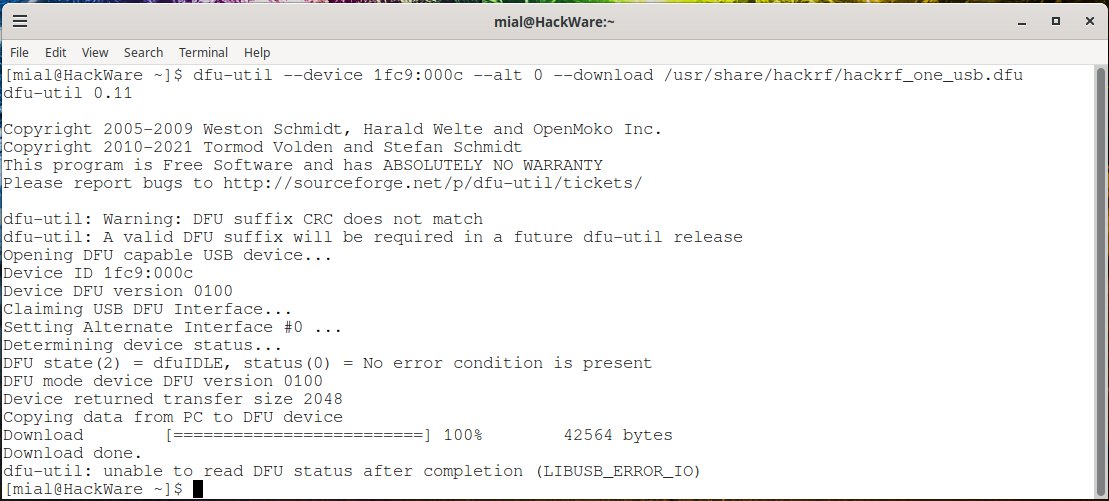
4.3.2 Flashing from DFU
# Download the latest firmware release from
# https://github.com/greatscottgadgets/hackrf/releases
# and unpack the firmware-bin directory.

dfu-util -i 0 -s 0x0000:leave -D firmware-bin/hackrf_one_usb.bin
The -s 0x0000:leave form is what GSG documentation specifies^[https://hackrf.readthedocs.io/en/latest/updating_firmware.html — Step 4 in the firmware update walk-through.]: write to flash address 0, then leave DFU and boot the new firmware.
dfu-util is in apt as dfu-util and in homebrew as dfu-util. On Windows it ships with Zadig setup.
4.3.3 Confirming the flash worked
$ hackrf_info
hackrf_info version: 2026.01.1
libhackrf version: 0.9 (2026.01.1)
Found HackRF
Index: 0
Serial number: 0000000000000000457863c834a45c0f
Board ID Number: 2 (HackRF One)
Firmware Version: 2026.01.1
Part ID Number: 0xa000cb3c 0x004f4747
Hardware Revision: r4
Firmware version should match what you flashed. Hardware revision should match what’s silkscreened on the board near MAX5864.
4.4 Routine Firmware Updates (hackrf_spiflash)
When the firmware is alive and you just want to update to a newer release, no DFU dance is needed:
hackrf_spiflash -w firmware-bin/hackrf_one_usb.binThis streams the new firmware image into the SPIFI flash via USB control commands, then reboots into the fresh image. Roughly 30 seconds for the 1 MB firmware image. The command verifies the image after writing (read-back compare) and aborts if the verify fails — the existing firmware is preserved in that case.
4.4.1 The version-pinning recommendation
For research workflows where reproducibility matters (e.g. a published decoder that expects a specific frequency-tuning behaviour), pin the firmware version in your project’s README:
## Firmware versions used

- HackRF One firmware: v2024.02.1 (matched against libhackrf 0.7)
- CPLD bitstream: 2024-02-02 default-known-good
- Mayhem (if PortaPack-driven): nightly-tag-2024-02-08
The HackRF firmware has historically maintained backward compatibility for libhackrf API contracts, but specific quantitative behaviours (gain step interpretations, sweep timing, sample-rate-vs-bandwidth trade-offs) have shifted across releases. Pinning prevents “I ran the same script and got different numbers” surprises across years.
4.5 The v2026.01.1 Release in Detail
The current release as of this volume’s authoring is v2026.01.1, released January 2026^[https://github.com/greatscottgadgets/hackrf/releases/tag/v2026.01.1.]. Highlights:
- HackRF Pro support (initial) — the Pro is supported in legacy compatibility mode. Software written for the One runs unchanged. Future releases will add Pro-specific extended-precision modes that the iCE40 FPGA enables.
- AGM Microelectronics CPLD support — newer PortaPack variants (notably some H4M batches) ship with an AGM CPLD substituted for a discontinued part; the firmware now handles both.
- Build-system cleanup — the cmake + libopencm3 build chain has been refactored; out-of-tree builds work cleanly now.
hackrf_sweepimprovements — better handling of overlap regions; faster sweep at narrow step sizes.libhackrf0.9 — the library version bumped (was 0.8 in 2025.x). API surface compatible.
The release notes on GitHub list ~30 bug fixes and minor improvements; the PR list at github.com/greatscottgadgets/hackrf/pulls?q=is%3Apr+merged%3A%3E2025-09-01 shows the contributor activity.
4.5.1 Compatibility with PortaPack
The stock GSG firmware does not include the PortaPack UI — that is what Mayhem firmware (Vol 10) provides. When a PortaPack is attached, you typically replace the GSG firmware with Mayhem firmware via the same hackrf_spiflash flow. To go back to GSG firmware (e.g. for a host-driven workflow), reflash the stock image.
GSG and Mayhem firmware images are mutually exclusive — only one runs at a time. Switching is a hackrf_spiflash operation.
4.6 Building Firmware from Source
For development work or when you want a custom build, the toolchain is well-documented^[https://hackrf.readthedocs.io/en/latest/firmware_development_setup.html.].
4.6.1 Prerequisites
- GCC ARM Embedded toolchain — the ARM-supplied prebuilt toolchain. On Debian/Ubuntu:
apt install gcc-arm-none-eabi binutils-arm-none-eabi. On macOS:brew install --cask gcc-arm-embedded. On Windows: download from arm.com. - CMake ≥ 3.5
- Python 3 (build scripts)
dfu-utillibusb-1.0-dev
4.6.2 Build steps
git clone https://github.com/greatscottgadgets/hackrf
cd hackrf
git submodule update --init --recursive    # pulls in libopencm3

# Build host tools first (gives us hackrf_spiflash, hackrf_cpldjtag)
cd host
mkdir build && cd build
cmake ..
make -j$(nproc)
sudo make install
sudo ldconfig

# Build firmware
cd ../../firmware
mkdir build && cd build
cmake -DBOARD=HACKRF_ONE ..    # for HackRF Pro: -DBOARD=HACKRF_PRO
make -j$(nproc)
The build produces firmware/build/hackrf_usb/hackrf_usb.bin — flash this with:
hackrf_spiflash -w firmware/build/hackrf_usb/hackrf_usb.bin4.6.3 Common build-time decisions
Table 1 — 6.3 Common build-time decisions
cmake -D… flag | Effect |
|---|---|
-DBOARD=HACKRF_ONE | Default; builds for HackRF One |
-DBOARD=HACKRF_PRO | Builds for HackRF Pro |
-DCMAKE_BUILD_TYPE=Debug | Debug symbols + assertions; larger image; useful with JTAG |
-DUSB_BULK_BUFFER_SIZE=… | Override sample ring-buffer size; affects throughput tuning |
-DPORTAPACK=ON | Builds with PortaPack support hooks (rarely useful since Mayhem covers this) |
4.7 The CPLD Bitstream — When and How
The CPLD bitstream changes very rarely. Reasons it might need flashing:
- First-time bring-up of a board (factories pre-flash; resellers usually pre-flash).
- Botched development experiment that wrote a non-working bitstream.
- Firmware release notes explicitly call for a CPLD update — check the changelog. v2024.02.1 was such a release.
4.7.1 Flashing
hackrf_cpldjtag -x firmware/cpld/sgpio_if/default.xsvfAfter a few seconds, three LEDs blink in a known pattern; the CPLD is now reset to default-known-good. You should immediately reboot the HackRF (unplug + replug, or hackrf_spiflash -R) so the LPC4320 firmware re-reads the CPLD’s pin states.
4.7.2 Confirming
A working CPLD allows samples to flow:
hackrf_transfer -r /tmp/test.cfile -f 100000000 -s 2000000 -n 4000000
# Expect "Captured 4000000 samples in X seconds, no overruns" or similar.
ls -la /tmp/test.cfile     # should be 16 MB (4 M samples × 4 bytes/I+Q float)
If samples fail to flow but hackrf_info works, the CPLD is the suspect.
4.8 Troubleshooting
Table 2 — 8. Troubleshooting
| Symptom | Likely cause | Fix |
|---|---|---|
lsusb shows nothing on insertion | Dead unit, dead cable, dead USB port | Try another cable + port; if still nothing, DFU mode |
lsusb shows 1d50:6088 (DFU) | Firmware corrupted or DFU button held | Reflash via dfu-util (§3.2) |
lsusb shows 1d50:6089 but hackrf_info errors | Permissions / udev rules | sudo cp 53-hackrf.rules /etc/udev/rules.d/ + reload |
hackrf_info works, samples don’t flow | CPLD bitstream corrupt | hackrf_cpldjtag -x .../default.xsvf (§7.1) |
| Sample drops / “stream-related errors” | USB chain bottleneck | Dedicated USB hub or root port; reduce sample rate |
hackrf_info shows wrong revision | Strap pins floating; only a problem on r1–r5 | Trust the silkscreen near MAX5864 |
| Mayhem boots but no HackRF radio response | Mayhem and stock firmware confusion | hackrf_spiflash -w hackrf_one_usb.bin to restore |
| Frequency reads off by 20+ ppm | Stock crystal, no warm-up | Wait 30 min, or external CLKIN, or HackRF Pro |
The GSG troubleshooting page^[https://hackrf.readthedocs.io/en/latest/troubleshooting.html] is the canonical reference and should be checked first.
4.9 JTAG Debugging
The LPC4320 is JTAG-debuggable like any other Cortex-M4F device. Suitable probes:
- Black Magic Probe — open-hardware GDB-server-on-probe; my preferred probe for Cortex-M development.
- SEGGER J-Link — commercial; works flawlessly; expensive.
- ST-Link/V2 with OpenOCD — works for ARM Cortex-M; requires the right OpenOCD config.
JTAG pinout is on the HackRF schematic (P5 connector — small footprint, usually pads not headered; soldering 10 leads required for first use). GSG’s LPC43XX_Debugging.html^[https://hackrf.readthedocs.io/en/latest/LPC43XX_Debugging.html] documents the workflow with Black Magic Probe specifically.
GDB session walkthrough:
# Black Magic Probe presents two ACM ports
gdb-multiarch firmware/build/hackrf_usb/hackrf_usb.elf
(gdb) target extended-remote /dev/ttyACM0
(gdb) monitor swd_scan
(gdb) attach 1
(gdb) load
(gdb) break hackrf_usb_init
(gdb) continue
JTAG debugging is most useful when developing custom firmware that crashes — a hard fault is otherwise opaque since USB drops on crash and you have no console.
4.10 The HackRF Pro Firmware Path
The Pro’s firmware tree branches in firmware/hackrf_pro/. Conceptual differences:
- iCE40 bitstream is loaded by the LPC4320 over SPI on every boot — there is no separate
hackrf_cpldjtagstep. The bitstream lives in the firmware image and is shipped together. - TCXO detection: the firmware checks for the TCXO presence and configures Si5351 differently; legacy mode emulates the One’s behaviour.
- MAX2831 register table: different from MAX2837; the firmware’s transceiver driver is parameterised at compile time.
- Extended-precision modes (planned): under firmware development as of 2026-05; will appear in 2026.x releases. Will require a corresponding
libhackrfAPI extension.
To build for Pro:
cmake -DBOARD=HACKRF_PRO ..
make -j$(nproc)
hackrf_spiflash -w firmware/build/hackrf_usb/hackrf_usb.bin
4.11 Cheatsheet Updates from this Volume
For Vol 12:
- Latest stock firmware: v2026.01.1 (Jan 2026)
- DFU enter (forced): hold DFU button while plugging USB →
1d50:6088 - Routine update:
hackrf_spiflash -w hackrf_one_usb.bin - Bricked-device recovery:
dfu-util -i 0 -s 0x0000:leave -D hackrf_one_usb.bin - CPLD reflash:
hackrf_cpldjtag -x firmware/cpld/sgpio_if/default.xsvf - Reset:
hackrf_spiflash -R - Build for Pro:
cmake -DBOARD=HACKRF_PRO ..
4.12 Resources
Table 3 — 12. Resources
| Resource | URL |
|---|---|
| HackRF firmware repo | https://github.com/greatscottgadgets/hackrf |
| Latest release (v2026.01.1) | https://github.com/greatscottgadgets/hackrf/releases/tag/v2026.01.1 |
| Updating firmware (GSG docs) | https://hackrf.readthedocs.io/en/latest/updating_firmware.html |
| Firmware development setup (GSG docs) | https://hackrf.readthedocs.io/en/latest/firmware_development_setup.html |
| LPC43xx debugging (GSG docs) | https://hackrf.readthedocs.io/en/latest/LPC43XX_Debugging.html |
| Troubleshooting (GSG docs) | https://hackrf.readthedocs.io/en/latest/troubleshooting.html |
| dfu-util project | http://dfu-util.sourceforge.net/ |
| libopencm3 (used by HackRF firmware) | https://github.com/libopencm3/libopencm3 |
| GCC ARM Embedded toolchain | https://developer.arm.com/downloads/-/arm-gnu-toolchain-downloads |
Comments (0)