HackRF One · Volume 9
HackRF One Volume 9 — The PortaPack H2+ (and the H1 / H2 / H4 / H4M Comparison)
Hardware, schematic, and a defensible upgrade-path matrix
9.1 About this Volume
The PortaPack is the add-on PCB that turns a HackRF One into a standalone handheld radio. It piggybacks on the HackRF One’s expansion header, shares the LPC4320 (Mayhem firmware replaces stock GSG firmware on the LPC4320), and provides display, navigation, audio, and SD-card storage.
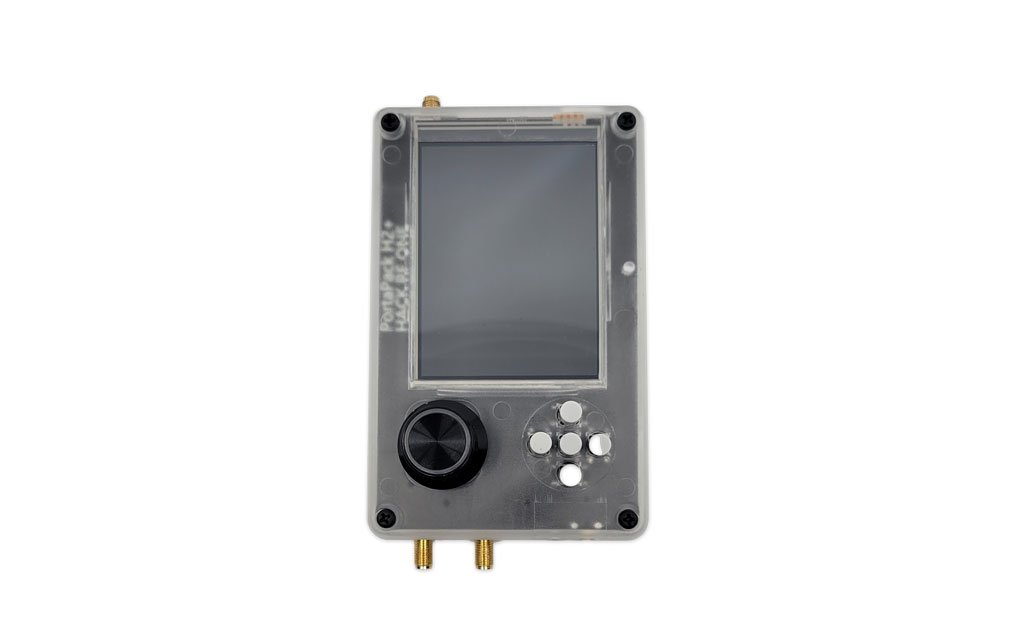
Five generations are in the wild — H1, H2, H2+, H4, H4M — and the bundle covered here ships an H2+ in a CNC aluminum enclosure (the JSTVRO H2R4 bundle; see 00-inventory/porta.md for the full silkscreen / I/O identification of this specific unit). The H2+ is not a GSG product — the ”+” designation emerged from the AliExpress / clone-community ecosystem around 2019–2020 for a refreshed PortaPack PCB with a 3.2″ IPS panel, a side encoder knob, a 5-button D-pad, and an aluminum-case option. It has since become the de-facto current PortaPack form factor — Mayhem firmware development specifically targets this layout, and most “PortaPack H2” listings on AliExpress today are actually H2+ in the strict sense.
Note on the HackRF main board under the PortaPack. The HackRF One that lives under porta’s PortaPack H2+ is the Clifford Heath modified design (JSTVRO-manufactured, pre-USBC V1 revision). The CH modifications are RF front-end only — they don’t affect any of the PortaPack-side hardware this volume covers, and the expansion-header pinout, the LPC4320 sharing, the I²S audio path, and everything else in §2 below are identical between a stock HackRF and a CH-modified one. But for context: see Vol 1 §3.3 for the full Heath story (CLA4611-085LF antenna protection, TRF37B73 MMICs, SKY13453 RF switches, improved Bias-T) and the Mayhem wiki Clifford’s-version page for community testing notes.
This volume walks the H2+ hardware in detail, then enumerates the per-generation differences (H1, original H2, H4, H4M) in a comparison matrix that doubles as an upgrade decision tree.
The Mayhem firmware itself is in Vol 10. This volume is the hardware.
9.2 The PortaPack H2+ Hardware
9.2.1 The expansion-header connection
The HackRF One’s expansion header (P22 in the schematic) exposes:
Table 1 — The HackRF One's expansion header (P22 in the schematic) exposes
| HackRF pin | Function | PortaPack uses for |
|---|---|---|
| GPIO0–GPIO15 | LPC4320 GPIO general-purpose | LCD parallel data + control, button matrix, SD card |
| I²C SDA/SCL | Shared with on-board Si5351C bus | LCD touch (if equipped), audio codec config |
| SPI MISO/MOSI | Shared with MAX2837 SPI | SD card SPI mode (some PortaPack variants) |
| Audio out | I²S audio from LPC4320 | Headphone amp (H4/H4M); speaker (H4M) |
| 3.3 V / GND | Power for accessory boards | LCD backlight + logic |
| LPC reset | Bring-up control | DFU forcing |
The H2+ uses a relatively conservative pin allocation — most signals are GPIO/SPI, no exotic peripherals. This is part of why Mayhem firmware works on H1 through H4M with mostly identical code paths.
9.2.2 The display — 3.2″ IPS TFT (320×240)
The H2+‘s display is the first big departure from the original H2: a 3.2″ IPS panel at 320×240, still driven by an ILI9341-class controller^[https://www.crystalfontz.com/controllers/Ilitek/ILI9341/ — ILI9341 datasheet PDF. Some H2+ batches use the pin-compatible ILI9486 instead; Mayhem auto-detects.] over the LPC4320’s 16-bit parallel GPIO bus (configured via SGPIO — same peripheral that drives the sample stream, repurposed for display when not streaming).
Table 2 — 2.2 The display — 3.2″ IPS TFT (320×240)
| Parameter | Value |
|---|---|
| Diagonal | 3.2″ (vs 2.4″ on original H2) |
| Resolution | 320×240 pixels |
| Colour depth | 16-bit (RGB565) |
| Panel type | IPS (vs TN on H1/H2) |
| Refresh rate | ~60 Hz (driven by Mayhem) |
| Backlight | white LED, driven by PWM from LPC4320 |
| Touch | none on H2+ |
The IPS panel is the H2+‘s headline upgrade over the original H2 — viewing angles are wide and the screen stays readable at oblique angles and in indirect daylight. It is not anti-glare coated (the H4M is what introduced that), so direct sunlight still washes it out, but the practical-bench-and-shaded-outdoor experience is meaningfully better than the H2’s TN panel.
9.2.3 Navigation control — encoder knob + D-pad
The H2+‘s most visible mechanical change is the side-mounted rotary encoder (typically blue-illuminated on the JSTVRO aluminum-case batches) with push-to-confirm, paired with a 5-button D-pad (up / down / left / right / centre) on the face. There is no separate “DFU / BACK / OPTION / MENU” tactile-button cluster — Mayhem maps those functions onto long-presses of the D-pad and the encoder.
Table 3 — 2.3 Navigation control — encoder knob + D-pad
| Control | Function |
|---|---|
| Encoder rotation | Numeric scrub (frequency, gain, volume); list scroll |
| Encoder press | Confirm / enter sub-menu |
| D-pad up/down | Coarse navigation between fields |
| D-pad left/right | Sibling-screen navigation; sometimes finer numeric step |
| D-pad centre press | Default action / OK |
| Long-press centre | Back / menu (context-dependent in Mayhem) |
The button matrix and encoder both wire into LPC4320 GPIOs that Mayhem polls in its UI loop; latency is ~16 ms (60 Hz UI tick). The encoder is read via two GPIOs in quadrature plus a third for the press — Mayhem’s encoder driver handles the de-glitching in firmware.
9.2.4 Audio
The H2+ has no on-board audio codec — that didn’t arrive until the H4. Audio is driven through the HackRF One’s existing I²S audio path, which goes back to the MAX2837’s baseband output / input. This means:
- Output uses the 3.5 mm headset jack on the H2+‘s bottom edge (TRS in most JSTVRO batches). Mayhem feeds audio through the LPC4320 → MAX2837 → analog out path.
- Microphone — the JSTVRO aluminum-case H2+ has a small mic hole on the bottom panel (next to the headset jack), wired into the MAX2837’s audio-in for transmit-side voice modes (AM/FM/SSB voice TX where the licence allows).
- Speaker is not on H2+ — H4/H4M added one.
- Audio quality is limited by the MAX2837’s audio path, which was never designed for high-fidelity audio (it’s a 2.4 GHz transceiver, after all). Voice-grade speech is fine; music is not the use case.
9.2.5 microSD card slot
A push-push microSD slot on the H2+‘s top edge (next to the RESET and ISP buttons in the JSTVRO aluminum-case layout) takes cards up to 32 GB SDHC (Mayhem doesn’t support exFAT well — keep cards FAT32). The slot wires to the LPC4320 over SSP1 (synchronous serial port) in SPI mode. Read speed is typically 5–10 MB/s — fast enough for capture-to-card workflows at sample rates up to ~5 MS/s, slow enough that 20 MS/s capture-to-card-only is not practical.
9.2.6 Battery and CNC enclosure
The H2+ daughterboard exposes a JST-PH 2-pin connector for a single-cell LiPo battery (3.7 V nominal). In the CNC aluminum-case bundle (the JSTVRO form factor and the dominant H2+ packaging in the market), the case includes an integrated battery cavity and ships with a 1500–2000 mAh cell pre-installed; the JST is mated at the factory and the case-back screws clamp the cell into a foam-lined pocket. Bare-board H2+ kits (no case) expose the JST and leave cell sourcing to the user.
The H2+ still has the original H2’s momentary push power switch (the H4 was what introduced the sliding switch), which means:
- Pressing it powers the device.
- Pressing it again does not fully cut battery — the LPC4320 enters deep-sleep but continues to draw a small idle current (“phantom drain”) on the order of 5–10 mA. A 1500 mAh battery left untouched for a week loses 30–50% capacity.
- Full battery isolation requires unplugging the JST connector. In the CNC aluminum case this means removing the four case-back screws and lifting the battery out of the foam pocket — practical for long-term storage, annoying for daily standby.
This is the H2+‘s most-complained-about quality issue (inherited unchanged from the H2). The H4 and H4M fix it with sliding power switches that fully cut battery.
9.2.7 Real-time clock
The H2+ has an on-board RTC chip (DS3231 or PCF8523, depending on batch) on a coin-cell backup, accessible via I²C. Mayhem uses this for timestamping captures and for scheduled-event apps.
9.2.8 USB pass-through
The H2+ does not have its own USB port — it uses the HackRF One’s USB (USB mini-B on the r4 reference design, including the JSTVRO clone covered here; USB-C on newer GSG revisions r9/r10 and on HackRF Pro). When a USB cable is connected to the HackRF, the host can talk to either the stock GSG firmware (if flashed) or Mayhem (if Mayhem is flashed) — the firmware running on the LPC4320 determines what the host sees. The flasher at hackrf.app drives this same port over Web Serial (see Vol 4 §3 for the canonical update workflow and 00-inventory/porta.md for the unit-specific step-by-step).
9.2.9 Power source priority
When both USB and battery are connected:
- USB takes precedence; battery charges via the on-board LTC4054 (or similar) charge IC at ~500 mA.
- When USB is disconnected, battery runs the device.
- Charging current limit can be set via solder-link options on some H2+ batches.
9.3 The H1 / H2 / H2+ / H4 / H4M Matrix
Table 4 — 3. The H1 / H2 / H2+ / H4 / H4M Matrix
| Feature | H1 (~2016) | H2 (2020-22) | H2+ (~2019–present, clone-community) | H4 (2023) | H4M (Q4 2024) |
|---|---|---|---|---|---|
| Display | TN 2.4″ 320×240 | TN 2.4″ 320×240 | IPS 3.2″ 320×240 | IPS 3.2″ 320×240 | IPS + anti-glare 3.2″ 320×240 |
| Navigation | 5-way + tactiles | 5-way + tactiles (some w/ wheel) | side encoder knob + 5-button D-pad | encoder + D-pad | encoder + D-pad |
| Power switch | momentary | momentary | momentary (same circuit as H2 — phantom drain) | sliding (full cut) | sliding (full cut) |
| USB | from HackRF | from HackRF | from HackRF | USB-C on H4-only daughterboard | USB-C (faster charging) |
| Audio codec | none (HackRF path) | none | none | dedicated codec | dedicated codec + auto headphone/speaker switch |
| Microphone | no | no | yes (bottom-panel mic hole on aluminum-case batches) | yes | yes |
| Speaker | no | no | no | yes | yes |
| Battery telemetry | none | none | none | basic | percent + voltage + current + ETA |
| GPIO header (accessories) | none | none | none | I²C breakout | I²C-capable GPIO connector |
| Enclosure | original plastic | plastic | CNC aluminum dominant variant (foam-padded battery pocket) | plastic | plastic / aluminum sleeve options |
| Vendor | GSG (discontinued) | GSG / community | clone-community (JSTVRO, HamGeek, etc.) | GSG-aligned vendors | OpenSourceSDRLab, Lab401, others |
| Mayhem support | legacy code path | first-class | first-class (Mayhem’s primary target today) | first-class | first-class (co-developed with Mayhem team) |
| Approximate price (bundle) | discontinued | $80–120 (with HackRF: $300–400) | $90–130 (with HackRF: ~$130–200 from AliExpress in CNC bundle) | $130–180 (with HackRF: $400–450) | $180–230 (with HackRF: $450–500) |
A practical note on the H2+ naming: not every AliExpress listing that says “PortaPack H2+” is the IPS + knob + CNC variant — some sellers still label the older TN-panel H2 boards “H2+” because the ”+” suffix is unregulated. The reliable identifier is the silkscreen on the daughterboard: it reads “Portapack H2+” verbatim on the genuine refreshed PCB. The IPS panel, encoder knob, and 3.2″ diagonal are the visible tells.
9.3.1 The H4M was co-developed
The H4M’s launch in Q4 2024^[https://www.rtl-sdr.com/a-review-of-the-new-hackrf-portapack-h4m/ — review documents the cooperation between the H4M-vendor and the Mayhem team during design.] was unusual: the hardware vendor worked directly with the Mayhem firmware team to ensure that the H4M’s capabilities (battery telemetry, dedicated audio codec, GPIO connector) were exposed in firmware on day one. Existing H1/H2/H2+ Mayhem apps continue to work on H4M; H4M-specific features (battery info screens, audio routing) are first-class additions rather than bolt-ons.
9.3.2 The upgrade decision
Should an H2+ owner upgrade to an H4M?
The H2+ already closes the two biggest H2-era friction points (TN panel → IPS, plastic case → CNC aluminum with integrated battery pocket), which changes the upgrade calculus significantly. What the H2+ does not fix versus the H4M:
Table 5 — The H2+ already closes the two biggest H2-era friction points (TN panel → IPS, plastic case → CNC aluminum with integrated battery pocket), which changes the upgrade calculus significantly. What the H2+ does not fix versus the H4M
| Friction point still present on H2+ | H4M improvement | Worth $50–100 alone? |
|---|---|---|
| Phantom drain when “off” (momentary switch) | Sliding switch cuts battery completely | Yes (if backpack-carried) |
| No anti-glare coating — direct sun still washes out | IPS + anti-glare meaningfully better in sunlight | Modest (situational) |
| No on-board audio codec (audio via MAX2837 path) | Dedicated codec → cleaner audio + line-level out | Modest (voice OK on H2+) |
| No speaker | Built-in speaker (auto-switched from headphone in H4M) | Yes (for AM/FM/voice spotting without earbuds) |
| No battery telemetry — guess when to recharge | Real-time percent + voltage + current + ETA | Modest |
| micro-USB on the HackRF | USB-C with faster charging | Modest |
| No GPIO header for accessories | I²C-capable connector for sensors / GPS | Only if you’ll use it |
The H4M is still unambiguously the better device, but the gap has narrowed — the IPS panel and CNC case were the two biggest visible H2-era complaints, and the H2+ already delivers both. The H4M now mostly buys you the sliding power switch (genuine long-term-standby fix), an audio codec + speaker (matters for off-the-bench listening), and battery telemetry (matters for backpack ops).
A pragmatic strategy: keep the H2+ as the daily-driver bench-and-pocket unit (it’s already paid for and already has IPS), and only upgrade to an H4M if the standby drain or the speaker becomes the dominant pain point. There is no case anymore for upgrading purely for screen quality — that’s what the H2+ already is.
9.4 The Schematic
The H2+ has no official, GSG-published schematic — it’s a clone-community derivative of the original PortaPack H2. The closest public reference is the original PortaPack H2 schematic on Sharebrained’s archive^[https://github.com/sharebrained/portapack-hackrf — the original repo, which holds the Eagle CAD files. Some schematic PDFs are mirrored on hackaday.io project pages such as https://hackaday.io/project/183219-hackrf-portapack-h2.], which the H2+ inherits with three documented deltas:
- Display interface re-routed to drive the 3.2″ IPS panel (still 16-bit parallel via SGPIO; the panel module footprint is different but the signal layer is the same).
- Encoder added on two LPC4320 GPIOs in quadrature plus a third GPIO for the press; the original H2’s “rotary jog wheel” footprint on some batches is the lineage.
- D-pad button matrix replacing the original H2’s separated 5-way + tactile-cluster layout. Same GPIO count, different physical arrangement.
Otherwise the H2+ inherits the H2’s design unchanged:
- Single-sided assembly with the screen on the front and the LPC4320 expansion connector on the back.
- The audio jack is wired to a 3.5 mm TRS (the JSTVRO aluminum-case batches; some clone batches use TRRS).
- The headphone amp is a basic op-amp circuit, not a dedicated headphone-driver IC.
- The microSD slot is wired to SSP1 in SPI mode at 5–10 MHz.
- The battery charging path uses an LTC4054L-4.2 (linear) charger; current limit set by a programming resistor (~500–830 mA depending on batch).
- No on-board ESD protection on the audio jack — careful handling around static-prone cables.
9.5 Disassembly and Repair
The H2+ is screw-together, not glued, but the CNC aluminum case (the dominant H2+ packaging) disassembles differently from the original H2’s plastic case. Disassembly of the JSTVRO aluminum-case form factor:
- Power off and unplug USB.
- Remove the four case-back screws (one near each corner of the back plate). These are typically M2 hex-socket; a 1.5 mm hex driver fits.
- Lift the back plate. The LiPo cell sits in a foam-lined pocket — note its orientation before disconnecting the JST.
- Disconnect the battery JST.
- The HackRF + PortaPack stack lifts out as one assembly; the daughterboard is mated to the HackRF expansion header via the standard 2×10 connector and lifts free with gentle vertical pull.
For the original bare-board H2+ kits (no case), disassembly is just the standard separation of the two PCBs at the expansion-header connector.
Common repairs:
- Cracked LCD: replace the entire 3.2″ IPS module ($25–35 from AliExpress; verify it ships with the same ILI9341-compatible controller, the same ribbon length, and 320×240 native — some replacements are 480×320 / ILI9486 with a different driver path that Mayhem may not auto-detect cleanly).
- Failed audio jack: 3.5 mm TRS jacks are commodity parts — Mouser and Digi-Key stock equivalents. Solder-replace.
- Failed power switch: tactile switches are commodity. Replace.
- Encoder failure: rotary encoders with push-switch are also commodity (EC11 or PEC11 series, 12 mm body). The blue LED ring on the JSTVRO unit is a separate two-pin connection — colour can be changed by swapping the LED.
- Battery JST-PH connector: solder-replace; new connector + wire is $5.
- Damaged CNC case: case-bodies are sold separately by JSTVRO and a few other AliExpress sellers, typically $15–25.
9.6 Custom PortaPack Variants
A few community vendors have done custom PortaPack designs. None are GSG-blessed; all run Mayhem firmware:
- OpenSourceSDRLab sells the H4M with various housing options^[https://opensourcesdrlab.com/].
- Lab401 sells PortaPack H4M kits aimed at pen-test workflows^[https://lab401.com/products/portapack-h4m].
- Rabbit-Labs sells HackRF + PortaPack bundles in various configurations^[https://rabbit-labs.com/].
None of these are clones of GSG hardware — the HackRF One inside is genuine GSG (or in some cases, a documented clone with disclosure). The PortaPack add-on is what differs across vendors.
9.7 Cheatsheet Updates from this Volume
For Vol 12:
- H2+ display: 3.2″ IPS 320×240, ILI9341-class, no touch — readable in indirect daylight but no anti-glare coating
- H2+ navigation: side encoder knob (rotation + press) + 5-button D-pad (no separate DFU/MENU/BACK cluster — long-presses handle them)
- H2+ power: same momentary switch as H2 → phantom drain when “off” → for long-term storage, open the case and unplug the JST
- H2+ audio path: still through HackRF baseband (no on-board codec until H4); voice-grade, not music
- H2+ has a bottom-panel mic hole (aluminum-case batches) for transmit-side voice modes
- H2+ microSD: top-panel push-push slot, FAT32 only (Mayhem)
- H4M is the only PortaPack that fully fixes phantom drain (sliding switch) and adds codec / speaker / battery telemetry
- Disassembly (JSTVRO CNC case): 4 back-panel screws, then the HackRF+PortaPack stack lifts out
- Battery connector: JST-PH 2-pin; CNC-case batches ship with cell pre-installed in foam pocket, bare-board kits don’t
- Silkscreen identifier: daughterboard reads “Portapack H2+” verbatim — IPS + knob + 3.2″ are the visible tells if the silk is hidden
9.8 Resources
Table 6 — 8. Resources
| Resource | URL |
|---|---|
| Sharebrained PortaPack repo (origin) | https://github.com/sharebrained/portapack-hackrf |
| ILI9341 LCD controller datasheet | https://www.crystalfontz.com/controllers/Ilitek/ILI9341/ |
| H4M review (RTL-SDR.com) | https://www.rtl-sdr.com/a-review-of-the-new-hackrf-portapack-h4m/ |
| Mayhem firmware (covers H1–H4M) | https://github.com/portapack-mayhem/mayhem-firmware |
| Mayhem wiki | https://github.com/portapack-mayhem/mayhem-firmware/wiki |
| OpenSourceSDRLab | https://opensourcesdrlab.com/ |
| Lab401 PortaPack H4M | https://lab401.com/products/portapack-h4m |
| Rabbit-Labs | https://rabbit-labs.com/ |
| Hacker Warehouse PortaPack H2 | https://hackerwarehouse.com/product/portapack-h2-for-hackrf-one/ |
| HackRF One r9 / PortaPack compatibility | https://hackerwarehouse.tv/product-knowledgebase/portapack-h2/hackrf-one-r9-and-portapack-compatibility/ |
| Hackaday.io PortaPack H2+ project | https://hackaday.io/project/183219-hackrf-portapack-h2 |
Comments (0)