OpenSourceSDRLab PortaRF · Volume 10
OpenSourceSDRLab PortaRF Volume 10 — Custom Firmware Development
Mayhem fork pattern, build toolchain, adding a custom app, PortaRF UI considerations, common pitfalls
10.1 About this volume
Vol 10 covers custom Mayhem firmware development for PortaRF. This is the deepest-rabbit-hole volume — most operators never need it. It’s relevant when:
- A protocol you care about isn’t in mainline Mayhem
- You want UI customizations specific to your workflow
- You’re contributing to Mayhem upstream
- You’re researching PortaPack firmware internals
Cross-reference: HackRF One Vol 10 covers the canonical Mayhem development workflow (build toolchain, source organization, worked custom-app example). This volume adds PortaRF-specific considerations — sealed-enclosure debugging constraints, integrated-UI-hardware variations, single-box thermal limits that may affect sustained-development testing cycles.
This is aspirational content — relevant only if PortaRF is acquired and a specific custom-firmware need emerges. Until then, mainline Mayhem covers all typical use cases.
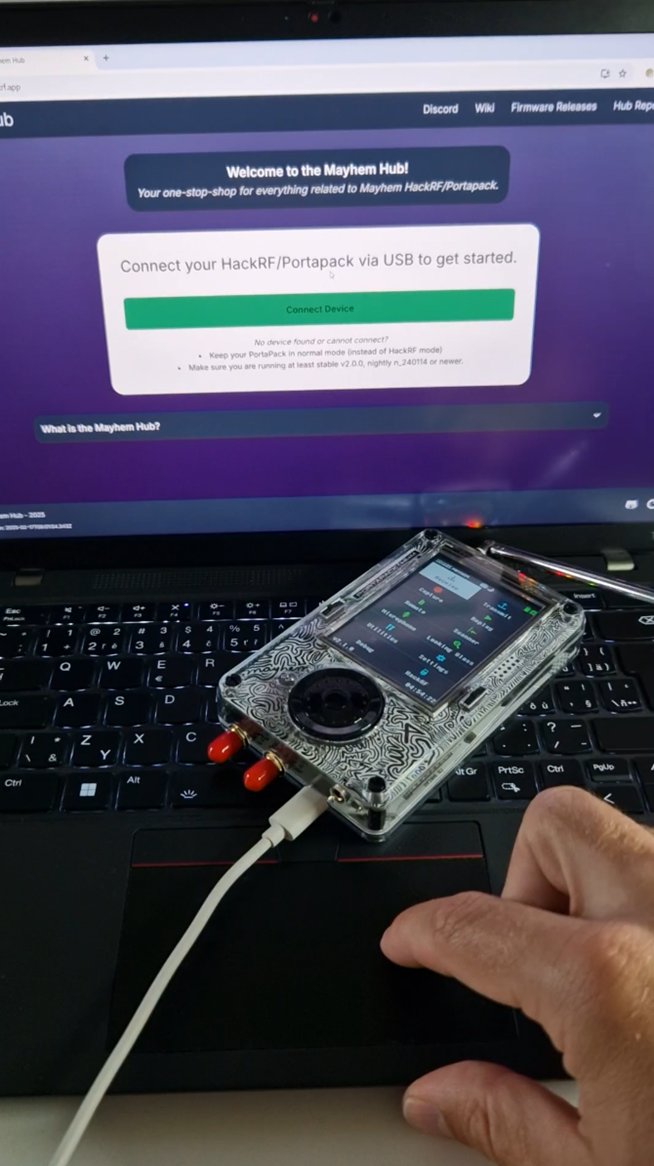
.bin, and stage it, the Hub (or an SD-card drop) writes it onto the PortaPack. The same USB-tethered path is where you pull firmware releases and connect for on-device debugging during a build-test cycle. Photo: Mobile Hacker (mobile-hacker.com).10.2 Forking Mayhem — the standard pattern
10.2.1 GitHub fork workflow
1. Browse to https://github.com/portapack-mayhem/mayhem-firmware
2. Click "Fork" → creates github.com/<your-username>/mayhem-firmware
3. Clone locally:
   git clone --recursive https://github.com/<your-username>/mayhem-firmware.git
   cd mayhem-firmware
4. Set up upstream remote:
   git remote add upstream https://github.com/portapack-mayhem/mayhem-firmware.git
   git fetch upstream
5. Create a feature branch:
   git checkout -b my-custom-feature
The --recursive clone is important — Mayhem has Git submodules (chibios-rt, libopencm3, etc.) that need to be cloned alongside.
10.2.2 Maintaining sync with upstream
# Periodically sync with upstream
git fetch upstream
git checkout main  # or master, depending on branch convention
git merge upstream/main
git push origin main

# For your feature branches:
git checkout my-custom-feature
git rebase main
For long-running features: rebase weekly or at least when starting a new development session.
10.2.3 Why fork rather than just download
- Reproducible builds: your commit history records exactly what changed
- Contribute upstream: if your work is generally useful, PR to mainline
- Branch isolation: experiment on branches without breaking your stable build
- Backup: GitHub serves as a backup of your work
10.2.4 What never to do
- Never commit secret material (firmware-side keys, signed binaries from vendor) — once on GitHub, public
- Never force-push to mainline — breaks anyone else who’s pulled
- Never run experimental builds on field PortaRF — use a dev unit (or your spare unit)
10.3 Build toolchain setup
10.3.1 Prerequisites
Table 1 — 3.1 Prerequisites
| Tool | Purpose | Install |
|---|---|---|
gcc-arm-none-eabi | ARM cross-compiler | Platform-specific (below) |
cmake | Build system | Most package managers |
libopencm3 | Low-level Cortex-M support | Submodule of Mayhem |
dfu-util | DFU mode flashing | Most package managers |
git | Source management | Most package managers |
| A text editor | Code editing | VS Code, vim, emacs |
10.3.2 macOS setup
# Install Homebrew if not already present
brew install --cask gcc-arm-embedded
brew install cmake dfu-util
brew install libopencm3   # (or build from Mayhem submodule)
10.3.3 Linux setup (Debian/Ubuntu)
sudo apt update
sudo apt install gcc-arm-none-eabi cmake libopencm3-dev dfu-util git
10.3.4 Windows setup
- WSL2 (recommended): install Ubuntu in WSL2, follow Linux instructions
- Native Windows: install gcc-arm-none-eabi from arm.com, cmake from cmake.org, dfu-util from sourceforge
WSL2 is the easier path for Windows users — Mayhem’s build system is bash-friendly.
10.3.5 Verify toolchain
arm-none-eabi-gcc --version
# Expected: arm-none-eabi-gcc (Arm GNU Toolchain ...) X.Y.Z

cmake --version
# Expected: cmake version X.Y.Z

dfu-util --version
# Expected: dfu-util X.Y
If any of these fail: re-install the missing tool.
10.3.6 First build
cd mayhem-firmware
mkdir build && cd build
cmake ..
make -j

# Result: portapack-*-mayhem.bin in build directory
If the build succeeds, you have a Mayhem .bin ready to flash. Run ls *.bin to find it.
10.4 Mayhem source-tree orientation
10.4.1 Top-level structure
mayhem-firmware/
├── firmware/                Main firmware tree
│   ├── application/         Application-layer code
│   │   ├── apps/            Per-app sources
│   │   ├── ui/              UI primitives (widgets, layout)
│   │   ├── disp/            Display abstraction
│   │   ├── encoder.cpp      Encoder handling
│   │   ├── battery.cpp      Battery management
│   │   └── main.cpp         Top-level entry
│   ├── baseband/            DSP / signal processing
│   │   ├── apps/            Baseband apps (RX/TX waveform processing)
│   │   └── proc_*.cpp       Per-mode processing
│   ├── common/              Shared utilities
│   ├── chibios-portapack/   ChibiOS RTOS subset
│   └── CMakeLists.txt       Top-level build config
├── flashloader/             Bootloader code
├── docs/                    Architecture documentation
├── tools/                   Build helpers + utility scripts
└── README.md
10.4.2 The application/apps directory
Each Mayhem app is one or more .cpp + .hpp files in firmware/application/apps/:
firmware/application/apps/
├── ais_app.cpp / .hpp           # AIS decoder
├── adsb_app.cpp / .hpp          # ADS-B decoder
├── analog_audio_app.cpp / .hpp  # Audio receiver
├── replay_app.cpp / .hpp        # Replay attack
├── capture_app.cpp / .hpp       # I/Q capture
└── ...
The analog_audio_app.cpp is a useful reference — it’s a relatively simple app that exercises the standard Mayhem patterns (RX, demodulation, audio output, UI).
10.4.3 The baseband directory
Baseband apps run on the Cortex-M0 second core, doing real-time DSP. Each app has both an application-side (firmware/application/apps/) and a baseband-side (firmware/baseband/) component.
For most custom development, you modify the application side. Baseband modifications are advanced.
10.4.4 The UI subsystem
firmware/application/ui/
├── button.hpp        # Button widget
├── checkbox.hpp      # Checkbox widget
├── grid.hpp          # Menu grid
├── label.hpp         # Text label
├── menu.hpp          # Menu primitive
├── text_edit.hpp     # Text entry
└── ...
For UI customization (new buttons, custom layouts), these are your starting points.
10.4.5 Key utility classes
Table 2 — 4.5 Key utility classes
| Class | Purpose |
|---|---|
View | Base class for all UI views |
NavigationView | Manages view stack (push, pop) |
Receiver | Abstracts RX state |
Transmitter | Abstracts TX state |
Application | Lifecycle hooks |
Read firmware/application/main.cpp for the entry-point flow. New apps are registered through Mayhem’s app-registry mechanism.
10.5 Adding a custom Mayhem app — worked example
A minimal “hello world” app pattern.
10.5.1 Create the source files
firmware/application/apps/hello_app.hpp:
#pragma once

#include "ui_navigation.hpp"
#include "ui_widget.hpp"

namespace ui {

class HelloAppView : public View {
public:
    HelloAppView(NavigationView& nav);

    void focus() override;
    std::string title() const override { return "Hello"; }

private:
    NavigationView& nav_;

    Text text_hello {
        { 0, 0, 240, 16 },
        "Hello, PortaRF!"
    };
};

} /* namespace ui */firmware/application/apps/hello_app.cpp:
#include "hello_app.hpp"

namespace ui {

HelloAppView::HelloAppView(NavigationView& nav) :
    nav_(nav)
{
    add_children({ &text_hello });
}

void HelloAppView::focus() {
    text_hello.focus();
}

} /* namespace ui */
10.5.2 Register the app
In firmware/application/main.cpp (or wherever the app registry lives in current Mayhem — verify against source):
#include "hello_app.hpp"

// In the appropriate registration block:
nav.push<HelloAppView>();   // or add to the menu structure
(The exact registration mechanism varies between Mayhem versions; check current source for the specific pattern.)
10.5.3 Update CMakeLists.txt
In firmware/application/CMakeLists.txt:
# Add hello_app to the source list
target_sources(application PRIVATE
    # ... existing sources ...
    apps/hello_app.cpp
)
10.5.4 Build + flash + test
cd mayhem-firmware/build
make -j
# Result: portapack-*-mayhem.bin

# Copy to SD card; flash via SD-card method (Vol 8 § 3)
cp portapack-h1_h2-mayhem.bin /Volumes/PORTARF/
# Insert SD into PortaRF, reboot
On PortaRF: navigate to the menu where you registered the app; launch; should display “Hello, PortaRF!“
10.5.5 Iterating
For development cycles:
- Edit source on host
make(incremental build is fast — a few seconds)cp.bin to SD- Reboot PortaRF
- Test on device
The flash + reboot cycle takes ~1 minute. For rapid iteration, use a dedicated dev SD that lives in PortaRF.
10.5.6 Beyond hello world
The interesting Mayhem apps:
- RX with demodulation: see
analog_audio_app.cpp - TX with synthesis: see
siggen_app.cpp(signal generator) - Custom decoder: see
adsb_app.cppor any decoder - Capture: see
capture_app.cpp - Replay: see
replay_app.cpp
Each is a self-contained example of a Mayhem app architecture. Read several before starting your own custom app.
10.6 PortaRF-specific UI considerations
10.6.1 Display hardware variations
Mayhem builds support different PortaPack revisions. PortaRF likely uses H2+ or H4M:
- H2+ build:
portapack-h1_h2-mayhem.bin— ST7789 display driver, no QWERTY - H4M build:
portapack-h4m-mayhem.bin— ST7789P3 display driver, QWERTY support
If you’re developing for PortaRF: target the build that matches your unit. Building a custom .bin for the wrong revision will fail at boot.
10.6.2 If PortaRF has H4M
- QWERTY input is available — your app can accept text entry
- Slightly different display init — should be transparent if you use existing Mayhem primitives
- Some apps assume H4M features — verify your custom app gracefully degrades on H2+ if you want cross-compatibility
10.6.3 Thermal considerations during dev
Sustained development cycling (build + flash + run repeatedly) can:
- Warm the PortaRF case (especially if you’re running RF tests)
- Drain the battery faster than typical use
- Trigger thermal-protection behavior in extreme cases
For dev sessions: keep PortaRF on USB-C power. Don’t worry about battery; do worry about thermal if running constant TX or wideband sweep.
10.6.4 Test cases that matter on PortaRF
When developing a new Mayhem app, test on PortaRF for:
- Display rendering — does the layout work at 320×240?
- Button responsiveness — does encoder + D-pad input feel right?
- Battery drain — does the app drain battery faster than expected?
- SD usage — if the app writes data, does it cope with SD speed limits?
- USB integration — if tethered, does the app coexist with host-side tools?
- Field deployment — does the app work when battery is low / thermal is elevated?
Bench testing on porta works for most validation; PortaRF-specific testing matters for handheld-form-factor concerns.
10.7 Build + flash workflow
10.7.1 Development cycle
For a typical edit-build-test cycle:
# 1. Edit source
vim firmware/application/apps/my_app.cpp

# 2. Incremental build
cd build && make -j

# 3. Find the new .bin
ls -la portapack-*-mayhem.bin

# 4. Copy to dev SD card
cp portapack-h1_h2-mayhem.bin /Volumes/PORTARF_DEV/

# 5. Eject SD, swap into PortaRF, reboot
# 6. Test
Total cycle time: ~2 minutes for a small change. Larger refactors that trigger full rebuilds take longer.
10.7.2 Faster iteration patterns
- Use a dedicated dev SD: small, cheap, lives in PortaRF for dev sessions
- Build on a fast machine: full builds take ~5 minutes; incremental rebuilds <30 seconds
- Use a script for the build+copy+eject sequence: scripts the SD handoff
- Two-monitor setup: code on one, PortaRF screen visible on the other
10.7.3 Release builds
For a “stable” build you’ll deploy or share:
cd build
make clean
make -j
Verify the .bin works on PortaRF; then:
- Tag the source revision:
git tag v0.1-custom - Save the .bin to a release archive
- Document changes for users
For sharing: the .bin is what others flash. The source is what others build from. Both have value.
10.7.4 CI/CD pattern
For maintained custom forks, a GitHub Actions workflow can build releases automatically:
on:
  push:
    tags: ['v*']
jobs:
  build:
    runs-on: ubuntu-latest
    steps:
      - uses: actions/checkout@v4
        with:
          submodules: recursive
      - name: Install dependencies
        run: |
          sudo apt-get update
          sudo apt-get install -y gcc-arm-none-eabi cmake libopencm3-dev
      - name: Build
        run: |
          cd firmware && mkdir build && cd build
          cmake .. && make -j
      - name: Upload .bin
        uses: actions/upload-release-asset@v1
        # ... attach .bin to GitHub release
For solo development this is overkill; for community projects with multiple maintainers, it’s worth setting up.
10.8 Cherry-picking features from Havoc + other forks
When you want a specific feature from another Mayhem fork.
10.8.1 Identify the feature
In the source fork (Havoc, a community fork, etc.), find:
- The .cpp / .hpp files that implement the feature
- Any CMakeLists.txt / build-config changes needed
- Any resource files (.bin assets, etc.)
- Any commit history that adds the feature
10.8.2 Generate a patch
# Add the source fork as a remote
git remote add havoc https://github.com/furrtek/portapack-havoc.git
git fetch havoc

# Find the relevant commit(s)
git log havoc/master -- firmware/application/apps/feature_name.cpp

# Generate a patch
git format-patch -1 <commit-sha>

# Or cherry-pick directly (often easier)
git cherry-pick <commit-sha>
10.8.3 Resolve conflicts
The fork’s tree may have diverged from current Mayhem. Common conflicts:
- CMakeLists.txt has different content (resolve manually)
- Adjacent code has been refactored (resolve manually)
- API signatures have changed (port the feature to current API)
For complex ports: it may be easier to study the source feature and re-implement against current Mayhem than to merge mechanically.
10.8.4 Verify the port
After cherry-pick:
- Build cleanly — no missing headers, no undefined references
- Test on PortaRF — feature actually works
- No regressions — existing apps still work
10.8.5 Upstream contribution
If the feature is generally useful:
- PR to Mayhem mainline — community benefit
- Maintain in your fork only — if it’s PortaRF-specific or experimental
Most cherry-picks from Havoc have already been merged into Mayhem over the years. Check Mayhem before assuming a Havoc feature is unique.
10.9 Common build errors + fixes
Table 3 — 9. Common build errors + fixes
| Symptom | Cause | Fix |
|---|---|---|
arm-none-eabi-gcc: command not found | Toolchain not installed or not in PATH | Install gcc-arm-none-eabi |
error: 'libopencm3.h' not found | Submodule not cloned | git submodule update --init --recursive |
error: 'osmosdr.h' not found | Wrong project (this is host-side, not firmware) | Verify you’re in mayhem-firmware/firmware, not gnuradio |
CMake Error: Could not find ... compiler | Wrong CMake configuration | Verify CMake found the ARM compiler |
link error: undefined reference to ... | Missing source files in CMakeLists.txt | Add your new .cpp files to target_sources |
link error: code size exceeds flash | Too many features enabled | Disable optional apps in CMakeLists.txt |
make: *** No rule to make target | Missing or moved source file | Check the file path; restore if accidentally deleted |
error: expected ';' before (C++) | C++ syntax error | Check the specific line for typos |
| Build succeeds but flash fails | Wrong PortaPack revision target | Verify build target matches PortaPack hardware revision |
| App appears but crashes on launch | Stack overflow or null pointer | Reduce stack usage; check pointer initialization |
For deeper troubleshooting, the Mayhem Discord channel is active and helpful.
10.10 Maintenance + upstream sync
For custom forks intended to be maintained:
10.10.1 Periodic sync
# Sync your fork with upstream Mayhem
git fetch upstream
git checkout main
git merge upstream/main

# Resolve any conflicts
# Rebuild + test
# Push to origin
10.10.2 Rebase feature branches
git checkout my-feature
git rebase main
# Resolve conflicts
# Test
10.10.3 When upstream breaks your features
Mayhem occasionally refactors:
- API changes: your custom code references functions that no longer exist
- Structural reorgs: file paths change; CMakeLists.txt references break
- Subsystem replacement: features you depended on get replaced
For each: read the upstream changelog; port your changes to the new API. Allocate dev time for this — it’s normal maintenance.
10.10.4 Documentation
Document your fork:
- README: what your fork does that mainline doesn’t
- Build instructions: specific to your fork if different
- Compatibility: which PortaPack revisions / Mayhem versions
- Known issues: bugs you’re aware of
For PortaRF-specific forks, explicitly document the target revision — H2+ vs H4M vs H4M Clifford Edition. Users will appreciate not having to figure it out.
10.10.5 Releasing
For each release:
- Tag the source:
git tag v0.x.y - Build the .bin:
make -j - Create GitHub release with the .bin attached
- Update changelog
- Push tag:
git push --tags
For users: they download the .bin, flash via SD card workflow (Vol 8 § 3).
10.11 Resources
Mayhem source + community
- Mayhem repo: https://github.com/portapack-mayhem/mayhem-firmware
- Mayhem wiki — development guide: https://github.com/portapack-mayhem/mayhem-firmware/wiki
- Mayhem Discord: linked from wiki
- Mayhem issues: https://github.com/portapack-mayhem/mayhem-firmware/issues
Toolchain
- gcc-arm-none-eabi: https://developer.arm.com/Tools%20and%20Software/GNU%20Toolchain
- libopencm3: http://libopencm3.org/
- CMake: https://cmake.org/
- ChibiOS (RTOS used by Mayhem): https://www.chibios.org/
Cross-references
- HackRF One Vol 10 (canonical custom-firmware reference):
../../../HackRF One/03-outputs/HackRF_One_Complete.html - Vol 6 § 4 (this project) — Mayhem feature catalog
- Vol 8 (this project) — flashing custom builds
Sibling forks
- Havoc firmware (legacy reference): https://github.com/furrtek/portapack-havoc
- Stock PortaPack (historical): https://github.com/sharebrained/portapack-hackrf
End of Vol 10. Next: Vol 11 covers operational posture for PortaRF — regional rules, antenna safety, capture data discipline, pre-engagement checklist.
Comments (0)