OpenSourceSDRLab PortaRF · Volume 7
OpenSourceSDRLab PortaRF Volume 7 — Programming Environments
Host-side tools, GNU Radio integration, SDRangel and alternatives, PortaRF-specific host considerations
7.1 About this volume
Vol 7 covers programming environments for working with PortaRF from a host PC. Because PortaRF enumerates as a standard HackRF One (same vendor + product ID, same protocol), every host-side tool that works with HackRF works with PortaRF unchanged.
This is the most “inherited” volume of the series — the canonical reference is HackRF One Vol 7. The PortaRF-specific deltas are minimal: USB-C cable handling, no driver differences, no protocol differences.
Cross-reference: ../../../HackRF One/03-outputs/HackRF_One_Complete.html Vol 7 covers host-side tools in full detail. This volume cites that and focuses on PortaRF-specific operational considerations.
Note on Vol 10: Custom Mayhem firmware development moved to Vol 10 in this series. This volume focuses on host-side programming; firmware-side development is Vol 10.
7.2 Host-side tools — hackrf_*
The standard hackrf_* command suite works identically on PortaRF. Installation:
# macOS (Homebrew)
brew install hackrf

# Debian/Ubuntu
sudo apt install hackrf

# Fedora/CentOS
sudo dnf install hackrf

# Windows: download from greatscottgadgets.com or use Pothos SDR bundle
7.2.1 The full tool catalog
Table 1 — 2.1 The full tool catalog
| Tool | Purpose | Typical use |
|---|---|---|
hackrf_info | Identify the device, report firmware version, serial | First command for any session |
hackrf_transfer | Capture raw I/Q to file or replay from file | Workhorse capture/replay tool |
hackrf_spiflash | Flash HackRF firmware | Rare; Vol 8 covers |
hackrf_sweep | Wideband spectrum sweep | Discovery; can feed a viewer |
hackrf_clock | Configure / verify reference clock | PPM calibration |
hackrf_operacake | Configure Opera Cake antenna switch | Rare; only if using daughter card |
hackrf_debug | Read internal registers / diagnostic output | Debugging silicon-level issues |
hackrf_cpldjtag | Update HackRF CPLD | Very rare; only for new revisions |
7.2.2 hackrf_info — the verify-everything-is-OK command
hackrf_info

# Expected output:
# hackrf_info version: 2024.02.1
# libhackrf version: 0.9 (0.9.0)
# Found HackRF
# Index: 0
# Serial number: 0000000000000000XXXXXXXXXXXXXXXX
# Board ID Number: 2 (HackRF One)
# Firmware Version: 2024.02.1 (API:1.07)
# Part ID Number: 0xa000cb3c 0x00641864
# Hardware Revision: r9 (or r10/r10+/H4M per Heath revision)
Use this command:
- After connecting PortaRF for the first time
- Before any capture / TX session (confirms device responding)
- When debugging a problem (“is the unit even there?”)
- To check firmware version
7.2.3 hackrf_transfer — capture and replay
Common patterns:
# Capture 10 seconds at 433.92 MHz, 2 MS/s, 40 dB gain
hackrf_transfer -r capture.cfile \
                -f 433920000 \
                -s 2000000 \
                -g 40 \
                -n 20000000  # 20M samples = 10 sec at 2 MS/s

# Replay (TX) the captured file
hackrf_transfer -t capture.cfile \
                -f 433920000 \
                -s 2000000 \
                -x 0  # TX gain; 0 dB conservative

# Wideband capture (more demanding on SD/USB)
hackrf_transfer -r wideband.cfile \
                -f 2400000000 \
                -s 10000000 \
                -g 32 \
                -n 100000000  # 10 seconds at 10 MS/s
Options reference:
-r FILE: read from radio (RX); save I/Q to FILE-t FILE: transmit (TX); read I/Q from FILE-f Hz: center frequency-s Hz: sample rate (2 MS/s minimum, 20 MS/s maximum)-g dB: RX gain (0-62 in 8 dB steps; LNA + VGA combined)-x dB: TX gain (0-47 in 1 dB steps)-l N: amp enable (0 or 1; enables external LNA via bias-T)-a N: amp gain for RF amplifier (rarely used)-n N: number of samples to capture
7.2.4 hackrf_sweep — wideband sweep
# Sweep 100 MHz to 6 GHz, output binary FFT data
hackrf_sweep -f 100:6000 -B

# Sweep narrower band with finer resolution
hackrf_sweep -f 432:435 -B -B 100000

# Pipe to a viewer (requires a viewer)
hackrf_sweep -f 100:6000 -B | python3 viewer.py
hackrf_sweep output is raw FFT bins in binary format. Several community viewers exist (search Mayhem wiki). For PortaRF: Mayhem’s built-in sweep app is easier; hackrf_sweep is for scripted host-side workflows.
7.2.5 Tools rarely needed
hackrf_spiflash: see Vol 8 § 4hackrf_operacake: only if using an Opera Cake antenna switch (rare with PortaRF since GPIO header isn’t exposed)hackrf_clock: only for PPM calibration or external clock reference setuphackrf_debug: for vendor / advanced debugginghackrf_cpldjtag: never, unless explicitly directed by vendor
7.2.6 Cross-reference for full details
The canonical walkthrough of every tool with options, examples, and edge cases lives in HackRF One Vol 7. Use that for depth; this section is the orienting summary.
7.3 GNU Radio integration
GNU Radio is the foundational framework for software-defined-radio research and development.
7.3.1 Installation
# macOS
brew install gnuradio

# Debian/Ubuntu
sudo apt install gnuradio gnuradio-osmosdr

# Fedora/CentOS
sudo dnf install gnuradio gr-osmosdr

# Windows: PothosSDR bundle from pothosware.com is the easiest path
The gr-osmosdr package provides the HackRF source/sink blocks used by GNU Radio flowgraphs.
7.3.2 GNU Radio Companion (GUI)
gnuradio-companionA graphical flowgraph editor. Drag blocks, connect them, run.
Typical PortaRF flowgraph:
osmocom Source       # PortaRF as I/Q source
   args: hackrf=0
   sample_rate: 2M
   center_freq: 96900000
   gain: 24
   ↓
Low Pass Filter      # Channel selection
   cutoff: 75000
   ↓
WBFM Receive         # FM demodulation
   audio_decimation: 50
   ↓
Audio Sink           # Speaker output
Result: hear local FM broadcasts via PortaRF.
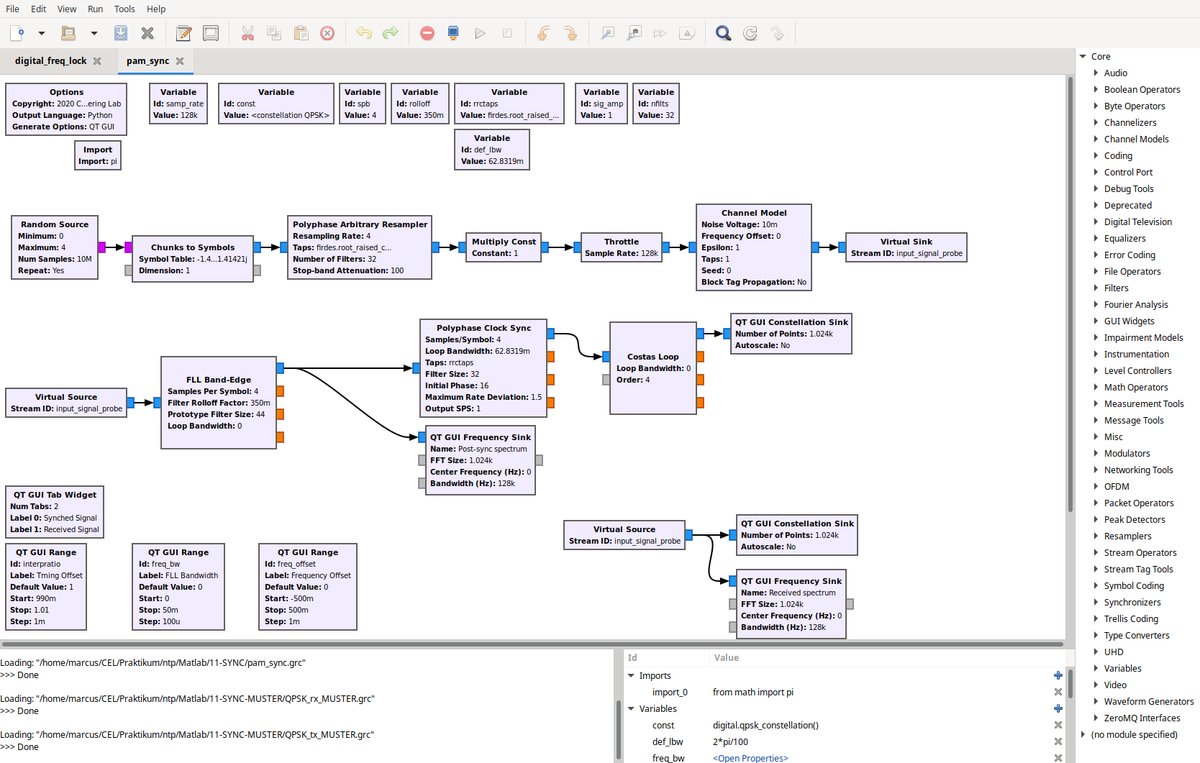
osmocom Source block sees it with no special handling, and any HackRF flowgraph runs against it unchanged. This is the host-side half of the PortaRF's "tethered lab work" mode (Vol 9). Screenshot: Marcusmueller (Ettus), CC BY-SA 4.0, via Wikimedia Commons.7.3.3 Python flowgraphs
GNU Radio Companion exports to Python; you can also write directly:
#!/usr/bin/env python3
from gnuradio import gr, blocks, analog, audio
import osmosdr

class fm_receiver(gr.top_block):
    def __init__(self):
        gr.top_block.__init__(self, "FM Receiver")

        # PortaRF source
        self.source = osmosdr.source(args="hackrf=0")
        self.source.set_sample_rate(2e6)
        self.source.set_center_freq(96.9e6, 0)
        self.source.set_gain(24, 0)

        # Filter + demodulator
        self.lpf = filter.fir_filter_ccc(1, [...])
        self.demod = analog.wfm_rcv(quad_rate=2e6, audio_decimation=50)

        # Audio sink
        self.audio = audio.sink(40000)

        # Connect
        self.connect(self.source, self.lpf, self.demod, self.audio)

if __name__ == '__main__':
    tb = fm_receiver()
    tb.start()
    input("Press Enter to exit...")
    tb.stop()
7.3.4 Common flowgraph patterns
Table 2 — 3.4 Common flowgraph patterns
| Pattern | Use case |
|---|---|
| Source → demod → sink | Live receive (FM, AM, SSB) |
| Source → file sink | I/Q capture (alternative to hackrf_transfer) |
| File source → sink | Replay captured signal (TX block at sink) |
| Source → FFT → display | Spectrum analyzer |
| Source → decoder → text sink | Protocol decoding |
| File source → matched filter → bit detector | Offline decoder development |
7.3.5 GR vs Mayhem
For PortaRF specifically:
- GR is for development / research — flexible, scriptable, but requires a host PC
- Mayhem is for deployment / operation — fixed apps, no host needed
- Most users use both — GR for new decoder development, Mayhem for field use
7.3.6 Performance considerations
GR runs on the host CPU. PortaRF sustains 20 MS/s I/Q output; the host must process this. For high-rate work:
- Use a modern multi-core CPU
- Increase the
gr-blocksthread count - Consider GPU-accelerated blocks (gr-fosphor for waterfall)
- Drop sample rate if CPU can’t keep up (errors will manifest as dropped samples)
7.4 SDRangel / GQRX / CubicSDR alternatives
For users who prefer GUI-driven SDR over GR flowgraph composition.
7.4.1 SDRangel
The most full-featured GUI SDR for HackRF/PortaRF:
# Linux
sudo apt install sdrangel

# Or download from sdrangel.org for Windows / macOS
Features:
- Multi-channel — multiple receivers / transmitters per device
- Many built-in decoders — broader than Mayhem in some areas
- Recording / playback — handles I/Q with various formats
- Spectrum + waterfall — high-quality real-time displays
- Custom plugins — community-contributed extensions
- TX support — generation, replay, beacons
For complex tethered work: SDRangel is often the right tool. It’s more capable than Mayhem on a host PC, less capable on a handheld.
7.4.2 GQRX
Lightweight Linux/macOS receiver:
brew install gqrx- Simple, fast, reliable
- Receive-only (TX not supported)
- Good for casual listening / spectrum monitoring
- Less feature-rich than SDRangel
If you want a “radio that just works” for monitoring: GQRX.
7.4.3 CubicSDR
Cross-platform GUI:
- Receive-only
- Multi-platform (Linux, macOS, Windows)
- Simple UI
- Less active development than SDRangel
7.4.4 SDR#
Windows-only .NET-based:
- Most popular Windows SDR
- Receive-only by default; HackRF plugin enables TX
- Many community plugins
- Closed source (with open plugins)
7.4.5 Which to choose
Table 3 — 4.5 Which to choose
| If you… | Use |
|---|---|
| Want maximum flexibility | GNU Radio |
| Want GUI with broad features | SDRangel |
| Want a simple receiver | GQRX (Linux/macOS) or SDR# (Windows) |
| Want cross-platform consistency | SDRangel |
| Are developing custom protocols | GNU Radio |
| Are debugging HackRF | hackrf_* tools first; GR for waveform inspection |
For PortaRF: SDRangel is the typical “tethered to a laptop” choice. Mayhem covers standalone use.
7.5 Python + libhackrf scripting
For automation and scripted workflows.
7.5.1 PyHackRF wrapper
pip install pyhackrf2Basic usage:
from pyhackrf2 import HackRF

hackrf = HackRF()
hackrf.sample_rate = 2_000_000
hackrf.center_freq = 433_920_000
hackrf.lna_gain = 16
hackrf.vga_gain = 16

# Capture 1 million samples
samples = hackrf.read_samples(1_000_000)

# samples is a numpy array of complex floats
# Process / save as needed
hackrf.close()
7.5.2 Custom scripted workflows
# Sweep frequencies, capture at each, save
frequencies = [433_000_000, 868_000_000, 915_000_000, 2_400_000_000]

for f in frequencies:
    hackrf.center_freq = f
    samples = hackrf.read_samples(10_000_000)
    np.save(f"capture_{f}_Hz.npy", samples)
7.5.3 Integration with analysis frameworks
# Combine with scipy for signal processing
from scipy import signal

# FFT analysis
fft = np.fft.fft(samples)
power = 20 * np.log10(np.abs(fft))

# Filter
b, a = signal.butter(4, 100000, fs=hackrf.sample_rate, btype='low')
filtered = signal.filtfilt(b, a, samples)

# Demodulate (custom)
demod = np.abs(filtered)
7.5.4 Use cases for Python scripting
- Scheduled captures (cron jobs running PortaRF nightly)
- Multi-band sweeps in sequence
- Custom decoders (when GR doesn’t have what you need)
- Automated A/B testing of receivers/antennas
- Batch processing of recorded captures
For deeply-custom workflows, Python scripting is more flexible than GR flowgraphs (though GR is more performant for real-time work).
7.6 PortaRF host-side specifics — USB-C and driver paths
What’s different between PortaRF and porta on the host side. Spoiler: very little.
7.6.1 USB enumeration
PortaRF enumerates as a standard HackRF One:
Vendor ID: 0x1d50 (OpenMoko, Inc.)
Product ID: 0x6089 (Great Scott Gadgets HackRF One)
Identical to porta. No driver differences.
7.6.2 USB-C considerations
- Cable: USB-C-to-USB-A or USB-C-to-USB-C; data + power capable
- Avoid charge-only cables — these don’t enumerate as USB devices
- Cable quality matters at high data rates — cheap cables may drop samples at 20 MS/s
7.6.3 Linux driver setup
# Add user to plugdev group for non-root access
sudo usermod -a -G plugdev $USER

# Or install hackrf-tools which includes the udev rule
sudo apt install hackrf

# Verify
lsusb | grep -i hackrf
# Expected: Bus 001 Device 042: ID 1d50:6089 OpenMoko, Inc. ...
7.6.4 macOS driver setup
No driver installation needed beyond brew install hackrf. The libusb-based hackrf tools work directly.
7.6.5 Windows driver setup
WinUSB-based; install via Zadig if not auto-installed:
- Download Zadig from zadig.akeo.ie
- Connect PortaRF
- Run Zadig
- Replace driver with WinUSB
- Verify via
hackrf_infofrom PowerShell / cmd
7.6.6 Cross-platform consistency
Once enumerated, hackrf_* tools behave identically across platforms. Capture files transfer between platforms unchanged. GNU Radio flowgraphs port unchanged. Python scripts portable.
The PortaRF is just a HackRF One to the host PC. No special handling.
7.7 Resources
HackRF host tools (cross-ref)
- HackRF One Vol 7 (canonical host-side tools):
../../../HackRF One/03-outputs/HackRF_One_Complete.html - HackRF tools repo: https://github.com/greatscottgadgets/hackrf
- libhackrf API: https://github.com/greatscottgadgets/hackrf/wiki
GNU Radio
- Main site: https://www.gnuradio.org/
- Tutorials: https://wiki.gnuradio.org/index.php/Tutorials
- gr-osmosdr: https://github.com/osmocom/gr-osmosdr
GUI SDR alternatives
- SDRangel: https://www.sdrangel.org/
- GQRX: https://gqrx.dk/
- CubicSDR: https://cubicsdr.com/
- SDR# (Windows): https://airspy.com/download/
Python
- PyHackRF2 (Python wrapper): https://pypi.org/project/pyhackrf2/
- NumPy: https://numpy.org/
- SciPy: https://scipy.org/
Custom firmware development (cross-ref Vol 10)
- Mayhem firmware: https://github.com/portapack-mayhem/mayhem-firmware
- libopencm3: http://libopencm3.org/
- gcc-arm-none-eabi toolchain: https://developer.arm.com/downloads/-/gnu-rm
Sibling references
- porta’s host-side setup:
../../../HackRF One/00-inventory/porta.md - Hack Tools comparison:
../../../_shared/comparison.md
End of Vol 7. Next: Vol 8 walks the firmware update workflows — Mayhem self-flash via SD card, HackRF firmware update via hackrf_spiflash, recovery procedures.
Comments (0)