Ruckus Game Over · Volume 7
Game Over Module — Volume 7
Known Issues, Mitigations, and Mods
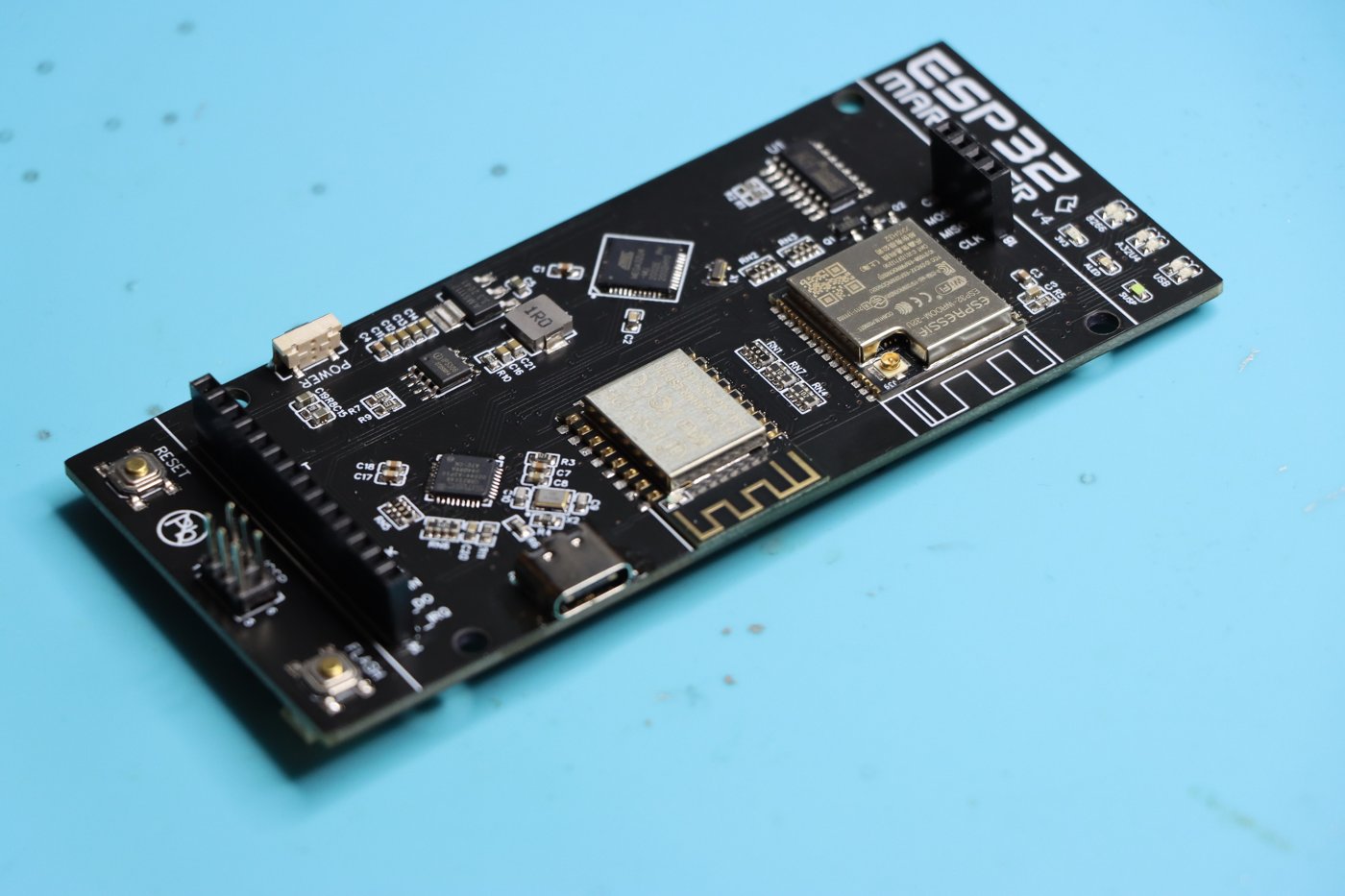
The most consequential question prospective Game Over buyers ask is: does this board damage Flippers? The honest answer requires unpacking what the reports actually say, what the technical hypothesis is, and what the current evidence supports.
This sub-chapter investigates without editorializing. The facts are laid out; the conclusion is yours.
The reports
Across the Tindie review history (April 2024 through February 2026) and forum mentions of the Game Over module, the bricking pattern appears in this shape:
- A Feb 2026 review (the most recent at time of writing) is unambiguous: “Two of my Flipper Zero’s has been damaged because of this product. Never got any compensation for it. Please don’t buy from random Tindie stores, learned this the hard way.”
- Earlier reviews (mostly 2024) include accounts of damaged Flippers, sometimes attributed to the End Game predecessor and sometimes to early Game Over batches. Some report the Flipper’s battery specifically being damaged (“Another person I know had their battery ruined because of it”).
- Other reviews from the same period are positive — many users report no problems whatsoever.
- The vendor has responded to several reviews acknowledging issues and describing firmware updates pushed in response.
This means the issue is real but not universal. Some units, some configurations, some Flippers — reports of damage. Others, no damage.
The technical hypothesis
What’s physically plausible given the hardware:
The Flipper’s 3V3 GPIO rail is community-rated for ~150 mA continuous and derived from the BQ25896 charge controller’s regulated 3V3 output. The BQ25896’s 3V3 LDO has a thermal protection circuit but no fast over-current cutoff. In a brownout scenario:
- Game Over draws sustained > 200 mA during Wi-Fi attack work (Vol 2 § 8 power table).
- The 3V3 rail sags below the 2.7 V minimum the STM32WB55 needs for stable BLE / RTC operation.
- The Flipper’s BLE stack faults — visible as failed pairings, the Mobile App disconnecting, etc. Recovers on reset.
- In severe sustained sag, the Flipper’s other peripherals (NFC controller, sub-GHz radio) experience under-voltage events that can corrupt their internal state — particularly the ST25R3916 NFC controller, which is sensitive to power glitches.
- In the worst case, sustained brownouts during charging cycles can stress the BQ25896 itself or the 18650 Li-ion cell’s protection PCM (protection circuit module) — which is the most likely path to “damaged battery.”
The Flipper’s MCU itself (STM32WB55) is robust against under-voltage — it brown-out-resets cleanly without flash corruption. So “bricking” is unlikely to mean the MCU is dead; more likely it means battery / PMIC / NFC chip is degraded.
Vendor response history
From observable Tindie review threads:
- 2024: vendor acknowledged 3V3-rail issues; pushed firmware updates that throttled TX power and added software-side power throttling.
- 2024–25: documentation updated with the “do not run modules without an antenna” warning and “do not attach to a powered Flipper” warning.
- 2025: further firmware iterations to throttle attack-mode power draw.
- Feb 2026 review reports two damaged Flippers, suggesting the vendor’s mitigations are not fully sufficient on all units when operated certain ways.
The vendor is responsive and active. The issue is not “vendor abandonment”; it is a hardware design constraint (the Flipper 3V3 rail is genuinely undersized for multi-radio attack work) that firmware-only mitigations can only partially address.
What to actually do
Rules to keep your Flipper safe with Game Over (or any multi-radio module):
- Always power Game Over via its own USB-C during any attack session — Wi-Fi deauth, BLE spam, sub-GHz TX. Treat the Flipper 3V3 rail as logic only.
- Mount and unmount with the Flipper powered off. The vendor’s own warning. Hot-mounting can corrupt SD; less commonly, can damage the GPIO header itself.
- Don’t run multi-radio attacks on a Flipper that’s also charging. The 3V3 rail is most stressed during charging; adding attack load on top is the worst-case condition.
- Don’t run sub-GHz TX simultaneously on the Flipper’s onboard CC1101 and Game Over’s CC1101 daughter. The shared antenna ground path can backfeed RF (Vol 2 § 7.2).
- Don’t run any module without an antenna installed — vendor’s warning, applies to RF-PA stage protection.
- Be ready to pop the cell out of the Flipper if you ever feel it getting unusually warm during Game Over operation. Heat is the first sign of cell-protection-circuit stress.
- Keep a backup Flipper if possible. The Hack Tools project already plans for this — TJ411 stays in the travel kit, the Game-Over-host unit is a separate physical Flipper. If the Game-Over-host gets damaged, the travel daily-driver is unaffected.
These rules don’t make the issue impossible — but they reduce the risk dramatically and address every documented failure mode.
Decision posture
The Game Over is operable safely if the rules in § 1.4 are followed. The modular architecture (one Flipper dedicated to Game Over hosting, separate from the daily-driver) is itself a mitigation — if the worst happens, only the dedicated host is damaged, not the travel-kit unit. The vendor is responsive and the firmware has been iteratively improved. The Feb 2026 review represents a worst- case operator profile (likely attack work without USB-C power, on a charging Flipper), not the typical experience.
Proceed with awareness of the rules.
7.1 Sandisk microSD compatibility issue
7.1.1 The issue
Reported by multiple Game Over users since 2024: Sandisk-branded microSD cards intermittently fail to mount or fail mid-session, even when the same card works fine in other ESP32 boards.
The vendor’s diagnosis (responding to a review):
There is a known issue with newer Sandisk branded microSD’s, this is an upstream espressif API issue and not related to the board at all. It should eventually be fixed. Some Sandisk cards work fine, others fail to mount.
This is not a Game Over hardware bug; it’s an ESP32 SDMMC API quirk that affects some Sandisk firmware revisions. ESP-IDF has periodic fixes upstream, which propagate to Marauder via Arduino-ESP32 core updates.
7.1.2 Recommended cards
- Lexar (vendor-recommended, multiple capacities tested OK).
- Kingston (vendor-recommended).
- Samsung EVO (community-reported OK, not vendor-tested).
- Generic / unbranded — variable; avoid.
7.1.3 Mitigation
If you already have Sandisk cards and they work, keep them. If they fail, swap to Lexar or Kingston before assuming the Game Over has hardware issues.
PCAP captures are append-only writes — even a marginally compatible card may work for short captures and fail on long ones. Test with a capture > 100 MB before a real field session.
7.2 Daughter-slot orientation hazard
The 8-pin daughter-card slot is recessed and reinforced but not keyed. Inserting a daughter card backwards reverses power and ground:
- Pin 1 (GND) and Pin 2 (3V3) swap in the wrong orientation, applying 3V3 to ground and ground to 3V3 on the daughter card.
- For a CC1101 daughter, this may survive briefly but is not guaranteed; the chip’s internal protection diodes can absorb a reverse-polarity transient but not a sustained one.
- For an NRF24 daughter, this is almost always fatal — NRF24L01+ has weaker reverse-polarity protection than CC1101, and the chip’s 3V3 LDO will let the cap charge in the wrong direction, which permanently damages the silicon.
7.2.1 How to insert correctly
The Marauder dev-board-pro daughter card family uses a pin-1 indicator:
- Some daughters have a white silk dot at pin 1.
- Some have a chamfered corner at pin 1.
- Some have pin 1 labeled “1” in silk.
Match this against the pin 1 indicator on the Game Over PCB — typically a small white triangle or “1” silk-screened next to the slot. Both must align.
7.2.2 If you’ve inserted backwards
Power off immediately. Remove the daughter card. Inspect for damage:
- Smell — burnt-component smell is a strong indicator of damage.
- Visual — dark or browned PCB near the chip means heat damage.
- Test — re-install in correct orientation, power up, check if the daughter still appears in the firmware menu.
If the daughter card is dead, replace it. The Game Over itself is unlikely to be damaged (the slot is just passive headers).
7.3 Antenna co-location with Flipper CC1101
When the CC1101 daughter is installed and the Game Over is mounted on a Flipper, two CC1101 radios are physically present in close proximity sharing antenna ground (Vol 2 § 7.2).
7.3.1 Symptoms of TX collision
If you transmit on both CC1101s simultaneously:
- Game Over’s daughter PA stage may overheat (RF energy backfeeding through the shared ground).
- Flipper’s onboard CC1101 may show unusually high noise floor immediately after.
- In the worst case, one of the PAs degrades — visible as reduced output power on subsequent TX commands.
7.3.2 The rule
Don’t TX on both simultaneously. RX on both is fine — receivers are passive. TX from one at a time.
In practice, this means:
- Don’t run a Flipper sub-GHz capture/replay while running Game Over CC1101 capture/replay on the same band.
- If you have a workflow that needs simultaneous sub-GHz on two bands (e.g. 433 MHz on Flipper, 868 MHz on Game Over daughter), space the TX bursts in time — alternating, not concurrent.
This is the same operational rule as for any two co-located CC1101s on different boards (it’d apply to a Mayhem v2 + Flipper combo too).
7.4 Power dips on long deauth runs
Even with USB-C powering Game Over, long deauth runs (multi-minute sustained TX bursts) can cause power-supply ripple that destabilizes the ESP32-S3.
7.4.1 Symptoms
- Marauder UI freezes or reboots mid-attack.
- OLED corrupts visually (artifacts, ghosting).
- microSD becomes unmounted and PCAP capture stops.
- Companion FAP loses UART connection.
7.4.2 Mitigation
- Use a high-quality USB-C power source — a wall-charger USB-C that can deliver 1 A clean is better than a USB-C power bank that drops voltage under load.
- Don’t combine USB-C-to-Game-Over and USB-C-to-Flipper from the same source. Two separate sources prevents cross-talk.
- Limit attack bursts to ~5 minutes maximum, with rest periods between. Deauth doesn’t need to be continuous to be effective.
- Watch the OLED status LED for any color flicker that indicates power instability.
7.5 Companion FAP UART speed quirks
Default Marauder UART is 115200. Some Game Over batches and some Flipper firmwares can negotiate 921600 for faster log retrieval. But:
7.5.1 Symptoms of UART speed mismatch
- Companion FAP shows garbled text in command output.
- Commands appear to send but no response received.
- Long output (e.g. AP scan results) truncates randomly.
7.5.2 Mitigation
- Always start at 115200. Confirm everything works.
- Only step up to higher speeds if you have a specific need (large PCAP retrievals, fast scrolling logs).
- If you switch to higher speed and see issues, drop back. Some USB-UART bridge chips on Game Over batches don’t reliably handle 921600 with the long cable run from Flipper to ESP through GPIO.
7.6 OLED contrast / dim issues
Some users report the OLED becoming dim over time or showing reduced contrast after extended use.
7.6.1 Cause
OLED panels (organic LEDs) age — pixel brightness decreases over thousands of hours of use. Not specific to Game Over; affects every OLED on the planet.
7.6.2 Mitigation
- Auto-off in Marauder settings, if available — turn off the OLED when idle.
- Reduce brightness when not actively using the menu (Settings → Brightness in some builds).
- Don’t display the same screen for hours (e.g. don’t leave the AP scan list on for an entire day) — OLED burn-in is real, though slower than CRT or plasma.
7.7 Mods
7.7.1 Aftermarket case (3D-printed alternatives)
The stock clear ABS case is OK but not great. Community alternatives:
- Reinforced PETG case — slightly more durable; available on Printables under various “Game Over PETG” search terms.
- Battery sandwich case — adds a 1S Li-Po + boost converter for true handheld use without external USB-C. Untested for the 3V3 brownout issue — adding a battery doesn’t necessarily fix the rail-stability problem if the boost converter is undersized.
- Belt-clip case — for body-mounted long-duration logging.
Search Printables and Thingiverse for “Game Over Flipper” to find current options.
7.7.2 Antenna upgrade
Stock antennas are decent but compact. Upgrades:
- High-gain 2.4 GHz directional for the ESP32-S3 — useful when you need to focus on a specific AP.
- Dual-band 2.4/5 GHz — works for 2.4 GHz, useless for 5 GHz (which the ESP32-S3 doesn’t have anyway). Only buy if you also use the antenna on 5 GHz hardware elsewhere.
- Active antennas with built-in LNAs — for marginal-signal RX work. Adds a few dB; helps probe-sniff at range.
For the daughter card:
- CC1101 long-whip (40 cm) for 433 MHz extreme range work.
- NRF24 PCB-trace 2.4 GHz is integrated into most NRF24 daughter cards; an external upgrade is rare for 2.4 GHz mousejack work (range is short by design).
7.7.3 GPS pigtail mod (advanced)
To add GPS support without an external module: identify an unused UART pin on the ESP32-S3 (Vol 2 § 3.3 has the pin map), solder a 3.3 V GPS module (NEO-6M or similar) to that pin pair plus 3V3/GND. Fits inside the case if you 3D-print a slightly thicker back shell.
This makes Game Over a true wardriving tool. Trade-offs:
- Voids any vendor warranty.
- Requires confidence with fine soldering.
- The result is still inferior to AWOK Dual Touch V3 for wardriving (AWOK has GPS designed in from the start with proper antenna paths).
Don’t do this mod if wardriving is the goal; use AWOK for wardriving and keep Game Over for its current role.
7.7.4 External flash upgrade
If running custom firmware that exceeds 4 MB, you can solder a 16 MB W25Q128 SPI flash to the ESP32-S3’s spare SPI bus. Same caveats as the AWOK external-flash mod (Vol 9 of AWOK deep dive):
- Hot-air rework station needed.
- ESP-IDF partition table customization needed.
- Provides real PCAP/log storage if SD remains incompatible with available cards.
Edge case. Most users won’t need this.
7.7.5 USB-C upgrade (when stock USB is borderline)
Some Game Over batches have older USB-C jacks that can become intermittent over time. If you’re seeing flaky USB enumeration:
- Inspect the USB-C jack visually — bent pins, loose solder.
- Reflow the jack with a hot-air gun (~280 °C, 30 s).
- If still flaky, replace the jack — USB-C SMD jacks are <$1 from Mouser and a 5-minute solder job for someone with rework experience.
This repair is straightforward for anyone with rework experience. Most users replace the unit instead.
7.8 Summary of “things to know before mounting”
Consolidated rules (the essential ones):
- Power Game Over from its own USB-C during attack work. Always.
- Mount/unmount with the Flipper powered off. Always.
- Antenna installed before powering on. Always.
- Daughter card orientation: match pin-1 indicators. Always.
- Use Lexar or Kingston microSD cards. Avoid Sandisk.
- Don’t TX on Game Over CC1101 + Flipper CC1101 simultaneously.
- Limit deauth bursts to ~5 minutes; rest between.
- UART at 115200 unless you have a reason for faster.
These eight rules cover essentially every documented Game Over operational issue.
7.9 What’s next
Vol 8 covers legal/ethics posture, where Game Over fits in the broader Hack Tools lineup, pairing recommendations, and the reference list.
Comments (0)