Wi-Fi Pineapple · Volume 3
Hak5 WiFi Pineapple Volume 3 — What a Pineapple Does: the PineAP Technique Catalog
The PineAP suite component by component — recon, KARMA/Allow-Associations, beacon response, SSID-pool broadcast, capture, targeting, deauth, handshake capture, client tracking — every one mapped to what happens on the air
3.1 About this volume
This is the volume that answers the first question — “what does a pineapple actually do?” — at the technique level, model-independent. Every WiFi Pineapple, from the Mark VII to the Enterprise, runs the PineAP suite: the coordinated sniffing-and-injection engine. The models differ in how fast and how many radios — the technique catalog is the same.
This volume is paired with Vol 4 (where these techniques sit across white/red/black/blue-hat work and the legal line) and Vol 8 (the full posture). Read Vol 4 before operating any of the TX-active techniques in this volume — § 6 onward describe things that transmit, and transmitting against networks you don’t own or aren’t authorized to test is a crime. This volume describes the mechanism; Vol 4 governs the use.
Cross-reference: the ESP32 Marauder Firmware deep dive covers the frame-level anatomy of deauth, the probe-request structure, the EAPOL handshake, and captive-portal mechanics in schematic detail. This volume covers how the PineAP suite orchestrates them; it cites Marauder for the bit-level frame anatomy rather than re-deriving it.
3.2 The 802.11 association flaw the whole device exploits
Everything the Pineapple does rests on one design decision in the 802.11 standard:
Wi-Fi clients don’t wait to hear a network — they advertise what they’re looking for.
A phone or laptop remembers every network it’s ever joined. To reconnect quickly, it doesn’t passively wait to hear HomeWiFi — it actively, repeatedly broadcasts probe requests: “is HomeWiFi here? is Office-5G here? is Marriott_GUEST here?” — the entire preferred-network list, shouted into the air, by every device, constantly.
   The flaw, on the air
   ════════════════════════════════════════════════

   A phone walking down the street, every few seconds:

     probe req: "HomeWiFi?"        ── broadcast, in the clear
     probe req: "Office-5G?"       ── broadcast, in the clear
     probe req: "Marriott_GUEST?"  ── broadcast, in the clear
     probe req: "Joe's iPhone"     ── (a hotspot it once used)
              ⋮
   This list IS the device's location history + habits, leaking
   continuously. And: whatever answers "yes, I'm HomeWiFi" first,
   convincingly, the client will try to associate with.

   KARMA (2004) → PineAP (2026): "be whatever it's asking for."
Two consequences flow from this, and the PineAP suite is built to harvest both:
- Intelligence — that probe list is a privacy goldmine. It reveals where a device has been, what it trusts, sometimes its owner (“Joe’s iPhone”). Just listening (§ 4-5) collects it.
- A connection vector — if you answer the probe convincingly (§ 6-7), the client associates to you. Now you are its access point: its traffic flows through your device.
Modern OSes have pushed back — MAC randomization, fewer directed probes, “don’t auto-join open networks” prompts. PineAP’s design (and the community’s MANA refinements) absorbs those defenses, but they’re real, and Vol 4 § on blue-team notes them. The flaw is narrower than in 2008 — it is not closed.
3.3 The PineAP suite — the map
PineAP is not one feature — it’s a coordinated set. Here’s the whole suite at a glance, in the order an operator typically engages them:
   THE PINEAP SUITE
   ═══════════════════════════════════════════════════════════════

   PASSIVE  (listening only — generally legal, Vol 4)
   ┌─────────────────────────────────────────────────────────┐
   │ Recon            scan the airspace: APs, clients, who's │
   │                  talking to whom                        │
   │ Log Probes       record every probe request heard       │
   │ Log Associations record every client that connects      │
   │ Capture SSIDs    harvest probed SSIDs into the "pool"    │
   │   to Pool                                                │
   └─────────────────────────────────────────────────────────┘
                          │
                          ▼
   ACTIVE  (transmitting — authorization REQUIRED, Vol 4 + 8)
   ┌─────────────────────────────────────────────────────────┐
   │ Allow Associations  KARMA: let clients connect via ANY  │
   │   (formerly KARMA)   SSID they probe for — the rogue AP  │
   │ PineAP Daemon       the engine that must run for the    │
   │                     active features below               │
   │  ├ Beacon Response  answer a specific probe with a      │
   │  │                  targeted beacon (invisible to others)│
   │  └ Broadcast SSID   continuously beacon the whole pool   │
   │     Pool            (the Mark V called this "Dogma")     │
   │ Deauthentication    kick a client off its real AP so it │
   │                     reconnects (to you, or so you catch │
   │                     the handshake)                      │
   │ Handshake Capture   grab the WPA/WPA2 4-way handshake   │
   │                     for offline cracking                 │
   └─────────────────────────────────────────────────────────┘
                          │
                          ▼
   TARGETING  (the scope discipline overlay — Vol 9)
   ┌─────────────────────────────────────────────────────────┐
   │ Source MAC / Target MAC — aim everything above at a     │
   │ specific device or AP, not the whole room. This is how  │
   │ you stay inside an engagement's scope.                  │
   └─────────────────────────────────────────────────────────┘
The rest of this volume walks each box.
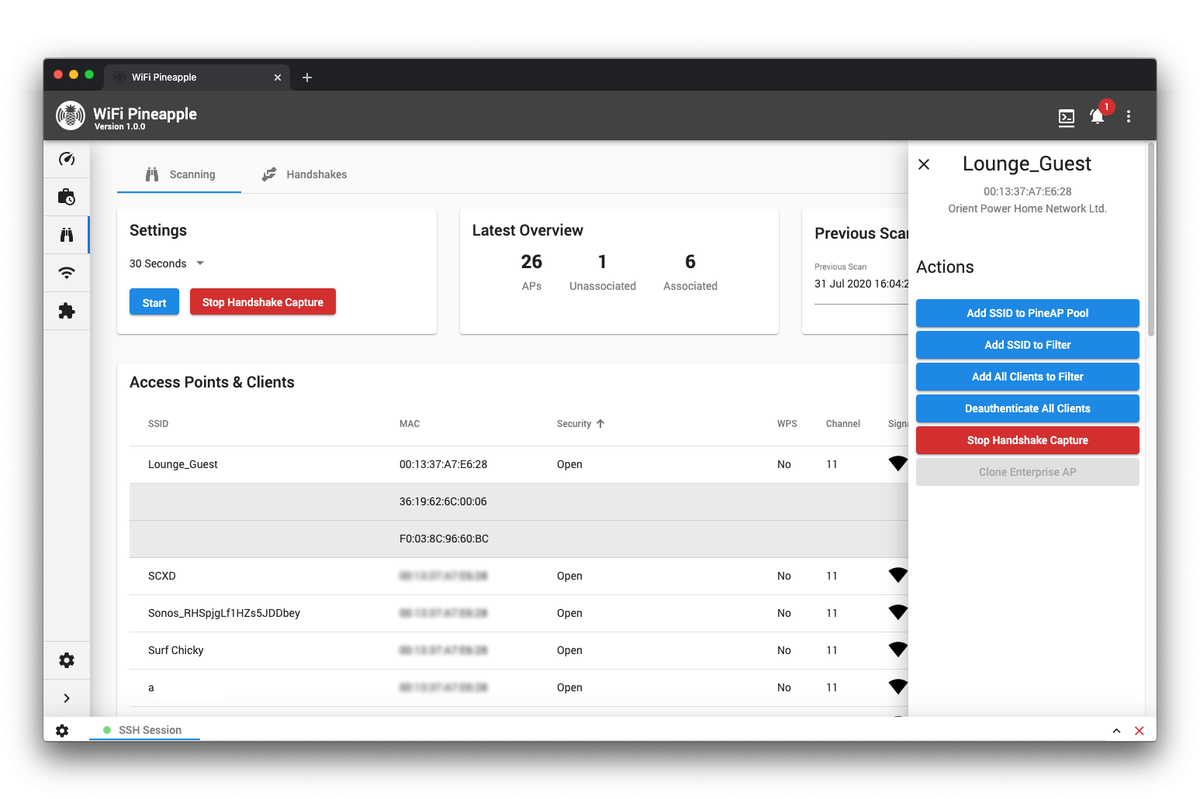
3.4 Recon — passive situational awareness
What it is: the Pineapple’s scanning mode. It surveys the airspace and builds a picture: which access points are broadcasting, which clients are present, what each client is associated to, signal strengths, channels.
On the air: purely passive — the Pineapple is listening, not transmitting. It’s reading beacons (APs announcing themselves) and the probe/data frames clients emit anyway.
Why it’s first: recon is how you know what you’re looking at before you touch anything. It’s also the foundation of the defensive use (Vol 4 § blue-team): a recon sweep of your own airspace shows you the rogue APs, the KARMA responders, the deauth floods — i.e. it detects other people’s Pineapples.
Modern Pineapple recon (per recent firmware — “Enhanced Recon”) presents this as an interactive airspace view: APs and their associated clients, laid out so you can see the relationships. The Pager surfaces it on its own 2.4” screen; the Mark VII and Enterprise in the web UI.
Legal status: receiving and logging publicly-broadcast 802.11 management frames is generally legal in most jurisdictions (Vol 4 draws the precise line). Recon is the safe mode — it’s where wardriving (Vol 17) and attack-watching (Vol 4 § blue) live.
3.5 Log Probes / Log Associations — the listening layer
Two passive logging functions that feed everything else:
Table 1 — Two passive logging functions that feed everything else
| Function | What it records | What it feeds |
|---|---|---|
| Log Probes | Every Probe Request frame heard — the SSID a nearby device is looking for, and the device’s MAC | Intelligence on who’s around and what they trust; the raw material for the SSID pool (§ 8); target selection (§ 9) |
| Log Associations | Every time a client associates — to a real AP or to the Pineapple | The “Clients” view; confirmation that a rogue-AP attempt worked; the SSID column showing what each client joined |
These run continuously and quietly. They are the device’s memory of the airspace. The probe log in particular is the privacy-sensitive artifact — it’s a list of devices and their network histories — and Vol 8 § on capture data covers handling it responsibly.
3.6 Allow Associations — KARMA, the rogue AP
This is the core. This is what makes a Pineapple a Pineapple.
What it is: “Allow Associations” — historically and functionally KARMA (Vol 2 § 4) — makes the Pineapple answer yes to association attempts for any SSID a client probes for. A device shouts “is HomeWiFi here?”; with Allow Associations on, the Pineapple replies “yes, I’m HomeWiFi,” and the client associates.
On the air: the Pineapple is now actively transmitting — sending probe responses and association responses, claiming to be networks it is not. This is unambiguously active, intrusive, TX behavior.
The effect: once a client associates, the Pineapple is that client’s access point. Every packet the client sends to the internet now transits the Pineapple. From there: traffic inspection, captive portals, downgrade attacks, DNS manipulation — the Pineapple is positioned as a man-in-the-middle.
The toggle reality: in the modern UI this is literally a switch labeled “Allow Associations.” It works with the client/SSID filtering (the allow/deny lists) and the targeting (§ 9) so you can scope it. Turning it off prevents clients from connecting at all — which is the correct default state until you are inside an authorized engagement.
Filtering and scope: Allow Associations honors filter lists — you can allow only specific client MACs or specific SSIDs. Combined with § 9’s targeting, this is what (technically) lets you confine a rogue-AP attack to the devices an engagement actually authorizes. It does not make the attack legal — Vol 4 — it makes it scoped.
3.7 The PineAP Daemon — beacon response + SSID-pool broadcast
The PineAP Daemon is the background process that has to be running for the active beaconing features to work. Operationally important detail: the daemon needs dedicated access to a radio (historically wlan1), and it conflicts with putting that same radio into client mode — you can’t have one radio both running PineAP and acting as your uplink. (A separate USB adapter, or a model with more radios, resolves this — which is one concrete reason the Enterprise’s five radios matter.)
With the daemon running, two beaconing behaviors become available:
3.7.1 Beacon Response — the surgical version
What it is: when a client probes for a specific SSID, the Pineapple sends a targeted beacon for exactly that SSID, aimed at exactly that client. Other devices in the area don’t see it.
Why it matters: it’s the quiet, in-scope version of being a rogue AP. Instead of flooding the whole room with fake networks, you respond only to the device you’re targeting, only with the network it asked for. It continues for a period after association so the client stays put.
3.7.2 Broadcast SSID Pool — the loud version
What it is: the Pineapple continuously broadcasts every SSID in its “pool” (the list built by § 8) — either to the broadcast address (everyone) or to targeted MACs. This is the Mark V’s “Dogma” (Vol 2 § 4): proactively being a whole list of networks, all the time.
On the air: loud. A device near a pool-broadcasting Pineapple sees a flood of network names appear — which is also exactly the detection signature a blue-team recon sweep looks for (Vol 4 § blue, Vol 20).
Beacon Response vs Broadcast Pool is the surgical-vs-shotgun choice, and it maps directly onto scope discipline: an authorized engagement scoped to specific devices uses Beacon Response + targeting; broad pool broadcast is loud, indiscriminate, and far harder to keep inside a scope.
3.8 Capture SSIDs to Pool — building the bait list
What it is: the passive harvester. “Capture SSIDs to Pool” watches probe requests (§ 5) and adds every SSID it hears into the pool — the list that Broadcast SSID Pool (§ 7.2) then beacons out.
The loop: devices probe for the networks they trust → Capture SSIDs to Pool harvests those names → Broadcast SSID Pool beacons them back out → devices see “their” trusted network and associate. The Pineapple is, in effect, learning what bait works in this specific location from the targets themselves.
Operationally: the pool is editable. You can let it auto-fill, you can hand-curate it, you can clear it. For a scoped engagement you’d typically not run open capture-and-broadcast — you’d put only the in-scope SSID(s) in the pool deliberately. Auto-capture-and-broadcast is the indiscriminate mode.
3.9 Targeting — Source MAC / Target MAC, staying in scope
PineAP exposes two targeting parameters that overlay every active technique:
Table 2 — PineAP exposes two targeting parameters that overlay every active technique
| Parameter | What it sets |
|---|---|
| Source MAC | The MAC the Pineapple transmits as (the wlan0 address) — the identity it presents |
| Target MAC | The MAC the Pineapple aims at — either the broadcast address (everyone) or a single specific device |
Why this is the most important operational control in the suite: targeting is how you stay inside an engagement’s scope. An authorized pentest is authorized against specific assets — these laptops, this AP, this network. Target MAC set to a specific device means your beacon responses, your deauth, your rogue-AP responses go to that device only. Target MAC set to broadcast means you’re hitting everything in radio range — every bystander’s phone, the coffee shop next door, the building across the street.
The scope rule: broadcast-target active operations are almost never inside an engagement scope, because an engagement cannot authorize you to attack bystanders. Targeted operations can be in scope. This is technical scoping, not legal cover — Vol 4 — but it is the mechanism by which a careful operator keeps an authorized engagement authorized.
3.10 Deauthentication — forcing the reconnect
What it is: the Pineapple transmits deauthentication frames — 802.11 management frames that tell a client (or an AP) “this session is over, disconnect.” The client drops off its real network.
Why you’d do it: two reasons, both about forcing a reconnect you can catch:
- Capture the handshake (§ 11) — a client only does the WPA 4-way handshake when it joins a network. Deauth it, it reconnects, you capture the handshake.
- Push it to the rogue AP — deauth it off the real network, and if your rogue AP (§ 6-7) is presenting that same SSID more strongly, the client may reconnect to you instead.
On the air: loud, active, disruptive, and highly detectable — a deauth flood is one of the most recognizable hostile-Wi-Fi signatures there is (Vol 4 § blue, Vol 20). Modern firmware’s “Improved Deauth” makes it more reliable; it does not make it quieter.
The hard line: deauthentication is denial of service. Against networks/devices you don’t own and aren’t authorized to test, it is illegal essentially everywhere — Vol 4 and Vol 8 are explicit. Frame-level anatomy of the deauth frame: cross-reference the ESP32 Marauder Firmware deep dive.
3.11 Handshake capture — the offline-cracking pipeline
What it is: the Pineapple captures the WPA/WPA2 4-way handshake — the cryptographic exchange a client and AP perform when the client joins. Recent firmware has Automatic Handshake Capture that does this opportunistically during recon.
Why the handshake: it contains the material needed to offline-crack the network’s pre-shared key. You don’t crack on the Pineapple — you capture there and crack on a real machine.
   Handshake-capture pipeline
   ═══════════════════════════════════════════════

   Pineapple                          Host workstation
   ─────────                          ────────────────
   recon + (optional) deauth
   to force a reconnect
        │
        ▼
   capture the 4-way handshake  ──────► aircrack-ng / hashcat
   to a .pcap / .hccapx                 (GPU dictionary / mask
        │                                attack against the PSK)
        ▼
   pull off the device via scp ───────► offline crack
   (Vol 19 — tooling)
The Pineapple’s role is capture, not crack. Vol 19 covers the host-side toolchain (aircrack-ng, hashcat, the hc22000 format, GPU time estimates) — and notably, the ESP32 Marauder Firmware deep dive’s Vol 9 already covers the hashcat side in depth; this series cross-references it rather than re-deriving the crack math.
WPA-Enterprise: recent Pineapple firmware also has WPA-Enterprise Attacks — a different and more involved beast than PSK capture (it targets the RADIUS/EAP exchange). Vol 10/15 (per-model firmware volumes) cover what’s actually exposed.
3.12 Evil twin — assembling the techniques into an attack
“Evil twin” isn’t a single PineAP feature — it’s the named pattern you get by composing the pieces:
   EVIL TWIN = recon + rogue AP + (often) deauth + a captive portal
   ═══════════════════════════════════════════════════════════════

   1. RECON          identify the target network + its clients
   2. ROGUE AP       stand up an AP with the SAME SSID (Allow
                     Associations / Beacon Response), ideally
                     stronger signal than the real one
   3. DEAUTH         (optional) kick the client off the real AP
                     so it looks for a reconnect
   4. CLIENT JOINS   the client associates to the "twin" — you
   5. CAPTIVE PORTAL present a login/credential page, or just
                     pass traffic through and inspect it
The “evil twin” is the canonical demonstration of why a Pineapple exists: it turns the 802.11 association flaw (§ 2) into a working man-in-the-middle position. It’s also the canonical demonstration of why the legal posture is what it is — every step from 2 onward is active, intrusive, and authorization-required. Vol 4 § red-team walks the authorized version; Vol 8 is the discipline.
3.13 The full attack chain, end to end
Putting the whole catalog in sequence — the shape of a Pineapple engagement:
   ┌─ PASSIVE — situational awareness ────────────────────────┐
   │ Recon → Log Probes → Log Associations                    │
   │ Result: you know the APs, the clients, the probe lists.  │
   │ (This phase is also the entire BLUE-TEAM use — Vol 4.)   │
   └──────────────────────┬───────────────────────────────────┘
                          │  ── authorization gate ──
                          │  Vol 4 + Vol 8: scope, written
                          │  authorization, target list confirmed
                          ▼
   ┌─ ACTIVE — engagement (authorized targets only) ──────────┐
   │ Set Source/Target MAC → scope to the authorized device(s)│
   │ Capture SSIDs to Pool (or hand-set the in-scope SSID)    │
   │ PineAP Daemon up → Beacon Response (surgical)            │
   │ Allow Associations → the target joins the Pineapple      │
   │ (optional) Deauth → force the reconnect                  │
   │ Handshake Capture → pull for offline crack (Vol 19)      │
   │ Evil-twin / captive portal → the MITM objective          │
   └──────────────────────┬───────────────────────────────────┘
                          ▼
   ┌─ CAMPAIGNS — automate + report ──────────────────────────┐
   │ The web UI's Campaigns run a scripted version of the     │
   │ above on a schedule and emit a report (Vol 5 § 4).       │
   └──────────────────────────────────────────────────────────┘
The single most important thing about this chain: there is an authorization gate between the passive and active phases, and it is not optional. Everything above the gate is generally lawful situational awareness. Everything below it transmits, intrudes, and requires authorization. The Pineapple makes crossing that gate a UI toggle — the operator is what keeps it honest.
3.14 What PineAP does NOT do
Scoping the catalog — common misconceptions:
Table 3 — Scoping the catalog — common misconceptions
| It does NOT… | Reality |
|---|---|
| Crack WPA/WPA2 on the device | It captures handshakes; cracking is host-side (aircrack-ng / hashcat) — Vol 11/19 |
| Break WPA3 / SAE the way it “breaks” WPA2 | WPA3’s SAE handshake isn’t offline-crackable the same way; PMF (protected management frames) also blunts deauth. PineAP’s classic chain targets WPA2-PSK and open networks best. |
| Magically defeat a careful modern client | MAC randomization, reduced directed probing, “don’t auto-join” prompts all reduce the attack surface. PineAP/MANA absorb a lot of it — but a hardened, patched device that doesn’t probe for saved networks is a much harder target. |
| Work beyond Wi-Fi (and, on the Pager, BT) | It’s an 802.11 tool. No sub-GHz, no cellular, no RFID. The Pager adds Bluetooth/BTLE — Vol 12/13. |
| Give you “free internet” or be a casual gadget | It is a pentest instrument. § 13’s authorization gate is the whole point. |
| Hide what it’s doing | Active PineAP — pool broadcast, deauth — is loud and detectable. Vol 20 covers the signatures. “Stealthy” Pineapple operation means surgical targeting (§ 9), not invisibility. |
3.15 Resources
PineAP — the authoritative reference
- The PineAP Suite (Hak5 docs): https://docs.hak5.org/wifi-pineapple-6th-gen-nano-tetra/getting-started/the-pineap-suite/
- Mark VII docs (current PineAP UI): https://docs.hak5.org/wifi-pineapple/
Technique background
- KARMA — Dai Zovi & Macaulay, original technique (~2004-2005)
- MANA — the EFF/SensePost KARMA refinement
- ESP32 Marauder Firmware deep dive — frame-level anatomy of deauth, probe requests, EAPOL handshake, captive portals:
Within this series
- Vol 2 — the KARMA → Dogma → PineAP lineage
- Vol 4 — where each technique sits across hat-colors + the legal line
- Vol 8 — the full operational posture
- Vol 11 / Vol 19 — handshake-capture → host-side cracking pipeline
- Vol 20 — the on-air detection signatures of each active technique
This is Volume 3 of a 21-volume series. Next: Vol 4 places this technique catalog across the spectrum of use — white-hat / penetration testing / red team / black hat / blue team — and draws the legal line precisely: which of these techniques are lawful situational awareness, which require written authorization, and which are crimes regardless of intent.
Comments (0)