Wi-Fi Pineapple · Volume 11
Hak5 WiFi Pineapple Volume 11 — Mark VII + AC: The Tactical Kit and 5 GHz
The MK7AC adapter, the tactical carry kit, dual-band operation, and why this is the recommended first buy
11.1 About this volume
The Mark VII + AC Tactical is not a different device from the Mark VII — it is the Mark VII plus the MK7AC USB adapter plus a tactical carry kit, sold as a bundle. This volume covers the delta: what the AC adapter adds (5 GHz / 802.11ac), what the tactical kit adds (field carry), and why Vol 1’s decision tree and Vol 16’s comparison both land on this bundle as the recommended first Pineapple purchase.
Vols 9-10 are the Mark VII; this volume assumes them. If the Mark VII is the baseline, the +AC Tactical is the baseline made field-ready and 5-GHz-complete — and that is exactly the device a first-time Pineapple owner should have.
11.2 What the +AC Tactical kit is
The Mark VII + AC Tactical bundle, as Hak5 sells it:
┌─ WiFi Pineapple Mark VII + AC Tactical ────────────────────┐
│ Base       = WiFi Pineapple Mark VII (Vols 9-10)           │
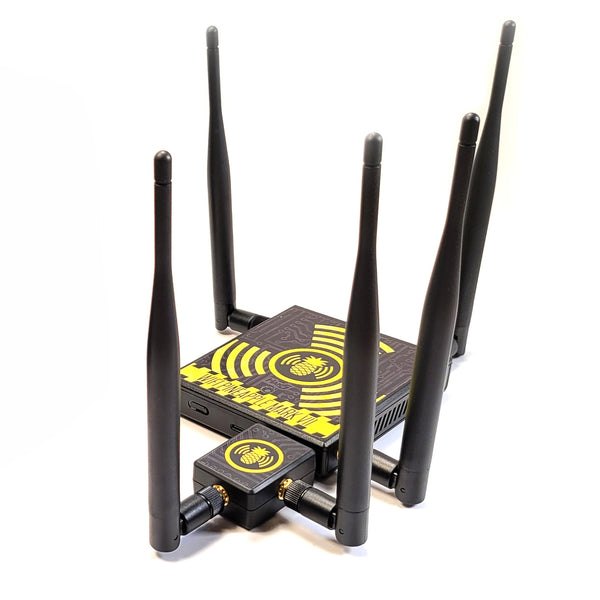
│ Adds       MK7AC adapter — MediaTek MT7612U, dual-band     │
│            802.11ac, 866 Mbps — dedicated 5 GHz monitor    │
│            + injection radio                               │
│ Adds       2× high-gain RP-SMA antennas (for the MK7AC)    │
│ Adds       USB-C to USB-A 3.0 adapter (host-port bridging) │
│ Adds       Tactical carry case                             │
│ Adds       Field-guide book                                │
│ Adds       Decals                                          │
│ Price      ~$235 (research-baseline — verify shop.hak5.org)│
└────────────────────────────────────────────────────────────┘
So the bundle is device + capability + kit: the Mark VII you already know (Vols 9-10), the MK7AC that closes its one real gap (§3), and the physical kit that makes it a field tool rather than a bench tool (§5). “Tactical” in Hak5’s product line denotes exactly this — the field-ready, carry-kit packaging.
11.3 The MK7AC adapter — closing the 5 GHz gap
The MK7AC is the heart of this volume. It is a USB Wi-Fi adapter that plugs into the Mark VII’s USB 2.0 host port (Vol 9 §6) and adds a 5 GHz / 802.11ac monitor-and-injection radio.
Table 1 — 3. The MK7AC adapter — closing the 5 GHz gap
| MK7AC | Spec (research-baseline) |
|---|---|
| Chipset | MediaTek MT7612U |
| Bands | dual-band — the operational value is the 5 GHz it adds |
| Standard | 802.11ac |
| Peak rate | 866 Mbps |
| Modes | monitor mode + packet injection (on the Mark VII firmware) |
| Connection | USB — into the Mark VII’s USB 2.0 host port |
| Ships with | the adapter, 2× high-gain RP-SMA antennas, a USB-C-to-USB-A 3.0 adapter |
| Standalone use | also works as a Linux Wi-Fi adapter (Kali/Parrot/Ubuntu) via the in-kernel mt76x2u driver |
Why the gap exists and why this closes it. The bare Mark VII’s three built-in radios are 2.4 GHz native (Vol 9 §4). Modern Wi-Fi has moved to 5 GHz — most current APs, and increasingly the WPA2/WPA3 networks a real engagement targets, run on 5 GHz, sometimes 5 GHz only. A 2.4-GHz-only Pineapple simply cannot see a 5-GHz-only target network. The MK7AC adds a dedicated 5 GHz monitor and injection interface — the Mark VII firmware presents it as an additional role-assignable radio (Vol 9 §4), and now the device can recon, capture, and attack on 5 GHz.
   What the MK7AC changes
   ════════════════════════════════════════════════════════

   bare Mark VII:        3 radios, all 2.4 GHz
                         5-GHz-only networks = INVISIBLE

   Mark VII + MK7AC:     3 built-in (2.4 GHz)
                         + 1 MK7AC (5 GHz, monitor + inject)
                         = full 2.4 / 5 GHz coverage

   The MK7AC is not an "upgrade." It is the part that makes
   the Mark VII complete for MODERN Wi-Fi. A Mark VII without
   it has a hole exactly where most current targets live.
The standalone-Linux-adapter property is a useful bonus: the MK7AC is also a perfectly good monitor-mode/injection adapter for a laptop running Kali — so it is not a single-purpose accessory, it is a capable Wi-Fi adapter that also slots into the Pineapple.
The host-port power budget (Vol 9 §6) is a real consideration — the MK7AC draws from the Mark VII’s USB 2.0 port; the included USB-C-to-USB-A 3.0 adapter exists partly to handle host-side connection realities. Confirm stable operation on the actual unit (doc-audit).
11.4 Dual-band operation
With the MK7AC installed, the Mark VII operates dual-band — 2.4 GHz and 5 GHz concurrently. The role-based radio model (Vol 9 §4) now spans four radios:
   Role assignment, Mark VII + MK7AC
   ════════════════════════════════════════════════════════

   built-in radio 1 (2.4 GHz) ──► MANAGEMENT
   built-in radio 2 (2.4 GHz) ──► PineAP   (2.4 GHz)
   built-in radio 3 (2.4 GHz) ──► MONITOR  (2.4 GHz)
   MK7AC        radio (5 GHz) ──► MONITOR + INJECT (5 GHz)

   Now the device recons and attacks BOTH bands. A 5-GHz-only
   target is a target again. The exact role assignment is
   operator-configurable (Vol 9 §4, Vol 10 §2) — this is the
   typical shape, not the only one.
What dual-band actually enables:
- Recon and attack against 5-GHz-only networks — the networks the bare Mark VII could not see.
- Band-aware testing — engaging a target on whichever band it actually uses, including networks that band-steer clients between 2.4 and 5 GHz.
- Concurrent dual-band recon — watching both bands’ airspace at once, because the radios are separate (Vol 7 §3 — role separation is concurrency).
Operationally, dual-band is not a “mode” you switch into — it is just what a Mark VII + MK7AC is. The MK7AC’s radio is one more role-assignable radio in the same pool; the workflows of Vol 10 §4-5 are unchanged, they just now have a 5 GHz radio available to assign.
11.5 The tactical carry kit
The non-electronic half of the bundle — what makes a Mark VII a field tool:
- The tactical carry case — an organiser that holds the Mark VII, the MK7AC, the antennas, the cabling, and a battery pack, cable-managed and protected. The difference between “a puck and a tangle of bits in a bag” and “a kit you can deploy from.”
- The field-guide book — a printed reference for field operation. (Hak5’s field guides are genuinely useful as a quick on-site reference; the deep dive is the depth, the field guide is the laminate-card equivalent — and this series’ Vol 21 cheatsheet is the same idea.)
- Decals.
For untethered field operation the kit pairs with a USB battery pack (Vol 9 §6) — the Mark VII is USB-C powered and modest in draw, so a power bank runs the device-plus-MK7AC untethered, which is what the wardriving and field-pentest use cases need (Vol 17 §2-3).
The “tactical” framing is not marketing fluff — it is the recognition that a Mark VII used in the field needs to be carried, protected, powered, and referenced in the field, and the kit is the answer to all four.
11.6 Operating the +AC vs the bare Mark VII
Operationally, the +AC Tactical is identical to the bare Mark VII — same web UI, same PineAP engine, same Campaigns, same firmware (Vol 10). The MK7AC does not change how you operate; it changes what you can reach. There is no separate “+AC firmware” or “+AC UI” — there is the Mark VII firmware, with one more radio available.
The setup delta over Vol 10 §2:
   +AC Tactical setup delta (over the bare Mark VII flow)
   ════════════════════════════════════════════════════════

   ... Mark VII first-boot steps 1-5 (Vol 10 §2) ...

   5b. INSTALL THE MK7AC — plug it into the USB 2.0 host
       port; attach its two RP-SMA antennas. Use the
       included USB-C-to-USB-A 3.0 adapter if the host-side
       connection needs it.

   6.  RADIOS — the role-assignment step now has a FOURTH
       radio (the MK7AC, 5 GHz) to assign. Typical: assign
       it the 5 GHz monitor + inject role (§4).

   ... continue with Vol 10 §2 step 7 (Cloud C2) ...
What workflows change: none in shape — but every recon, capture, and PineAP workflow from Vol 10 §4-5 now has a 5 GHz radio it can use. A recon sweep can sweep 5 GHz. A handshake capture can target a 5 GHz client. A PineAP test can run on 5 GHz. The workflow is Vol 10’s; the reach is this volume’s.
11.7 Why this is the recommended first buy
The Vol 1 decision-tree recommendation, defended in full. For a first Pineapple, buy the Mark VII + AC Tactical kit. The argument:
-
The Mark VII is the baseline — so skills transfer everywhere. Everything you learn on a Mark VII (the web UI, PineAP, Campaigns, the operating model) transfers to the Pager and the Enterprise, because they run the same firmware family and operating model (Vols 13, 15). Learning on the baseline means learning the thing the whole line is built on. Starting on the Pager or Enterprise means learning a specialised device first and back-filling the baseline later.
-
The MK7AC closes the single biggest capability gap. The bare Mark VII’s 2.4-GHz-only limitation is real and it bites against modern targets (§3). The +AC kit includes the fix. Buying the bare Mark VII means buying a device with a known hole and then buying the MK7AC separately anyway — the kit is the same destination, bundled.
-
The tactical kit makes it field-usable. A Pineapple that lives on a bench is half a tool. The carry case, the field guide, the battery-pack pairing make the Mark VII a deployable device — which is what a pentest tool needs to be.
-
The price is reasonable for what it covers — ~$235 (research-baseline) for the baseline device + the 5 GHz fix + the field kit is the cost-effective entry point. (Vol 16 §7 sets the full four-model acquisition order.)
Why not start with the Pager or the Enterprise:
- The Pager (Vols 12-13) is form-factor-specific — it is the walk-around, pocket, on-device-screen device. It is excellent at that, but it is a complement to the baseline, not a replacement for learning the baseline. Buy it second, once the platform is familiar.
- The Enterprise (Vols 14-15) is scale-specific — a rack-mount, five-radio, ~100-client platform. It is overkill for a single scoped pentest and it is a permanent-install device, not a learn-the-platform device. Buy it when a deployment actually needs that scale.
   The first-buy logic, in one line
   ════════════════════════════════════════════════════════

   Mark VII + AC Tactical = the BASELINE (skills transfer)
                          + the 5 GHz FIX (no known hole)
                          + the FIELD KIT (actually deployable)
                          at the cost-effective entry price.

   The Pager and Enterprise are SPECIALISATIONS of a platform
   you should learn on the baseline first. Vol 16 §7 has the
   full acquisition order for owning all four.
11.8 Resources
- WiFi Pineapple Mark VII docs: https://docs.hak5.org/wifi-pineapple/
- Mark VII + AC Tactical / upgrades: https://shop.hak5.org/pages/wifi-pineapple-mark-vii-ac-tactical
- WiFi Pineapple Mark VII compare: https://shop.hak5.org/pages/wifi-pineapple-mark-vii-compare
- Vols 9-10 — the Mark VII this kit is built on
- Vol 16 — the full model comparison and the four-model acquisition order
- Vol 17 — setup playbooks (where the field kit is put to work)
- Vol 18 — antenna and battery mods
This is Volume 11 of a 21-volume series. Next: Vol 12 covers the WiFi Pineapple Pager hardware — the pocketable Pineapple with an on-device color display, tri-band 2.4/5/6 GHz Wi-Fi plus Bluetooth, an integrated 2000 mAh battery, and a whole physical-feedback subsystem.
Comments (0)