Wi-Fi Pineapple · Volume 10
Hak5 WiFi Pineapple Volume 10 — Mark VII: Firmware, Operation, Mods & Use Cases
Running the baseline — first boot, the firmware build, the operating workflows, Hak5 + community mods, and where the Mark VII fits
10.1 About this volume
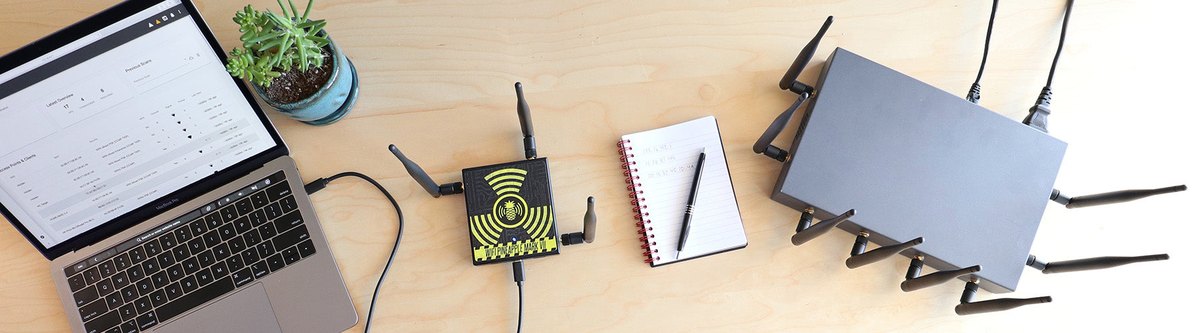
Vol 9 was the Mark VII as hardware. This volume is the Mark VII in operation — first boot through use cases. The two together are the complete Mark VII picture; everything from here builds on Vol 9’s three-role-radio, modest-SoC, 2.4-GHz-native device.
The foundation volumes carry the concepts this volume applies: Vol 5 (the firmware foundation — OpenWrt, the stack, Campaigns, Cloud C2), Vol 6 (the web UI and module ecosystem), Vol 3 (the PineAP technique catalog this volume operates), and Vols 4 + 8 (the legal line and the operational posture every active step is bound by). This volume does not re-derive them — it shows the Mark VII doing them.
Research-baseline applies (Aspirational tool); a doc-audit pass against an acquired unit re-pins the firmware version and exact UI specifics.
10.2 First boot and setup
The Mark VII setup flow, from box to operating:
   Mark VII first-boot sequence
   ════════════════════════════════════════════════════════

   1. POWER     USB-C — from a host port, a wall adapter, or
                a battery pack (Vol 9 §6). The RGB LED signals
                boot, then ready.

   2. CONNECT   reach the device's management interface — over
                the USB-C ethernet, or the management radio
                (Vol 9 §4). The device serves its own setup.

   3. WEB UI    browse to the Mark VII's web UI (Vol 6 §2).
                Everything from here is in the browser.

   4. FIRST-RUN set the root password; configure the
                management interface; enable the Management
                UI Firewall (Vol 5, Vol 6 §8) — lock the
                management surface down before anything else.

   5. FIRMWARE  update to the current Mark VII firmware
                (§3) before operating.

   6. RADIOS    confirm the role assignment across the three
                radios (Vol 9 §4); install + assign the MK7AC
                if present (Vol 11).

   7. C2 (opt)  enroll in Cloud C2 only if remote/fleet
                operation is wanted (Vol 5 §5, Vol 19) —
                it is a remote path IN; weigh it (Vol 6 §8).
The exact IPs, interface names, and menu labels are firmware-version-specific and a doc-audit item — DEVELOPMENT.md §2 has the generic flow, and the current docs.hak5.org has the authoritative current steps. The shape above is stable: power, reach the management interface, set up in the browser, update firmware, confirm radios, decide on C2.
The one non-negotiable: step 4’s Management UI Firewall. The web UI is the device’s own attack surface (Vol 6 §8) — a Mark VII operated in hostile airspace with an un-hardened management interface is handing an adversary an interception platform. Harden it at first boot, not later.
10.3 The Mark VII firmware build
The Mark VII runs the Mark VII firmware — the highly modified OpenWrt + PineAP + web UI + module system + Campaigns stack that Vol 5 describes, packaged for this device. As of this writing the line is the 2.0 firmware generation, whose headline features:
Table 1 — The Mark VII runs the Mark VII firmware — the highly modified OpenWrt + PineAP + web UI + module system + Campaigns stack that [Vol 5](/wifi-pineapple/vol-5/) describes, packaged for this device. As of this writing the line is the 2.0 firmware generation, whose headline features
| Feature | What it gives the operator |
|---|---|
| Enhanced Recon | the overhauled recon view (Vol 6 §3) — the interactive airspace picture |
| Automatic Handshake Capture | the device captures WPA handshakes automatically as they occur in recon, rather than requiring a manual capture action |
| Improved Deauth | a refined deauthentication implementation (Vol 3 §9) |
| Management UI Firewall | the hardening control for the management surface (Vol 6 §8, §2 above) |
| WPA-Enterprise Attacks | attack support against WPA-Enterprise (802.1X) networks, not just PSK |
| Revamped Campaigns | the rebuilt Campaigns system (Vol 5 §4) — define, schedule, run scripted audits and generate reports |
“Which firmware is best” — the Vol 5 §6 answer, restated for the Mark VII: the current stable Hak5 release. There is no alternative-firmware ecosystem for the Pineapple (Vol 5 §7 — the core is closed; the community builds at the module layer, Vol 6, not the firmware layer). “Best firmware” is therefore not a choice between firmwares — it is “keep the device on the current Hak5 stable build.” Update at setup (§2 step 5), update when Hak5 ships a release, and let a doc-audit pass re-pin the exact version number (it ages).
Firmware images live at downloads.hak5.org/pineapple/mk7; the changelog is on the Hak5 site.
10.4 Operating workflows — recon, PineAP, Campaigns
The Mark VII realises the Vol 3 technique catalog on its three role-based radios. The three core workflows:
Recon. The Recon area of the web UI (Vol 6 §3) is the interactive airspace view — APs, clients, who is associated to whom, signal, channels — driven by the monitor-role radio (Vol 9 §4). With the 2.0 firmware’s Enhanced Recon and Automatic Handshake Capture, recon is also passively capturing — handshakes that occur while you watch are captured without a separate action. Recon is the workflow that is lawful as passive observation (Vol 4 legal line) — it is where a Mark VII engagement starts, and the part of it that needs the least authorization friction.
PineAP. The PineAP area is the attack engine’s control panel (Vol 6 §3, Vol 3 §6-8) — Allow Associations (KARMA), the PineAP daemon, Beacon Response, the SSID pool, capture-to-pool, the Source/Target MAC filters. This is driven by the PineAP-role radio. Everything in the PineAP area is active TX — it crosses the Vol 4 legal line — so the workflow here is gated: the authorization artifact (Vol 8 §2) comes first, the Source/Target MAC targeting (Vol 3 §8) scopes it, and the engagement stays inside that scope.
Campaigns. The Campaigns area (Vol 5 §4) is where recon-and-PineAP get automated — define a scripted audit, schedule it, let it run, get a report. The 2.0 firmware’s Revamped Campaigns is the “turn a repeatable engagement into a one-click, reportable run” workflow. Campaigns is what makes the Mark VII a professional pentest deliverable generator rather than just an interactive tool.
   The three workflows, and which side of the legal line
   ════════════════════════════════════════════════════════

   RECON      monitor radio · passive observation
              ── generally lawful as recon (Vol 4) ──
              the workflow you can run with the least friction

   PineAP     PineAP radio · ACTIVE TX (KARMA, beacons, deauth)
              ── authorization-required (Vol 4, Vol 8) ──
              gated: auth artifact first, MAC targeting scopes it

   CAMPAIGNS  orchestrates the above into a scripted, reported
              audit — inherits the legal status of whatever it
              runs (a recon-only Campaign is recon; a Campaign
              that runs PineAP is authorization-required)
10.5 Detailed operating instructions
Step-by-step for the common operations. Each is bound to Vols 4/8 — the authorization gate is step zero of every active one.
A recon sweep (passive):
1. Confirm the monitor-role radio is assigned (Vol 9 §4).
2. Open Recon in the web UI. Start the scan.
3. Read the airspace: APs, their clients, signal, channels.
   With 2.0 firmware, handshakes capture automatically as
   they occur.
4. Note targets of interest; export the recon data.
   — This is passive. Generally lawful as recon (Vol 4).
A scoped PineAP rogue-AP test (active — authorization required):
0. AUTHORIZATION ARTIFACT in hand (Vol 8 §2). Scope confirmed.
1. PineAP area: configure Allow Associations (KARMA),
   the daemon, Beacon Response, the SSID pool.
2. SCOPE IT: set Source/Target MAC filters (Vol 3 §8) so
   PineAP only engages the authorized target client(s) —
   not the whole airspace.
3. Run PineAP. Watch the Clients area for the target
   associating.
4. Observe / capture per the engagement's objective.
5. Stop PineAP. Closeout (Vol 8 §9): stop TX, secure the
   captures, restore state.
A handshake capture:
1. In Recon, identify the target AP/client.
2. With 2.0 Automatic Handshake Capture, a handshake that
   occurs naturally is captured. To FORCE one, a scoped
   deauth (Vol 3 §9) makes the client re-handshake — that
   is ACTIVE TX, authorization required.
3. Export the captured handshake.
4. Crack it OFF-DEVICE — hashcat mode 22000 on a GPU host
   (Vol 19 §3). The Mark VII captures; it does not crack.
A Campaign run:
1. Campaigns area: define the audit — what recon, what
   PineAP actions, what schedule.
2. Confirm the Campaign's actions are within the
   authorization artifact's scope (a Campaign that runs
   PineAP is authorization-required — §4).
3. Run or schedule it.
4. Review the generated report — the client deliverable.
The exact button labels and screen layouts are firmware-version-specific (doc-audit item); the workflow — and the authorization gating — is stable.
10.6 Hak5 mods for the Mark VII
The official Hak5 add-ons and accessories for the Mark VII:
- The MK7AC adapter — the single most important Mark VII add-on. A USB MT7612U dual-band module that adds 5 GHz / 802.11ac monitor and injection (Vol 9 §4, Vol 11 the full treatment). It closes the Mark VII’s defining gap. It also functions as a standalone Linux Wi-Fi adapter (Kali/Parrot/Ubuntu, mt76x2u driver). The bare Mark VII should be a Mark VII + MK7AC — which is why Hak5 sells the +AC Tactical kit as the recommended package (Vol 11).
- The Tactical case and field guide — the +AC Tactical kit’s carry case, field-guide book, and decals (Vol 11 §5).
- Antenna upgrades — higher-gain and directional antennas for the three built-in radios (Vol 9 §5, Vol 18 §4).
- Battery / power accessories — for untethered operation (Vol 9 §6).
The full, current accessory inventory is on shop.hak5.org and should be checked at purchase — but the MK7AC is the one that matters, and the rest is convenience.
10.7 Community mods
The Pineapple’s community contribution lives at the module layer (Vol 5 §7, Vol 6 §4-5) — the core firmware is closed, so the community builds modules, not firmware forks. For the Mark VII specifically:
- Community modules — recon visualisations, evil-portal page sets, attack workflows, reporting/export tooling, integrations, quality-of-life utilities, installed and managed from the web UI’s Modules area.
- The staleness caveat (Vol 6 §5): modules vary in quality and maintenance; some target old firmware/old models. The current, working Mark VII module set is a research-job-against-the-live-catalog — Vol 18 (the mods catalog) is where that inventory lives, done against the live module catalog rather than enumerated here where it would go stale.
- OpenWrt-layer tweaks — SSH in, work the OpenWrt layer underneath (Vol 5 §8). The power-user path; unsanctioned but it works.
- Antenna / battery / case mods — the physical mods (Vol 18 §4-6).
The vetting rule (Vol 6 §8, Vol 18 §8): a community module runs with device privileges on an interception device. Treat installing one as running an untrusted root process — because that is what it is. Prefer current, maintained, source-visible modules. Vol 18 carries the full catalog and the full vetting discipline.
10.8 Use cases — where the Mark VII fits
The Mark VII is the baseline — and “baseline” defines its use cases as much as its capabilities do:
Table 2 — The Mark VII is the baseline — and "baseline" defines its use cases as much as its capabilities do
| Use case | Why the Mark VII fits |
|---|---|
| Learning the platform | it is the Pineapple — the reference device. Skills, modules, Campaigns, the whole operating model learned here transfer to every other model. |
| Standard scoped pentests | the puck form factor + a laptop + (with the MK7AC) full 2.4/5 GHz coverage is the field-pentest default. Campaigns turn it into a reportable deliverable. |
| Desk-based blue-team airspace watching | a Mark VII in monitor mode at a desk is a passive (lawful — Vol 4) rogue-AP / deauth / KARMA-responder detector (Vol 4 §6, Vol 17 §5). |
| The reference unit | when comparing or teaching, the Mark VII is the thing the Pager and Enterprise are described relative to. |
Where the Mark VII tops out — and which model takes over:
- 5 GHz — the bare Mark VII is 2.4 GHz native; the MK7AC (Vol 11) closes this, and a Mark VII should have one. This is a solved gap, not a reason to choose a different model.
- Scale — the Mark VII handles a modest client population. A large-venue assessment with ~100 concurrent clients is the Enterprise’s job (Vol 14-15), not the Mark VII’s.
- Mobility / walk-around — the Mark VII needs a laptop (and a power bank for untethered). A pocket, on-device-screen, battery-powered walk-around device is the Pager (Vol 12-13).
- Permanent deployment — a Mark VII is a bring-it-and-take-it device. A permanent monitoring install is the Enterprise (Vol 15 §8).
The Mark VII does not need to be all of those things — it needs to be the baseline, and it is. Vol 16 is the full model comparison; Vol 17 is the setup-per-job playbooks.
10.9 Resources
- WiFi Pineapple Mark VII docs: https://docs.hak5.org/wifi-pineapple/
- Mark VII firmware downloads + changelog: https://downloads.hak5.org/pineapple/mk7
- Vol 5 — the firmware foundation (OpenWrt, the stack, Campaigns, Cloud C2)
- Vol 6 — the web UI and module ecosystem
- Vol 3 — the PineAP technique catalog this volume operates
- Vols 4 + 8 — the legal line and operational posture every active step is bound by
- Vol 9 — Mark VII hardware · Vol 11 — the +AC Tactical kit · Vol 18 — the mods catalog
- Vol 16 — model comparison · Vol 17 — setup playbooks
This is Volume 10 of a 21-volume series. Next: Vol 11 covers the Mark VII + AC Tactical kit — the MK7AC dual-band adapter that closes the 5 GHz gap, the tactical carry kit, dual-band operation, and why this bundle is the recommended first Pineapple purchase.
Comments (0)