PWNagotchi · Volume 9
PWNagotchi Volume 9 — The Plugins Ecosystem
PiSugar, GPS, web UI, AutoUpdate, AircrackOnly, OHCAPI, fix_brcmf, gps-listener, bt-tether — what the canonical plugins do and which ones you actually want enabled
Pwnagotchi plugins are Python files dropped into /usr/local/share/pwnagotchi/default-plugins/ (jayofelony-shipped) or /usr/local/share/pwnagotchi/custom-plugins/ (yours). Each plugin subclasses pwnagotchi.plugins.Plugin and implements lifecycle hooks the daemon calls at specific events:
Table 1 — Pwnagotchi plugins are Python files dropped into /usr/local/share/pwnagotchi/default-plugins/ (jayofelony-shipped) or /usr/local/share/pwnagotchi/custom-plugins/ (yours). Each plugin subclasses pwnagotchi.plugins.Plugin and implements lifecycle hooks the daemon calls at specific events
| Hook | When fired |
|---|---|
on_loaded() | At daemon start, after the plugin is imported |
on_ready(agent) | Once bettercap + UI are initialized and ready |
on_internet_available(agent) | When the Pi has internet access (e.g., joined a control network) |
on_handshake(agent, filename, ap, client) | When bettercap captures a handshake |
on_ui_setup(ui) | When the UI is being built — add custom UI elements here |
on_ui_update(ui) | Every UI refresh tick — update plugin-owned UI elements |
on_epoch(agent, epoch, epoch_data) | When the AI agent completes a training epoch |
on_unload(ui) | When the plugin is being unloaded (clean shutdown) |
Plus ~15 more (on_wait, on_sleep, on_bored, etc.) | Various daemon-state transitions |
A plugin is enabled by adding a [main.plugins.<plugin_name>] block to config.toml with enabled = true and any plugin-specific config. The plugin file’s filename must match the block name (pisugar.py ↔ [main.plugins.pisugar]).
9.1 The canonical plugin set (jayofelony bundle)
jayofelony’s image ships with ~30-40 plugins out of the box. The ones that matter:
Table 2 — jayofelony's image ships with ~30-40 plugins out of the box. The ones that matter
| Plugin | What it does | Recommended? |
|---|---|---|
grid | The pwngrid peer-to-peer protocol integration | On (default) |
auto-update | Periodic OTA upgrade of pwnagotchi + bettercap | Off in production |
pisugar | PiSugar 2/3 battery management | On if you have one |
gps | UART GPS module integration | On if you have one |
bt-tether | Bluetooth tether to phone for off-device web UI | Off unless you’ve set it up |
webcfg | Web-UI-driven plugin config (no SSH needed) | On |
webgpsmap | A map view of captures in the web UI (needs gps) | On if GPS enabled |
wpa-sec | Auto-upload captures to wpa-sec.stanev.org for crowdsourced cracking | Off — see §10 legal |
aircrackonly | Filter handshakes to only save aircrack-verifiable ones | Optional |
fix_brcmf | Re-apply the patched brcmfmac firmware on every boot | On — see §5 |
gps-listener | Listen for GPS NMEA over TCP from a phone | Optional |
ohcapi | Auto-upload to onlinehashcrack.com | Off — see §10 |
quickdic | Try a small dictionary against captures on-device | Optional |
memtemp | Show CPU temp + RAM on the e-ink face | Optional |
screen_refresh | Force periodic full-frame refresh to clear ghosting | On for older Waveshare panels |
paw-gps | A PAW-GPS android phone integration | Optional |
led | Drive the Pi’s ACT LED for status signaling | Optional |
session-stats | Per-session capture statistics on the web UI | On |
wigle | Upload wardriving traces to wigle.net | Off — see §10 |
Roughly: turn on grid / webcfg / fix_brcmf (always). Add pisugar and gps if you have the hardware. Skip the upload-to-the-internet plugins by default — they leak metadata about what you’re capturing.
9.2 PiSugar plugin — battery management
The PiSugar 3 (Vol 2 §6.2) talks to the Pi over I²C. The pisugar plugin:
- Reads battery voltage + percentage
- Reads charge state (charging / discharging / full)
- Shows battery percentage on the e-ink face status row
- Triggers
sudo systemctl poweroffat a configured low-battery threshold (default 10%) — orderly shutdown protects the SD card
Config:
[main.plugins.pisugar]
enabled = true
default_display = "voltage"            # "voltage" / "percentage" / "auto"
shutdown_pct = 10                       # auto-shutdown threshold
The PiSugar 3 also has a hardware RTC the plugin syncs with on boot, fixing the Pi Zero’s lack of built-in RTC. Set pisugar.rtc_sync = true to enable.
Plug-and-play with the PiSugar 2 (older hat) too — same plugin, slightly different I²C addresses, auto-detected.
9.3 GPS plugin — location logging
For wardriving — annotating captures with where they happened.
Hardware: a UART GPS module connected to the Pi’s UART pins (GPIO 14/15) or a USB GPS dongle (typically a u-blox UBX-class chip). Cheap options: Adafruit Ultimate GPS Breakout ($30), GlobalTop Gms-g6 ($20), Beitian BN-880 USB (~$25).
[main.plugins.gps]
enabled = true
speed = 19200                            # baud rate; check your module datasheet
device = "/dev/ttyS0"                    # UART; "/dev/ttyACM0" for USB
When enabled, every captured handshake gets a sidecar .gps.json file:
{
  "Latitude": 40.7128,
  "Longitude": -74.0060,
  "Altitude": 12.5,
  "Date": "2026-05-15T22:30:15Z"
}
The webgpsmap plugin uses these to render a Leaflet map in the web UI showing every capture’s location. Cute, useful for understanding your route’s coverage.
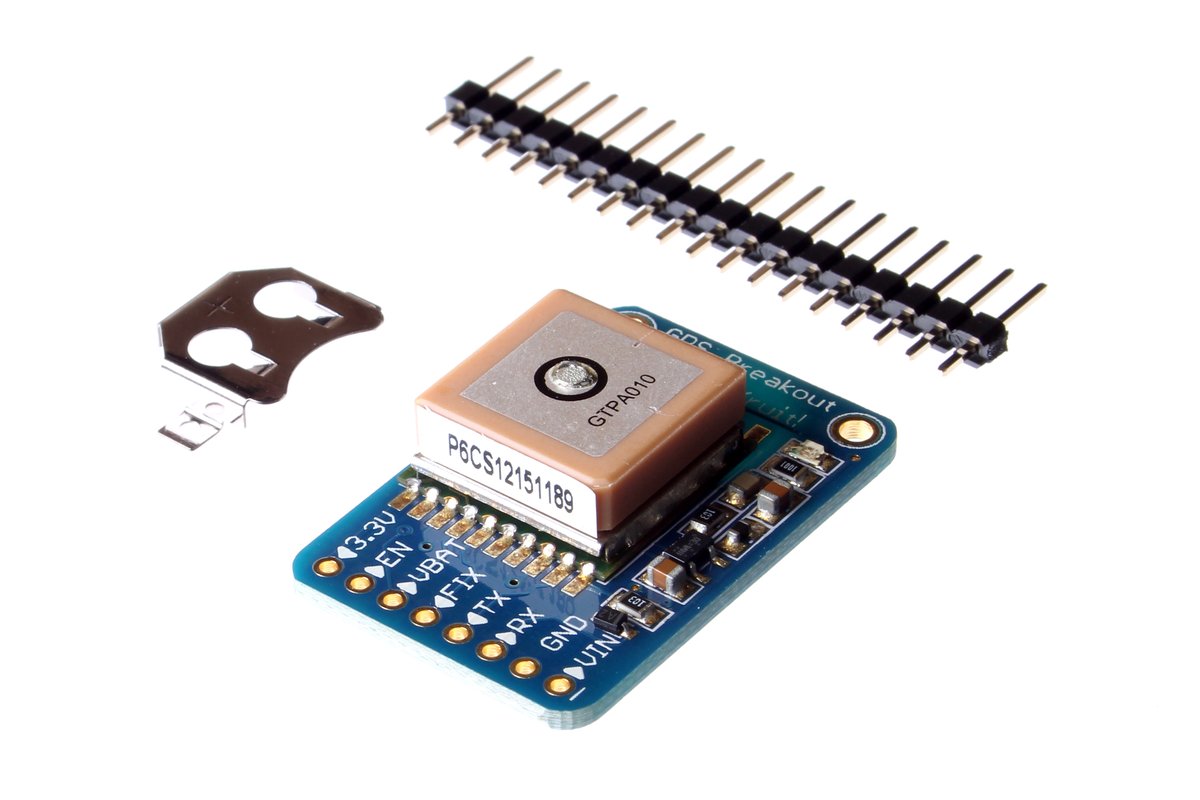
gps plugin attaches to. The Adafruit Ultimate GPS Breakout pictured uses an MTK3339 chipset and exposes a TTL-serial interface on a 5-pin breakout — TX/RX/VIN/GND/PPS.Figure 4.1 — File:Adafruit GPS Module Breakout 2.jpg. CC BY-SA 2.0. Via Wikimedia Commons.
9.4 fix_brcmf — keep monitor mode working
The single most-needed jayofelony plugin. The Broadcom brcmfmac firmware on Raspberry Pi OS needs a patch to expose monitor mode (Vol 2 §2). Any apt upgrade that updates the linux-firmware or brcmfmac-firmware package can silently overwrite the patched firmware with the upstream-stock version, killing monitor mode without obvious warning.
fix_brcmf checks the firmware hash on every boot and re-applies the patched build if upstream has clobbered it.
[main.plugins.fix_brcmf]
enabled = true
Strongly recommend leaving this on. It’s invisible when nothing’s wrong; it saves your install when something is.
9.5 The web UI plugins — webcfg, session-stats, webgpsmap
These build on the base web UI (Vol 5 §8). Each adds a tab or panel:
webcfg— exposes every[main.plugins.*]block inconfig.tomlas a web form. Toggle plugins, edit per-plugin config, restart the daemon — all from the browser. Eliminates the most-common SSH-required workflow.session-stats— a “since boot” page showing capture rate, unique BSSIDs seen, unique clients seen, peers seen, agent loss curve.webgpsmap— a Leaflet map showing each captured handshake at its GPS location, color-coded by signal strength.
[main.plugins.webcfg]
enabled = true

[main.plugins.session-stats]
enabled = true

[main.plugins.webgpsmap]
enabled = true                          # requires `gps` plugin also enabled
9.6 The cloud-upload plugins — wigle, wpa-sec, ohcapi
These three plugins push your captured data to third-party services. Each is a defensible design choice for some users and a trap for most:
Table 3 — These three plugins push your captured data to third-party services. Each is a defensible design choice for some users and a trap for most
| Plugin | Service | What’s uploaded | Concerns |
|---|---|---|---|
wigle | wigle.net | BSSID + SSID + GPS + timestamp | Wigle is a public DB; your wardriving trace becomes searchable by anyone, attributed to your account |
wpa-sec | wpa-sec.stanev.org | Full .22000 hashes | Wpa-sec runs crowdsourced cracking; if a password cracks it goes in their public DB |
ohcapi | onlinehashcrack.com | Full .pcap hashes | Similar — third-party cracking, results may be published |
The arguments for: distributed cracking is fast, and Wigle’s coverage is a public good for Wi-Fi geo-lookup.
The arguments against: you’re uploading attack material with timestamps and locations to third parties. If you’ve targeted (even inadvertently) a network you don’t own, you’re handing evidence of that targeting to someone outside your control. Disabled by default in jayofelony for good reason. Enable only with full understanding.
9.7 aircrackonly — handshake quality filter
The aircrackonly plugin runs every captured .pcap through a quick aircrack-ng -e check; if the handshake isn’t aircrack-verifiable (incomplete, missing nonce, etc.), the .pcap is renamed .pcap.invalid (or deleted, depending on config). Keeps the loot drawer clean.
[main.plugins.aircrackonly]
enabled = true
mode = "rename"                         # "rename" or "delete"
Useful if you find yourself accumulating dozens of half-handshake pcaps from a busy environment. Skippable if you’d rather hand-filter.
9.8 memtemp — system diagnostics on the face
Adds a small overlay to the e-ink face showing:
- CPU temperature
- RAM used / free
- Disk used / free
[main.plugins.memtemp]
enabled = true
fields = "mem,temp,cpu"
Useful when you suspect heat throttling or running out of disk. The Pi Zero 2 W will throttle at ~80°C in a sealed case under sustained load (deauth bursts are hot); this surfaces the warning.
9.9 Per-plugin legal envelope
Restating from Vol 1 + Vol 10: every Pwnagotchi plugin operates within the same legal envelope. Capturing handshakes from third-party networks is illegal in most jurisdictions. Uploading captured material to a third-party crowdsourced cracking service makes you the operator who handed off attack material to an external party. Disable
wpa-sec,wigle,ohcapiunless your use case explicitly fits — own-network testing, written-authorization penetration test, etc.
The plugin defaults are wisely conservative. Don’t fight the defaults without thinking.
9.10 Writing your own plugin (preview of Vol 11)
A minimal plugin:
# /usr/local/share/pwnagotchi/custom-plugins/hello.py
import logging

import pwnagotchi
import pwnagotchi.plugins as plugins


class Hello(plugins.Plugin):
    __author__ = '<your-name>'
    __version__ = '1.0.0'
    __license__ = 'GPL3'
    __description__ = 'A minimal hello-world plugin'

    def on_loaded(self):
        logging.info("[hello] plugin loaded — hi there.")

    def on_handshake(self, agent, filename, ap, client_station):
        logging.info(f"[hello] captured handshake! file={filename}, ap={ap['hostname']}, "
                     f"sta={client_station['mac']}")
Config:
[main.plugins.hello]
enabled = true
Drop the file, edit config.toml, systemctl restart pwnagotchi, watch the journal for [hello] plugin loaded — hi there. Vol 11 goes deeper into the lifecycle hooks and UI integration.
9.11 Plugin troubleshooting
Table 4 — 12. Plugin troubleshooting
| Symptom | Cause | Fix |
|---|---|---|
| Plugin enabled in config but never loads | Filename doesn’t match plugin name; or syntax error in plugin Python | Check journalctl -u pwnagotchi -n 200; look for traceback at load time |
| Plugin loads but does nothing | The expected hook isn’t being called — your plugin overrides a hook the daemon never fires | Check hook signature matches; the daemon won’t call hooks that don’t exist on Plugin base class |
| Plugin crashes the daemon | Unhandled exception in a hook propagates up | Wrap hook bodies in try / except; log the traceback |
| Multiple plugins fight for the same UI region | They both call ui.add_element(...) at the same position | Use position = (x, y) config in your plugin’s config block; coordinate with other plugins |
9.12 The plugin-update cadence
jayofelony bundles plugins; community-contributed plugins land via PRs to his fork. Update path:
sudo pwnagotchi update # if auto-update is disabled but you want to pull latestOr just re-flash the latest jayofelony image periodically (every ~6 months) — gives you the latest plugin set + brcmfmac firmware + base OS in one step. Save /etc/pwnagotchi/config.toml and /root/handshakes/ first.
For Fancygotchi (Vol 7): update separately via git pull in /usr/local/share/fancygotchi/.
9.13 Cheatsheet updates from this volume
Items to roll into Vol 12 (laminate-ready cheatsheet):
- “Always enable:
grid,webcfg,fix_brcmf.” (§2, §5)- “Disable by default:
wigle,wpa-sec,ohcapi— they leak metadata.” (§7, §10)- “Plugin file’s filename must match
[main.plugins.<name>]block name.” (§1)- “Plugin enabled but not loading?
journalctl -u pwnagotchishows the import traceback.” (§12)- “Update plugins by re-flashing jayofelony every ~6 months, OR
sudo pwnagotchi update.” (§13)
Comments (0)