M5Stack Cardputer Zero · Volume 1
M5Stack Cardputer Zero Volume 1 — Overview, Family Lineage, and Decision Tree
What it actually is — a Raspberry Pi CM0 pocket Linux computer — where it branches off the Cardputer family, the Zero-vs-ADV-vs-cyberdeck decision tree, and depth indices into Vols 2-12
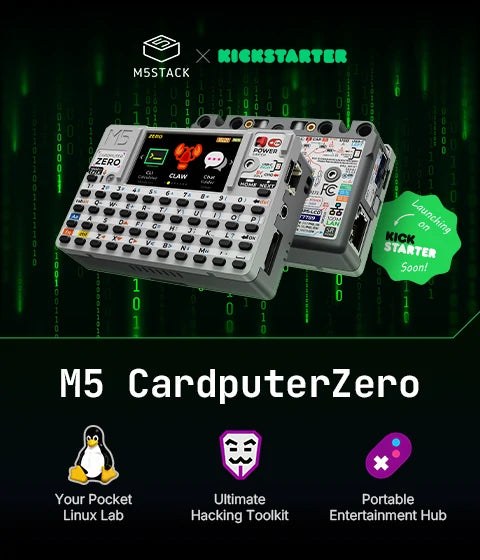
CONFIRMED PRODUCT (Kickstarter launch 2026-05-26). The M5Stack CardputerZero is a pocket-sized Linux computer built on a Raspberry Pi Compute Module 0 (CM0) — the same silicon class as a Raspberry Pi Zero 2 W. It boots a real OS (Raspberry Pi OS / Debian, aarch64) off a microSD card; there is no firmware to flash and no Arduino sketch. Two variants ship: Lite and Full. The table below is the authoritative hardware summary for the whole series; the rest of this volume reframes the family lineage and buy/skip decision around this Linux reality. Sources: M5Stack shop/docs; CNX-Software 2026-05-25; Linux Gizmos 2026-05-25.
Aspect Confirmed spec Core module Raspberry Pi Compute Module 0 (CM0) (“Zero” = the Pi CM0, not a budget tier) SoC / CPU RP3A0 system-in-package → Broadcom BCM2710A1 die (BCM2837 family), quad-core ARM Cortex-A53 @ 1.0 GHz, ARMv8-A / aarch64. (Same SiP as the Raspberry Pi Zero 2 W.) GPU VideoCore IV (OpenGL ES 1.1 / 2.0) RAM 512 MB LPDDR2 (on-package, not upgradeable) Storage microSD (boots from it). Full ships a bundled 32 GB microSD; Lite ships none. Display 1.9″ IPS LCD, ST7789v3 controller, 320×170 landscape (170×320 native), PWM backlight Keyboard 46-key matrix QWERTY Camera Full only: 8 MP Sony IMX219, 4-lane CSI (3280×2464); absent on Lite IMU Full only: BMI270 (6-axis) + BMM150 (3-axis mag) → 9-axis IR Transmitter + receiver RTC RX8130CE Audio ES8389 codec + AW8737A amp + 1 W / 8 Ω speaker + MEMS mic + 3.5 mm TRRS jack Wi-Fi 2.4 GHz 802.11 b/g/n (on-module, IPEX antenna) Bluetooth BT 4.2 + BLE Ethernet 10/100 Mbps RJ45 (wired) HDMI / video out Digital HD A/V out, up to 1080p30 USB 2× USB Type-C (host/device, switchable) + 1× USB Type-A host Expansion Cap EXT 2.54 mm 14-pin header: SPI, UART, I²C, USB, GPIO, 5V, GND Grove HY2.0-4P with built-in electronic I²C ⇄ UART switch Cap modules Officially supports optional Cap CC1101 (NFC/sub-GHz) and Cap LoRa over the EXT bus Battery 3.7 V / 1500 mAh LiPo, BQ27220 fuel gauge, USB-C charging (recommend 5V/2A) Idle power ~2.5 W idle (Linux SoC — no MCU-style deep sleep) Dimensions 84.0 × 54.0 × 23.1 mm (credit-card footprint, ~23 mm thick) Price $59 Lite / $89 Full (KS super early bird); $99 / $149 regular Campaign Kickstarter, launched 2026-05-26, 9 AM EDT
1.1 About this volume
This is the overview volume of a twelve-volume deep dive into the M5Stack CardputerZero — the Linux member of the Cardputer line: a credit-card-sized computer built on the Raspberry Pi Compute Module 0 that boots Raspberry Pi OS / Debian off a microSD card. It is a different class of machine from the ESP32-S3 Cardputer and Cardputer ADV — a real computer, not a microcontroller — and this series treats it that way.
This volume’s job is to:
- Place the device in the family lineage — show that the Zero branches off the ESP32-S3 Cardputer/ADV line into a Linux/Pi-CM0 architecture, rather than being a cut-down ADV (§ 4).
- State the confirmed hardware — the master spec table is § 5; every hardware number elsewhere in the series traces to it.
- Frame the buy decision — § 7 is the decision tree: a pocket Linux box (Zero) vs an ESP32 MCU handheld (Cardputer ADV) vs a larger Linux handheld (a cyberdeck). These are now different-architecture tools, not budget-vs-premium of the same thing.
- Index the depth — § 12 points into Vols 2-12 for the schematic-level hardware, the boot/OS chain, the security tooling, and the cheatsheet.
Cross-reference discipline. The real software-sibling devices in this collection are the Cyberdecks project’s Linux handhelds — the Clockwork uConsole (Pi CM4) and PicoCalc. For OS, dev workflow, and the Linux-handheld comparison, this series cross-references ../../Cyberdecks/ (peer top-level project, cyberdecks.fubsypoly.com). The ESP32 Cardputer ADV is referenced only for family lineage and shared Cap/Grove accessories — not for OS, programming, or flashing, because it is a fundamentally different (microcontroller) machine. Raspberry Pi resources apply directly, since the Zero shares the Pi Zero 2 W’s SoC.
1.2 Product confirmation, and why earlier drafts said ESP32
Read this before treating older volumes of this series at face value. The CardputerZero is a confirmed, shipping (Kickstarter, 2026-05-26) product, and it is a Raspberry Pi CM0 Linux computer. That is settled fact, sourced from M5Stack’s own shop and docs plus independent coverage (CNX-Software, LinuxGizmos, Hackster) and the public CardputerZero / m5stack GitHub orgs.
Why earlier drafts of this series said “ESP32-S3.” The first draft (2026-05-13) was written before the product launched, from a plausible-but-wrong textbook assumption: every prior Cardputer (the original K132 and the ADV) is an ESP32-S3 device, and M5Stack’s “Zero / Lite” suffixes elsewhere in its catalog (ATOM Zero, etc.) denote budget tiers. So the draft inferred a cut-down ESP32-S3 handheld — smaller battery, no EXT bus, ~$30-40. The inference was reasonable and entirely wrong. “Zero” here is not a budget tier — it is literally the Raspberry Pi Compute Module 0. The device is a Linux computer with the EXT bus present, a full audio chain, Ethernet, HDMI, and a camera option. There is no esptool, no M5Burner, no Arduino sketch in the Zero’s world; you write an OS image to a microSD card and it boots like any Pi. That single mistaken premise is corrected throughout this series; this is the one place it is called out, per the doc-audit protocol.
The rest of this volume — and the series — is written to the confirmed Linux device.
1.3 What the Cardputer Zero is
The M5Stack CardputerZero is a pocket Linux computer in the Cardputer form factor. Concretely:
- A Raspberry Pi Compute Module 0 (CM0) — RP3A0 SiP, BCM2710A1 die (BCM2837 family), quad Cortex-A53 @ 1.0 GHz, 512 MB LPDDR2, VideoCore IV GPU. This is the same silicon as the Raspberry Pi Zero 2 W, so the entire Raspberry Pi software stack runs on it with zero porting effort.
- It boots a real OS — Raspberry Pi OS / Debian (aarch64) — off a microSD card. On the Full model a 32 GB microSD is bundled; on the Lite you supply your own. M5Stack’s own framing: it “brings the Cardputer series into the Linux era … standard Linux toolchains, remote SSH access, command-line workflows, lightweight coding and scripting, on-site troubleshooting.”
- It has a 46-key QWERTY keyboard and a 1.9″ 320×170 IPS LCD (ST7789v3) — a usable little terminal with a small-screen Wayland shell on top (covered in Vol 6).
It is not a stripped-down ADV. It carries a full peripheral set:
- Cap EXT 14-pin bus (SPI / UART / I²C / USB / GPIO / 5V / GND) is present — plus a Grove HY2.0-4P port with an electronic I²C⇄UART switch. The EXT bus officially mates with optional Cap CC1101 (NFC/sub-GHz) and Cap LoRa modules.
- Full audio chain: ES8389 codec + AW8737A amp + 1 W speaker + MEMS mic + 3.5 mm TRRS jack.
- 9-axis IMU (BMI270 + BMM150) and an 8 MP IMX219 camera on the Full model.
- IR transmit + receive, RX8130CE RTC.
- Wired Ethernet (10/100 RJ45), 2.4 GHz Wi-Fi, BT 4.2 + BLE, HDMI out (up to 1080p30).
- USB: 2× USB-C (host/device switchable) + 1× USB-A host — plug in keyboards, USB Wi-Fi adapters, SDR dongles, a Proxmark3, etc.
- 3.7 V / 1500 mAh LiPo with a BQ27220 fuel gauge, USB-C charged.
The most consequential facts for everything downstream: it runs Linux binaries, and the EXT bus is there. Those two together are the value proposition; Vol 4 covers the expansion bus and Vols 5-9 the OS, security tooling, and RF paths.
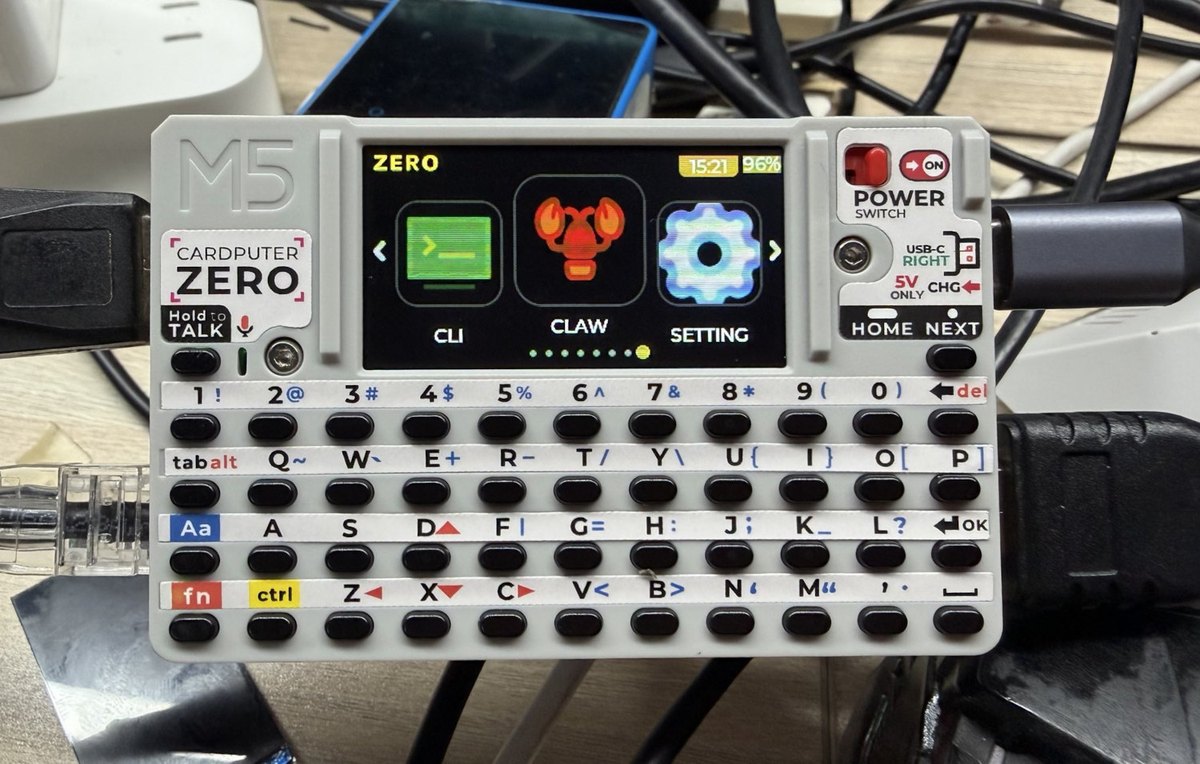
1.4 The Cardputer family — lineage diagram
The Zero is the point where the Cardputer line changes architecture. The original Cardputer and the Cardputer ADV are ESP32-S3 microcontroller handhelds; the Zero branches off into a Linux / Raspberry Pi CM0 computer. It is not a cut-down ADV — it is a different kind of machine that happens to share the form factor, the QWERTY-on-a-card identity, and the Cap/Grove accessory mounts.
   M5Stack Cardputer line — architecture split as of 2026-05-26
   ════════════════════════════════════════════════════════════

                  ┌─────────────────────────────────┐
                  │   "Cardputer" identity          │
                  │   QWERTY + IPS display          │
                  │   credit-card handheld          │
                  └────────────────┬────────────────┘
                                   │
            ┌──────────────────────┴───────────────────────┐
            │                                               │
   ── MCU branch (ESP32-S3) ──                   ── Linux branch (Pi CM0) ──
            │                                               │
   ┌────────┴─────────┐                          ┌──────────▼───────────┐
   │                  │                          │  Cardputer Zero      │
┌──▼────────┐  ┌──────▼────────┐                 │  (CardputerZero)     │
│ Cardputer │  │ Cardputer ADV │                 │                      │
│ (K132)    │  │ (K132-Adv)    │                 │ Raspberry Pi CM0     │
│ 2024      │  │ 2025-2026     │                 │ RP3A0 / BCM2710A1    │
│           │  │               │                 │ 4× Cortex-A53 1 GHz  │
│ ESP32-S3  │  │ ESP32-S3      │                 │ 512 MB LPDDR2        │
│ MCU       │  │ Stamp-S3A     │                 │ boots Linux (µSD)    │
│ 56-key    │  │ 56-key        │                 │ 46-key               │
│ 1.14″ LCD │  │ 1.14″ LCD     │                 │ 1.9″ 320×170 LCD     │
│ Grove     │  │ Grove + EXT   │                 │ Grove + Cap EXT      │
│ flash fw  │  │ flash fw      │                 │ Ethernet · HDMI      │
│           │  │ Cap LoRa      │                 │ camera (Full)        │
└───────────┘  └───────────────┘                 │ $59 Lite / $89 Full  │
   runs firmware  runs firmware                   └──────────────────────┘
   (Arduino/IDF)  (Arduino/IDF)                      runs a real OS
                                                      (Debian aarch64)
The two branches share accessories (Cap modules, Grove units) and heritage, but not software. ESP32 firmwares (Bruce, Marauder, Evil-Cardputer, M5Launcher-as-bootloader) belong to the MCU branch and do not run on the Zero’s Linux — the Zero’s equivalents are Linux-native programs (see § 6 and Vol 9). The closest software peers to the Zero are not its ESP32 siblings but the Cyberdecks project’s Linux handhelds (uConsole, PicoCalc).
1.5 Confirmed hardware specification
This is the master table for the series. Every hardware figure in Vols 2-12 traces here. Values are from M5Stack’s shop/docs reconciled with CNX-Software and LinuxGizmos coverage; the two “Full only” rows are the Lite-vs-Full delta.
Table 1 — 5. Confirmed hardware specification
| Subsystem | Confirmed value | Notes |
|---|---|---|
| Core module | Raspberry Pi Compute Module 0 (CM0) | “Zero” = the Pi CM0 |
| SoC | RP3A0 SiP → Broadcom BCM2710A1 die (BCM2837 family) | Same SiP as Raspberry Pi Zero 2 W |
| CPU | Quad-core ARM Cortex-A53 @ 1.0 GHz, ARMv8-A / aarch64 | |
| GPU | VideoCore IV, OpenGL ES 1.1 / 2.0 | |
| RAM | 512 MB LPDDR2 | On-package, not upgradeable |
| Storage | microSD boot. Full bundles 32 GB; Lite none | (Preview articles’ “32 GB eMMC” was a misreport — it is microSD) |
| Display | 1.9″ IPS, ST7789v3, 320×170 landscape, PWM backlight | |
| Keyboard | 46-key matrix QWERTY | |
| Camera | 8 MP Sony IMX219, 4-lane CSI (3280×2464) | Full only |
| IMU | BMI270 (6-axis) + BMM150 (3-axis mag) → 9-axis | Full only |
| IR | Transmitter and receiver | |
| RTC | RX8130CE | |
| Audio | ES8389 codec + AW8737A amp + 1 W/8 Ω speaker + MEMS mic + 3.5 mm TRRS | Full audio chain |
| Wi-Fi | 2.4 GHz 802.11 b/g/n, IPEX antenna | No 5 GHz on-module |
| Bluetooth | BT 4.2 + BLE | |
| Ethernet | 10/100 Mbps RJ45 | Wired networking |
| HDMI / A/V | Digital HD out, up to 1080p30 | |
| USB | 2× USB-C (host/device switchable) + 1× USB-A host | Host/slave toggle |
| Expansion (EXT) | Cap EXT 2.54 mm 14-pin: SPI/UART/I²C/USB/GPIO/5V/GND | Present |
| Grove | HY2.0-4P, electronic I²C⇄UART switch | |
| Cap modules | Optional Cap CC1101 (NFC/sub-GHz), Cap LoRa over EXT | Mechanical fitment shared w/ ADV — verify exact compat on receipt |
| Battery | 3.7 V / 1500 mAh LiPo, BQ27220 gauge, USB-C charge | Recommend 5V/2A supply |
| Idle power | ~2.5 W idle | Linux SoC — no µA deep sleep |
| Dimensions | 84.0 × 54.0 × 23.1 mm | ~23 mm thick |
| Price | $59 Lite / $89 Full (KS super early bird); $99 / $149 regular | |
| Campaign | Kickstarter, launched 2026-05-26 |
Lite vs Full delta. Full adds three things the Lite omits: the 8 MP IMX219 camera, the 9-axis IMU (BMI270 + BMM150), and the bundled 32 GB microSD. Everything else — CM0, RAM, display, keyboard, audio chain, Ethernet, HDMI, USB, EXT bus, IR, RTC, battery — is common to both. Vol 2 walks the board at schematic level; Vol 5 covers the power tree.
1.6 What the Linux + EXT bus + Ethernet actually buys you
The earlier draft’s value analysis was built on subtractions (“if the EXT bus is omitted, if audio is cut, if the battery is smaller”). All of that is moot — none of it was cut. The real proposition is additive: this is a $59-89 pocket computer that runs the same software as a Linux laptop, plus a hardware expansion bus and wired Ethernet. Three things carry the weight.
1.6.1 It boots a real OS
Because it is Raspberry Pi silicon, it inherits the entire Raspberry Pi / Debian software stack with no community porting. That means:
- Standard Linux toolchains on-device —
gcc/g++, Python 3, Rust,apt. You write and run normal Linux programs, not flashed firmware. - A full CLI security toolkit, Linux-native:
nmap,tcpdump,tshark,scapy,aircrack-ng,kismet,bettercap,hostapd,bluez. These are ordinaryaptpackages, not ports. Two independent reviewers framed the Zero as “a full Linux pentest toolkit.” (Honest caveat: 512 MB RAM and a 1 GHz quad-A53 make it a recon / scripting / drop-box machine, not a cracking rig or a heavy-SDR DSP host — see Vol 9 and the limits in § 6.4.) - SSH-everything — it is a portable SSH/orchestration box and teaching Linux machine. With Ethernet + Wi-Fi + battery it is a credible drop box.
- A small-screen Wayland shell + on-device Debian
.debapp store (theCardputerZeroorg’s AppStore), and an LVGL app SDK (czdev) with a desktop emulator so you can develop 320×170 apps with no hardware. Vol 6 and Vol 7 cover the OS and app stack.
1.6.2 The Cap EXT bus is present
The 14-pin EXT header exposes SPI, UART, I²C, USB, GPIO, 5V, GND and officially supports Cap LoRa and Cap CC1101 modules. Under Linux that turns into real capability:
- Cap LoRa →
meshtasticd(the Linux Meshtastic daemon) or the org’strail-mateGPS/LoRa-chat app. The Zero is a genuine Meshtastic node, not via flashed firmware but via a Linux daemon driving a LoRa module on the bus. - Cap CC1101 → sub-GHz / NFC work from userspace.
- Plus the USB-A host port for RTL-SDR (
rtl_433,dump1090), a Proxmark3 client, a monitor-mode Wi-Fi adapter, etc.
Vol 4 is the EXT-bus and Cap-module volume; Vol 9 covers the RF workflows.
1.6.3 Wired Ethernet + HDMI
A 10/100 RJ45 and an HDMI output make it a real little workstation: jack it into a switch for a wired drop box or a console server, or plug it into a monitor with a USB keyboard for a desktop session. Neither is something the ESP32 Cardputers offer.
1.6.4 Honest limits (state them)
- 512 MB RAM, quad A53 @ 1 GHz — modest. Fine for recon, scripting, single-tool runs, drop-box duty; not for big-wordlist cracking, full GNU Radio flowgraphs, or many-VM work (use a laptop / Pi 5 for those).
- On-module Wi-Fi is 2.4 GHz b/g/n only; 5 GHz and reliable monitor/injection need a USB adapter on the USB-A port.
- It is a full computer, so it has a full computer’s attack surface — SSH credentials, no secure boot by default, and a microSD that is trivially readable in any card reader. Operational-posture implications are in Vol 11.
1.7 Decision tree — Zero vs Cardputer ADV vs a cyberdeck
These three are different-architecture tools, not three price points of one product. Pick by what you need the machine to be.
   What do you actually need the pocket device to be?
                         │
        ┌────────────────┼────────────────────────┐
        │                │                         │
        ▼                ▼                         ▼
 ┌──────────────┐ ┌────────────────┐     ┌────────────────────┐
 │ A real Linux │ │ A bare-metal   │     │ A bigger Linux     │
 │ computer in  │ │ MCU you flash  │     │ handheld (full kb, │
 │ a pocket     │ │ firmware onto  │     │ bigger screen,     │
 │ (apt, SSH,   │ │ (Arduino/IDF,  │     │ Pi CM4-class)      │
 │ CLI tools)   │ │ µA sleep, RF   │     │                    │
 │              │ │ firmwares)     │     │                    │
 └──────┬───────┘ └───────┬────────┘     └─────────┬──────────┘
        │                 │                        │
        ▼                 ▼                        ▼
 ┌──────────────┐  ┌───────────────┐      ┌────────────────────┐
 │ CardputerZero│  │ Cardputer ADV │      │ Cyberdeck          │
 │ (Pi CM0,     │  │ (ESP32-S3,    │      │ (uConsole CM4 /    │
 │  Linux)      │  │  flash fw)    │      │  PicoCalc — see    │
 │              │  │               │      │  ../../Cyberdecks/)│
 └──────┬───────┘  └───────────────┘      └────────────────────┘
        │
        ▼  Buying a Zero? Lite or Full?
   ┌─────────────────────────────────────┐
   │ Need the camera, the 9-axis IMU, or  │
   │ a bundled SD card?                   │
   └──────────────┬──────────────────────┘
          ┌───────┴────────┐
         YES              NO
          │                │
          ▼                ▼
     ┌─────────┐     ┌──────────────┐
     │ Full    │     │ Lite         │
     │ ($89)   │     │ ($59) + your │
     │         │     │ own microSD  │
     └─────────┘     └──────────────┘

   Quick guidance:
   - Want apt/SSH/nmap/aircrack in your pocket, a drop box, or a
     Meshtastic-over-Linux node → CardputerZero.
   - Want µA deep sleep, instant-on, a single-purpose RF firmware
     (Bruce/Marauder/Evil-Cardputer), ESP-NOW → Cardputer ADV (different
     class; see ../../M5Stack Cardputer ADV/).
   - Want a roomier Linux handheld with a real keyboard and a bigger
     screen → a cyberdeck (../../Cyberdecks/). The Zero is the
     smallest/cheapest Linux handheld of that cohort.
Bottom line: the Zero and the ADV are complementary, not ranked. If your task is “run Linux security tools / scripts in my pocket,” the Zero is the right tool. If your task is “flash a purpose-built ESP32 RF firmware and run it for days on a coin of battery,” the ADV is the right tool. If you want a bigger Linux handheld, look to the Cyberdecks project.
1.8 Capability matrix — Zero vs siblings
Table 2 — 8. Capability matrix — Zero vs siblings
| Capability | Cardputer K132 | Cardputer ADV | CardputerZero (Full) |
|---|---|---|---|
| Architecture | ESP32-S3 MCU | ESP32-S3 MCU | Raspberry Pi CM0 (Linux) |
| Runs a real OS (Debian/RPi OS) | ✗ | ✗ | ✓ (aarch64) |
| Programmability | Flash firmware (Arduino/IDF) | Flash firmware (Arduino/IDF) | apt + native gcc/Python/Rust; LVGL czdev apps |
| QWERTY keyboard | ✓ (56-key) | ✓ (56-key) | ✓ (46-key) |
| Display | 1.14″ 240×135 | 1.14″ 240×135 | 1.9″ 320×170 IPS |
| Storage / boot | microSD | microSD | microSD OS boot (Full: 32 GB bundled) |
| Cap EXT 14-pin bus | ✗ | ✓ | ✓ |
| Grove HY2.0-4P | ✓ | ✓ | ✓ |
| Cap LoRa / Meshtastic | ✗ | ✓ (firmware) | ✓ (Cap LoRa + meshtasticd) |
| Cap CC1101 (sub-GHz/NFC) | ✗ | ✓ | ✓ |
| MEMS microphone | ✗ | ✓ | ✓ |
| Audio codec + 3.5 mm jack | ✗ | ✓ (ES8311) | ✓ (ES8389 + jack) |
| 9-axis IMU | ✗ | 6-axis | ✓ (BMI270 + BMM150) |
| Camera | ✗ | ✗ | ✓ (8 MP IMX219) |
| IR TX/RX | ✓ | ✓ | ✓ (TX + RX) |
| Wi-Fi | 2.4 GHz | 2.4 GHz | 2.4 GHz (USB adapter for 5 GHz/injection) |
| Bluetooth | BLE | BLE | BT 4.2 + BLE |
| Wired Ethernet (RJ45) | ✗ | ✗ | ✓ (10/100) |
| HDMI out | ✗ | ✗ | ✓ (≤1080p30) |
| USB-A host | ✗ | ✗ | ✓ |
| Battery | 1500 mAh | 1750 mAh | 1500 mAh |
| Linux-native security tooling | ✗ | ✗ | ✓ (nmap/aircrack/kismet/bettercap/tshark) |
| µA deep sleep | ✓ | ✓ | ✗ (~2.5 W idle) |
| Approx. price | ~$45 | ~$60 | $59 Lite / $89 Full |
The Zero is not “the ADV with rows removed” — it is a different machine. Where the ADV wins is the MCU domain (deep sleep, instant-on, dedicated RF firmwares); where the Zero wins is everything that requires an operating system, plus Ethernet, HDMI, USB-A host, and a camera.
1.9 Use cases that justify a Zero
Where a pocket Linux box specifically earns its place over an ESP32 handheld or a laptop:
1.9.1 Portable Linux security toolkit / drop box
apt install the tools you already know — nmap, tcpdump, tshark, aircrack-ng, kismet, bettercap, responder — and run them from a device that fits in a shirt pocket. With Ethernet + Wi-Fi + a 1500 mAh battery it is a credible drop box: leave it on a wired or wireless network, SSH back in. Caveat: for serious Wi-Fi attack work attach a monitor-mode USB adapter on the USB-A port; the on-module 2.4 GHz radio is driver-limited. (Vol 9 has the workflows; Vol 11 the posture.)
1.9.2 Meshtastic / LoRa node under Linux
With a Cap LoRa module on the EXT bus and meshtasticd, the Zero is a full Meshtastic node with a screen, keyboard, and Linux underneath — or run the org’s trail-mate (GPS + LoRa chat + maps). This is a real, supported path, not a workaround.
1.9.3 Teaching / learning Linux on real hardware
A $59 machine that boots Debian, has a keyboard and screen, and survives being handed around. Good for embedded-Linux, networking, and CLI instruction where a “real computer the student can break and re-image” beats a microcontroller.
1.9.4 Field SSH terminal / console server / orchestration box
USB-A host + Ethernet + HDMI make it a pocket admin terminal: serial-console into gear, run Ansible, jump-host into a network. The HDMI out + a USB keyboard turn it into a tiny desktop when you need one.
1.9.5 LVGL app development with no hardware
The czdev AppBuilder ships an SDL2 desktop emulator that renders the 320×170 LCD inside a keyboard skin on macOS / Linux / Windows (MSYS2). You can build and test Zero apps before a unit ever arrives, and submit a public Git repo online to get a ready-to-install .deb. (Vol 7.)
1.10 Comparison to sibling tools in the lineup
Table 3 — 10. Comparison to sibling tools in the lineup
| Sibling tool | Relationship to the Zero | Zero wins when | Sibling wins when |
|---|---|---|---|
| Cardputer ADV | Same family, different architecture (ESP32 MCU) | You need an OS, apt/SSH, Ethernet, a camera | You need µA sleep, instant-on, a dedicated RF firmware (Bruce/Marauder) |
| Cardputer original (K132) | ESP32 ancestor | Linux + EXT bus + Ethernet | Lowest cost, mature ESP32 firmware today |
| M5Stick S3 | ESP32-S3 stick form factor | QWERTY + Linux workflows | Wearable + ESP-NOW + ES8311 audio in a stick |
| Cyberdecks: uConsole / PicoCalc | Software siblings (Linux handhelds) | Smallest / cheapest of the cohort, pocketable | Bigger screen, full keyboard, CM4-class compute (uConsole) |
| Flipper Zero | Different niche (integrated RF/RFID multitool) | A general-purpose Linux box + USB-A host | Integrated RFID/NFC/sub-GHz, no Linux to manage |
| DSTIKE Hackheld | ESP8266 single-purpose Wi-Fi tool | A general Linux toolkit | Tiny standalone deauther, no OS to boot |
| Bus Pirate 6 | Bench protocol tool | Field-portable Linux host driving the bus | Bench-grade protocol bring-up |
The Zero’s niche: the smallest, cheapest Linux machine in the collection — a pocket computer that runs the same tools as a laptop and carries an RF expansion bus. If you need an operating system in your pocket, it is the right tool; if you need a single-purpose flashed firmware, look to the ESP32 siblings; if you need a bigger Linux handheld, look to the Cyberdecks project.
1.11 Lite vs Full, and what to verify on receipt
The product is confirmed, so the pre-purchase question is no longer “does it exist” but Lite or Full, plus a short receipt-time sanity check.
1.11.1 Lite vs Full
Table 4 — 11.1 Lite vs Full
| Factor | Choose Lite ($59) | Choose Full ($89) |
|---|---|---|
| Camera (8 MP IMX219) | Don’t need it | Want CSI camera / vision apps |
| 9-axis IMU (BMI270+BMM150) | Don’t need motion/orientation | Want IMU (gestures, orientation, dead-reckoning) |
| Bundled microSD | Have your own cards | Want a ready-to-boot 32 GB card included |
| Everything else | Identical | Identical |
If you don’t specifically need the camera or the IMU, the Lite is the same computer for $30 less — just supply a microSD.
1.11.2 Verify on receipt
- OS boots — write a current Raspberry Pi OS / Debian aarch64 image (or M5’s
m5stack-imager/pi-genbuild) to a microSD and confirm it boots to the small-screen shell. (Vol 6.) - Model matches order — Full units should show the IMX219 camera (
libcamera-hello) and the IMU (BMI270/BMM150 on I²C); Lite units won’t. - EXT bus + Grove — confirm the 14-pin Cap EXT header and the Grove port; if you bought a Cap LoRa or Cap CC1101, verify mechanical + electrical fitment (shared with the ADV — confirm, don’t assume).
- Networking — Ethernet link + DHCP, 2.4 GHz Wi-Fi associate, BT scan.
- Audio chain — speaker, MEMS mic capture, 3.5 mm jack.
- HDMI out to a monitor; USB-A host enumerates a keyboard / USB Wi-Fi adapter.
- Power — charges over USB-C (recommend a 5V/2A supply), BQ27220 fuel-gauge readable.
- Firmware/kernel — note kernel +
cm0-firmware/ dtoverlay versions for reproducibility. (Vol 6.)
Vol 12 § 3 carries the laminate-ready version of this checklist.
1.12 Depth indices into Vols 2-12
Hardware
- CM0 module + board block diagram → Vol 2 § 2-3
- Display (320×170 ST7789v3) + 46-key keyboard subsystem → Vol 2 § 4-5
- Audio chain (ES8389 + AW8737A + MEMS mic + jack) → Vol 2 § 6
- Power topology + battery (1500 mAh, BQ27220) → Vol 2 § 7 + Vol 5
- Sensors (IMU, camera, IR, RTC) → Vol 2 § 7
- Board photos + annotated PCB diagrams → Vol 2 throughout
External interfaces
- USB-C ×2 + USB-A host → Vol 3 § 2
- microSD (OS boot) → Vol 3 § 3
- Grove HY2.0-4P → Vol 3 § 4
- Ethernet / HDMI / audio jack → Vol 3 § 5
- Antenna / Wi-Fi / BT → Vol 3 § 6
Expansion + modules
- Cap EXT 14-pin bus pinout → Vol 4 § 2
- Cap LoRa / Cap CC1101 over the bus → Vol 4 § 3-4
- USB-A host peripherals (SDR, Proxmark3, Wi-Fi adapters) → Vol 4 § 5
Power
- Battery + fuel gauge → Vol 5 § 2
- Charge subsystem (USB-C, 5V/2A) → Vol 5 § 3
- Per-mode current / ~2.5 W idle → Vol 5 § 4
- Field runtime + power discipline → Vol 5 § 5
Operating system + shell
- Writing the OS image to microSD (
m5stack-imager/pi-gen/dd) → Vol 6 § 2 - Boot chain (u-boot,
cm0-firmware, dtoverlays) → Vol 6 § 3 - Small-screen Wayland shell + AppStore +
.debrepo → Vol 6 § 4-5
Programming + app SDK
- Native toolchains (gcc/g++/Python/Rust on Debian aarch64) → Vol 7 § 2
czdevAppBuilder + LVGL + SDL2 emulator → Vol 7 § 3- App ABI (
cz_app.h,app_main/app_event) → Vol 7 § 4 - M5Stack Linux libs / cross-compile → Vol 7 § 5
Imaging + recovery
Use cases + recipes
- Linux security-toolkit recipes → Vol 9 § 2
- Meshtastic / LoRa over the EXT bus → Vol 9 § 3
- RF via USB-A (RTL-SDR, Proxmark3) → Vol 9 § 4
- Chameleon Ultra over BLE (CM0-correct) → Vol 9 § 9
Custom development
- Worked app example + cross-device patterns → Vol 10 § 2-4
Operational posture
- Regional rules → Vol 11 § 2
- LiPo handling → Vol 11 § 3
- Drop-box / full-computer attack surface (SSH, no secure boot, readable SD) → Vol 11 § 4-5
Cheatsheet
- Quick-facts panel → Vol 12 § 2
- Verify-on-receipt checklist → Vol 12 § 3
- Troubleshooting flow → Vol 12 § 9
1.13 Resources
Vendor / official
- CardputerZero shop page: https://shop.m5stack.com/pages/m5-cardputerzero
- M5Stack docs (CardputerZero): https://docs.m5stack.com/en/CardputerZero
- M5Stack shop: https://shop.m5stack.com/
- M5Stack community forum: https://community.m5stack.com/
- Kickstarter campaign (launched 2026-05-26): search “M5Stack CardputerZero” on https://www.kickstarter.com/
Ecosystem (the real software stack)
- CardputerZero Hub (Web UI + App Store): https://cardputerzero.github.io/
- CardputerZero GitHub org (OS, shell, apps, packages): https://github.com/CardputerZero
- AppBuilder (
czdevCLI + emulator): https://github.com/m5stack/CardputerZero-AppBuilder - M5Stack Linux libs: https://github.com/m5stack/M5Stack_Linux_Libs
- Official
.debrepository: https://github.com/m5stack/CardputerZeroRepository
Independent coverage
- CNX-Software: https://www.cnx-software.com/2026/05/25/cardputerzero-a-raspberry-pi-cm0-pocket-computer-for-makers/
- Linux Gizmos: https://linuxgizmos.com/m5stack-previews-cardputerzero-handheld-raspberry-pi-cm0-system/
Raspberry Pi (applies directly — shared SoC)
- Raspberry Pi OS: https://www.raspberrypi.com/software/
- Raspberry Pi Imager: https://www.raspberrypi.com/software/
- Pi camera / libcamera (IMX219): https://www.raspberrypi.com/documentation/computers/camera_software.html
Sibling project deep dives
- Cyberdecks project (the Linux-handheld siblings — uConsole, PicoCalc):
../../Cyberdecks/· https://cyberdecks.fubsypoly.com - Cardputer ADV deep dive (family lineage + shared Cap/Grove accessories only — it is ESP32, a different class):
../../M5Stack Cardputer ADV/ - M5Stick S3 deep dive (ESP32-S3 stick sibling):
../../M5Stick S3/
Cross-tool references
- Hack Tools comparison:
../../_shared/comparison.md - Capability matrix: sortable view
- Legal / ethics:
../../_shared/legal_ethics.md
This is Volume 1 of a twelve-volume series on the M5Stack CardputerZero — the Raspberry Pi CM0 pocket Linux computer. Next: Vol 2 walks the confirmed hardware in schematic-style detail — the CM0 module on the PCB, the 320×170 display, the 46-key keyboard, the ES8389 audio chain, the EXT bus, and the power tree — illustrated with M5Stack’s annotated board diagrams and product photos (first-party bench photos to follow once hardware is in hand).
Comments (0)