M5Stack Cardputer Zero · Volume 4
M5Stack Cardputer Zero Volume 4 — Expansion & Module Ecosystem
The Cap EXT 14-pin bus, Grove HY2.0, and Linux/USB peripherals — three real expansion paths on a Pi-CM0 pocket Linux box
4.1 About this volume
Vol 4 covers expansion on the Cardputer Zero: every way you bolt
extra hardware onto the device. The Zero is a Raspberry Pi Compute Module 0
(CM0) pocket Linux computer — quad-core Cortex-A53 @ 1.0 GHz, 512 MB LPDDR2,
booting Raspberry Pi OS / Debian aarch64 off microSD (see Vol 2 for
the silicon, Vol 5 for power, Vol 6 for the OS/software
stack). That single fact changes the entire expansion story relative to the
ESP32-based Cardputers: expansion peripherals here are Linux devices —
/dev/spidev*, /dev/i2c-*, /dev/ttyACM*, /dev/sd* — driven by kernel
drivers and ordinary userland, not Arduino libraries.
There are three real expansion paths, and the Zero has all three:
   Cardputer Zero — expansion fan-out
   ──────────────────────────────────

                 ┌──────────────────────────┐
                 │   Cardputer Zero (CM0)    │
                 │  Linux / aarch64 / Debian │
                 └────┬──────────┬───────┬───┘
                      │          │       │
        ┌─────────────┘          │       └─────────────┐
        ▼                        ▼                     ▼
   ┌──────────┐          ┌───────────────┐     ┌───────────────┐
   │ Cap EXT  │          │   Grove       │     │  USB host     │
   │ 14-pin   │          │   HY2.0-4P    │     │ 2×USB-C +     │
   │ SPI/UART │          │   I²C ⇄ UART  │     │ 1×USB-A       │
   │ I²C/USB/ │          │   (1 port)    │     │ (hubs, Wi-Fi, │
   │ GPIO/5V  │          │               │     │  SDR, GPS,    │
   └────┬─────┘          └───────┬───────┘     │  storage)     │
        │                        │             └───────┬───────┘
   Cap CC1101              I²C/UART units              │
   Cap LoRa               (/dev/i2c-*,          standard Linux
   (kernel drivers)        /dev/tty*)            USB device tree
This volume is engineer-grade, confirmed-fact content sourced from the ground-truth dossier and official M5Stack launch material. Where a mechanical or electrical detail can only be nailed down with the device in hand, it is flagged “verify on receipt” rather than guessed.
4.2 Corrected premise — the Zero HAS the Cap EXT bus
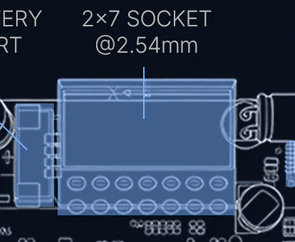
Headline: the Cardputer Zero exposes the full Cap EXT 2.54 mm 14-pin expansion bus — SPI, UART, I²C, USB, GPIO, plus 5 V and GND. M5Stack’s launch material officially lists optional Cap CC1101 (NFC / sub-GHz) and Cap LoRa modules for it. The bus is real, it is documented, and it is the headline expansion feature of this device — not a missing one.
NOTE — premise correction. Every claim in this volume’s earlier drafts that the Zero “lacks the EXT bus” or is “Grove-only” is wrong and has been removed. The Zero is not a stripped-down ESP32 handheld; it is a Pi-CM0 Linux box with the full Cap EXT bus and Grove and USB host. All three paths coexist.
4.2.1 Why earlier drafts said “no EXT bus”
The original Vol 4 was written before the product shipped, from a plausible-but-wrong textbook assumption: M5Stack’s portfolio uses “Zero” / “Atom” naming for budget, feature-reduced variants (ATOM Lite, M5Stamp), so the research-baseline series reasoned by analogy that a “Cardputer Zero” would be the cheap ESP32 Cardputer with the EXT bus deleted to hit a $30–40 price point — leaving Grove as the only expansion. That entire chain of inference was inverted by the actual product:
- “Zero” here does not mean budget tier — it names the Raspberry Pi Compute Module Zero (CM0) that powers the device. It is the Linaro/Pi silicon, not a price grade.
- The real device is a $59 Lite / $89 Full Linux computer (see Vol 1), not a $30–40 microcontroller toy.
- It ships the full Cap EXT 14-pin bus, Grove, and USB host — strictly more expansion than the assumption allowed, not less.
The lesson for the rest of this deep dive: the ADV is a family-lineage and shared-accessory reference only. It is an ESP32 device; its software, flashing, and programming model do not transfer to the Zero (see Vol 6, Vol 7). The Cap/Grove connectors are shared heritage; the compute and OS are a different class of machine.
4.3 Path 1 — the Cap EXT 2.54 mm 14-pin bus
The Cap EXT bus is the Zero’s high-bandwidth expansion port. It is a 2.54 mm (0.1″) pitch 14-pin header carrying a full set of buses, and it is the electrical home of the optional Cap modules.
4.3.1 Bus signals and what they carry
Per M5Stack’s published bus description, the 14-pin Cap EXT header carries:
Table 1 — Per M5Stack's published bus description, the 14-pin Cap EXT header carries
| Bus / rail | Purpose on the Zero | Linux interface (typical) |
|---|---|---|
| SPI | High-bandwidth peripheral attach (LoRa/CC1101 transceivers, fast displays/ADC) | /dev/spidevB.C via spidev; chip drivers bind on top |
| UART | Serial peripherals (GPS, serial radios, console) | /dev/ttyAMA* / /dev/serial* |
| I²C | Additional sensors / EEPROMs / RTCs | /dev/i2c-N |
| USB | A USB lane broken out on the header | enumerates in the Linux USB tree |
| GPIO | Interrupts, chip-select, reset, control lines | libgpiod (gpioget/gpioset/gpiomon), sysfs (legacy) |
| 5 V | Module power rail | — |
| GND | Ground return | — |
VERIFY ON RECEIPT. The exact pin-to-signal map (which physical pin is SCLK vs MOSI vs a given GPIO line, and the device-tree node numbers for each bus) is not reproduced here because it is not yet confirmed pin-by-pin from a shipping unit. Do not wire against a guessed pinout — read the silkscreen and the M5Stack Cap EXT pin table on arrival, then record it in Vol 2. The capability set above (SPI/UART/I²C/USB/GPIO/5V/GND) is confirmed; the per-pin assignment is the part to validate.
The presence of both SPI and GPIO interrupt/CS lines on the header is what makes the Cap EXT bus qualitatively different from Grove: an SPI transceiver like the SX126x or CC1101 needs SCLK/MOSI/MISO/CS plus one or two interrupt GPIOs (DIO/GDO) — exactly what a 4-pin Grove connector cannot provide, and exactly what this header does.
4.3.2 Cap modules — CC1101 and LoRa
M5Stack’s launch blog names two optional Cap modules for the Zero. Treat the silicon families below as confirmed; treat exact module SKUs/part-marking as verify-on-receipt.
Table 2 — 3.2 Cap modules — CC1101 and LoRa
| Cap module | Function | Likely silicon | Bus used | Hack Tools relevance |
|---|---|---|---|---|
| Cap CC1101 | NFC / sub-GHz transceiver | TI CC1101 (sub-GHz ISM: 300–348 / 387–464 / 779–928 MHz) | SPI + GPIO (GDO0/GDO2) | Sub-GHz capture/replay, OOK/2-FSK, rtl_433-style decoding from the radio side |
| Cap LoRa | LoRa transceiver | Semtech SX127x / SX126x class | SPI + GPIO (DIO/BUSY/RESET) | Meshtastic node, long-range telemetry, LoRa chat |
VERIFY ON RECEIPT — module/silicon confirmation. “Cap CC1101” strongly implies the TI CC1101; “Cap LoRa” implies an SX127x/SX126x. Confirm the exact part marking and whether the LoRa Cap is SX1262 (LoRa-only, lower power) or an SX127x on arrival — the kernel driver you bind (
cc1101out-of-tree,sx127x, orsx126x) depends on it. Mechanical Cap fitment is shared with the Cardputer ADV’s Cap bus, but the ADV is an ESP32 device, so do not assume ADV Cap firmware/examples apply — only the connector is shared. Verify exact module-to-Zero compatibility when both are in hand.
4.3.3 Driving Cap modules under Linux (no Arduino)
This is the structural break from the ESP32 Cardputers. On the ADV/original
Cardputer you would #include an Arduino driver and flash a sketch. On the Zero
you bind a kernel driver to the device-tree node for the bus and talk to it
as a Linux character device. No firmware flash, no esptool, no Arduino.
The relevant kernel pieces:
spidev— raw SPI access from userland (/dev/spidevB.C). Useful for bring-up and for tools that drive a transceiver register-by-register.sx127x/sx126xLoRa drivers — mainline/maintained Linux LoRa drivers that present the radio as a netdev or a character device, depending on the driver. This is whatmeshtasticdand other Linux LoRa stacks sit on.- CC1101 driver — out-of-tree
cc1101-driverstyle modules exist; the chip is also widely driven from userland overspidev. libgpiod— the modern GPIO userland (the chip’s DIO/GDO interrupt lines, CS, reset). Usegpiomonto watch a DIO interrupt,gpiosetto assert reset.- Device-tree overlay — wiring the Cap module to its bus is done with a DT
overlay; M5Stack maintains
m5stack-linux-dtoverlays(see Vol 6) for exactly this purpose.
A representative bring-up sequence (illustrative — adjust to the confirmed overlay/pinout):
# 1. Apply the Cap-LoRa device-tree overlay (names verify-on-receipt)
sudo dtoverlay m5stack-cap-lora        # or add to /boot/config.txt

# 2. Confirm the SPI device and GPIO lines appear
ls /dev/spidev*                        # e.g. /dev/spidev0.0
gpiodetect && gpioinfo                 # libgpiod: find the DIO/RESET lines

# 3. Bind / load the LoRa driver (sx126x or sx127x per confirmed silicon)
sudo modprobe sx127x                   # verify which family on receipt

# 4. Watch a DIO interrupt line fire on RX (libgpiod)
gpiomon -f -n 1 gpiochip0 <DIO-line>
TIP. Because everything is a Linux device, the same workflow you would use on a Raspberry Pi Zero 2 W (which shares the RP3A0/BCM2837 silicon, per Vol 2) applies unchanged. Any Pi LoRa/CC1101 HOWTO transfers — the CM0 is Pi-class silicon, so there is zero community-porting effort.
4.3.4 Cap LoRa → meshtasticd and trail-mate
The single most consequential Cap workflow is Meshtastic, and — unlike the inverted-premise earlier draft claimed — the Zero does it natively and well, because it runs Linux:
meshtasticd— the official native-Linux Meshtastic daemon. It drives an SX126x/SX127x LoRa radio directly over SPI + GPIO and exposes the standard Meshtastic API (CLI client, web UI, MQTT bridge). On the Zero, the Cap LoRa module is the radio;meshtasticdis the node software. This is a drop-in Meshtastic node — keyboard for text entry, screen for the message view, battery for portability, real mesh routing inmeshtasticd. No “UART tunnel research project,” no custom bridge firmware.CardputerZero/trail-mate— the org’s outdoor-assistant app: GPS + LoRa Chat + Maps. It is the concrete demonstration that the Cap EXT bus drives a LoRa module under Linux on this device — an integrated mesh-chat + navigation app built for the 320×170 screen (see Vol 6 for the app/SDK story).
   Cap LoRa data path on the Zero
   ──────────────────────────────
   SX126x/SX127x (Cap LoRa)
        │  SPI (SCLK/MOSI/MISO/CS) + DIO/BUSY/RESET GPIO
        ▼
   Cap EXT 14-pin header
        │
        ▼
   Linux kernel  ──  sx126x/sx127x driver + spidev + libgpiod
        │
        ▼
   meshtasticd  ──►  Meshtastic CLI / web UI / MQTT
   trail-mate   ──►  GPS + LoRa Chat + Maps (320×170 LVGL app)
Contrast with the ESP32 family. On the ESP32 Cardputers, Meshtastic means flashing the Meshtastic firmware onto the microcontroller. On the Zero, Meshtastic is a Linux daemon running alongside everything else (SSH, your pentest tools, a web UI) on a multitasking OS. It is a strictly more capable arrangement.
4.4 Path 2 — Grove HY2.0-4P as Linux peripherals
The Zero carries a Grove HY2.0-4P connector with M5Stack’s built-in
electronic switch that toggles the port between I²C and UART modes. Under
Linux these appear as ordinary /dev/i2c-N and serial (/dev/ttyS* /
/dev/ttyAMA*) devices — so a Grove unit is just a Linux peripheral on a 4-pin
connector. This is the low-bandwidth, single-port expansion path; the Cap EXT
bus (§3) is the high-bandwidth one.
4.4.1 Grove units survey (framed as Linux devices)
The M5Stack Grove “Unit” catalog is large; the table below tightens it to units that earn their place on a Linux pocket box, with the Linux interface each presents. Prices are approximate M5Stack street prices and are verify-at-purchase.
Table 3 — 4.1 Grove units survey (framed as Linux devices)
| Unit | Function | Port mode | Linux interface | Use on the Zero |
|---|---|---|---|---|
| GPS Unit | GNSS receiver (NMEA) | UART | /dev/ttyS* → gpsd | Position/time sync; pair with trail-mate/Meshtastic |
| Environment (ENV) | Temp / humidity / pressure | I²C | /dev/i2c-N → libgpiod/sysfs sensors | Field sensing, logging |
| TVOC / eCO₂ | Air quality (SGP30-class) | I²C | /dev/i2c-N | Air-quality logging |
| Light (DLight) | Ambient lux | I²C | /dev/i2c-N | Brightness automation, logging |
| Magnetometer (3-axis) | Magnetic field | I²C | /dev/i2c-N | Compass, anomaly detection |
| Ultrasonic | Distance ranging | I²C/UART | /dev/i2c-N or serial | Range finding |
| RS485 | Industrial serial bus | UART | /dev/ttyS* → libmodbus | Modbus / industrial recon |
| IR Unit (external) | IR TX + RX | (GPIO-class) | lirc / libgpiod | Adds external IR if needed (Zero already has IR — see Vol 2) |
| RFID 2 (WS1850S) | 13.56 MHz NFC reader | I²C | /dev/i2c-N | NFC tag read; complements the org RFID app (see Vol 6) |
| Encoder / Button / RGB | Human I/O, status LED | I²C | /dev/i2c-N | Extra controls / indicators |
| Relay / Servo / Stepper | Actuation | I²C | /dev/i2c-N | Switching / motion control |
| OLED / Mini-display | Secondary display | I²C | /dev/i2c-N → fbtft/userland | Status pane |
NOTE — one port, many devices. A single Grove I²C connector hosts as many I²C devices as fit the address space (chain via Grove I²C hubs). UART mode is one serial peer per port. So “one Grove port” is a real constraint for serial peripherals but not for I²C sensors.
TIP. Because Grove units present as standard
i2c/serialdevices, you do not need M5Stack’s Arduino “Unit” libraries. Use the generic Linux driver for the underlying chip (e.g. the GPS overgpsd, an SGP30 over its kernel driver / a Pythonsmbus2script). Identify the chip, not the M5 SKU.
4.4.2 What Grove cannot carry
Grove is a 4-pin, modest-current, low/medium-speed connector. It cannot carry:
- High-bandwidth SPI transceivers (LoRa, CC1101, fast ADC/displays) — these need SCLK/MOSI/MISO/CS + interrupt GPIO. Use the Cap EXT bus (§3) instead.
- High-current loads — the Grove 5 V/3.3 V rail is limited; switch real loads through a Grove Relay unit, don’t draw them through the connector.
- USB-class devices — Grove is not USB. Use the USB host ports (§5).
The Zero’s answer to every one of those gaps is another path it actually has (Cap EXT or USB) — which is the whole point of the corrected premise.
4.5 Path 3 — USB host (the Linux superpower)
This path does not exist on the ESP32 Cardputers and is the single biggest expansion advantage of the Zero: it is a Linux host with real USB host ports, so the entire Linux USB peripheral universe plugs straight in.
4.5.1 Two USB-C + one USB-A, host/device switchable
Per the confirmed hardware (see Vol 2):
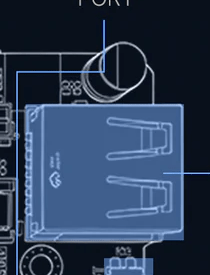
- 2× USB Type-C — host/device switchable (a hardware host/slave toggle).
- 1× USB Type-A host — plug devices in directly, no adapter.
In host mode the Zero enumerates USB devices exactly like a Raspberry Pi or
a laptop: a USB Wi-Fi adapter becomes wlan1, a serial dongle becomes
/dev/ttyUSB0, an SDR becomes a libusb device, mass storage mounts under
/media. A powered USB hub multiplies the single Type-A into many — useful given
the modest count of native ports.
WARNING — power budget. The Zero idles around 2.5 W and runs on a 3.7 V / 1500 mAh cell (see Vol 5). Bus-powered USB peripherals (especially a HackRF or a hungry Wi-Fi adapter with a PA) draw real current. For anything beyond a low-power dongle, use a powered hub or expect a sharp runtime hit. M5Stack recommends a 5 V / 2 A supply for the device itself.
4.5.2 The USB peripheral catalog that matters for Hack Tools
This is where the Zero earns its place in the collection — it runs the same USB-attached security gear as a Linux laptop, just slower (512 MB RAM, quad-A53; see the honest-limits discussion in Vol 11).
Table 4 — 5.2 The USB peripheral catalog that matters for Hack Tools
| USB peripheral | Enumerates as | Enables | Notes / caveat |
|---|---|---|---|
| USB Wi-Fi adapter (monitor-mode) | wlan1 (mac80211) | aircrack-ng, Kismet, hcxdumptool, bettercap, hostapd, mdk4, wifite | Recommended for serious Wi-Fi work — the on-module 2.4 GHz radio is injection-limited; a known monitor-mode adapter (e.g. MT7612U for 5 GHz) is the fix |
| RTL-SDR | libusb (rtlsdr) | rtl_433, dump1090, ADS-B, ISM decode | Light enough for the CM0; great fit |
| HackRF One | libusb | Wideband RX/TX, hackrf_* tools | Works, but GNU Radio flowgraphs are heavy for 512 MB — prefer lightweight CLI tools |
| GPS dongle (u-blox) | /dev/ttyACM*/ttyUSB* → gpsd | Position/time, wardrive tagging | Alternative to the Grove GPS unit |
| Proxmark3 / NFC reader | /dev/ttyACM* / libusb | RFID/NFC research (pm3 client) | Runs the Linux pm3 client natively |
| USB mass storage | /dev/sd* | Capture offload, wordlists, extra storage | Mounts like any Linux disk |
| Powered USB hub | hub | Fan-out + power isolation | Essential for multi-device or hungry peripherals |
| USB Ethernet / keyboard / etc. | standard class drivers | Extra NICs, full keyboard, HID | Generic Linux class support |
Cross-reference. The Wi-Fi-adapter caveat and the full Linux pentest tool survey live in Vol 11 (operational posture) and the dossier’s Hack Tools angle. The Chameleon Ultra integration is handled CM0-correctly in Vol 9 §9 (it talks over BLE, not USB/EXT). This volume’s job is the expansion plumbing; those volumes carry the workflows.
4.6 Expansion compared — Zero vs ESP32 Cardputers vs Pi HATs
Three reference points clarify where the Zero’s expansion sits. Note the family distinction throughout: the ADV and original Cardputer are ESP32-S3 microcontrollers; the Zero is a Pi-CM0 Linux computer. They share connectors (Cap, Grove), not a programming model.
Table 5 — 6. Expansion compared — Zero vs ESP32 Cardputers vs Pi HATs
| Expansion path | Cardputer Zero (CM0/Linux) | Cardputer ADV (ESP32-S3) | Original Cardputer (ESP32-S3) | Raspberry Pi (40-pin HAT) |
|---|---|---|---|---|
| Cap EXT 14-pin bus | Yes — SPI/UART/I²C/USB/GPIO; driven by Linux kernel drivers | Yes — its own Cap EXT bus; driven by Arduino/ESP-IDF | No EXT bus | n/a (different connector) |
| Grove HY2.0-4P | Yes — appears as /dev/i2c-* / serial | Yes — Arduino “Unit” libs | Yes — Arduino “Unit” libs | Via add-on; not native |
| USB host | Yes — 2×USB-C + 1×USB-A, full Linux USB stack | No (USB-C is for flash/serial, device-mode) | No | Yes (Pi-class) |
| 40-pin Pi HAT | No — the CM0 form factor uses the Cap EXT bus instead | n/a | n/a | Yes (the defining Pi expansion) |
| Driver model | Kernel drivers, spidev, libgpiod, device-tree overlays | Arduino libraries, flashed firmware | Arduino libraries, flashed firmware | Kernel drivers + Pi HAT EEPROM overlays |
| Multitasking while expanded | Yes (Linux) | No (single firmware image) | No | Yes (Linux) |
Two things to internalize from this table:
- The Zero is the only Cardputer with USB host. That alone makes it a different class of expandable device — the USB-A port is a doorway to the entire Linux peripheral universe (monitor-mode Wi-Fi, SDR, GPS, storage) that the ESP32 siblings simply cannot reach.
- The CM0 form factor does not take 40-pin Pi HATs. If you come from the Raspberry Pi world expecting a 40-pin GPIO header and a HAT ecosystem, that is not how this device expands. The Cap EXT 14-pin bus is the Zero’s equivalent of the HAT header — fewer pins, M5-specific Cap modules, but the same idea (a bus-out header for snap-on hardware). Pi software and driver knowledge transfers fully (it is Pi silicon); Pi HAT hardware does not fit.
4.7 Cost analysis — what the three paths cost and enable
The earlier “Zero+Grove vs ADV+Caps” framing was built on the false no-EXT-bus premise and is discarded. The right question for the real device is: what does each of the Zero’s three expansion paths cost, and what does it unlock? Base prices are the confirmed $59 Lite / $89 Full (KS super-early-bird; $99 / $149 regular — see Vol 1). The Full already bundles the camera, the 9-axis IMU (BMI270 + BMM150), and a 32 GB microSD, so several “add-ons” the ESP32 framing assumed are already on-board here.
Table 6 — 7. Cost analysis — what the three paths cost and enable
| Path | Representative add-on | Approx. cost | What it unlocks | Already on-board? |
|---|---|---|---|---|
| Cap EXT | Cap LoRa module | ~$15–30 (verify) | Native meshtasticd node + trail-mate (GPS/LoRa chat/maps) over SPI | — |
| Cap EXT | Cap CC1101 module | ~$15–30 (verify) | Sub-GHz / NFC TRX over SPI (capture/replay) | — |
| Grove | GPS / ENV / RFID2 / sensor units | ~$5–25 each | Linux /dev/i2c-* + serial peripherals; sensing, NFC read | — |
| USB-A host | Monitor-mode USB Wi-Fi adapter | ~$15–35 | Real Wi-Fi audit (5 GHz + injection) — the on-module radio’s limits, solved | — |
| USB-A host | RTL-SDR dongle | ~$30 | rtl_433 / ADS-B / ISM decode | — |
| USB-A host | Powered hub | ~$10–15 | Multi-device + power isolation for hungry peripherals | — |
| (on-board) | IMU, IR, camera, audio, Ethernet, microSD | $0 | 9-axis (Full), IR TX+RX, 8 MP IMX219 (Full), full audio chain, 10/100 RJ45, microSD | Yes (Full) |
Reading the table:
- A complete LoRa/mesh field unit = Zero (Lite $59 or Full $89) + Cap LoRa
(~$15–30) → a native Linux Meshtastic node with
meshtasticdand trail-mate. No bridge firmware, no UART-tunnel research. This is the capability the false-premise draft claimed the Zero couldn’t have. - Serious Wi-Fi audit = Zero + a ~$15–35 monitor-mode USB adapter, plugged into the USB-A host port. The ESP32 Cardputers have no such port — they cannot do this at all.
- Most “add-ons” the old draft costed (IMU, IR, audio, GNSS-adjacent) are either on-board (IMU/IR/audio/Ethernet) or trivially added — the Zero is not the feature-stripped device the earlier cost model assumed.
Where the Zero genuinely wins: it is a $59–89 pocket Linux computer whose three expansion paths (Cap EXT, Grove, USB host) together cover RF (LoRa/sub-GHz via Cap, SDR via USB), sensing (Grove I²C), networking (USB Wi-Fi + on-board Ethernet), and storage (USB + microSD) — running real multitasking Linux. The ESP32 Cardputers cover a strict subset and run one firmware image at a time. See Vol 11 for the honest performance/posture limits that bound all of this (512 MB RAM, quad-A53 — fine for recon/scripting/drop-box duty, not a cracking rig).
4.8 Resources
- M5Stack Cardputer Zero product / launch (Cap EXT + Cap CC1101 + Cap LoRa confirmation): https://shop.m5stack.com/ and the M5Stack launch blog.
- Meshtastic native Linux daemon (
meshtasticd): https://meshtastic.org/docs/software/linux/ CardputerZero/trail-mate(GPS + LoRa Chat + Maps): GitHubCardputerZeroorg.m5stack/m5stack-linux-dtoverlays(device-tree overlays for M5 Linux devices): GitHubm5stackorg — see Vol 6.- Linux LoRa drivers (
sx127x/sx126x),spidev,libgpiod— standard kernel/userland; any Raspberry Pi Zero 2 W LoRa/CC1101 HOWTO applies (shared RP3A0/BCM2837 silicon, see Vol 2). - M5Stack Grove Unit catalog: https://docs.m5stack.com/en/category/Unit
- M5Stack Cap module catalog: https://docs.m5stack.com/en/category/Cap
- Cardputer ADV deep dive — family lineage + shared Cap/Grove connectors only
(ESP32 device; its software/flashing/programming does not transfer):
../../M5Stack Cardputer ADV/and that project’sCLAUDE.md. - Linux-handheld software siblings (peer top-level project):
../../Cyberdecks/(Clockwork uConsole = Pi CM4 Linux handheld; PicoCalc) atcyberdecks.fubsypoly.com— the Zero is the smallest/cheapest Linux handheld of that cohort.
End of Vol 4. Next: Vol 5 covers the Zero’s power profile — the 1500 mAh cell, ~2.5 W Linux idle (no MCU deep-sleep), BQ27220 fuel gauge, and runtime under load including the USB-host power budget that bounds the §5 peripheral catalog.
Comments (0)